Keepassxc-browser: Can't connect database anymore
Since the update to 1.5.0 the extension wasn't working for me anymore (it couldn't open the database). Therefore I tried to remove the database and wanted to add it again, but now if I click on connect nothing is happening.
The database should be connected.
I wasn't able to find a workaround yet.
- Go to the extension settings
- Click on connect
- Nothing happens
Debug info
KeePassXC - 2.4.3
KeePassXC-Browser - 1.5.0
Operating system: Mac
Browser: Chrome
 kingfame
All 18 comments
Please check if the extension is really connected. You can check this from the extension icon popup.
 varjolintu
on 27 Sep 2019
varjolintu
on 27 Sep 2019
It says it can't decrypt message. But currently there is no database configured because the connect button doesn't work.
kingfame
on 27 Sep 2019
Try to restart KeePassXC and use Reload from the extension popup.
varjolintu
on 27 Sep 2019
Remove and install the browser extension again worked for me. The previous settings are gone and I had to connect to the database again.
 JanMalte
on 27 Sep 2019
JanMalte
on 27 Sep 2019
Same issue for me - hasn't worked since the 1.5.0 extension update. Tried:
- a new profile in Firefox (69.0.1 Windows 10)
- reinstalling the extension
- reinstalling keepassxc (2.4.3 portable)
- checking registry key
- manually starting proxy
- direct connect with no proxy
- toggling browser integration options in keepassxc
- testing with Chrome (same general error)
Interestingly, I have a Linux Virtualbox which was working fine with extension 1.3.2. When I checked for updates and bumped it to 1.5.0, same "can't decrypt" error.
Debugging the extension doesn't give a lot away. I see:
Connecting to native messaging host org.keepassxc.keepassxc_browser keepass.js:976:13
Error 9: Key exchange was not successful. keepass.js:1061:13
Error 4: Cannot decrypt message 2 keepass.js:1061:13
Error: "Could not establish connection. Receiving end does not exist."
    onReconnect moz-extension://fb249386-fa23-45fc-9529-85141d48bf71/background/event.js:89
event.js:92:21
Error: No content script available for this tab. keepass.js:1174:25
With direct connection (proxy disabled):
Connecting to native messaging host org.keepassxc.keepassxc_browser keepass.js:976:13
Failed to connect: Unknown error keepass.js:946:13
Error: No content script available for this tab. keepass.js:1174:25
Error 9: Key exchange was not successful. keepass.js:1061:13
Error 5: Cannot connect to KeePassXC. Check that browser integration is enabled in KeePassXC settings. 2 keepass.js:1061:13
Error: "Could not establish connection. Receiving end does not exist."
    onReconnect moz-extension://fb249386-fa23-45fc-9529-85141d48bf71/background/event.js:89
event.js:92:21
Error: No content script available for this tab. keepass.js:1174:25
 mikeggrant-eumetsat
on 27 Sep 2019
mikeggrant-eumetsat
on 27 Sep 2019
I've tried all of the above steps too as well as uninstalling Firefox and KeepasXC. I was using the portable versions for both and then switched to Windows installed versions of both. I used every option of proxy configs and still no go.
 gthiel5
on 27 Sep 2019
gthiel5
on 27 Sep 2019
Strange. Does it help if you delete the connectio keys from KeePassXC and the extension and try to reconnect? I haven't been able to reproduce this issue.
EDIT: Just tried it with my Linux VM I haven't started for months. Extension was updated to 1.5.0 and everything worked normally.
What you could try is to debug the background script for keepass.js and see why the keepass.verifyKeyResponse() fails at line 596.
varjolintu
on 27 Sep 2019
I did that and now the browser icon for keepassxc opens the program but
still gives error message. Now, I can't connect the database to Firefox
On Fri, Sep 27, 2019, 10:03 AM Sami Vänttinen notifications@github.com
wrote:
Strange. Does it help if you delete the connectio keys from KeePassXC and
the extension and try to reconnect? I haven't been able to reproduce this
issue.—
You are receiving this because you commented.
Reply to this email directly, view it on GitHub
https://github.com/keepassxreboot/keepassxc-browser/issues/609?email_source=notifications&email_token=AJK2HLHO3EPGW4EYHQNAJCDQLYHBNA5CNFSM4I3CXMT2YY3PNVWWK3TUL52HS4DFVREXG43VMVBW63LNMVXHJKTDN5WW2ZLOORPWSZGOD7Y72YI#issuecomment-535952737,
or mute the thread
https://github.com/notifications/unsubscribe-auth/AJK2HLCKMK3LVSTJYBLOOE3QLYHBNANCNFSM4I3CXMTQ
.
gthiel5
on 27 Sep 2019
When you receive the "Cannot decrypt" message that indicates the associated key is no longer valid between the extension settings and your database. Try clearing out all known keys in the database by going into the database settings:
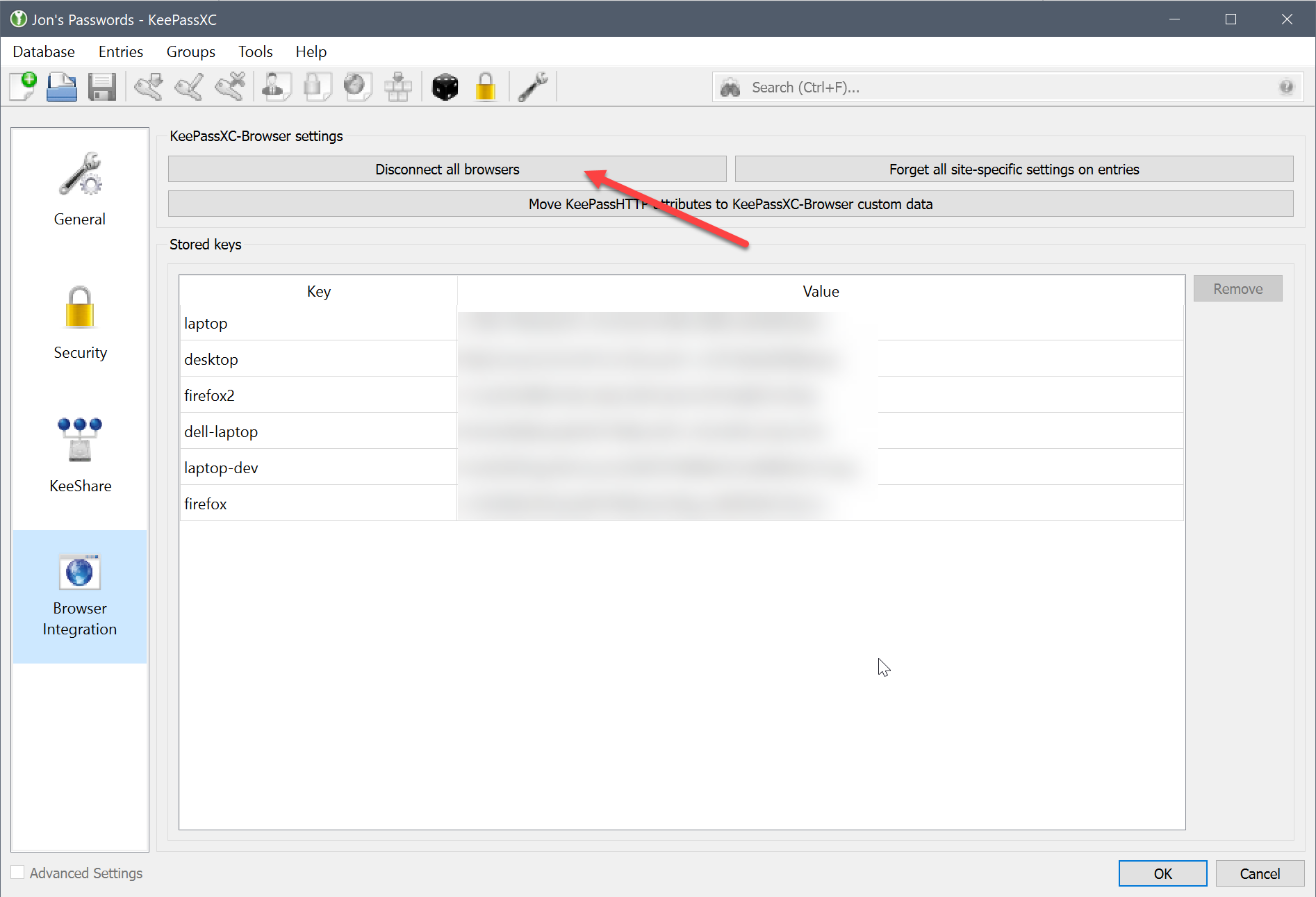
Then you can reconnect from the browser. If it continues to fail this would indicate that the proxy is not being launched correctly by the browser _OR_ the proxy cannot communicate with KeePassXC (although technically this is a different error).
 droidmonkey
on 27 Sep 2019
droidmonkey
on 27 Sep 2019
I don't have that button in version 2.4.3.
[image: image.png]
[image: image.png]
On Fri, Sep 27, 2019 at 10:46 AM Jonathan White notifications@github.com
wrote:
When you receive the "Cannot decrypt" message that indicates the
associated key is no longer valid between the extension settings and your
database. Try clearing out all known keys in the database by going into the
database settings:[image: image]
https://user-images.githubusercontent.com/2809491/65778530-1639e800-e114-11e9-9194-a9a479dae5b6.png—
You are receiving this because you commented.
Reply to this email directly, view it on GitHub
https://github.com/keepassxreboot/keepassxc-browser/issues/609?email_source=notifications&email_token=AJK2HLGPDYMFRGCIWFPLTBLQLYMFJA5CNFSM4I3CXMT2YY3PNVWWK3TUL52HS4DFVREXG43VMVBW63LNMVXHJKTDN5WW2ZLOORPWSZGOD7ZEJCA#issuecomment-535970952,
or mute the thread
https://github.com/notifications/unsubscribe-auth/AJK2HLCR25HX3MN3FHAMESLQLYMFJANCNFSM4I3CXMTQ
.
--
Thank you,
G. Thiel
Very little is needed to make a happy life: it is all within yourself, in
your way of thinking.
Marcus Aurelius Antoninus
gthiel5
on 27 Sep 2019
Sorry - I found it. It's in Database Settings
On Fri, Sep 27, 2019 at 11:08 AM G Thiel gthiel64@gmail.com wrote:
I don't have that button in version 2.4.3.
[image: image.png]
[image: image.png]On Fri, Sep 27, 2019 at 10:46 AM Jonathan White notifications@github.com
wrote:When you receive the "Cannot decrypt" message that indicates the
associated key is no longer valid between the extension settings and your
database. Try clearing out all known keys in the database by going into the
database settings:[image: image]
https://user-images.githubusercontent.com/2809491/65778530-1639e800-e114-11e9-9194-a9a479dae5b6.png—
You are receiving this because you commented.
Reply to this email directly, view it on GitHub
https://github.com/keepassxreboot/keepassxc-browser/issues/609?email_source=notifications&email_token=AJK2HLGPDYMFRGCIWFPLTBLQLYMFJA5CNFSM4I3CXMT2YY3PNVWWK3TUL52HS4DFVREXG43VMVBW63LNMVXHJKTDN5WW2ZLOORPWSZGOD7ZEJCA#issuecomment-535970952,
or mute the thread
https://github.com/notifications/unsubscribe-auth/AJK2HLCR25HX3MN3FHAMESLQLYMFJANCNFSM4I3CXMTQ
.--
Thank you,
G. ThielVery little is needed to make a happy life: it is all within yourself, in
your way of thinking.
Marcus Aurelius Antoninus
--
Thank you,
G. Thiel
Very little is needed to make a happy life: it is all within yourself, in
your way of thinking.
Marcus Aurelius Antoninus
gthiel5
on 27 Sep 2019
I've reset the connection to the browser within KeePassXC. I can't get it
to connect to the database. I've tried the program settings for Browser
integration, setting the bottom three checkboxes in every combination.
(update native messaging..., use a proxy..., use a custom proxy...)
I also ran a registry cleaner in case installing the Windows version of
Firefox and KeePassXC left some registry entries that are causing the
problem.
I still get the "cannot connect" message.
On Fri, Sep 27, 2019 at 11:11 AM G Thiel gthiel64@gmail.com wrote:
Sorry - I found it. It's in Database Settings
On Fri, Sep 27, 2019 at 11:08 AM G Thiel gthiel64@gmail.com wrote:
I don't have that button in version 2.4.3.
[image: image.png]
[image: image.png]On Fri, Sep 27, 2019 at 10:46 AM Jonathan White notifications@github.com
wrote:When you receive the "Cannot decrypt" message that indicates the
associated key is no longer valid between the extension settings and your
database. Try clearing out all known keys in the database by going into the
database settings:[image: image]
https://user-images.githubusercontent.com/2809491/65778530-1639e800-e114-11e9-9194-a9a479dae5b6.png—
You are receiving this because you commented.
Reply to this email directly, view it on GitHub
https://github.com/keepassxreboot/keepassxc-browser/issues/609?email_source=notifications&email_token=AJK2HLGPDYMFRGCIWFPLTBLQLYMFJA5CNFSM4I3CXMT2YY3PNVWWK3TUL52HS4DFVREXG43VMVBW63LNMVXHJKTDN5WW2ZLOORPWSZGOD7ZEJCA#issuecomment-535970952,
or mute the thread
https://github.com/notifications/unsubscribe-auth/AJK2HLCR25HX3MN3FHAMESLQLYMFJANCNFSM4I3CXMTQ
.--
Thank you,
G. ThielVery little is needed to make a happy life: it is all within yourself,
in your way of thinking.
Marcus Aurelius Antoninus--
Thank you,
G. ThielVery little is needed to make a happy life: it is all within yourself, in
your way of thinking.
Marcus Aurelius Antoninus
--
Thank you,
G. Thiel
Very little is needed to make a happy life: it is all within yourself, in
your way of thinking.
Marcus Aurelius Antoninus
gthiel5
on 27 Sep 2019
@gthiel5 Can you ensure all paths are correct? You can follow the Troubleshooting guide.
varjolintu
on 27 Sep 2019
I ran the troubleshooting steps up to #4.
The problem seems to be that the portable apps
(..\portableapps\keepassxcportable\keepassxcportable.exe has access to
different settings than the
.\portableapps\keepassxcportabl\app\keepassxc\keepasxc.exe
The proxy settings were different.
I changed them to match and now everything's running fine.
On Fri, Sep 27, 2019 at 12:20 PM Sami Vänttinen notifications@github.com
wrote:
@gthiel5 https://github.com/gthiel5 Can you ensure all paths are
correct? You can follow the Troubleshooting guide
https://github.com/keepassxreboot/keepassxc-browser/wiki/Troubleshooting-guide
.—
You are receiving this because you were mentioned.
Reply to this email directly, view it on GitHub
https://github.com/keepassxreboot/keepassxc-browser/issues/609?email_source=notifications&email_token=AJK2HLDZQTGXXF6FMSQZSTLQLYXDFA5CNFSM4I3CXMT2YY3PNVWWK3TUL52HS4DFVREXG43VMVBW63LNMVXHJKTDN5WW2ZLOORPWSZGOD7ZM6EQ#issuecomment-536006418,
or mute the thread
https://github.com/notifications/unsubscribe-auth/AJK2HLAI2Q76XISEF5TCMDDQLYXDFANCNFSM4I3CXMTQ
.
--
Thank you,
G. Thiel
Very little is needed to make a happy life: it is all within yourself, in
your way of thinking.
Marcus Aurelius Antoninus
gthiel5
on 27 Sep 2019
After removing the key from my database I could re-connect the extension again. Not sure what was wrong here.
kingfame
on 27 Sep 2019
Could be related to the use of the recycle bin in the database hash identifier. We are fixing that in KeePassXC 2.5.0
droidmonkey
on 27 Sep 2019
I note the bug is closed, but include a bit more info as it might be useful for others or perhaps to inform some other issue report for @varjolintu, as it's . If you'd like to follow it up further, I'm happy to do so.
I tried clearing the database keys in keepassxc, which didn't help. I also fiddled with the recycle bin settings (didn't help) and even created a new database and imported my passwords in the hopes of ditching any saved info (didn't help).
I then chased up local storage as a possible location of cached info and deleted the directory holding extension content in C:\Users\USERID\AppData\Roaming\Mozilla\Firefox\Profiles\PROFILE\storage\default\moz-extension+++68a666f0-172d-41d1-bbbd-bbfb97326c60*. This at least seemed to reset things a bit more than anything else, but still didn't result in a working connection.
Finally, I got it to work by doing:
- close firefox
- wipe all database keys in keepassxc, disconnect all browsers, close keepassxc
- start keepassxc, open database
- wipe firefox extension storage using the file manager
- restart firefox
- start extension debugger
- tried to connect with the extension, again getting the "cannot decrypt" message
- used the debugger to wipe the stored server public key (on the console, type keepass.serverPublicKey="" and press return)
- tried to connect with the extension, now getting the prompt to connect, which works!
Having done this, it works for the current session. If I restart firefox, I get back to the cannot decrypt issue. However, I can then repeat just the step with the debugger wiping the public key, then the connection is restored without any further intervention. This seems to be reproducible and I suppose it may be some sort of race condition or other misfortune in the initial key exchange part.
For completeness, here's a dump of the debugger during the process above from the point of restarting firefox (hope there's nothing too sensitive in here!):
```Connecting to native messaging host org.keepassxc.keepassxc_browser keepass.js:976:13
Error 7: Message encryption failed. Is KeePassXC running? 2 keepass.js:1061:13
Error: No content script available for this tab. keepass.js:1174:25
Server public key: GfJlVLoyUOdZN9/kKsXCqdD0VRP1ieI3QemAtdU/wAU= 2 keepass.js:603:21
Object { action: "get-databasehash", message: "vJBjV+jNX07C74jE/Z+Ho1W0i5vLb9YgAILk4k9laDaopzMbLDB22f9TO/1/nxGQNNJnU5OEuM1OpxZ8e+7gqw==", nonce: "1CCrB2AUU+BXs1D2zwTmur2SrXWFW1oU", clientID: "ZfrXA2rSAwvr0Ust2pOy++omiIPxxa0i" }
Logpoint @ keepass.js:90:4
received
Object { action: "get-databasehash", error: "Cannot decrypt message", errorCode: "4" }
Logpoint @ keepass.js:102:20
hash response
Object { action: "get-databasehash", error: "Cannot decrypt message", errorCode: "4" }
Logpoint @ keepass.js:521:12
Error 4: Cannot decrypt message keepass.js:1061:13
database hash
Object { associated: {…}, keyPair: {…}, serverPublicKey: Uint8Array(32), clientID: "ZfrXA2rSAwvr0Ust2pOy++omiIPxxa0i", isConnected: true, isDatabaseClosed: true, isKeePassXCAvailable: true, isEncryptionKeyUnrecognized: false, currentKeePassXC: "2.4.3", requiredKeePassXC: "2.3.0", … }
Logpoint @ keepass.js:567:8
Object { action: "get-databasehash", message: "O3vzKmfnnZZJdRQJ3WEXyM8KjJY5QcLic/Uwf1dpsV+rH2FVAf/AzDkm5PuaYKmoAr4doTE93mCbqJeFIeXqEA==", nonce: "TcFiHOZhiQIPa32wyrsDymGGd6IgRRPl", clientID: "ZfrXA2rSAwvr0Ust2pOy++omiIPxxa0i" }
Logpoint @ keepass.js:90:4
received
Object { action: "get-databasehash", error: "Cannot decrypt message", errorCode: "4" }
Logpoint @ keepass.js:102:20
hash response
Object { action: "get-databasehash", error: "Cannot decrypt message", errorCode: "4" }
Logpoint @ keepass.js:521:12
Error 4: Cannot decrypt message keepass.js:1061:13
database hash
Object { associated: {…}, keyPair: {…}, serverPublicKey: Uint8Array(32), clientID: "ZfrXA2rSAwvr0Ust2pOy++omiIPxxa0i", isConnected: true, isDatabaseClosed: true, isKeePassXCAvailable: true, isEncryptionKeyUnrecognized: false, currentKeePassXC: "2.4.3", requiredKeePassXC: "2.3.0", … }
Logpoint @ keepass.js:567:8
Object { action: "get-databasehash", message: "ft4CGNLJwukQuSSQXmF/WBljc8gPic5ee2tlsieMQTNo7Q6UgTOnWPisV0jHaJi56OAoMQUhFa/oNuugh/VBNw==", nonce: "BGgW6mIjmnPetn2KxWgkWpPRY4ClaNym", clientID: "ZfrXA2rSAwvr0Ust2pOy++omiIPxxa0i", triggerUnlock: "true" }
Logpoint @ keepass.js:90:4
received
Object { action: "get-databasehash", error: "Cannot decrypt message", errorCode: "4" }
Logpoint @ keepass.js:102:20
hash response
Object { action: "get-databasehash", error: "Cannot decrypt message", errorCode: "4" }
Logpoint @ keepass.js:521:12
Error 4: Cannot decrypt message keepass.js:1061:13
database hash
Object { associated: {…}, keyPair: {…}, serverPublicKey: Uint8Array(32), clientID: "ZfrXA2rSAwvr0Ust2pOy++omiIPxxa0i", isConnected: true, isDatabaseClosed: true, isKeePassXCAvailable: true, isEncryptionKeyUnrecognized: false, currentKeePassXC: "2.4.3", requiredKeePassXC: "2.3.0", … }
Logpoint @ keepass.js:567:8
keepass.serverPublicKey=''
""
Object { action: "change-public-keys", publicKey: "pJbmTQ54vvHxE1pyarNoFLOgd7EGYF72581Du5XU9l0=", nonce: "bT/1QbcQYjTHTW32A9UvYfnareJ09+eh", clientID: "tyO20fSqlU9Nje+a3J4u7WEQ0R64Saie" }
Logpoint @ keepass.js:90:4
Error 7: Message encryption failed. Is KeePassXC running? keepass.js:1061:13
received
Object { action: "change-public-keys", nonce: "bj/1QbcQYjTHTW32A9UvYfnareJ09+eh", publicKey: "sJtLylXl0U97gqR1SnPYGM5jFAS3btg5jA5FBs85VVU=", success: "true", version: "2.4.3" }
Logpoint @ keepass.js:102:20
response Logpoint @ keepass.js:594:8
Object { action: "change-public-keys", nonce: "bj/1QbcQYjTHTW32A9UvYfnareJ09+eh", publicKey: "sJtLylXl0U97gqR1SnPYGM5jFAS3btg5jA5FBs85VVU=", success: "true", version: "2.4.3" }
Logpoint @ keepass.js:596:12
Server public key: sJtLylXl0U97gqR1SnPYGM5jFAS3btg5jA5FBs85VVU= keepass.js:603:21
Object { action: "get-databasehash", message: "pnmxtRuDF5p0bR1wM36ek3XqjQRGGAGN2aVUrdNoE9Do7ZTd3szK2Pyyh8mPuO2dEVohi42Z3w93LwQ07WSZIg==", nonce: "h0F/Tlenyk6m3W/vbyYt3lzn/Vy8pkDv", clientID: "tyO20fSqlU9Nje+a3J4u7WEQ0R64Saie", triggerUnlock: "true" }
Logpoint @ keepass.js:90:4
received
Object { action: "get-databasehash", message: "pNbs6MLvGfWJr2XGMmyRGlVtHnzAQAIbQpek+KwwVFlRbJNejg2YOL3SVpvvuKHgiJOUln19mF+/p7DcrlITARfhHT0P0u/cA/rE08bSaaztLL0ga2aZQwk74fbi8hEJhHD0+3SZ5NmoBZwJoOUVwUkRL+4XZUtsWtkil1RN4BsBvNAEidZ91WHQyYjCPM3WVOOYKG5G/oWilwl8KIlOBNUMY0D4jUYRagPeDxNt6Iw9tqOTl8rkvBJpvhAIDCPWm29s", nonce: "iEF/Tlenyk6m3W/vbyYt3lzn/Vy8pkDv" }
Logpoint @ keepass.js:102:20
hash response
Object { action: "get-databasehash", message: "pNbs6MLvGfWJr2XGMmyRGlVtHnzAQAIbQpek+KwwVFlRbJNejg2YOL3SVpvvuKHgiJOUln19mF+/p7DcrlITARfhHT0P0u/cA/rE08bSaaztLL0ga2aZQwk74fbi8hEJhHD0+3SZ5NmoBZwJoOUVwUkRL+4XZUtsWtkil1RN4BsBvNAEidZ91WHQyYjCPM3WVOOYKG5G/oWilwl8KIlOBNUMY0D4jUYRagPeDxNt6Iw9tqOTl8rkvBJpvhAIDCPWm29s", nonce: "iEF/Tlenyk6m3W/vbyYt3lzn/Vy8pkDv" }
Logpoint @ keepass.js:521:12
Error 11: No saved databases found. keepass.js:1061:13
Object { action: "get-databasehash", message: "7mwMULhu94DnSgUBXJSKNa9YwEOia0g/QIaAnEJeQ/SbFGCLzgP23+D5PRoeiH/gzhh96hpmu/wY/uH4Qf4vCA==", nonce: "j4zmXCE4pOTURYB3rCtgPrxD/towgnQH", clientID: "tyO20fSqlU9Nje+a3J4u7WEQ0R64Saie" }
Logpoint @ keepass.js:90:4
received
Object { action: "get-databasehash", message: "qWuM4u74duRkLD9wJg43tHIApEyCC33pU8nCCtZ1FPj+aHeXP3A/JyZuZUV6ns740Tg+jmpD0ExYxuGEx2FlqsqN45Se8zRSkeVBuvR90EaNTuWGZ8poWMlabMz8bsUN2+9yhyEC+mauCsPiq3vFIHC0mLL4r7nTuju+yA7+b0ofMZo6SrwLPNPqJsaNFq9PomG9/9nvkWamuIY8dG+48YQl6FkqLuMZoFDl4q0nlmy+foZ5/VuIBCnzVVvw8QVvzV93", nonce: "kIzmXCE4pOTURYB3rCtgPrxD/towgnQH" }
Logpoint @ keepass.js:102:20
hash response
Object { action: "get-databasehash", message: "qWuM4u74duRkLD9wJg43tHIApEyCC33pU8nCCtZ1FPj+aHeXP3A/JyZuZUV6ns740Tg+jmpD0ExYxuGEx2FlqsqN45Se8zRSkeVBuvR90EaNTuWGZ8poWMlabMz8bsUN2+9yhyEC+mauCsPiq3vFIHC0mLL4r7nTuju+yA7+b0ofMZo6SrwLPNPqJsaNFq9PomG9/9nvkWamuIY8dG+48YQl6FkqLuMZoFDl4q0nlmy+foZ5/VuIBCnzVVvw8QVvzV93", nonce: "kIzmXCE4pOTURYB3rCtgPrxD/towgnQH" }
Logpoint @ keepass.js:521:12
Object { action: "associate", message: "5CbxcqwfZopp1qdVTKGlSocHVbPDlskS8/RZzORVlh+ozFTtg0RnduxBm9XV0vRnj2BF4WLheUPUVNW7aKUCEFB7PdeuTk8qGo+I5Ym8UAWiKbwCOAmI/JE8ZR+oJRM6Ux0H75en6II745Z0MY3iuywfc0Cqzrw+n5jwjNbNb3Yw4uxtTGoK6Cjm8qcmNd6aQMQ=", nonce: "sKEHoF646SpM+37ZR9kZxISBKZsBumXN", clientID: "tyO20fSqlU9Nje+a3J4u7WEQ0R64Saie", triggerUnlock: "true" }
Logpoint @ keepass.js:90:4
received
Object { action: "associate", message: "dYoIrmCyzvn/5Q/0WWPNAA8fvpVILr5+iSuPIVhE/vz6K4giI20grppR8TmrSeO8bQe5z5gHLg1YGk7duSeUNk3yUR7FPXKo8emREfDg6XUB9eKbC3TAA+qiIOd/mgWJ2B95u7CaNrlSvhaoacRfhUn/MOrLpQZ908xK3IpLGkrFrCcu6hs86XZ18HgoYBLKmc62pGSS0bcEMZMv5yg9dKdttUyojUybuqJKFyJlcMa1NeNk2HGs9VZUvk88PUenHXVdb4bpehdlvMnPt72QFXQNdJcGLn91a34qk6f09hg=", nonce: "saEHoF646SpM+37ZR9kZxISBKZsBumXN" }
Logpoint @ keepass.js:102:20
```
mikeggrant-eumetsat
on 30 Sep 2019
@mikeggrant-eumetsat Thanks for this! It will certainly help. In the other thread I recommended testing some manual changes. It might be related to the message timeout which is much too short.
See https://github.com/keepassxreboot/keepassxc-browser/issues/615#issuecomment-536470883.
Could you put a breakpoint to the get-databasehash action and see what command triggers the first successful and the first failed response? That could help a little further.
This is a bit fustrating because still haven't been able to reproduce the issue myself.
varjolintu
on 30 Sep 2019
Related issues
 flibustenet
·
4Comments
flibustenet
·
4Comments
 muchqs
·
4Comments
muchqs
·
4Comments
 ForsakenHarmony
·
4Comments
ForsakenHarmony
·
4Comments
 whit-colm
·
4Comments
whit-colm
·
4Comments
 compilenix
·
5Comments
compilenix
·
5Comments