Keepassxc-browser: No logins found - Firefox
Expected Behavior
Browser extension finds login for site
Current Behavior
Browser extension does not find login for site
No logins found
Steps to Reproduce (for bugs)
- Open Firefox
- Connect to db (either manually or automatically)
- Visit site that has entry in the db, in this case https://www.reddit.com
- I browsed manually to reddit.com/login so as to avoid the ajax form issues
- Click in username field, expect to see username dropdown
- Right click username field, KeepassXC-Browser > Fill Username and Password
- No logins found
Debug info
KeePassXC - 2.4.1
KeePassXC-Browser - 1.4.3
Operating system: Mac
Browser: Firefox 66.0.5
I have Firefox Multi-Account Containers but this behavior occurs whether it's enabled or not
I also tried debugging it using Firefox's extension debugging but all I get is "Error 15: No logins found." No idea where it's actually failing.
 flanger001
All 18 comments
Does your entry in the database have https in front of the url?
 droidmonkey
on 8 May 2019
droidmonkey
on 8 May 2019
@droidmonkey Yep!
flanger001
on 8 May 2019
Change your entry's URL to https://reddit.com and try again.
 varjolintu
on 8 May 2019
varjolintu
on 8 May 2019
@varjolintu No dice. Also, why would it not work if the entry was https://www.reddit.com and I browsed to https://www.reddit.com/?
flanger001
on 8 May 2019
I cannot reproduce it. Reddit (the old.reddit.com included) works just fine for me.
EDIT: Have you got any other extension that could affect?
varjolintu
on 8 May 2019
I have these extensions:
- KeepassXC-Browser
- Facebook Container
- Firefox Multi-Account Containers
- 1Password Extension
- uBlock Origin
- Reddit Enhancement Suite
That's it.
flanger001
on 8 May 2019
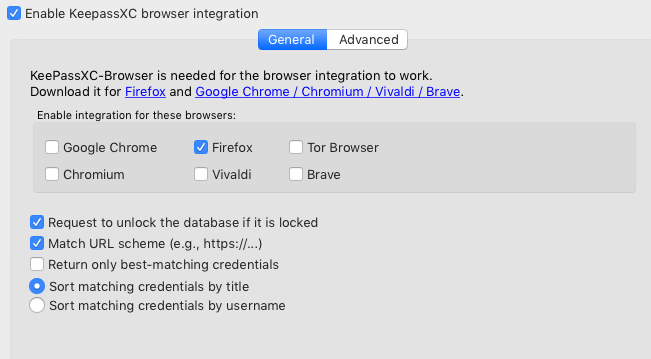
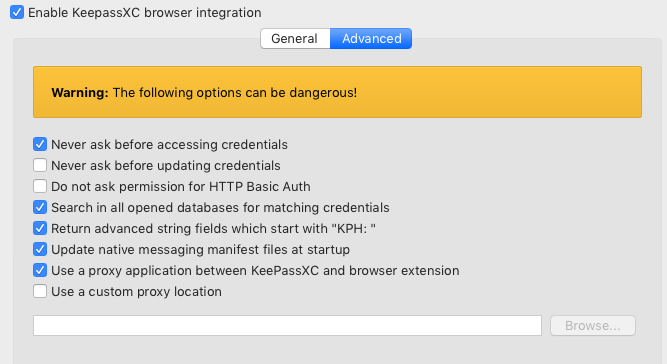
I should add that I've tried all the steps here: https://keepassxc.org/docs/keepassxc-browser-migration/
And this is what my settings look like
flanger001
on 8 May 2019
Ok, so I just noticed something else with the entry:
My Reddit entry had expired. I changed the expiration to a date in the future and the login started working. Then I changed the expiration back to a past date and the login stopped working again.
Is this expected behavior?
flanger001
on 8 May 2019
That makes sense to me
droidmonkey
on 8 May 2019
Hmm, in that case I'd say without any other indication that's a bug. Password "expiration" is more of a thing to notify the user to regularly change passwords and shouldn't prevent an otherwise valid password from being filled in imo.
EDIT: I do realize that is just an opinion and this is FOSS so you're under no obligation to change this for me, but I do think the behavior is a little opaque otherwise. Even just a note somewhere explaining why it's not finding entries that it absolutely should would be helpful, but I think having the extension disregard expiration on entries is a better choice. Perhaps that could even be an option?
flanger001
on 8 May 2019
This behaviour was fixed with https://github.com/keepassxreboot/keepassxc/issues/2111.
In my opinion, if the password is expired, and you have set it so, it shouldn't be used manually or by the extension.
varjolintu
on 8 May 2019
@varjolintu I would agree with you but that expectation is not ever set implicitly or explicitly, so whether it is a bug or not, it _feels_ like a bug. I assumed expiration was more of a reminder to the user and not something to base behavior on.
flanger001
on 8 May 2019
As an additional update, I tried this with Twitter.
Twitter entry is https://twitter.com and has an expiration date of May 22, 2019. I browsed to https://twitter.com and the extension isn't finding the entry.
flanger001
on 8 May 2019
Update to previous update: I opened up the debug tool and I keep getting Error 8: KeePassXC association failed, try again as the error. Database is open, the Twitter entry exists.
flanger001
on 8 May 2019
@varjolintu perhaps we can add a setting such as "Return expired credentials" which is default off. Either that or return expired credentials, but annotate the title with (expired) such that it displays like that in the browser. The latter option would be nice to indicate to the user they need to update their password.
droidmonkey
on 8 May 2019
@droidmonkey That could be done.
varjolintu
on 9 May 2019
Here's the KeePassXC side PR: https://github.com/keepassxreboot/keepassxc/pull/3134
And KeePassXC-Browser support for it: https://github.com/keepassxreboot/keepassxc-browser/pull/537
varjolintu
on 9 May 2019
Thank you both!
flanger001
on 9 May 2019
Related issues
 dgnuff
·
3Comments
dgnuff
·
3Comments
 sliwowitz
·
5Comments
sliwowitz
·
5Comments
 christophetd
·
4Comments
christophetd
·
4Comments
 brwolfgang
·
4Comments
brwolfgang
·
4Comments
 FWDekker
·
3Comments
FWDekker
·
3Comments
Most helpful comment
Here's the KeePassXC side PR: https://github.com/keepassxreboot/keepassxc/pull/3134
And KeePassXC-Browser support for it: https://github.com/keepassxreboot/keepassxc-browser/pull/537