Jupyterlab: Considerable slowdown in Firefox once notebook gets a bit larger
I am not sure to what extent performance should already be OK with the alpha preview, but I am currently noticing bad performance with Firefox which makes JupyterLab almost unusable (even for dogfooding). And it seems to me this has been better in the past when I tried it out.
Basically, a general slowdown in Firefox that I do not notice in Chrome. A very specific example I recorded here below, where I type in a new notebook with only one cell (which is fluent), but then switch to an existing notebook with already some content (in the same jupyterlab session), where it cannot follow my typing (as you can see the text at once pops up all, after I am done typing):

The notebook is certainly not especially large (just some pandas examples with only html table output, not plots), I can share if needed.
Using Firefox 51 on Ubuntu 16.04, with jupyterlab 0.15.0 from conda-forge.
If there are other things I can do to give you more information, let it know!
 jorisvandenbossche
All 88 comments
Scrolling in that notebook is still smooth, so it seems to be related to the text cells
jorisvandenbossche
on 7 Feb 2017
Hi @jorisvandenbossche, are you able to share the notebook on GitHub (maybe as a gist)?
 blink1073
on 7 Feb 2017
blink1073
on 7 Feb 2017
Yep, sure: http://nbviewer.jupyter.org/gist/jorisvandenbossche/eb0eaf2e66d43abe144a7f414db6246e (although as far as I can see, it is nothing special in the notebook)
jorisvandenbossche
on 7 Feb 2017
I also see the same problem with other notebook files (another point that it is probably note related to the specific file). Eg trying to open an existing notebook with some content (also not especially large), makes the browser unresponsive for a moment.
Sometimes this even pops up the 'unresponsive script' dialog (Script: http://localhost:8888/lab/main.bundle.js:33573), where you can choose between 'stop script' and 'continue script'. After waiting a bit, Jupyterlab is responsive again, the notebook is loaded, scrolling is smooth, but typing still slow.
jorisvandenbossche
on 7 Feb 2017
Thanks very much @jorisvandenbossche, we were just talking yesterday about needing more performance data and example notebooks that cause performance problems.
blink1073
on 7 Feb 2017
Marking as beta to at least take a look at the problem.
blink1073
on 7 Feb 2017
No problem.
Another data point: I just tried it on Windows 10 with firefox, downloaded one of the tutorial notebooks from ipython (https://nbviewer.jupyter.org/github/ipython/ipython/blob/4.0.x/examples/IPython%20Kernel/Cell%20Magics.ipynb) and have the same problem (actually even worse: the notebook scrolls fine, but I can't click into a cell to go into edit mode). So it is actually completely unusable on Windows/firefox combination.
Opened the same jupyterlab session in the default browser Edge, and although the css layout is horrible (not blaming you but microsoft :-)), the notebook opens and I can edit it just fine.
jorisvandenbossche
on 7 Feb 2017
Edge does not yet support CSS Variables (which we are using): https://developer.microsoft.com/en-us/microsoft-edge/platform/issues/171084/
blink1073
on 7 Feb 2017
Yes, no problem, was just a check to confirm it is specifically an issue with firefox
jorisvandenbossche
on 7 Feb 2017
Thank you again for being so thorough in your report.
blink1073
on 7 Feb 2017
Found it: we are sending every keystroke to the server, whereas the classic notebook did not.
blink1073
on 3 Mar 2017
Keystrokes are not the issue: we are no longer sending keystrokes to the server when the inspector is closed. The issue is with nested codemirror instances on the page. When loading a notebook with 100 empty code cells on Firefox 51 on Ubuntu 16.04 in JupyterLab, we get, which is a line in CodeMirror relating to view port (it only comes up for a second before crashing the browser).

blink1073
on 29 Mar 2017
I can confirm that FF 53 is much slower than Chrome 58 with working with multiple large notebooks. Things that are slow:
- Putting two notebooks side by side, which redraws both of them.
- Resizing the relative widths of two side by side notebooks.
@sccolbert
 ellisonbg
on 12 May 2017
ellisonbg
on 12 May 2017
Showed it to @sccolbert and it also slow (but not as slow) on Chrome. Medium sized notebooks.
ellisonbg
on 12 May 2017
Notably, text files with thousands of lines are plenty fast. This seems to
be a problem with reflowing content in the notebook. Will profile this when
I'm back on my desktop machine.
On May 11, 2017 10:12 PM, "Brian E. Granger" notifications@github.com
wrote:
Showed it to @sccolbert https://github.com/sccolbert and it also slow
(but not as slow) on Chrome. Medium sized notebooks.—
You are receiving this because you were mentioned.
Reply to this email directly, view it on GitHub
https://github.com/jupyterlab/jupyterlab/issues/1639#issuecomment-300965294,
or mute the thread
https://github.com/notifications/unsubscribe-auth/AAIYSYxqLiLz0TWlyBNaVqw80tBmysVRks5r48AFgaJpZM4L5WFs
.
 sccolbert
on 12 May 2017
sccolbert
on 12 May 2017
@sccolbert assigning this one to you for the beta. This is the performance problem I showed you in NYC. More than willing to help provide examples, etc.
ellisonbg
on 8 Jun 2017
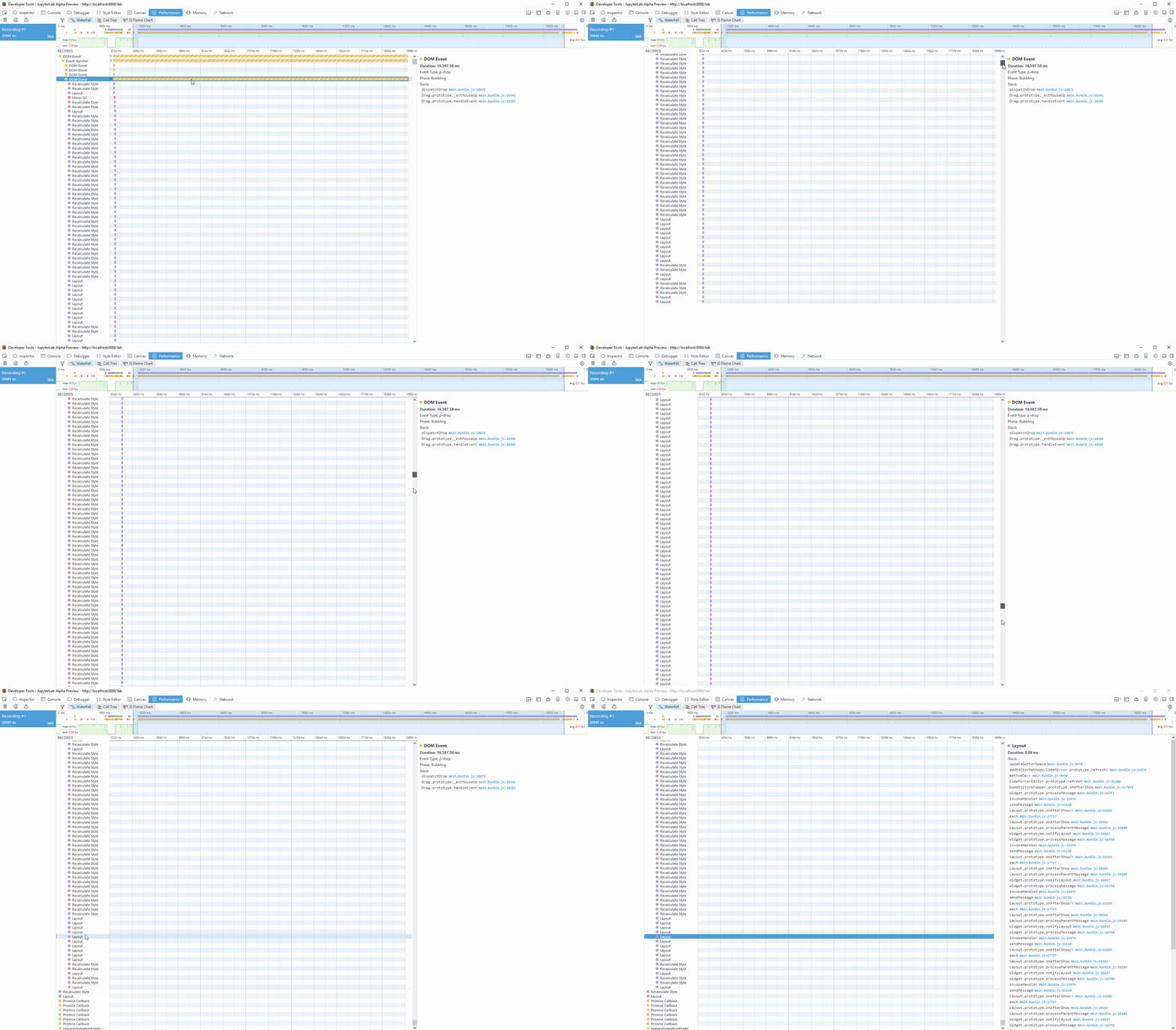
Looks like this is really pathological code mirror refreshing/layout going on:
sccolbert
on 21 Jun 2017
Perhaps related I see slowdown even when opening notebooks and switching tabs from one to another. Firefox freezes for a seconds or two (show "not responding" comment at the top) before resuming. Similar the "unresponsive script" pops but stops at a different line:
Script: http://localhost:8888/lab/static/main.bundle.js:8251
This is not observed in Chrome.
Windows 7
jupyterlab 0.27
Firefox 55.0.3
Chrome 61.0.3163.100
notebooks used: scipy-2017-sklearn
 mppaskov
on 5 Oct 2017
mppaskov
on 5 Oct 2017
Yep, that sounds related. Any time Firefox has to compute the layout we're hitting this behavior.
blink1073
on 5 Oct 2017
Yep. Same issue.
sccolbert
on 5 Oct 2017
Can confirm that this slowdown is not observed on:
Chromium 61.0.3163.79 Built on Ubuntu , running on Ubuntu 17.04
 shadiakiki1986
on 6 Oct 2017
shadiakiki1986
on 6 Oct 2017
I have tried with firefox nightly (the future firefox 58 with the new style engine) and I also get the issue: just create a notebook with a large number of cells with print("this is a test") for instance. If I put between 50 and 100 copies of that cell then the notebook becomes unresponsive (and even completely unusable).
 ogrisel
on 26 Oct 2017
ogrisel
on 26 Oct 2017
Can confirm this on the newly released firefox 57.0 (Nov 14)
shadiakiki1986
on 25 Nov 2017
Another confirmation of this issue on the new version of Firefox.
 mtd240
on 27 Nov 2017
mtd240
on 27 Nov 2017
I also see this behavior on Firefox 57.0
 laurafroelich
on 1 Dec 2017
laurafroelich
on 1 Dec 2017
Firefox 57.0.1 same slowdown loading and switching tabs to large notebooks.
 scheckley
on 5 Dec 2017
scheckley
on 5 Dec 2017
Firefox and Chrome should be equivalent now based on timeline testing with large notebooks. We will still be slow to render large notebooks pending #2540.
blink1073
on 5 Dec 2017
I updated to the latest jupyterlab on conda-forge (0.30.2), and indeed it seems to be OK (usable) on reasonably sized notebooks on firefox now.
However, I notice that opening a notebook still is considerably slower on firefox compared to chrome.
jorisvandenbossche
on 5 Dec 2017
I am also observing the same behaviour on FF57 vs. Chromium 62. The lab got also generally slower on 0.30.x (I am running 0.30.5 right now).
 jochym
on 11 Dec 2017
jochym
on 11 Dec 2017
However, I notice that opening a notebook still is considerably slower on firefox compared to chrome.
Using lab the last days again, and the slow opening on Firefox is rather annoying.
I just opened a medium sized notebook (<100 cells, in my opinion not a huge notebook), and it took more than 30s to open.
jorisvandenbossche
on 14 Dec 2017
Specific notebook in case that could be helpful: https://drive.google.com/file/d/1-b7WGqXe4Ik6ggR9N14hTo6H6SesI8lo/view?usp=sharing (it's a not a clean notebook, so don't look at the content :-)
jorisvandenbossche
on 14 Dec 2017
I'm also experiencing this issue on my linux machine. Jupyterlab 0.30.6 and Firefox 57/59(20180107 nightly). Runs fine in chromium. Notebook is has ~550 plots (roughly 530 of which are generated in a single output cell) in about 80 cells.
 groutr
on 9 Jan 2018
groutr
on 9 Jan 2018
The same with 0.31 - it is much slower on firefox then on chromium. Holding on 0.29 - which was fine.
jochym
on 12 Jan 2018
I can confirm this issue on Firefox for Windows (nightly) - I get an 'unresponsive script' warning although the lab does eventually show up.
For comparison, on Safari for Mac I don't experience this issue.
 mangecoeur
on 18 Jan 2018
mangecoeur
on 18 Jan 2018
The difference is between firefox and chrome as well. I guess this may be just some corner case which is sub-optimal for firefox js interpreter.
jochym
on 18 Jan 2018
Additional data point. I finally moved to 0.31.1 in production and it is noticeably slower on Firefox and Chrome/Chromium. The workspace often does not load and puts "clear workspace?" dialog up.
Larger notebooks load very slow. It is even more noticeable when working on the remote server but visible also for local server.
jochym
on 25 Jan 2018
The issue is Firefox's implementation of flexbox, which has quadratic runtime behavior when flexboxes are nested. The solution is for us to restructure the way the notebook is layed out in the DOM/CSS so that it doesn't use flexbox. We know how to fix it, but we just haven't gotten there yet for a variety of other long-winded reasons.
sccolbert
on 25 Jan 2018
Ok. That is understandable (and sounds like the deficiency in firefox) but there is also substantial decrease in chrome performance. Is that connected? Should I submit a different issue?
jochym
on 25 Jan 2018
It's going to be somewhat related. We are having issues with "refreshing" code mirror at the appropriate times so that it can do it's layout thing. That "refresh" causes synchronous relayouts internally in the browser. This slows every browser down, but is especially bad on FF because of the quadratic flexbox behavior.
sccolbert
on 25 Jan 2018
OK. Glad you are aware of the issue and working on it. Thanks for your efforts! Let me know if I can be instrumental with fixing this.
jochym
on 25 Jan 2018
@sccolbert can you please link the bug you filed about the quadratic runtime in firefox?
i can’t seem to find it!
 flying-sheep
on 26 Jan 2018
flying-sheep
on 26 Jan 2018
I do think we have other performance regressions in recent releases other
than the FF bug though - probably related to CodeMirror refresh being
called to aggressively.
On Thu, Jan 25, 2018 at 11:08 PM, Philipp A. notifications@github.com
wrote:
@sccolbert https://github.com/sccolbert can you please link the bug you
filed about the quadratic runtime in firefox?i can’t seem to find it!
—
You are receiving this because you commented.
Reply to this email directly, view it on GitHub
https://github.com/jupyterlab/jupyterlab/issues/1639#issuecomment-360701196,
or mute the thread
https://github.com/notifications/unsubscribe-auth/AABr0EZz9-TlYQve5BgynUNgDr7iaZD2ks5tOXnXgaJpZM4L5WFs
.
--
Brian E. Granger
Associate Professor of Physics and Data Science
Cal Poly State University, San Luis Obispo
@ellisonbg on Twitter and GitHub
[email protected] and [email protected]
ellisonbg
on 27 Jan 2018
I think so. The 0.31.2 is barely usable again for us (remote operation with google-drive RT-colaboration). The difference from 0.27 is substantial. Particularly with loading time - it is really difficult to load 2M notebook from google drive. Pity, because the release is otherwise much nicer in multiple places. Right now we are considering reverting to 0.27 due to this slow-down. But if the workspace finally loads then it works fairly well - even for multiple, large notebooks.
jochym
on 27 Jan 2018
ok, thanks for the additional data point, we probably need to investigate
the cause of the regression for the beta 2 release.
On Sat, Jan 27, 2018 at 1:03 PM, Paweł T. Jochym notifications@github.com
wrote:
I think so. The 0.31.2 is barely usable again for us (remote operation
with google-drive RT-colaboration). The difference from 0.27 is
substantial. Particularly with loading time - it is really difficult to
load 2M notebook from google drive. Pity, because the release is otherwise
much nicer in multiple places. Right now we are considering reverting to
0.27 due to this slow-down. But if the workspace finally loads then it
works fairly well - even for multiple, large notebooks.—
You are receiving this because you were mentioned.
Reply to this email directly, view it on GitHub
https://github.com/jupyterlab/jupyterlab/issues/1639#issuecomment-361015097,
or mute the thread
https://github.com/notifications/unsubscribe-auth/AABr0JQYp_GA1Na934EMad7ELCKd7fjEks5tO48pgaJpZM4L5WFs
.
--
Brian E. Granger
Associate Professor of Physics and Data Science
Cal Poly State University, San Luis Obispo
@ellisonbg on Twitter and GitHub
[email protected] and [email protected]
ellisonbg
on 27 Jan 2018
Can we use the autorefresh technique for the cm widgets that are not in view yet? The addon only delays rendering for the first time. we probably need to reinstall the listener when focused out
 clkao
on 29 Jan 2018
clkao
on 29 Jan 2018
@blink1073 is working on a refactor of document opening behavior that will change loading to happen at its own pace, possibly even explicitly after the application has restored all of its tabs and windows. That removes one class of problems above, but leaves the underlying Firefox rendering issue. But it will create a dramatically faster load experience.
 afshin
on 30 Jan 2018
afshin
on 30 Jan 2018
Moving to Beta 1, with the plan that we'll at least test for regression (compared to 0.27?) right away.
 jasongrout
on 2 Feb 2018
jasongrout
on 2 Feb 2018
Great. This is really important for anyone trying to use RT collaboration over google drive. It was working really well at 0.27. And this functionality is very useful for working in the groups where not everyone is proficient in python - the synergy works nicely. This was actually a single thing which has moved my co-workers "over the hump" of the learning curve. I believe the RT functionality will drive adoption outside core python community. I'll be happy to help with resolving this problem.
jochym
on 2 Feb 2018
A few notes from a debugging session with @blink1073:
- We should short circuit non-change changes to CodeMirror settings. This should cut down on a lot unnecessary reflows. These will be done in
observables/src/model.tsandcodemirror/src/editor.ts. These can be done as patch releases for 0.31 - We can remove the loading spinner after the contents have loaded from disk, rather than after the kernel has started. This will put something on the page sooner than it otherwise was. We can do this for 0.32.
- There are some unnecessary calls to
CodeEditor.refresh()that we can work around. This can be done for 0.32. - The table layout refactor described above should still result in performance improvements. This will be done for 1.0
 ian-r-rose
on 3 Feb 2018
ian-r-rose
on 3 Feb 2018
This is actually not only on firefox. It is just particularly bad on FF. I am running on chromium and have the same problems - just a little less annoying.
jochym
on 3 Feb 2018
I can confirm that #3805 improved firefox nightly's performance quite noticeably, for larger notebook it is now as slow as chrome, probably also due to those wasted editor.update() calls.
clkao
on 4 Feb 2018
Not sure if it is related. For me clicking on another notebook tab with slightly more output is notably slower on Firefox (than on Opera or Chrome). I did not continue working in Firefox, because I somehow thought it is since Firefox was just much slower on Typescript in the JetStream Browser benchmark. Not sure if that makes sense.
 Gerenuk
on 5 Feb 2018
Gerenuk
on 5 Feb 2018
Unfortunately changes in CSS in 0.33.3 made the toolbar stick to the contents of the notebook and scroll with it!
I think this must be a simple mistake. Sorry @ian-r-rose. I did not spot it during my tests.
jochym
on 5 Feb 2018
Whoops, I can confirm as well. Looking into it.
blink1073
on 5 Feb 2018
Looks like we have to use absolution positioning for the toolbar and notebook to make up for what we lost in display: flex.
blink1073
on 5 Feb 2018
Whoops, my mistake!
ian-r-rose
on 5 Feb 2018
We have made a couple of performance improvements in #3805 and #3802, which have been published in v0.31.4.
A couple of other things (fewer editor refreshes, context refactor) will be addressed in the next release. Moving the milestone to Beta 2 for those,
ian-r-rose
on 6 Feb 2018
@ian-r-rose It seems that this is cursed or something. The build for 3.6 failed to upload for some reason. Please, retriger the build on CircleCI.
jochym
on 6 Feb 2018
I asked the conda-forge admins to kick the CircleCI build, I don't have the ability to do so.
blink1073
on 6 Feb 2018
Thanks. I can add myself to the maintainers for the package. I'm packaging some software for conda-forge already. But this will be active in the next build, so it will not help us now.
jochym
on 6 Feb 2018
I am one of the maintainers of the feedstock, but that only gives access to Github admin rights. I am about to release a new patch pending https://github.com/jupyterlab/jupyterlab/pull/3821, but worst case we could have made a new conda release with a different build number.
blink1073
on 6 Feb 2018
@blink1073 I think that if you are a maintainer you can do it if you register yourself (via github) on CCI. But maybe I am mistaken.
jochym
on 6 Feb 2018
I tried logging in on CircleCI, but that didn't help. I don't have access to the Settings in the Github repo. I have enabled CircleCI access for myself. I might be missing something else though.
blink1073
on 6 Feb 2018
For what it's worth, I tested loading Jake's 03.02 notebook in Firefox and Chrome on OS X in 0.31.0 and 0.31.4. Firefox is just under an order of magnitude faster loading the notebook in 0.31.4 compared to 0.31.0 (something like 6-7 seconds down to a little more than one second or so). Firefox was just about the same speed as Chrome for jlab 0.31.4 for me. Interestingly, it felt like Chrome was slower in 0.31.4 compared to 0.31.0 by maybe half a second or so, but not enough to be a problem.
Good job on the speedup for loading in Firefox!
jasongrout
on 7 Feb 2018
I added myself to the maintainers on conda-forge package. Please @blink1073 accept the PR when tests are ready.
jochym
on 7 Feb 2018
Done, thanks!
blink1073
on 7 Feb 2018
Hello, I'm also experiencing severe slowdowns, after running a python script on an attached console, switching ,for instance, from single tab mode to multiple tab mode takes around 5 seconds after some runs.
Firefox 58, windows 8.1 64bit
 waio1990
on 22 Feb 2018
waio1990
on 22 Feb 2018
We made lots of progress on this for beta 1. Are there concrete items we should still tackle for beta 2, or should we close this or set it to 1.0 or Future to remind ourselves to check this after the Big Notebook Restructuring?
jasongrout
on 15 Mar 2018
There are still a few things in the more medium-term that we should do. We have #4087, which is in master right now. And there are some things around not scheduling codemirror refreshes that we should still do. I think it's fair to push this to beta 3, or 1.0 though.
ian-r-rose
on 16 Mar 2018
Beta 3 it is! Thanks.
jasongrout
on 16 Mar 2018
What is next here?
 saulshanabrook
on 11 Sep 2018
saulshanabrook
on 11 Sep 2018
What is next here?
I think it would be great to have a benchmark notebook, tested in current jlab and current browsers. I think we have subjective improvement from many of the efforts put in so far, but it's hard to objectively measure progress here over time and in specific browsers.
jasongrout
on 10 Oct 2018
I believe this is OK now?
 vidartf
on 29 Nov 2018
vidartf
on 29 Nov 2018
I believe this is OK now?
Not really
 zsong
on 26 Feb 2019
zsong
on 26 Feb 2019
This is definitely still a problem. The solution will be to move away from a nested flex box based layout of the notebook to a table based layout. I think it was @sccolbert that did some testing of this approach and found it helped massively. That would be very disruptive of the UI code though and we had been waiting until the modeldb and RTC stuff lands to undertake it.
ellisonbg
on 26 Feb 2019
table based? oh wow, the 90s are back
flying-sheep
on 27 Feb 2019
@flying-sheep - maybe seems oldschool, but kinda makes sense when you think flexbox layouts are designed to re-flow (thus the 'flex' part) while the notebook shouldn't reflow ever - its basically a bunch of rows. I imagine FF can take a fast path calculating layouts for tables (or maybe it just such old and mature code that they've optimised the heck out of it by now).
mangecoeur
on 27 Feb 2019
I guess grids would be the modern approach. tables have a lot of quirks and inflexibilities and bugs when combined with newer features (e.g. position:sticky only works since a major rework and sticky elements in tables disappear after 15 seconds in some circumstances)
I recommend trying grids instead of tables. Where can I make my voice heard?
flying-sheep
on 27 Feb 2019
This is the place to be heard. I like the idea of also trying a grid based layout
Sent with GitHawk
ellisonbg
on 27 Feb 2019
OK, great! Thank you. Tables aren’t meant for layout. They’re designed for the display of tabular data, and will therefore refuse to do things you want from a layout system, while providing features that are great for displaying tabular data (except for the mentioned “sticky” problem)
flying-sheep
on 27 Feb 2019
I second (or third?) the idea of trying out using CSS grid to layout the notebook.
jasongrout
on 27 Feb 2019
Fourthing the css grid (or table) idea; might be the case when there's no need for fancy flex stuff, at least for the core body content which isn't really meant for reflow, so the browser is just doing extra work for no reason.
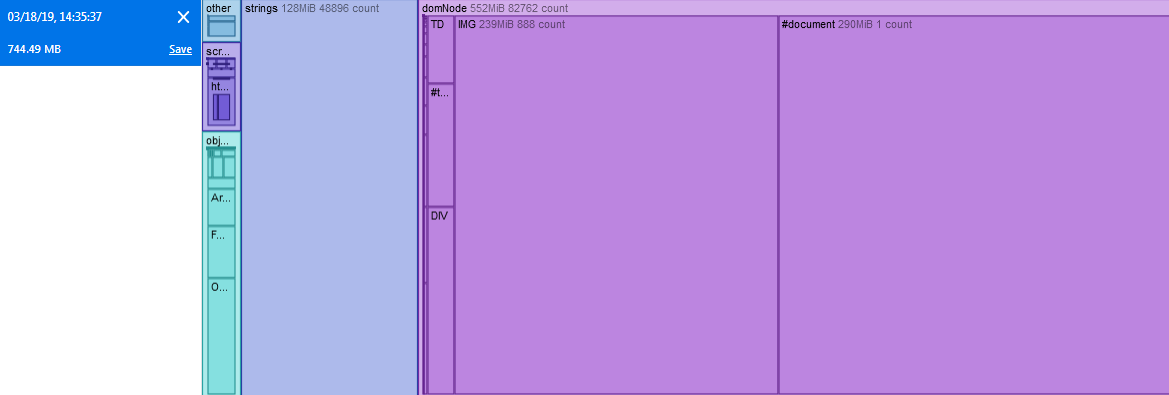
Btw memory usage of jlab gets pretty crazy at times too; here's memory snapshot in FF nightly, with a few notebooks open:
 aldanor
on 18 Mar 2019
aldanor
on 18 Mar 2019
I have the same issue in Chromium. If you want I could post the notebook. It is not quite as slow as in the OP but still laggy typing compared to a new notebook
 tbrodbeck
on 18 Aug 2019
tbrodbeck
on 18 Aug 2019
I have the same issue on both Chrome and Firefox on Ubuntu, but typing smoothly on safari on iPad with the same notebook. So the settings of browser should be concerned.
 githubfzq
on 15 May 2020
githubfzq
on 15 May 2020
Same problem here as well. Happens both on Jupyter Notebook and on Codecademy built-in editor.
 jtneto
on 16 May 2020
jtneto
on 16 May 2020
I have the same problem. Even scrolling is slow.
 saeedm2020
on 30 Jun 2020
saeedm2020
on 30 Jun 2020
I wanted to add https://github.com/jupyterlab/jupyterlab/issues/8680 to the thread. Pasting it here to move the convo forward per @jasongrout:
Description
Opening a notebook with 2k cells takes ~20 minutes on my machine. Aside from the time taken, this also locks up the webpage as its blocking. It seems reasonable to question if that is even a valid notebook size, but it has come up in practice which hints it's not contrived. In this case, it was the result of writing a lot of code in a single notebook, but rendering almost every intermediate step. Many python modules are much greater than 2k LOC.
Reproduce
Create a notebook:
import nbformat
import json

cells = []
for i in range(2000):
    cells.append(nbformat.v4.new_code_cell(source='print({})'.format(i)))

nb = nbformat.v4.new_notebook(cells=cells, metadata={'language': 'python',})

with open('large-notebook.ipynb', 'w') as f:
    f.write(json.dumps(nb, indent=4))
Now try to open large-notebook.ipynb. To time it, before you open the notebook, run this in dev tools setInterval(() => console.log('now'), 5000). The large notebook blocked for ~20 minutes for me. Quick debugging shows it's mostly code-mirror trying to create cells. If you merge all the code into one cell, you'll see it opens slowly, but not in an unusable amount of time.
Expected behavior
- A notebook loading never blocks other interactions for too long
- Large notebooks are loaded faster or in parts or ...
Context
- Operating System and version:
2.1.2 - Browser and version: Chrome
- JupyterLab version: Windows
 mlucool
on 10 Jul 2020
mlucool
on 10 Jul 2020
If the problem is related to the notebook being a flex-based layout, it's possible things are faster in Firefox 82. From the FF 82 release notes
Websites that use flexbox-based layouts load 20% faster than before;
jasongrout
on 20 Oct 2020
Related issues
 andyhegedus
·
55Comments
andyhegedus
·
55Comments
 selimrbd
·
79Comments
selimrbd
·
79Comments
 cceyda
·
49Comments
cceyda
·
49Comments
 nickeubank
·
160Comments
blink1073
·
92Comments
nickeubank
·
160Comments
blink1073
·
92Comments
Most helpful comment
I second (or third?) the idea of trying out using CSS grid to layout the notebook.