Jupyter-themes: jupyterthemes installs with no themes
I've installed jupyterthemes using
pip install jupyterthemes.
When I run jt -l, I get no themes - the list of themes is empty!!:
user$ jt -l
Available Themes:

user$ jt -t chesterish
Didn't recognize theme name: chesterish
Available Themes:

user$
I tried to trace the source of this curious behavior. I looked back at the output that I got when I installed jupyterthemes:
user$ pip install jupyterthemes
Downloading/unpacking jupyterthemes
  Downloading jupyterthemes-0.16.4.tar.gz (5.9MB): 5.9MB downloaded
  Running setup.py egg_info for package jupyterthemes

    warning: no files found matching 'jupyterthemes/fonts' anywhere in distribution
    warning: no files found matching '*.js' anywhere in distribution
Requirement already satisfied (use --upgrade to upgrade): ipython<6.0 in ./anaconda2/lib/python2.7/site-packages (from jupyterthemes)
Requirement already satisfied (use --upgrade to upgrade): jupyter in ./anaconda2/lib/python2.7/site-packages (from jupyterthemes)
Requirement already satisfied (use --upgrade to upgrade): jupyter_core in ./anaconda2/lib/python2.7/site-packages (from jupyterthemes)
Downloading/unpacking lesscpy>=0.12.0 (from jupyterthemes)
  Downloading lesscpy-0.12.0.tar.gz (168kB): 168kB downloaded
  Running setup.py egg_info for package lesscpy

Requirement already satisfied (use --upgrade to upgrade): seaborn in ./anaconda2/lib/python2.7/site-packages (from jupyterthemes)
Requirement already satisfied (use --upgrade to upgrade): ply in ./anaconda2/lib/python2.7/site-packages (from lesscpy>=0.12.0->jupyterthemes)
Requirement already satisfied (use --upgrade to upgrade): six in ./anaconda2/lib/python2.7/site-packages (from lesscpy>=0.12.0->jupyterthemes)
Installing collected packages: jupyterthemes, lesscpy
  Running setup.py install for jupyterthemes

    warning: no files found matching 'jupyterthemes/fonts' anywhere in distribution
    warning: no files found matching '*.js' anywhere in distribution
    Installing jt script to /Users/username/anaconda2/bin
    Installing jupyter-theme script to /Users/username/anaconda2/bin
  Could not find .egg-info directory in install record for jupyterthemes
  Running setup.py install for lesscpy

    Installing lesscpy script to /Users/username/anaconda2/bin
  Could not find .egg-info directory in install record for lesscpy>=0.12.0 (from jupyterthemes)
Successfully installed jupyterthemes lesscpy
Cleaning up...
However, when I visit my anaconda2 directory under /Users/username/, I see that
/Users/username/anaconda2/python2.7/lib/site-packages/jupyterthemes/fonts
exists. furthermore, the folder /Users/username/anaconda2/python2.7/lib/site-packages/jupyterthemes seems to have all of the contents intact. I haven't checked *.js, but I assume a similar contradition may be derived by looking through my file system.
 droberts01
All 16 comments
Do you have multiple versions of python installed through anaconda? or multiple environments (i.e., named py2 and py3, for instance)? If so, you may have to install jupyterthemes for each separately.
# assuming terminal is opened with default env already activated
pip install --upgrade jupyterthemes
then...
source activate py3
pip install --upgrade jupyterthemes
 dunovank
on 12 Jul 2017
dunovank
on 12 Jul 2017
Based on the following output, I don't think I have multiple versions of python installed, _but I could be wrong_:
USER$ source activate py3

CondaEnvironmentNotFoundError: Could not find environment: py3 .
You can list all discoverable environments with `conda info --envs`.

USER$ conda info --envs
# conda environments:
#
root                  *  /Users/Droberts/anaconda2

USER$
Nevertheless, I tried to see if your other suggestion
pip install --upgrade jupyterthemes
had any effect, and so, after running the above, I tried listing the themes again:
USER$ jt -l
Available Themes:

USER$
No effect. This is really mysterious...
droberts01
on 13 Jul 2017
hmm.. this is weird. Yours is the first and only report I've had about this issue which leads me to think that the install is running into something unique on your machine... And you're right, it looks like you only have one env installed.
Can you execute the following lines in a jupyter notebook and paste the output here?
import jupyterthemes as jt
print(jt.package_dir)
print(jt.stylefx.styles_dir)

import os
print(os.listdir(jt.stylefx.styles_dir))

import lesscpy
print(lesscpy.__version__)
Good idea - I suspected that it might have to do with my machine - the code you gave me worked at the second line, where it printed
/Users/Droberts/anaconda2/lib/python2.7/site-packages/jupyterthemes
But broke down right at the third line:
 /Users/Droberts/anaconda2/lib/python2.7/site-packages/jupyterthemes
 ----------------------------------------------------------------
 AttributeError                 Traceback (most recent call last)
 <ipython-input-1-be670b6a64f2> in <module>()
       1 import jupyterthemes as jt
       2 print(jt.package_dir)
 ----> 3 print(jt.stylefx.styles_dir)

 AttributeError: 'module' object has no attribute 'stylefx'
The two lines involving "import os" yielded a similar error:
 ----------------------------------------------------------------
 AttributeError                 Traceback (most recent call last)
 <ipython-input-4-8d80b2b8909c> in <module>()
       1 import os
 ----> 2 print(os.listdir(jt.stylefx.styles_dir))

 AttributeError: 'module' object has no attribute 'stylefx'
The last two lines of code (involving "import lesscpy") work, however, and yield the print statement
0.12.0
Any idea as to what the output was supposed to mean?
I already tried reinstalling anaconda2.
droberts01
on 15 Jul 2017
Hey @droberts01 can you tell me which version of jupyterthemes you have installed? I ran into a similar issue the other day on my machine complaining about stylefx not existing. Trying to figure out the issue now.
dunovank
on 16 Jul 2017
The folder containing jupyterthemes doesn't say, but there is a folder called "jupyterthemes-0.16.6-py2.7.egg-info" right under it in my anaconda "site-packages" directory. I assume that that is the version I have installed:
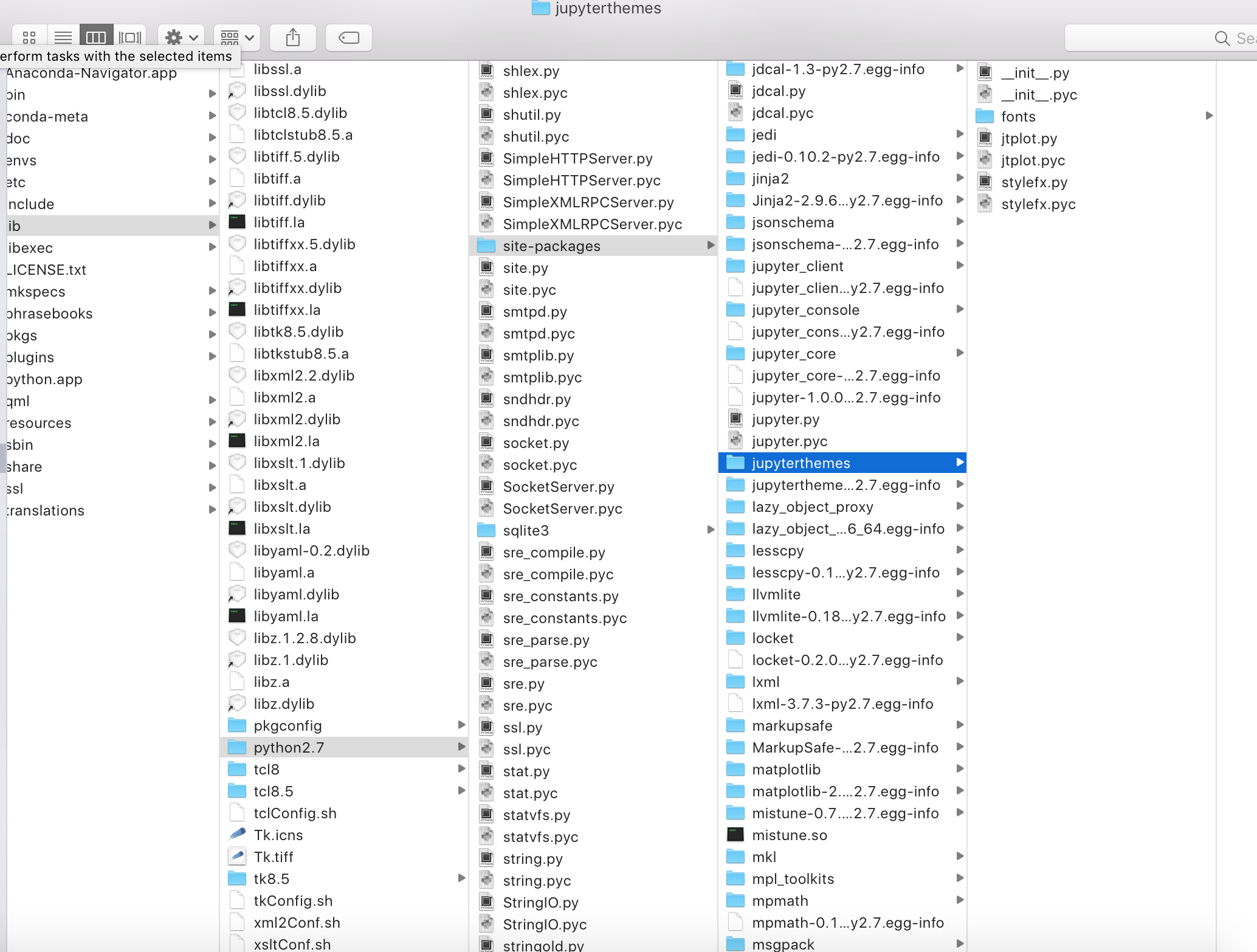
I should note, that in addition to
/Users/username/anaconda2/...
I also have an anaconda directory directly under root:
/anaconda/...
Shown below: it does not have jupyter themes, as you can see:
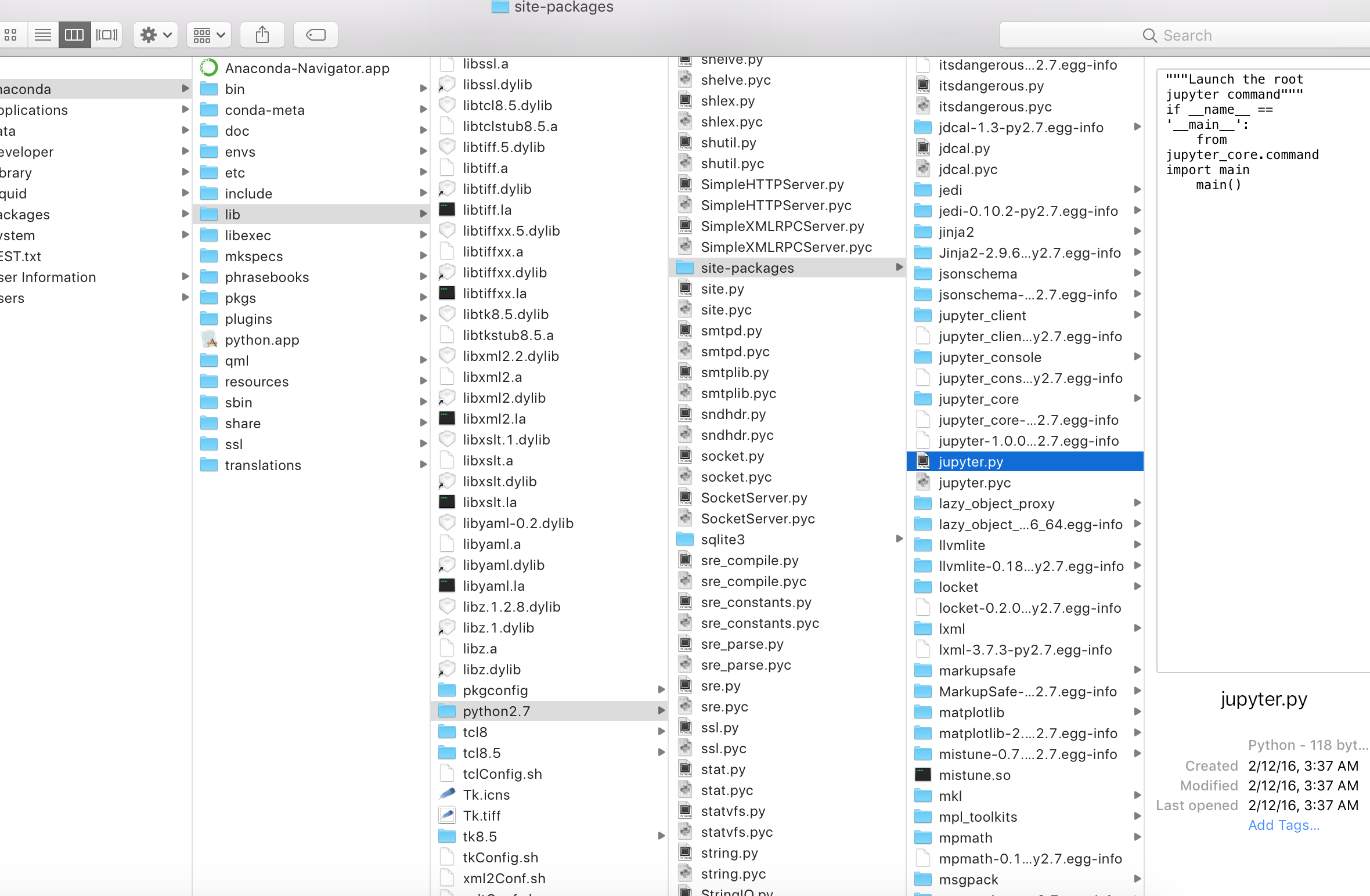
Anyways, that's probably not the source of the problem. But just want to give you as much information as possible.
droberts01
on 16 Jul 2017
actually that may be an important detail.
First, can you try running pip install --upgrade jupyterthemes to see if the issue is fixed (probably not but worth a shot)?
Is there any particular reason you have two anaconda directories? It's possible jupyterthemes is getting confused either during the install or when applying theme style (although I don't know exactly how)..
dunovank
on 17 Jul 2017
@droberts01 can you check if your issue is fixed by updating to v0.17.0?
pip install --upgrade jupyterthemes
dunovank
on 20 Jul 2017
This was my terminal output (issue is still there, basically the jupyterthemes folder installs with key missing folders)
Davids-MBP-3:~ Droberts$ pip install --upgrade jupyterthemes
Downloading/unpacking jupyterthemes from     https://pypi.python.org/packages/b0/86/ea80bd8cbec4cf68703f43fa9a53d11f577bfb2c84eb9587    c1dc5ef5d705/jupyterthemes-0.17.0.tar.gz#md5=1b10a23a7e842141cee9cdaa61a2cd1a
  Downloading jupyterthemes-0.17.0.tar.gz (5.9MB): 5.9MB downloaded
  Running setup.py egg_info for package jupyterthemes

    warning: no files found matching 'jupyterthemes/fonts' anywhere in distribution
    warning: no files found matching '*.js' anywhere in distribution
Downloading/unpacking ipython<6.0 from     https://pypi.python.org/packages/21/86/58d06db0c82af66c2d47faead027c3ce775cfbf9bc9d2f13f85d95f0a162/ipython-5.4.1.tar.gz#md5=1375f1503316e483d13f8997ed654828 (from jupyterthemes)
  Downloading ipython-5.4.1.tar.gz (5.0MB): 5.0MB downloaded
  Running setup.py egg_info for package ipython

Requirement already up-to-date: jupyter_core in ./anaconda2/lib/python2.7/site-packages (from jupyterthemes)
Requirement already up-to-date: lesscpy in ./anaconda2/lib/python2.7/site-packages (from jupyterthemes)
Requirement already up-to-date: matplotlib in ./anaconda2/lib/python2.7/site-packages (from jupyterthemes)
Downloading/unpacking setuptools>=18.5 from     https://pypi.python.org/packages/25/c1/344fdd1f543cba2d38c6fb7db86f2ffc468e72006487005e50df08f0243d/setuptools-36.2.0.zip#md5=60df703040ad8024d24727dc95483740 (from ipython<6.0->jupyterthemes)
  Downloading setuptools-36.2.0.zip (712kB): 712kB downloaded
  Running setup.py egg_info for package setuptools
    warning: no files found matching '*' under directory 'setuptools/_vendor'
Downloading/unpacking decorator from     https://pypi.python.org/packages/a8/26/93428c6d2885c8b5f2f0c569f8cb9c40bb4ab85c270e52b    fb481c7bb1529/decorator-4.1.1.tar.gz#md5=dbae97f4c5228c0c8616ac0252f57874 (from     ipython<6.0->jupyterthemes)
  Downloading decorator-4.1.1.tar.gz
  Running setup.py egg_info for package decorator

warning: no files found matching 'documentation.pdf'
Requirement already up-to-date: pickleshare in ./anaconda2/lib/python2.7/site-packages (from     ipython<6.0->jupyterthemes)
Requirement already up-to-date: simplegeneric>0.8 in ./anaconda2/lib/python2.7/site-packages (from ipython<6.0->jupyterthemes)
Requirement already up-to-date: traitlets>=4.2 in ./anaconda2/lib/python2.7/site-packages (from ipython<6.0->jupyterthemes)
Requirement already up-to-date: prompt_toolkit<2.0.0,>=1.0.4 in ./anaconda2/lib/python2.7/site-packages (from ipython<6.0->jupyterthemes)
Requirement already up-to-date: pygments in ./anaconda2/lib/python2.7/site-packages (from ipython<6.0->jupyterthemes)
Requirement already up-to-date: appnope in ./anaconda2/lib/python2.7/site-packages (from ipython<6.0->jupyterthemes)
Requirement already up-to-date: pexpect in ./anaconda2/lib/python2.7/site-packages (from ipython<6.0->jupyterthemes)
Requirement already up-to-date: ply in ./anaconda2/lib/python2.7/site-packages (from lesscpy->jupyterthemes)
Requirement already up-to-date: six in ./anaconda2/lib/python2.7/site-packages (from lesscpy->jupyterthemes)
Downloading/unpacking numpy>=1.7.1 from https://pypi.python.org/packages/c0/3a/40967d9f5675fbb097ffec170f59c2ba19fc96373e73ad47c2cae9a30aed/numpy-1.13.1.zip#md5=2c3c0f4edf720c3a7b525dacc825b9ae (from matplotlib-    >jupyterthemes)
  Downloading numpy-1.13.1.zip (5.0MB): 5.0MB downloaded
  Running setup.py egg_info for package numpy
    Running from numpy source directory.

warning: no previously-included files matching '*.pyc' found anywhere in distribution
warning: no previously-included files matching '*.pyo' found anywhere in distribution
warning: no previously-included files matching '*.pyd' found anywhere in distribution
Downloading/unpacking python-dateutil from https://pypi.python.org/packages/54/bb/f1db86504f7a49e1d9b9301531181b00a1c7325dc85a29160ee3eaa73a54/python-dateutil-2.6.1.tar.gz#md5=db38f6b4511cefd76014745bb0cc45a4 (from matplotlib->jupyterthemes)
  Downloading python-dateutil-2.6.1.tar.gz (241kB): 241kB downloaded
  Running setup.py egg_info for package python-dateutil

    warning: no previously-included files matching '__pycache__' found anywhere in distribution
    warning: no previously-included files matching '*.py[co]' found anywhere in distribution
Requirement already up-to-date: functools32 in ./anaconda2/lib/python2.7/site-packages (from matplotlib->jupyterthemes)
Requirement already up-to-date: subprocess32 in ./anaconda2/lib/python2.7/site-packages (from matplotlib->jupyterthemes)
Requirement already up-to-date: pytz in ./anaconda2/lib/python2.7/site-packages (from matplotlib->jupyterthemes)
Requirement already up-to-date: cycler>=0.10 in ./anaconda2/lib/python2.7/site-packages (from matplotlib->jupyterthemes)
Downloading/unpacking pyparsing!=2.0.4,!=2.1.2,!=2.1.6,>=1.5.6 from https://pypi.python.org/packages/3c/ec/a94f8cf7274ea60b5413df054f82a8980523efd712ec55a59e7c3357cf7c/pyparsing-2.2.0.tar.gz#md5=0214e42d63af850256962b6744c948d9 (from matplotlib->jupyterthemes)
  Downloading pyparsing-2.2.0.tar.gz (1.2MB): 1.2MB downloaded
  Running setup.py egg_info for package pyparsing

Requirement already up-to-date: wcwidth in ./anaconda2/lib/python2.7/site-packages (from     prompt_toolkit<2.0.0,>=1.0.4->ipython<6.0->jupyterthemes)
Installing collected packages: jupyterthemes, ipython, setuptools, decorator, numpy, python-    dateutil, pyparsing
  Found existing installation: jupyterthemes 0.16.6
    Uninstalling jupyterthemes:
      Successfully uninstalled jupyterthemes
  Running setup.py install for jupyterthemes

    warning: no files found matching 'jupyterthemes/fonts' anywhere in distribution
    warning: no files found matching '*.js' anywhere in distribution
    Installing jt script to /Users/Droberts/anaconda2/bin
    Installing jupyter-theme script to /Users/Droberts/anaconda2/bin
  Could not find .egg-info directory in install record for jupyterthemes from https://pypi.python.org/packages/b0/86/ea80bd8cbec4cf68703f43fa9a53d11f577bfb2c84eb9587c1dc5ef5d705/jupyterthemes-0.17.0.tar.gz#md5=1b10a23a7e842141cee9cdaa61a2cd1a in ./anaconda2/lib/python2.7/site-packages
  Found existing installation: ipython 5.3.0
    Uninstalling ipython:
      Successfully uninstalled ipython
  Running setup.py install for ipython
    checking package data
    check version number

    Installing ipython script to /Users/Droberts/anaconda2/bin
    Installing iptest2 script to /Users/Droberts/anaconda2/bin
    Installing iptest script to /Users/Droberts/anaconda2/bin
    Installing ipython2 script to /Users/Droberts/anaconda2/bin
  Could not find .egg-info directory in install record for ipython<6.0 from https://pypi.python.org/packages/21/86/58d06db0c82af66c2d47faead027c3ce775cfbf9bc9d2f13f85d95f0a162/ipython-5.4.1.tar.gz#md5=1375f1503316e483d13f8997ed654828 in ./anaconda2/lib/python2.7/site-packages (from jupyterthemes)
  Found existing installation: setuptools 27.2.0
Cleaning up...
Cannot remove entries from nonexistent file /Users/Droberts/anaconda2/lib/python2.7/site-    packages/easy-install.pth
Storing complete log in /Users/Droberts/.pip/pip.log
Davids-MBP-3:~ Droberts$`
It seems that the key warning messages are here:
warning: no files found matching 'jupyterthemes/fonts' anywhere in distribution
warning: no files found matching '*.js' anywhere in distribution
What is the "distribution"? In what manner does the install script look for jupyterthemes, and why does it have trouble?
droberts01
on 21 Jul 2017
hm... I'm made some changes to the setup.py MANIFEST to make sure the style and layout css and less files get packaged with font files. Would you mind updating again (to v0.17.3) to see if maybe that fixed it?
dunovank
on 21 Jul 2017
It worked!!!
Davids-MBP-3:~ Droberts$ jt -l
Available Themes:
   chesterish
   grade3
   monokai
   oceans16
   onedork
   solarizedd
   solarizedl
Awesome! and you can install a theme without errors?
dunovank
on 21 Jul 2017
yep!
droberts01
on 21 Jul 2017
Thank you so much (this is awesome) :)
droberts01
on 21 Jul 2017
No problem, happy to help!
dunovank
on 21 Jul 2017
Related issues
 Brenndoerfer
·
6Comments
Brenndoerfer
·
6Comments
 rouseguy
·
4Comments
rouseguy
·
4Comments
 AFederici
·
7Comments
AFederici
·
7Comments
 mlx809593812
·
8Comments
mlx809593812
·
8Comments
 Brett99
·
7Comments
Brett99
·
7Comments
Most helpful comment
Do you have multiple versions of python installed through anaconda? or multiple environments (i.e., named py2 and py3, for instance)? If so, you may have to install jupyterthemes for each separately.
then...