Jupyter-themes: error in printing
Not sure if this is already an issue as I didn't scroll through them all, but an error I noticed consistently for every theme is that the beginning of whatever you print gets cut off as seen below.
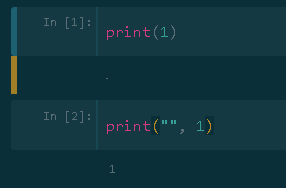
 AFederici
All 7 comments
I only see this issue for some fonts (e.g. anka, anonymous), while others (e.g. aurulent, hack) are fine.
 PDerryCW
on 15 Jun 2018
PDerryCW
on 15 Jun 2018
I am having the exact same issue.
Your suggested workaround (changing the font) doesn't seem to work on my machine.
 mattmagic149
on 3 Aug 2018
mattmagic149
on 3 Aug 2018
I'm also have this problem.Is there any solution to solve?
 goelo
on 3 Sep 2018
goelo
on 3 Sep 2018
replace the current div.output_area with the following in the custom css file
div.output_area {
display: -webkit-box;
padding: 13px;
}
 souravehossain
on 11 Sep 2018
souravehossain
on 11 Sep 2018
thanks, @souravehossain that worked!!!
 suprosanna
on 2 Oct 2018
suprosanna
on 2 Oct 2018
I had a hard time following what @souravehossain posted, but I eventually found the .css file under "~/.jupyter/custom/custom.css" and it worked
the ".jupyter" directory may be hidden, and you will have to view hidden directories to move into it
Thanks @souravehossain !
 mmcguffi
on 2 Oct 2018
mmcguffi
on 2 Oct 2018
@mmcguffi thank you so much! I also had trouble finding the right css file and your comment helped. Finally fixed the issue with @souravehossain's suggestion.
 Idodox
on 11 Oct 2018
Idodox
on 11 Oct 2018
Related issues
 Brett99
·
7Comments
Brett99
·
7Comments
 ozkansafak
·
3Comments
ozkansafak
·
3Comments
 diedummydie
·
8Comments
diedummydie
·
8Comments
 suberlak
·
4Comments
suberlak
·
4Comments
 Peydon
·
3Comments
Peydon
·
3Comments
Most helpful comment
replace the current div.output_area with the following in the custom css file
div.output_area {
display: -webkit-box;
padding: 13px;
}