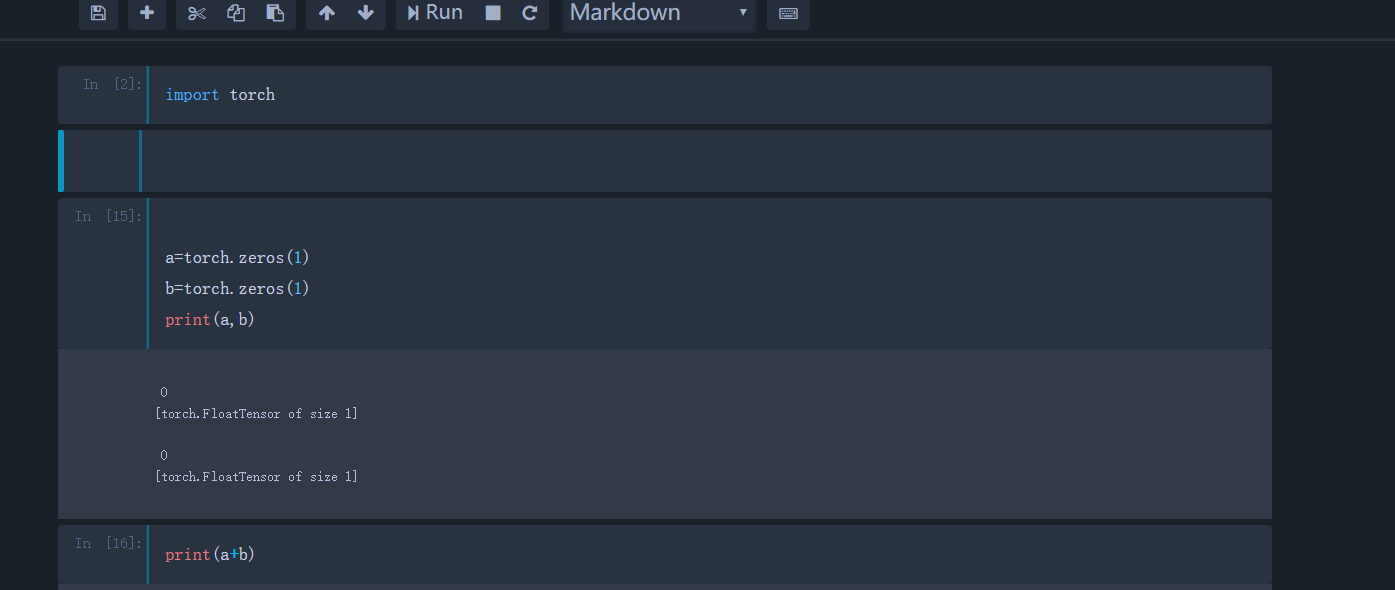
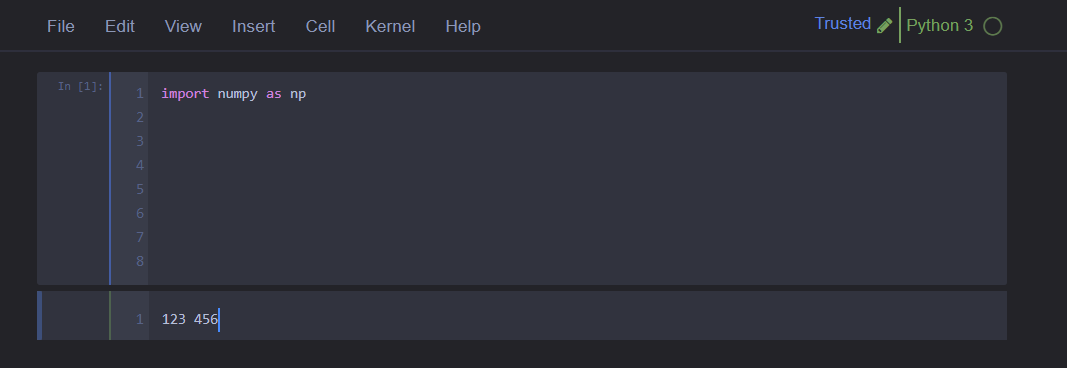
Jupyter-themes: Border not left alignment between markdown and code cells.
 Peydon
👍4
All 3 comments
Same problem here
 ghost
on 20 Dec 2017
ghost
on 20 Dec 2017
👍2
Managed to temporary fix this untill it gets fixed correctly by playing around with some numbers and changing div.prompt.input_prompt in cells.less in jupyterthemes/layout by removing 2 lines and adding 2 lines
div.prompt.input_prompt {
    .
    .
    .
    /*
    min-width: @prompt-min-width;
    width: @prompt-min-width !important;

    if these numbers don't work for you just play around with them,
    and make sure you re-apply the theme after every change
    */
    min-width: 11.7ex !important;
    max-width: 11.7ex;
}
and by adding padding-right: 10px; in a block in codemirror.less to fix the line numbers in markdown edit mode
css
.CodeMirror-linenumber,
div.CodeMirror-linenumber,
.CodeMirror-gutter.CodeMirror-linenumber
div.CodeMirror-gutter.CodeMirror-linenumber {
    .
    .
    .
    padding-right: 10px;
}
after saving, just re-apply the theme with jt -t
 medicm
on 3 Jan 2018
medicm
on 3 Jan 2018
👍3
Same problem here :(
 CapedHero
on 13 Mar 2018
CapedHero
on 13 Mar 2018
Was this page helpful?
0 / 5 - 0 ratings
Related issues
 vgoklani
·
6Comments
vgoklani
·
6Comments
 lucainnocenti
·
6Comments
lucainnocenti
·
6Comments
 VimalMollyn
·
4Comments
VimalMollyn
·
4Comments
 tanmay7270
·
5Comments
tanmay7270
·
5Comments
 zwh42
·
4Comments
zwh42
·
4Comments
Most helpful comment
Managed to temporary fix this untill it gets fixed correctly by playing around with some numbers and changing div.prompt.input_prompt in cells.less in jupyterthemes/layout by removing 2 lines and adding 2 lines
and by adding
padding-right: 10px;in a block in codemirror.less to fix the line numbers in markdown edit modecss .CodeMirror-linenumber, div.CodeMirror-linenumber, .CodeMirror-gutter.CodeMirror-linenumber div.CodeMirror-gutter.CodeMirror-linenumber { . . . padding-right: 10px; }after saving, just re-apply the theme with

jt -t