Jupyter-themes: Increasing cell-width to full screen
Would it be possible to automatically incorporate the solution from this:
into this project?
 vgoklani
All 6 comments
You should be able to do this with the -cellw CL argument (e.g., jt -t onedork -cellw 100%)
is that what you're looking for?
 dunovank
on 22 Apr 2017
dunovank
on 22 Apr 2017
yes! thanks:
jt -t oceans16 -f roboto -fs 12 -cellw 100%
it wasn't obvious from the README.md. It would help adding that one additional example
vgoklani
on 22 Apr 2017
I don't like the dark background. I only want to increase the width of the cell to 100%. When I used jt -cellw 100%, it didn't work. I changed 100% to 2000, still didn't work.
 xuzhang5788
on 23 Aug 2018
xuzhang5788
on 23 Aug 2018
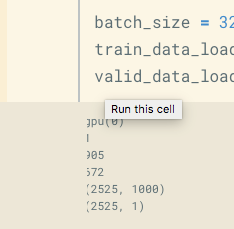
When I used the light color which you suggested, my head of output was cut a little bit. Such as "training", only display like "raining"
xuzhang5788
on 23 Aug 2018
When I used the light color which you suggested, my head of output was cut a little bit. Such as "training", only display like "raining"
Did you find a solution to this? I have the same issue:
 tdiethe
on 18 Sep 2018
tdiethe
on 18 Sep 2018
Discovered this has already been opened #273
When I used the light color which you suggested, my head of output was cut a little bit. Such as "training", only display like "raining"
Did you find a solution to this? I have the same issue:
tdiethe
on 18 Sep 2018
Related issues
 mlx809593812
·
8Comments
mlx809593812
·
8Comments
 Peydon
·
3Comments
Peydon
·
3Comments
 jingw222
·
3Comments
jingw222
·
3Comments
 VimalMollyn
·
4Comments
VimalMollyn
·
4Comments
 shravankumar147
·
3Comments
shravankumar147
·
3Comments
Most helpful comment
I don't like the dark background. I only want to increase the width of the cell to 100%. When I used jt -cellw 100%, it didn't work. I changed 100% to 2000, still didn't work.