Outside of the game.
 Sagatt
All 20 comments
Hello @KillahNeo,
It's my first time trying to get to understand the code and tweak it...
The simplest idea to achieve this is a _Launcher_ that just uses the julius binary, invoking with different arguments.
Simple mockup (borrowed from GOG, sorry):
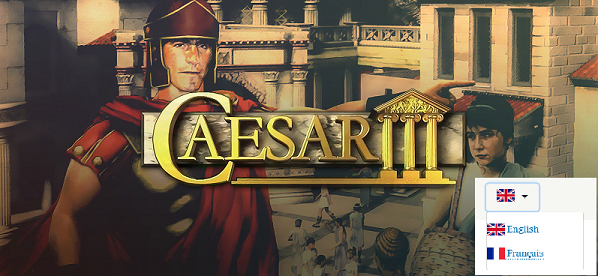
See: https://github.com/bvschaik/julius/blob/master/doc/RUNNING.md#command-line-options
Possible features:
- language
- display resolution
Technical details:
- I looked in the code, there is
determine_language()function (locale.c). This is used as a "hack" to see how "New game" text translates => obtain current selected language.
In arguments.h we havejulius_argsstructure to hold some persistent parameters - extend this with current selected language. - Example:
julius_launcher.exe- user chooses Language English then press some start button
julius.exe --language Russian- this can be a new command line option
Related topics / same ideas
Questions:
- Has anyone made a way to change (example) from English -> Russian ?? See bvschaik next answer.
What would be an accepted way to do this (at runtime)?How will this affect mobile versions (platform specific code needed)?
 theradeonxt
on 12 Feb 2020
theradeonxt
on 12 Feb 2020
There is no defined way to change between languages because they (almost) all use the same files for the language definitions. In addition, some languages require new files or require existing files to be replaced.
Starting from the "base" English version, these are the files that need to be changed/added for each language:
French, German, Italian, Spanish, Portuguese
- Replace
c3.eng - Replace
c3_mm.eng
Russian
- Remove
c3.eng - Remove
c3_mm.eng - Add
c3.rus - Add
c3_mm.rus - Add
c3_fonts.sg2 - Add
c3_fonts.555
Polish
- Replace
c3.eng - Replace
c3_mm.eng - Replace
c3.sg2 - Replace
c3.555 - Replace
c3_north.sg2 - Replace
c3_north.555 - Replace
c3_south.sg2 - Replace
c3_south.555
Traditional Chinese
- Replace
c3.eng - Replace
c3_mm.eng - Add
rome.555
And these are only for the in-game texts. Some languages have their own complete set of sound files and videos.
Using a launcher seems nice but this will only work on Windows, and not on the other platforms we support.
Changing at runtime would need to reload and initialize the language texts. That's currently already done when entering/exiting the editor since the editor has its own set of language files (c3_map.eng and c3_map_mm.eng). Furthermore, in case of from/to Polish, we need to reload the main graphics set. There's already code for that since changing climate also reloads the main graphics.
So technically, there is no problem changing language at runtime using a select-box in the options or something. We do need to define a standard of how to supply the other language files to Julius. For example, user should put alternative languages file in a subdirectory called lang-CODE, where code can be en, fr, de, etc.
 bvschaik
on 12 Feb 2020
bvschaik
on 12 Feb 2020
@bvschaik
Thanks for detailed explanation,
AFAIU, language change at runtime is not worth it (too complicated ATM).
And seems you want to keep as close to original C3 as possible.
However, when starting the game, it can be instructed to load the specific files associated with a user-selected language (according to the steps mentioned above).
Extract from code:
game_pre_init() in game.c
game_exit_editor() is similar

Goals:
- no change in original game files structure
- extension can be done in folder where julius exists - check the presence of
lang-XXXfolder and attempt to load the needed files, or revert to English if attempt fails - at least making the _user steps of copying files around completely hidden_
- user only has to obtain the files and put them in this folder (I assume these are maintained by the community)
Questions:
- Do save files use language-dependent texts (apart from name, city names etc)?
- What happens if I am using Russian (doing your workarounds), then load an older English save file?
theradeonxt
on 12 Feb 2020
AFAIU, language change at runtime is not worth it (too complicated ATM).
And seems you want to keep as close to original C3 as possible.
We already have the configuration screen (Options on the main menu), so I have no problem with adding a language selector there.
user only has to obtain the files and put them in this folder (I assume these are maintained by the community)
Nope, these are officially translated files provided by the several publishers that localized the game for their market. I was surprised to learn that Caesar 3 was officially available in so many languages. For Russian there are even three versions.
Do save files use language-dependent texts (apart from name, city names etc)?
What happens if I am using Russian (doing your workarounds), then load an older English save file?
Apart from the player's name: no. Even city names are coded as numbers and then looked up in the language file. For scenarios, the only text in there is the brief description.
In your example, everything would work fine since Russian includes Latin letters. The other way around might result in an unreadable player name - Владимир becomes Âëàäèìè because the same string is interpreted using different encodings, but that's the absolute worst that can happen.
bvschaik
on 12 Feb 2020
Well, I'm surprised this is an official feature at all, I spent like 30mins trying to find a language option inside game menus haha 😄
I would like to give this a try, then see if any problems arise (just a proof of concept for now)
I see it as a way to get familiar with the code (at least from top-down)
theradeonxt
on 12 Feb 2020
Changing the language is not an official feature, but the fact that the game has been translated is.
Some hints of how I would approach this:
- Add language to the args you mentioned
- In
dir_get_case_corrected_file: if a language has been set in the args, look in the folder of that language for the file; if found, return it; if not found, use the main c3 folder. For the folders: I would put the language folders inside the C3 folder, just like the MP3s, and not search from thejulius.exelocation: on some platforms this might not be a writable location (Mac, for example).
bvschaik
on 12 Feb 2020
Okay, thanks for the tips!
For folders, I let the user provide unofficial language files in some location and julius will check for this.
And for args enhancement, I can make some unit test as well.
theradeonxt
on 12 Feb 2020
I started work on this yesterday because it will come in handy when I start implementing Korean support. I believe this can be done with an in-game selector in the options.
bvschaik
on 17 Feb 2020
@bvschaik
No worries!
I mostly want to extend the argument stuff to prepare for giving julius some cmdline options.
Then, if an in-game option for language is implemented I can just give that from launcher.
Even if these are 2 ways of achieving the same thing, I believe it can lay the groundwork for future enhancements.
theradeonxt
on 17 Feb 2020
Work in progress:
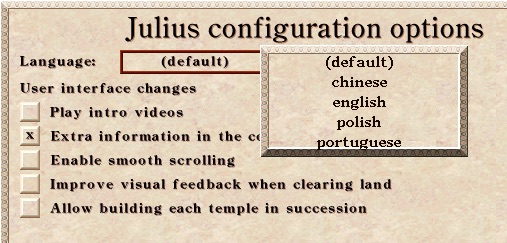
How this works: you create a folder named "chinese" (and "portuguese", and ...) in your C3 data dir with the localized files in them. The game looks for folders which contain language files and shows them in a list. Selecting one of them and hitting OK on the configuration screen will reload the language and related files.
bvschaik
on 18 Feb 2020
@bvschaik That is just wooow. Epic!
Btw are there no combo boxes in the game? Seems like a window on top.
theradeonxt
on 18 Feb 2020
There are indeed no real combo boxes. The editor uses something like it, but it's indeed a window on top.
You can test the language selector using this build (Windows).
bvschaik
on 18 Feb 2020
Work in progress:
How this works: you create a folder named "chinese" (and "portuguese", and ...) in your C3 data dir with the localized files in them. The game looks for folders which contain language files and shows them in a list. Selecting one of them and hitting OK on the configuration screen will reload the language and related files.
Could it be Traditional Chinese? as there are much difference between Simplified and Traditional for Chinese.
 411752230
on 29 Feb 2020
411752230
on 29 Feb 2020
In English, you have to write Chinese, English, Polish, etc., so these must start with upper case.
But how you change the language if you have to start the game and find the menu in English, what you don't understand (that's why you want to change it).
 CommonLoon102
on 29 Feb 2020
CommonLoon102
on 29 Feb 2020
Using a launcher seems nice but this will only work on Windows, and not on the other platforms we support.
There are cross-platform GUI frameworks, for example Eto. It supports Windows, Mac and anything that has GTK.
https://github.com/picoe/Eto
Creating a simple language selector in Eto would be trivial, just show the flags for the languages and maybe the name of the language below the flag (not in English but in that language).
User would click the flag and that's it. No need to pollute Julius' code with the language selection code. Also, users couldn't find the language select option in Julius if the don't know English, if they know English, then why switch from it? Yeah, I know they could know just a little to switch the language, but what about the others who don't. I mean, a language selector shouldn't require anybody to know a specific language at all.
CommonLoon102
on 29 Feb 2020
From what I understood from the code, the displayed language name is the name of the folder.
The launcher has the same problem as Julius: it has to auto-detect the language otherwise it will be in English. Also, it would require us to add yet another executable, besides having to add a rather large external dependency (a cross-compatible gui api, which would be incompatible with vita, switch and android anyway) which would do something than can already be done from within Julius.
Maybe the best solution would be to display a flag in the main menu. Clicking the flag would open the language selection menu. But since that requires adding new, compatible images (the flags themselves), for now I think the current implementation is better than nothing.
Also, just to be able to download Julius you already need to understand English or request someone who can guide you through it, so that problem isn't really a problem.
 crudelios
on 29 Feb 2020
crudelios
on 29 Feb 2020
I agree, with the additional binaries it will complicate the deployment, more things to keep track of.
But I think this may be done in a separate project. Julius is unchanged but another tool can do this. It helps free the user to obtain and know where to put lang files. This tool may be bundled with all the necessary files for multiple languages. It takes care of installation of files etc.
As for the language of the launcher, that is a good point. Like mentioned before by @CommonLoon102 the flags will show the language instead of text, its one solution.
All of these in mind, I guess it's work for 1 month, feedback from users, testing.
theradeonxt
on 29 Feb 2020
From what I understood from the code, the displayed language name is the name of the folder.
Yes. I only realized this later.
The launcher has the same problem as Julius: it has to auto-detect the language otherwise it will be in English. Also, it would require us to add yet another executable, besides having to add a rather large external dependency (a cross-compatible gui api, which would be incompatible with vita, switch and android anyway) which would do something than can already be done from within Julius.
It would be language independent, just showing the flags, e.g. a Polish flag, and below no text, or a text in Polish which means Polish in Polish.
Maybe the best solution would be to display a flag in the main menu. Clicking the flag would open the language selection menu. But since that requires adding new, compatible images (the flags themselves), for now I think the current implementation is better than nothing.
The current implementation is better than nothing, this is out of question :)
Also, just to be able to download Julius you already need to understand English or request someone who can guide you through it, so that problem isn't really a problem.
People can use Google Translate or similar for that. Google Translate doesn't work in Julius.
CommonLoon102
on 29 Feb 2020
If anyone wants to create an external launcher: feel free. It's not going to be included in the Julius repo because it will complicate deployment.
For the current implementation: see open PR.
Name of the directory = name of the item in the game, yes, so the user can name it whatever they want. About adding flags: any new images cannot be added, so that's a no. Besides, the game cannot see the language just from the files in a subdirectory. So it has to load the files first, determine language, determine flags, unload the language files... complicating the code by a major factor. Also, writing "Traditional Chinese" in Traditional Chinese while you currently have English selected is impossible since the English version of the game does not contain Chinese characters.
bvschaik
on 29 Feb 2020
If Julius supports a command line argument which will select the language then a launcher could be a separate project with all the already available languages. That would be the best I think.
CommonLoon102
on 29 Feb 2020
Related issues
 Uberwire
·
5Comments
Uberwire
·
5Comments
 ennioVisco
·
4Comments
411752230
·
9Comments
ennioVisco
·
4Comments
411752230
·
9Comments
 devnoname120
·
5Comments
crudelios
·
6Comments
devnoname120
·
5Comments
crudelios
·
6Comments
Most helpful comment
Work in progress:

How this works: you create a folder named "chinese" (and "portuguese", and ...) in your C3 data dir with the localized files in them. The game looks for folders which contain language files and shows them in a list. Selecting one of them and hitting OK on the configuration screen will reload the language and related files.