It sounds like bundling as a .app is necessary for DPI awareness: #57 #98. It would also be nice for user-friendliness (i.e. it's the necessary format that a 'release' build would take).
Just gathering together some research on how we might approach bundling this.
Produce an Xcode project
This is what I'm familiar with (when making Cocoa + Swift apps for macOS). However, the fact that we have a build process (based on cmake, no less) means I'm out of my comfort zone here; I don't know how I'd configure an Xcode project to read header/include paths from a CMakeLists file (although I know of examples in the React Native core).
I see that src/platform/julius.c is the entry-point of the app. I imagine we'd run main() only after presenting a dialogue to the user allowing them to specify the location of the Caesar III files (or only after loading a preference that they've saved from previous use of such a dialogue).
Do it all by shell commands
This would be ideal due to its simplicity, but we'd still need to provide some way to allow the user to choose the location of their Caesar III files.
Example from the libSDL forums
Here are suggestions from a conversation on the LibSDL forums (all quoted from here on):
To elaborate, if you're not using Xcode, you can write the whole process up into your Makefile. Basically, create the app bundle yourself. I've copied a few excerpts from my makefile below:
OUTPUTPATH=/Build/Release/
BUNDLE=$(OUTPUTPATH)/$(PROGRAM).app
mkdir -p $(BUNDLE)/Contents
mkdir -p $(BUNDLE)/Contents/MacOS
mkdir -p $(BUNDLE)/Contents/Resources
mkdir -p $(BUNDLE)/Contents/Frameworks
Copy frameworks like SDL:
cp -RH /Library/Frameworks/SDL2.framework $(BUNDLE)/Contents/Frameworks/
rm -fr $(BUNDLE)/Contents/Frameworks/SDL2.framework/Versions/A/Headers/
rm -fr $(BUNDLE)/Contents/Frameworks/SDL2.framework/Headers
Copy assets, icon file, Info.plist, etc., into resources folder:
cp license*.txt $(BUNDLE)/Contents/Resources
cp -f $(ICONFILE) $(BUNDLE)/Contents/Resources/$(ICONFILE)
cp Info.plist $(BUNDLE)/Contents/Resources
Create the executable from your object files and place in MacOS directory:
clang++ -o $(BUNDLE)/Contents/MacOS/$(PROGRAM) $(OBJECTS) $(LDFLAGS)
Change resource path of SDL (not sure why but this is necessary):
install_name_tool -change @rpath/SDL2.framework/Versions/A/SDL2 @executable_path/../Frameworks/SDL2.framework/Versions/A/SDL2 $(BUNDLE)/Contents/MacOS/$(PROGRAM)
Codesign (entitlements if necessary):
codesign -f -v -s "3rd Party Mac Developer Application: xxx" "$(BUNDLE)/Contents/Frameworks/SDL2.framework/Versions/A/SDL2"
codesign -f -v -s "3rd Party Mac Developer Application: xxx" --entitlements entitlements.plist "$(BUNDLE)"
Create pkg file:
MASPKGFILENAME=$(PROGRAM)-$(PROGVER).pkg
cd $(OUTPUTPATH) && productbuild --component "gamename" /Applications --sign "3rd Party Mac Developer Installer: xxx" "$(MASPKGFILENAME)"
Hope that helps in case there's something you didn't know. It's all pretty arcane...
Note that the last part involves code-signing. I have a developer account we can use for this purpose if this becomes necessary for making a release. Note that code-signing, certificates, and provisioning is a huge pain point, so there will be friction here.
Example from the SDL team
A detailed walkthrough is here, but I can summarise it here:
Add the following to your makefile:
bundle_contents = APP_NAME.app/Contents
APP_NAME_bundle: EXE_NAME
    mkdir -p $(bundle_contents)/MacOS
    mkdir -p $(bundle_contents)/Resources
    echo "APPL????" > $(bundle_contents)/PkgInfo
    $(INSTALL_PROGRAM) $< $(bundle_contents)/MacOS/
See instruction number 1 if you want to static link SDL (although it sounds like we'll be dynamically linking it, so we can skip this).
Add an appropriate
Info.plist.
 shirakaba
All 35 comments
@shirakaba:
This is what I'm familiar with (when making Cocoa + Swift apps for macOS). However, the fact that we have a build process (based on
cmake, no less) means I'm out of my comfort zone here; I don't know how I'd configure an Xcode project to read header/include paths from a CMakeLists file (although I know of examples in the React Native core).
I lost access to my main computer which was where I had my macOS system in a virtual machine (PSU fried, computer won't boot) so I can't check what I did there.
However I seem to remember there was a specific cmake option that allowed it to create an app bundle. At least I'm pretty sure I created an app bundle using just cmake. I'll try to fish out whatever site I found that described how to bundle an app in cmake and link it here.
Edit: Here it is, I found it in my archive: CMakeLists.txt
Note that this is an old version of CMakeLists.txt and it problably can't simply copy-pasted. Search for bundle to see what is needed to configure an app bundle.
I also think cmake supports the creation of XCode projects.
I see that
src/platform/julius.cis the entry-point of the app. I imagine we'd runmain()only after presenting a dialogue to the user allowing them to specify the location of the Caesar III files (or only after loading a preference that they've saved from previous use of such a dialogue).
I like that idea. On macOS, do the preferences file get saved within the app bundle or in a separate file?
- See instruction number 1 if you want to static link SDL (although it sounds like we'll be dynamically linking it, so we can skip this).
How are libraries usually dealt with on macOS? Are the files distributed within the app bundle or are the common libraries shared by the system, like on Linux?
- Add an appropriate
Info.plist.
Here's the one I used for reference: Info.plist.txt
 crudelios
on 14 Feb 2019
crudelios
on 14 Feb 2019
@crudelios That CMakeLists.txt looks like a great start, thanks for digging that up!
I like that idea. On macOS, do the preferences file get saved within the app bundle or in a separate file?
I believe it might get saved outside the bundle, somewhere under ~/Application Support/, into a database file (but I could be wrong). In any case, the API is called UserDefaults.
As for the idea itself: we could technically skip the whole preferences dialogue (and therefore, crucially, skipping any need for an Xcode project and all of its integration with cmake) if we just accepted that the app has to be launched as a sibling to the Caesar III files (as it does for Windows).
How are libraries usually dealt with on macOS? Are the files distributed within the app bundle or are the common libraries shared by the system, like on Linux?
Statically-linked libraries are distributed within the app bundle; dynamically linked (common libraries, as you say) may link to the system frameworks, or I guess to anywhere at all that you feel brave enough to point them at (the Homebrew package repository's file tree is an obvious example).
Thanks for the Info.plist. I can cross-check it against my own (I have on app in the App Store, so there should be nothing missing from it).
shirakaba
on 14 Feb 2019
To avoid using a XCode project, we could use something like Tiny File Dialogs to show a popup asking users to provide C3's data folder if it is not found.
crudelios
on 14 Feb 2019
@crudelios Interesting, I'll keep an open mind to that (I want to avoid an Xcode project at all costs, unless we really want to go crazy on a first-time setup screen).
However: Is there any particular reason not to just hard-code the assumption that Julius should sit next to the Caesar III folder (as our documentation instructs Windows users to arrange for already)?
The main reason I can see is if a user wants to have C3 on one drive while having Julius on another drive (either for disk space reasons, or so that they can, say, have one copy of Julius on their macOS drive – living completely separately from the C3 folder – and another on their Windows drive – again, either beside Julius or apart from it.
shirakaba
on 14 Feb 2019
Another potential approach: provide a text file by which the users can configure options. It would be read by the app bundle on startup. Sublime Text, Atom, and plenty of apps are using this approach nowadays (although I'll admit it's often not a great user experience). Steam has a similar "launch properties" config menu, although documentation is always hard to track down. That way we can:
- skip a UI dialogue altogether
- keep configuration platform-agnostic
- accept other configuration changes very easily
shirakaba
on 14 Feb 2019
However: Is there any particular reason not to just hard-code the assumption that Julius should sit next to the Caesar III folder (as our documentation instructs Windows users to arrange for already)?
The problem is that an app bundle is nothing more than a fancy directory, so the actual julius executable sits in an internal directory inside julius.app. Therefore, even if you place julius.app in the same directory as the C3 data files, julius will not detect it.
A "brute-force" solution would be to make julius look for the data files in somewhere like ../../.. (I don't remember for sure how many subdirectories there are to get from julius.app to the actual julius executable).
crudelios
on 14 Feb 2019
the actual
juliusexecutable sits in an internal directory insidejulius.app
I hadn't considered that the path would be deeper than that for Windows; good point.
A "brute-force" solution would be to make
juliuslook for the data files in somewhere like../../..(I don't remember for sure how many subdirectories there are to get fromjulius.appto the actualjuliusexecutable).
That's sort of what I had in mind, though, as it's no elegant than what the Windows executable does. i.e. look for the data files in whichever relative location is appropriate for the given bundling format.
I think in practice we'll try a few approaches and end up doing what's easiest to get working initially, then refine it as best we can.
shirakaba
on 14 Feb 2019
Well for now it can be brute-forced I guess.
There is also a command that allows the passing of command line arguments for the executable sitting inside the app bundle. I can't remember what that command is, but it isn't something trivial like ./julius.app /path/to/files.
crudelios
on 15 Feb 2019
I realised that if we want to distribute this on the App Store, it will probably automatically be dropped into Applications at first install. Perhaps a decent case for prompting users for the location of C3.
I think you may need an Xcode project to pass args along (that would be done in AppDelegate.m, which controls the app lifecycle); maybe these Cmake methods for producing bundles auto-generate a sensible AppDelegate.
shirakaba
on 15 Feb 2019
It's all a matter of trying things out.
I agree we should create an app bundle. I think letting the user choose a directory is a good idea, either by displaying a cross-platform folder select dialog or by instructing users to write it to a config file. Both are viable options.
@bvschaik What are your thoughts on this? Do you have any preference?
crudelios
on 16 Feb 2019
My preference is to ask the user with a file dialog. As far as I'm concerned it doesn't have to be cross-platform, it can just be the default dialog for the system. Writing the settings file can be done to SDL_GetPrefPath.
 bvschaik
on 16 Feb 2019
bvschaik
on 16 Feb 2019
Haven't had any time to study or experiment with bundling in depth yet, but discovered this command:
cd build
cmake -G Xcode ..
This generates an Xcode project corresponding to the cmake instructions. That Xcode project is pre-configured with a run configuration that can build an executable (debug-build) target at build/Debug/julius.
Packaging it up as a .app is a different question still, but this may be a usable stepping stone to consider.
shirakaba
on 17 Feb 2019
I played around (manually) with the auto-generated Xcode project, and here's one approach. Can't say whether it's correct at all (I normally work with static libraries, not executables – and certainly not anything made by cmake).
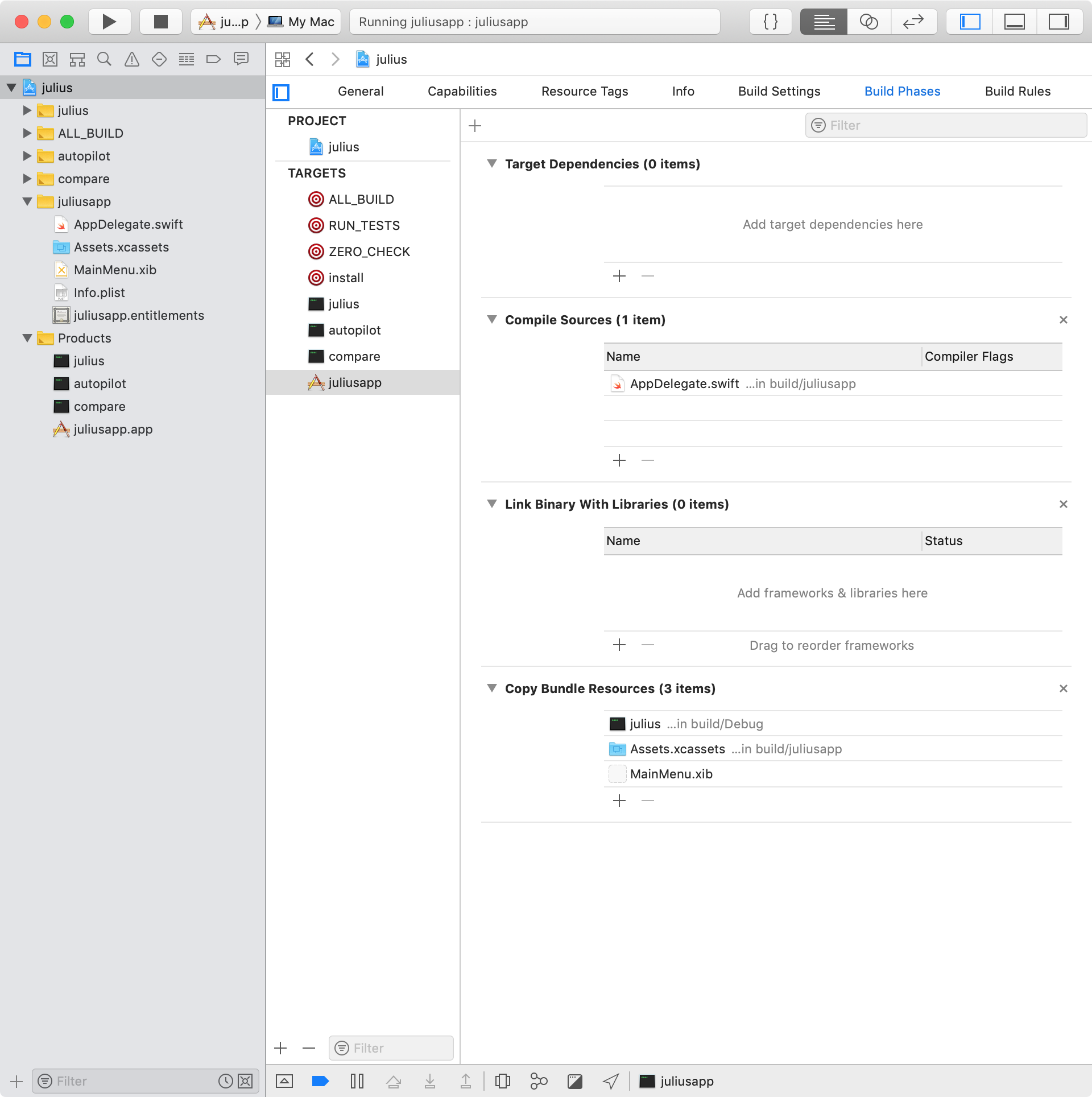
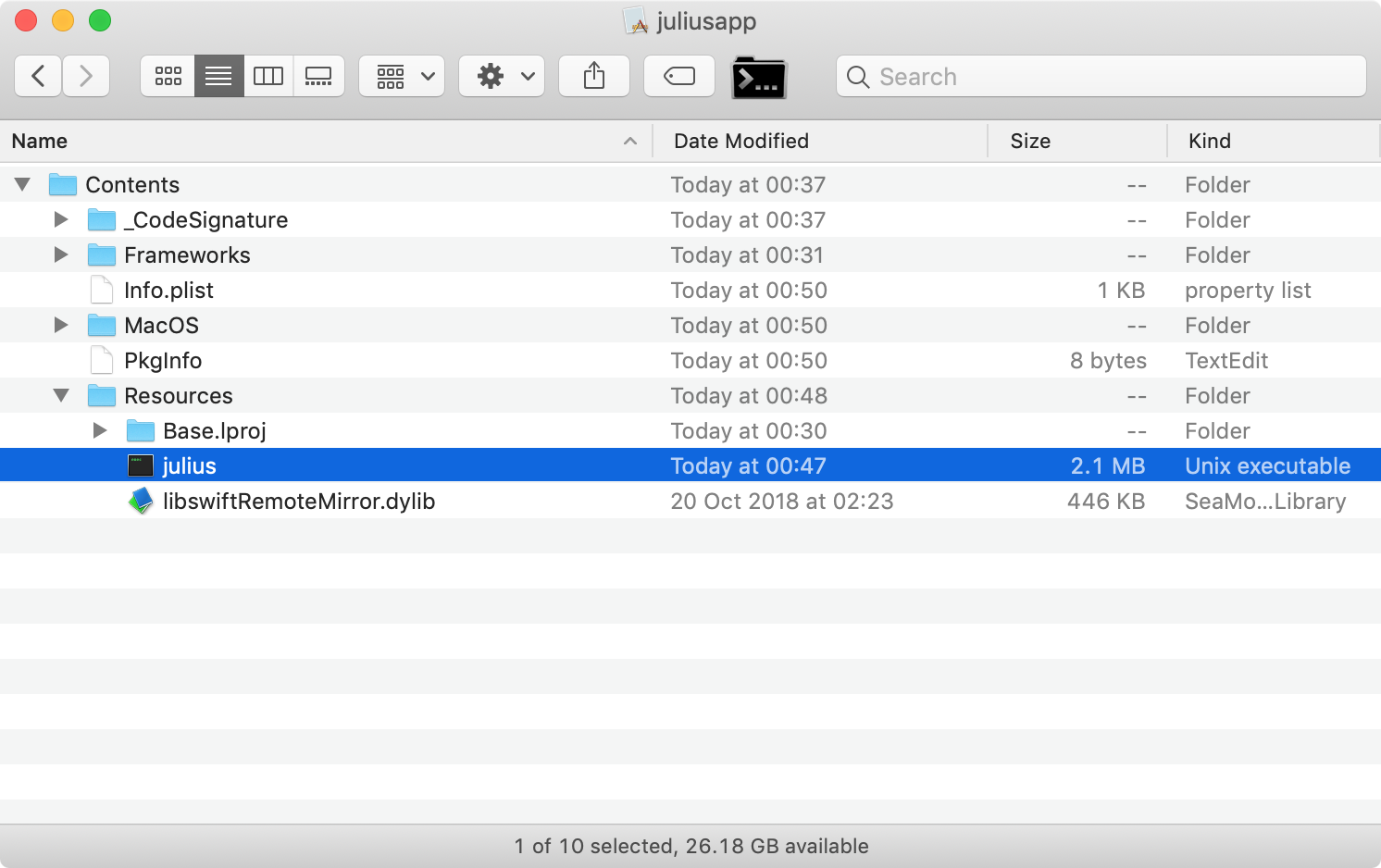
Doesn't feel right to just copy the executable into Resources. But we'll see if there's any way to work with that.
I don't yet know how to get AppDelegate.swift to pass args onto the executable (and just as importantly, invoke it), but once that's clear, I'd expect it to burst into life.
shirakaba
on 17 Feb 2019
Relevant reading:
https://stackoverflow.com/questions/45407392/package-a-unix-executable-within-a-macos-app
Three different suggestions given:
NSTask- "Helper App".
- Placing the executable into a
.bundleresource file (with executable permissions on its.plist).
shirakaba
on 17 Feb 2019
To set command line arguments to an app, this can be used:
open -a '/path/to/julius.app' --args /path/to/caesar3/folder
crudelios
on 17 Feb 2019
My main PC is still out, but I reinstalled my virtual macOS on my surface to try things out.
@shirakaba I've been pressed for time lately but if you want to go forward I'll help you when possible. Not that I know much about macOS or its developer environment, but I guess it's an opportunity to learn something new.
crudelios
on 20 Feb 2019
Hello,
I have a working bundle of Julius for macOS, see the commit here to see the changes. I hope this will bring the issue forward.
In this commit, I use CMake MACOSX_BUNDLE feature. If you want to test it: mkdir build && cd build && cmake .. && make.
Some notes:
- most of the work is in the CMakeLists.txt, where I set some variables that will populate the bundle's Info.plist (like the bundle name/version/identifier/icon path)
- I added a bash script that auto-creates the macOS icon file (icns format) from the file "julius_256.png". This bash script is automatically called by CMake on build, and the ICNS file is copied into the bundle.
- while calling "sudo make install", CMake will automatically copy the needed libraries into the "Frameworks" folder in the bundle, and link the binary against them. This makes the bundle distributable (see https://cmake.org/cmake/help/latest/module/BundleUtilities.html)
- the custom
Info.plist.inis the defaultMacOSXBundleInfo.plist.infile from CMake 3.13.4, with one additional key "NSHighResolutionCapable" that fixes the DPI problem on Retina screens - I arbitrarily set the minimum OSX deployment version to 10.10, but I suppose we can deploy for older systems
- I have modified the argument handling in the function
main()because the Finder automatically passes an argument "-psn_0_XXXXXX" as first argument when double-clicking on the bundle (see https://hg.libsdl.org/SDL/file/c005c49beaa9/test/testdropfile.c#l47). - in the
pre_init()function, I also added achdir()to the SDL_GetBasePath: this function returns the directory where the application is run from. On macOS/iOS, this function returns the path of the bundle's "Resources" directory (if the binary is inside a bundle). Which means that the user can just drag and drop Caesar III data inside the Resources folder (alongside the "julius.icns" file), and the bundle will work in an autonomous way. Note that it is still possible to pass a custom path:./julius.app/Contents/MacOS/julius custom/path/to/caesarIII. - it would probably be better to add a message box (with SDL_ShowSimpleMessageBox) alongside calls to SDL_Log, because those cannot be seen by the user if the app is launched by the Finder. Something like this could work:
    SDL_ShowSimpleMessageBox(SDL_MESSAGEBOX_ERROR,
        "Julius requires the original files from Caesar 3 to run",
        "Move the Julius executable to the directory containing an existing Caesar 3 installation, or run: julius path-to-c3-directory",
        NULL);
What do you think? Can someone test it on their Mac? I can make a PR if everyone's okay with this.
 superzazu
on 26 Feb 2019
superzazu
on 26 Feb 2019
Nice going! I'll check this later today.
I agree that a message box should be shown when resource files are missing.
The same problem also happens in Windows and is easily fixed.
In my new installation of macOS I cannot change set a "high scale mode", so I cannot test whether this change is compatible with my "DPI-aware" build.
crudelios
on 26 Feb 2019
@superzazu I finally tested this, it is working and shows an icon. The data folder location problem still persists though, but that can be fixed by adding a dialog to allow the user to set the directory.
There is a warning in SDL_Free() in julius.c. It seems you need to cast the const char * to void * in order to prevent that warning.
Also, the res/make_icns.sh needs proper permissions. I'm not sure there are set when downloading the file using git, but when I downloaded manually it did not work and I had to chmod the file.
crudelios
on 27 Feb 2019

Using Tiny File Dialogs, the above is possible without resorting to XCode.
This branch is a proof-of-concept. I tested it on Windows, macOS and Linux and all show the folder select dialog.
@bvschaik
Writing the settings file can be done to
SDL_GetPrefPath.
SDL_GetPrefPath is only available from SDL v 2.0.1 onwards.
Either we set the minimum SDL version to 2.0.1 or we must find an alternative for SDL 2.0.0 users.
A possible alternative would be to not save the settings and require the user to select the folder every time.
crudelios
on 27 Feb 2019
Thank you for testing @crudelios ; I pushed another commit that fixes both issues you reported (I removed the make_icns.sh file and added a cast on SDL_free() line).
superzazu
on 28 Feb 2019
SDL_GetPrefPathis only available from SDL v2.0.1 onwards.
Either we set the minimum SDL version to 2.0.1 or we must find an alternative for SDL 2.0.0 users.
A possible alternative would be to not save the settings and require the user to select the folder every time.
@crudelios We found that even SDL v2.0.3 gave significant ppi/resolution issues on Mojave. I think it's okay to bump up the minimum SDL version – at the very least – to 2.0.1, as users may still need something higher than SDL v2.0.3 on some platforms.
shirakaba
on 28 Feb 2019
@superzazu even though Bianca hasn't said anything yet, I think you should open a PR. That way the build is also tested in multiple environments.
I would suggest you to rebase all your commits into one before opening the PR to avoid commit bloat, but that's up to you!
crudelios
on 1 Mar 2019
@crudelios Could you make a PR for the file dialogs branch? I have some time this weekend so I'd like to play with the preferences. For now asking every time is fine.
bvschaik
on 15 Mar 2019
@bvschaik Done. Check #128.
crudelios
on 15 Mar 2019
@crudelios Thanks. I have implemented the preference file and tested it on macOS, Linux and WinXP.
I think this issue is done now, correct?
bvschaik
on 16 Mar 2019
Would uploading a release make sense?
shirakaba
on 16 Mar 2019
I'd like to merge the current pull requests first, and then make a 1.0.1 release for all platforms, including vita & switch.
bvschaik
on 18 Mar 2019
Since #51 was disabled for macOS, it seems appropriate to discuss the following issue here:
It seems that compiling SDL with SDL_MAC_NO_SANDBOX makes the mouse grab behave properly (source).
Since julius is now being bundled as an app, is there a way to distribute it with a version of SDL that has SDL_MAC_NO_SANDBOX enabled? It seems that can be safely used as long as we don't intend julius to be distributed to the app store.
crudelios
on 19 Mar 2019
@crudelios I decided to investigate whether there was any way to disable the mouse events portion of the App Sandbox (you can enable certain directories for the file system portion of App Sandbox, for example). However, indeed, the Designing for App Sandbox guide confirms:
Posting keyboard or mouse events to another app
You cannot sandbox an app that controls another app. Posting keyboard or mouse events using functions like
CGEventPostoffers a way to circumvent this restriction, and is therefore not allowed from a sandboxed app.
Note that in any case, you need to compromise on App Sandbox to allow Julius to read the Caesar III directory. You'd either need to:
- force users to place their Caesar III directory into one of the few directories that App Sandbox allows you to make exceptions for (e.g.
~/Downloadsand~/Applications, I think), or; - disable App Sandbox altogether.
So if a user wanted to place Caesar III in a directory not exemptible by App Sandbox (say, an SD card; the logic being that it could be accessed whether they're playing on a Windows partition or macOS partition), then App Sandbox would still get in the way.
So I'd say there are inviting reasons to disable App Sandbox anyway, even if it means the app couldn't be distributed on the App Store (which in any case would be hard to set up in cmake, as it requires an active dev account, and credentials such as a provisioning profile and certificates).
shirakaba
on 19 Mar 2019
@shirakaba That indeed is an argument in favor of disabling App Sandbox.
The only other problem is that I guess julius would require a custom built SDL with SDL_MAC_NO_SANDBOX defined.
crudelios
on 19 Mar 2019
As far as I understood I need to pass a CAESAR3 directory of an installed version. However I can't install a windows program on my MacOS machine.
In the source code I found this line:
"Caesar 3 installation, or run:\njulius path-to-c3-directory"
Where is the location of the njulius script? I would like to give it a try.
 zydariv
on 10 Mar 2020
zydariv
on 10 Mar 2020
There's a typo. \n means newline.
That line should be:
Caesar 3 installation, or run:
julius path-to-c3-directory
Regarding a possible solution, please check #166.
crudelios
on 10 Mar 2020
My apoligies. I did not see that linebreak..
I wanted to remove my comment, but did not find it. I just realized I had to look for it in the closed issues..
Maybe we should add a tutorial for installing julius on MacOS.
Install Caesar3 using wine in a location you can access with the finder
run the julius executable and choose the location where you have installed Caesar3
cheers
EDIT: I checked out #166 installing it via wine seems to be much easier than using the porting tools.
zydariv
on 10 Mar 2020
I agree we should add a tutorial.
Another option is to use innoextract if you have the GOG version, or unshield for the CD versions, with some extra steps required to put files in the right directories. Both tools are available through Homebrew.
Or perhaps I should write an extra utility that does these steps automatically for you..
bvschaik
on 10 Mar 2020
Related issues
 devnoname120
·
5Comments
devnoname120
·
5Comments
 mirh
·
9Comments
mirh
·
9Comments
 jdmillard
·
7Comments
crudelios
·
6Comments
jdmillard
·
7Comments
crudelios
·
6Comments
 atolstoy
·
4Comments
atolstoy
·
4Comments
Most helpful comment
Hello,
I have a working bundle of Julius for macOS, see the commit here to see the changes. I hope this will bring the issue forward.
In this commit, I use CMake MACOSX_BUNDLE feature. If you want to test it:
mkdir build && cd build && cmake .. && make.Some notes:
Info.plist.inis the defaultMacOSXBundleInfo.plist.infile from CMake 3.13.4, with one additional key "NSHighResolutionCapable" that fixes the DPI problem on Retina screensmain()because the Finder automatically passes an argument "-psn_0_XXXXXX" as first argument when double-clicking on the bundle (see https://hg.libsdl.org/SDL/file/c005c49beaa9/test/testdropfile.c#l47).pre_init()function, I also added achdir()to the SDL_GetBasePath: this function returns the directory where the application is run from. On macOS/iOS, this function returns the path of the bundle's "Resources" directory (if the binary is inside a bundle). Which means that the user can just drag and drop Caesar III data inside the Resources folder (alongside the "julius.icns" file), and the bundle will work in an autonomous way. Note that it is still possible to pass a custom path:./julius.app/Contents/MacOS/julius custom/path/to/caesarIII.What do you think? Can someone test it on their Mac? I can make a PR if everyone's okay with this.