Julia-vscode: None of the symbols in my package seem to be recognized
I get hundreds of "Missing reference":
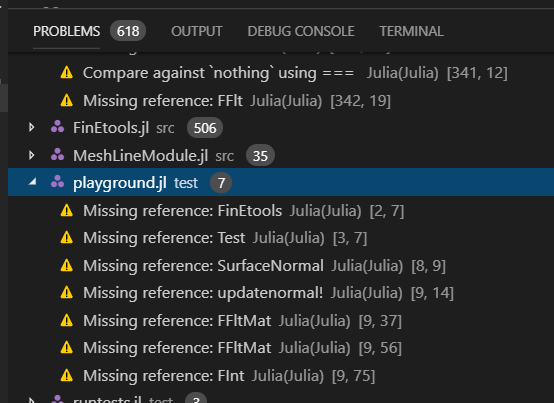
Yet, running the file playground works just fine.
 PetrKryslUCSD
All 29 comments
Which version of the extension? Can you describe the julia environment situation a bit more in which this is running?
 davidanthoff
on 20 Jul 2019
davidanthoff
on 20 Jul 2019
RC 7, on Win 10, with Julia 1.1.1. No documentation is available for anything but standard Julia lib files.
PetrKryslUCSD
on 20 Jul 2019
What does the VS Code window show as the active environment in the status bar?
davidanthoff
on 21 Jul 2019
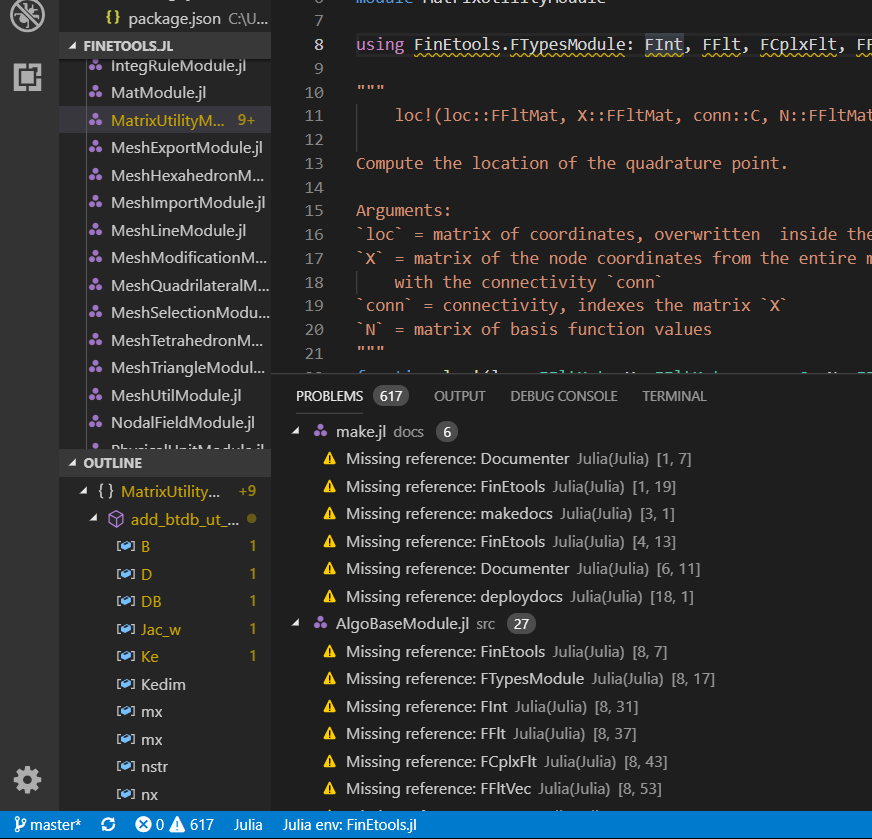
I believe it correctly states the environment, and when I point to a symbol initially it shows "Loading" and then there is a long string of error messages (as shown above).
PetrKryslUCSD
on 21 Jul 2019
I have the exact same problem with Julia 1.1.0 and Julia-VSCode 0.12.0-rc.7 (VSCode 1.36.1)
 eascarrunz
on 22 Jul 2019
eascarrunz
on 22 Jul 2019
This is due to the use of the pattern using FinEtools.SubModule: something from within the definition of FinEtools. If you try to use the same pattern when including a file from the REPL it'll error, e.g.:
module MyModule
module InnerModule
x = 1
end
using MyModule.InnerModule: x
end
If you set the environment to that which FinEtools (i.e. Julia 1.x) is installed then things should work (with the slightly odd effect that those submodule imports refer to the variables of the cached module rather than the source files your editing). Alternatively (and I'd say preferably) you could import your submodules using the more widespread format of using .FTypesModule etc
 ZacLN
on 22 Jul 2019
ZacLN
on 22 Jul 2019
This is interesting. Replacing using FinEtools.XYZ with using ..XYZ in all the source files of the package works to some degree: in the source files of FinEtools itself the documentation look up works. However, doing something like
module surfacenormaltest3
using FinEtools
using Test
function test()
XYZ = reshape([0.0, 0.0], 2, 1)
tangents = reshape([-1.0, 1.0], 2, 1)
fe_label = 0
fi = SurfaceNormal(2)
@show v = updatenormal!(fi, XYZ::FFltMat, tangents::FFltMat, fe_label::FInt)
@test v == [0.7071067811865475, 0.7071067811865475]
end
end
using .surfacenormaltest3
surfacenormaltest3.test()
where SurfaceNormal and updatenormal! are defined/exported in/from FinEtools, no documentation is available again.
PetrKryslUCSD
on 22 Jul 2019
This is interesting. Replacing
using FinEtools.XYZwithusing ..XYZin all the source files of the package works to some degree: in the source files ofFinEtoolsitself the documentation look up works. However, doing something likemodule surfacenormaltest3 using FinEtools using Test function test() XYZ = reshape([0.0, 0.0], 2, 1) tangents = reshape([-1.0, 1.0], 2, 1) fe_label = 0 fi = SurfaceNormal(2) @show v = updatenormal!(fi, XYZ::FFltMat, tangents::FFltMat, fe_label::FInt) @test v == [0.7071067811865475, 0.7071067811865475] end end using .surfacenormaltest3 surfacenormaltest3.test()where
SurfaceNormalandupdatenormal!are defined/exported in/from FinEtools, no documentation is available again.
Me too. Things defined/exported in the top-level module, e.g. EquationsOfState is still not recognized.
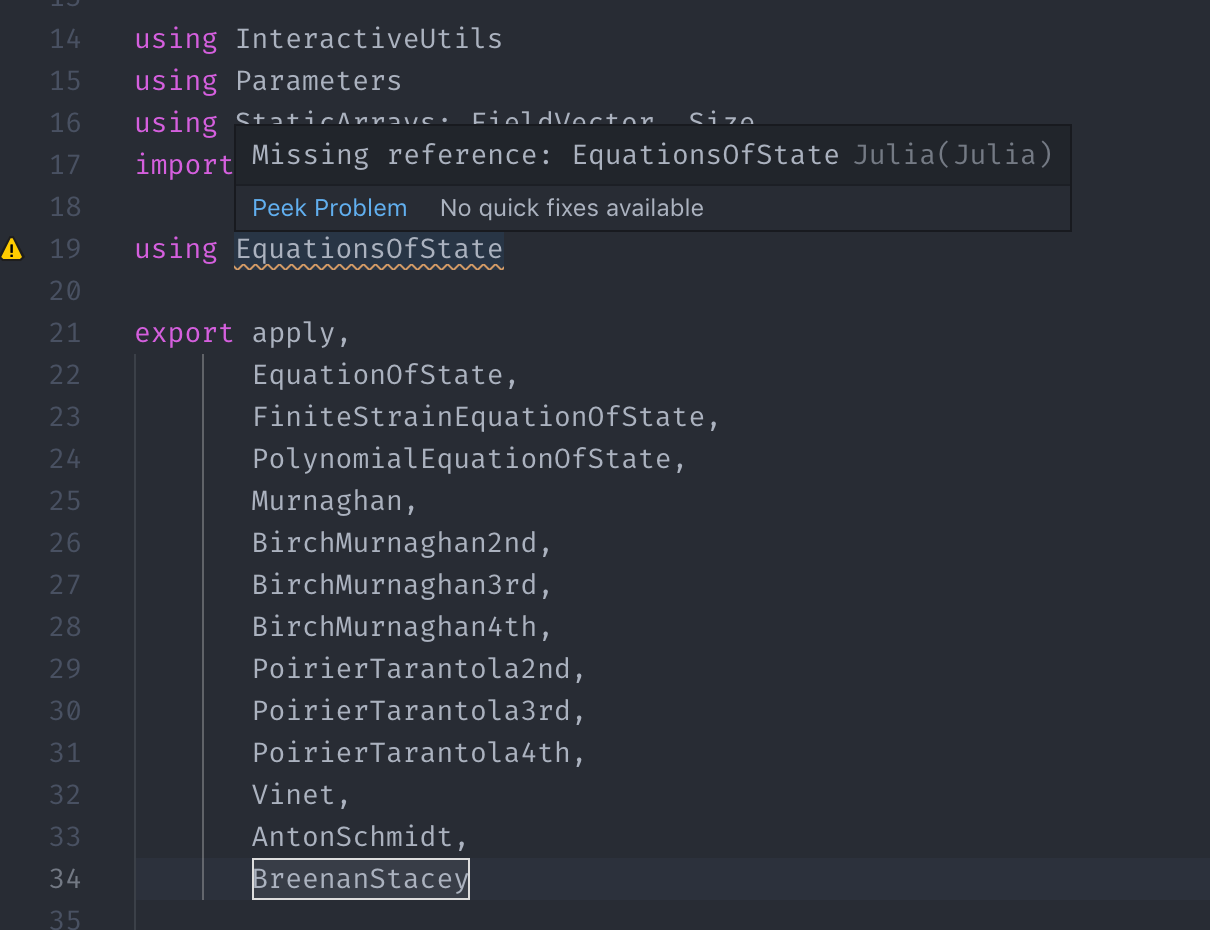
Things defined in its submodules are solved by using ..XXX, etc.
Please fix this bug!
Plugin version: 0.12.2
VSCode version:
Version: 1.38.1
Commit: b37e54c98e1a74ba89e03073e5a3761284e3ffb0
Date: 2019-09-11T13:31:32.854Z
Electron: 4.2.10
Chrome: 69.0.3497.128
Node.js: 10.11.0
V8: 6.9.427.31-electron.0
OS: Darwin x64 18.7.0
julia> versioninfo()
Julia Version 1.2.0
Commit c6da87ff4b (2019-08-20 00:03 UTC)
Platform Info:
OS: macOS (x86_64-apple-darwin18.6.0)
CPU: Intel(R) Xeon(R) W-2140B CPU @ 3.20GHz
WORD_SIZE: 64
LIBM: libopenlibm
LLVM: libLLVM-6.0.1 (ORCJIT, skylake)
Environment:
JULIA_NUM_THREADS = 12
 singularitti
on 15 Sep 2019
singularitti
on 15 Sep 2019
Note that in the OP, even Test is not recognized. I get the same problem of "Missing reference: Test" with a Julia file that just contains
using Test
This is on Julia 1.2, Julia plugin 0.12.3.
 bilderbuchi
on 8 Dec 2019
bilderbuchi
on 8 Dec 2019
Just got this bug. Juila 1.3.0, VSC 1.41.1
EDIT: on second thought, mine seems like a different bug. Only "local" modules are affected (not registered packages).
 norru
on 15 Jan 2020
norru
on 15 Jan 2020
Also see https://github.com/julia-vscode/julia-vscode/issues/867 with more examples of the same problem.
davidanthoff
on 27 Jan 2020
And I'm moving this to the v0.14.1 milestone. We are actively trying fixes for this right now, but they are a bit involved and we want to get 0.14.0 first.
davidanthoff
on 27 Jan 2020
https://github.com/julia-vscode/LanguageServer.jl/pull/498 is one attempt to solve this.
davidanthoff
on 27 Jan 2020
Is there a way to disable these false "Missing reference" problems? I have disabled the Missingrefs option and restarted VScode and I still get every variable in a JuMP modeled linted.

 NLaws
on 10 Apr 2020
NLaws
on 10 Apr 2020
I have similar problems too and would like to share additional info.
I have this script:
using Random
using Distributions
Normal()
Running in locally, I get a missing reference on Normal().
Running it inside a Docker container, I get a missing reference on both Random and Normal().
My system information:
Local Julia:
Julia Version 1.4.0
Commit b8e9a9ecc6 (2020-03-21 16:36 UTC)
Platform Info:
OS: Windows (x86_64-w64-mingw32)
CPU: Intel(R) Core(TM) i7-7500U CPU @ 2.70GHz
WORD_SIZE: 64
LIBM: libopenlibm
LLVM: libLLVM-8.0.1 (ORCJIT, skylake)
Julia inside docker container:
Julia Version 1.4.0
Commit b8e9a9ecc6 (2020-03-21 16:36 UTC)
Platform Info:
OS: Linux (x86_64-pc-linux-gnu)
CPU: Intel(R) Core(TM) i7-7500U CPU @ 2.70GHz
WORD_SIZE: 64
LIBM: libopenlibm
LLVM: libLLVM-8.0.1 (ORCJIT, skylake)
VS Code:
Version: 1.45.0-insider (user setup)
Commit: 44c5185373d5f209cd6c0b5d29a216fb801da34e
Date: 2020-04-10T18:12:33.780Z
Electron: 7.2.1
Chrome: 78.0.3904.130
Node.js: 12.8.1
V8: 7.8.279.23-electron.0
OS: Windows_NT x64 10.0.19041
Julia extension:
 hsm207
on 12 Apr 2020
hsm207
on 12 Apr 2020
It's not clear to me how many of these missing references issues are actual bugs and how many are due to not having environments set up quite right. Maybe what's needed is some documentation on how to have your environments, project directories, and modules set up to get correct linting?
One thing I've noticed is that if I have a project environment activated and I add some code with a new dependency, e.g.
using DataFrames
# stuff with data frames
I'll get missing reference errors. That's expected and normal. However, if I do ] add DataFrames, the missing references don't go away until I close and reopen VS Code. It would be nice if the linter immediately picked up changes to the Project.toml in the currently active session/environment.
EDIT:
Rather than completely closing and re-opening VS Code, closing the workspace and re-opening it (without exiting VS Code) also seems to bring in the changes to the Project.toml.
 CameronBieganek
on 14 May 2020
CameronBieganek
on 14 May 2020
Yes, we need to reread project files when they are updated, that is a known problem.
davidanthoff
on 15 May 2020
I have the same problem with Julia 1.4.2 and the Julia plugin 0.15.40, for a very simply package created using Pkg.generate(). The package is called ProjectSim, has a correct Project.toml, and a src/ProjectSim.jl file that defines the module ProjectSim. VSCode recognises the environment just fine, I get Julia env: ProjectSim in the status bar. Running using ProjectSim in the REPL works just fine. But typing using ProjectSim in another Julia file anywhere in the project folder (even in src/) results in squiggly lines under ProjectSim and no Intellisense working.
 tsela
on 6 Jun 2020
tsela
on 6 Jun 2020
@tsela If I understand your example correctly, that's the expected behavior. You can't load a package inside of itself. That would result in infinite recursion. It would be akin to doing this:
julia> module A
using A
end
ERROR: ArgumentError: Package A not found in current path:
- Run `import Pkg; Pkg.add("A")` to install the A package.
Stacktrace:
[1] require(::Module, ::Symbol) at ./loading.jl:892
which throws an error.
CameronBieganek
on 6 Jun 2020
@CameronBieganek Eh no. I'll be the first to admit I'm a beginner Julia user, but I'm pretty sure that's not what I'm doing. I'm not trying to use a package within itself, I'm trying to use it within its own environment. That's not quite the same thing and is actually completely licit in Julia. I can illustrate it. See the screenshot below:
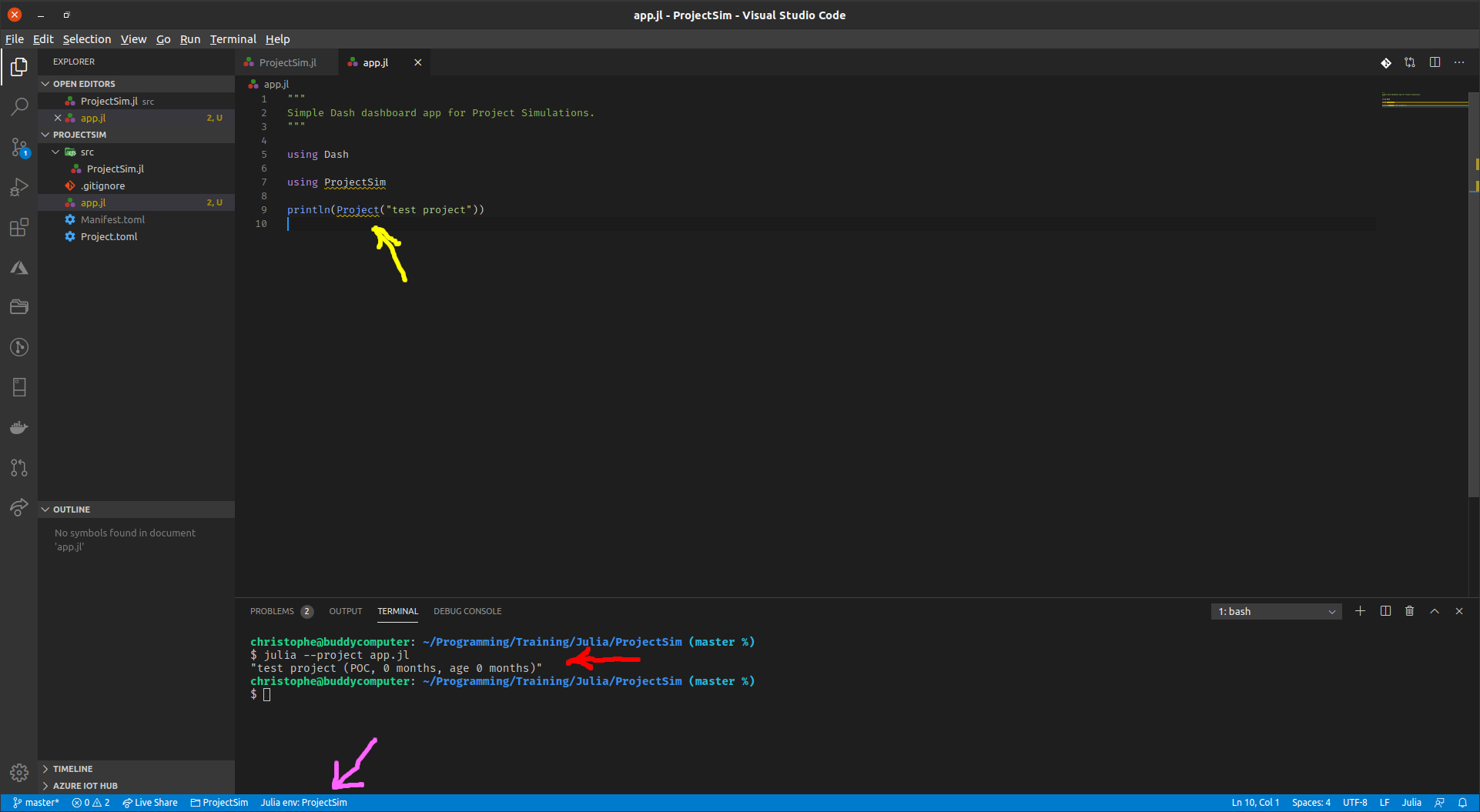
As you can see, I've got a simple app.jl script in the root folder of the ProjectSim package, which does using ProjectSim and creates and prints a simple object of type Project (which is defined within the ProjectSim module). If I run that script using julia --project app.jl in the terminal, it works perfectly fine (see red arrow). As expected, a package's main module is visible within the scope of its own environment. However, as you can also see (yellow arrow), VSCode does not recognise the ProjectSim module (see the squiggly lines), despite the Language Server saying it's working in the ProjectSim environment (see magenta arrow).
That's the bug: ProjectSim is in the scope of its own environment, as julia --project proves. So I would expect the Julia Language Server to index it just like it does every other package in that scope (notice how the Dash package is correctly indexed. It's only the local package which isn't).
Edit: Addendum: Note that running the code with Ctrl+Enter or Alt+Enter works fine too. It's only Intellisense which does not see the module.
tsela
on 6 Jun 2020
Ok, that makes sense. Thanks for the additional info. It was the "even in src/" part of your first comment that confused me, since most files in src are usually include-ed inside the package module defined in src/ProjectSim.
CameronBieganek
on 6 Jun 2020
Yeah, I understand, and sorry for being unclear. I just meant that it didn't matter where in the ProjectSim folder I put the app.jl file, I got the same issue :smiley:.
In the meantime, I found a "workaround" (in quotes because it's very impractical): if I add include("src/ProjectSim.jl") before the using ProjectSim line in the app.jl file and restart the Language Server, it finds the ProjectSim module and all the symbols defined therein just fine and Intellisense works. The only problem is that I cannot run the file like that as it gives me an ERROR: LoadError: importing ProjectSim into Main conflicts with an existing identifier, which is a perfectly understandable error given what I'm doing. So I need to comment the include whenever I want to run the script, and uncomment it and restart the Language Server whenever I want to actually work on the script. So, a workaround, but an impractical one. Hopefully this problem can be solved soon so I can get rid of that ugly workaround :+1:.
Edit: Update: It seems I don't need to restart the Language Server each time I uncomment the include. It just takes a few seconds to find all the right symbols and remove the squiggly lines. So the workaround is not quite as ugly as I first thought, but it's still impractical. I'd love to hear about a better workaround, at least until the actual issue is solved.
tsela
on 7 Jun 2020
I'd also like to +1 @tsela 's comment. The workaround is roughly the same as the one I've been using (which, while ok, is a little cumbersome) to develop some test suites.
With that, I'd still like to thank the devs for their work on this—especially since moving from Juno back to VSCode was a breath of fresh air :)
Environment:
Julia 1.4.0, macOS, Julia-vscode 0.15.40, VSCode 1.45.1
 angeris
on 10 Jun 2020
angeris
on 10 Jun 2020
I think I have the same problem with @tsela now on v0.16.7, all other modules are correctly indexed, except the project module itself.
I think a better workaround on this is to use a shared environment for the development of the project. The linter seems to be able to detect all the modules in a shared environment.
 Roger-luo
on 24 Jun 2020
Roger-luo
on 24 Jun 2020
Shared environments cause lots of problems with incompatible packages and are the reason why environments were developed in the first place. I don't think working with a shared environment is a good workaround at all. It's certainly not how you're supposed to work in Julia.
Right now, I use the following workaround that I took from another issue thread about the same problem (but can't find it right now so can't link to it). In order to get the project module itself correctly indexed without having to change anything when running the code, I replace using ProjectModule with:
if isdefined(@__MODULE__, :LanguageServer)
    include("src/ProjectModule.jl")
    using .ProjectModule
else
    using ProjectModule
end
It works fine, although a bit ugly to change one's code just because the tooling's indexing behaviour does not match what Julia itself does.
I mean, don't take me wrong, I think the Julia VSCode plugin is fantastic, but Intellisense is supposed to be one of the main strengths of VSCode (and it's certainly the feature people notice first and use/interact with most when using VSCode), and right now it's pretty much broken for Julia. This makes the whole plugin look bad despite the great work the team has put into this.
tsela
on 26 Jun 2020
Shared environments cause lots of problems with incompatible packages and are the reason why environments were developed in the first place.
This is not true. @tsela you could always create a new shared environment that contains the packages with specific versions you want to develop only. There won't be any problem on compatibility since they stay in different environments after all. I know this is not as convenient as a local project environment, but at least this is won't require any change of users' code and works better if you have multiple packages under development together. And it is just not practical to change the package code for this and make it into a release, it causes (maintenance) trouble for other developers using other editors. It is fine if you are the only developer tho.
I don't think working with a shared environment is a good workaround at all. It's certainly not how you're supposed to work in Julia.
It is just one of many options and it is definitely one of the way you are supposed to work in Julia. You can't develop multiple packages at once with a single local project environment. That's what shared environment was made for.
Anyway, I'm just listing possible workarounds here. Pick whatever you like. But still hope this issue gets fixed at some point.
Roger-luo
on 7 Jul 2020
And I think create a new (fake) shared environment is exactly what julia-vscode/LanguageServer.jl#498 is trying to do (automatically). The problem seems to be that the linter won't scan the local package module for all environments, it only scan what's inside [deps].
Roger-luo
on 7 Jul 2020
Bump. I have a package with a directory structure like this:
├── Manifest.toml
├── Project.toml
├── README.md
├── scripts
│   ├── get_anchor_xml.jl
│   ├── get_ptsd_citations_distribution.jl
│   ├── run_scopus_citation_graph.jl
│   └── test_scopus_query.jl
├── src
│   ├── CitationGraphs.jl
│   ├── citation_graph.jl
│   ├── metrics.jl
│   ├── pubmed_query.jl
│   └── scopus_query.jl
└── test
    ├── Manifest.toml
    ├── Project.toml
    └── runtests.jl
All of the scripts in the scripts folder are riddled with Missing reference linter warnings. It makes my scripts nearly illegible. I see that the milestone for this issue is "Backlog". In my opinion, this issue should be a higher priority, since it makes entire files unreadable.
CameronBieganek
on 7 Dec 2020
use Julia > Lint > Disabled Dirs configuration for the time being.
 aviatesk
on 7 Dec 2020
aviatesk
on 7 Dec 2020
Related issues
 tk3369
·
17Comments
tk3369
·
17Comments
 rapus95
·
62Comments
davidanthoff
·
28Comments
rapus95
·
62Comments
davidanthoff
·
28Comments
 tkoolen
·
14Comments
tkoolen
·
14Comments
 fplk
·
17Comments
fplk
·
17Comments
Most helpful comment
Shared environments cause lots of problems with incompatible packages and are the reason why environments were developed in the first place. I don't think working with a shared environment is a good workaround at all. It's certainly not how you're supposed to work in Julia.
Right now, I use the following workaround that I took from another issue thread about the same problem (but can't find it right now so can't link to it). In order to get the project module itself correctly indexed without having to change anything when running the code, I replace
using ProjectModulewith:It works fine, although a bit ugly to change one's code just because the tooling's indexing behaviour does not match what Julia itself does.
I mean, don't take me wrong, I think the Julia VSCode plugin is fantastic, but Intellisense is supposed to be one of the main strengths of VSCode (and it's certainly the feature people notice first and use/interact with most when using VSCode), and right now it's pretty much broken for Julia. This makes the whole plugin look bad despite the great work the team has put into this.