Julia-vscode: Julia 1.0 doesn't seem to work
 rapus95
All 62 comments
I have issue in julia v1.0 with err: Julia Language server is busy
 elvizlai
on 10 Aug 2018
elvizlai
on 10 Aug 2018
I get the same error, but it seems not only v1.0, but v0.7 has this problem.
I set as follow:
"julia.executablePath": "F:/Program Files/Julia-0.7.0/bin/julia.exe",
【THE file julia.exe is at F:\Program Files\Julia-0.7.0\binjulia.exe】
and vscode provide me a message:
Could not start the julia language server. Make sure the configuration setting julia.executablePath points to the julia binary.
 SalviaL
on 10 Aug 2018
SalviaL
on 10 Aug 2018
I have the following error launching REPL on vscode.
ERROR: LoadError: UndefVarError: Display not defined
Stacktrace:
 [1] top-level scope at none:0
 [2] include at ./boot.jl:317 [inlined]
 [3] include_relative(::Module, ::String) at ./loading.jl:1038
 [4] include(::Module, ::String) at ./sysimg.jl:29
 [5] exec_options(::Base.JLOptions) at ./client.jl:229
 [6] _start() at ./client.jl:421
in expression starting at /Users/abmlab/.vscode/extensions/julialang.language-julia-0.10.3/scripts/terminalserver/terminalserver.jl:39
Julia 1.0 works if launched from terminal or Applications.
julia> versioninfo()
Julia Version 1.0.0
Commit 5d4eaca0c9 (2018-08-08 20:58 UTC)
Platform Info:
  OS: macOS (x86_64-apple-darwin14.5.0)
  CPU: Intel(R) Core(TM) i5-4278U CPU @ 2.60GHz
  WORD_SIZE: 64
  LIBM: libopenlibm
  LLVM: libLLVM-6.0.0 (ORCJIT, haswell)
 affans
on 10 Aug 2018
affans
on 10 Aug 2018
1.0 and 0.7 are not yet supported.
 davidanthoff
on 11 Aug 2018
davidanthoff
on 11 Aug 2018
if VERSION < v"0.6.0-rc1" || VERSION >= v"0.7-"
    error("VS Code julia language server only works with julia 0.6.")
end
sad...
 lovememo
on 11 Aug 2018
lovememo
on 11 Aug 2018
We’re working on it :)
davidanthoff
on 11 Aug 2018
@davidanthoff I've never worked on a VScode extension (and probably out of my expertise), but let me know if I can help in anyway.
Also, is there an ETA?
affans
on 11 Aug 2018
I spent lots of time to try to solve it but I am filed......
Until I watch this issue OMG....
COME ON!
 HitachiWang
on 12 Aug 2018
HitachiWang
on 12 Aug 2018
Yes, the same problem with me...
Cannot start with a message:
Could not start the julia language server. Make sure the configuration setting julia.executablePath points to the julia binary.
When I switched to v0.6.4, this issues disappears, so I think this must be an issue with v1.0.0 supporting.
 shang-zd
on 17 Aug 2018
shang-zd
on 17 Aug 2018
@davidanthoff
First thank you for the hardwork and dedication to this project.
I noticed you said it's being worked on however I see the last commit was back in July.
Just curious if you have a proposed timeline for when it may hit the market, this may help with some of the repetitive questions about it not working.
 rwatts3
on 21 Aug 2018
rwatts3
on 21 Aug 2018
I've been waiting for it for a long time.
 crazy0713
on 22 Aug 2018
crazy0713
on 22 Aug 2018
Better yet. If you want to give a quick synopsis and a free pointers on where to start in the code base I'm happy to take a crack at a PR.
rwatts3
on 22 Aug 2018
I got the same error with julia 1.0:
Could not start the julia language server. Make sure the configuration setting julia.executablePath points to the julia binary.
 bajizhh
on 28 Aug 2018
bajizhh
on 28 Aug 2018
I think @ZacLN is working on all the backend stuff. I don't have much time right now to help. So I think we don't really have a timeline... It will be ready when it is. I'm not sure where we could use help, these updates are iffy and often require a really good understanding of the whole, so my gut feeling is that this is mostly something Zac and I need to do...
davidanthoff
on 28 Aug 2018
I've made some PRs to all the relevant packages that get things working on v1.0 that should get merged in the next day or so (whenever David has time).
Any help is much appreciated as both of us are fairly busy at the moment so what I'm going to do is write up a little explanatory document covering the basic framework re: @rwatts3 ask above, along with a list of what needs doing. Some is very fiddly and some more straightforward so I'll try to signpost where best people could contribute.
 ZacLN
on 28 Aug 2018
ZacLN
on 28 Aug 2018
good news ,thank you for your hard work!
crazy0713
on 29 Aug 2018
Same thing here, for Julia 1.0, I can access the julia.exe from my windows command line since it is set in PATH variable already. But in VSCode, the extension always not working at all.
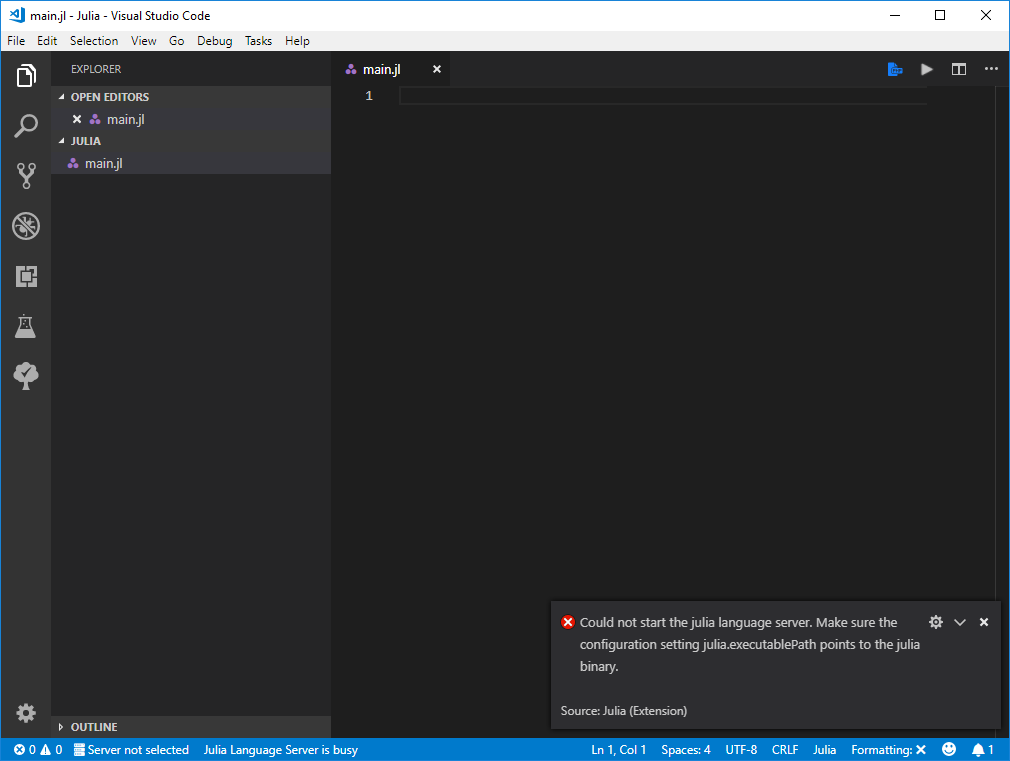
 hejunchen
on 29 Aug 2018
hejunchen
on 29 Aug 2018
If you can't bother reading everything, jump down to a TL;DR at the end of the comment
I'm not sure if this is by any means correct as it goes untested (EDIT: tested on 1.0.0), but might be the source of at least some issues (for Julia 1.0.0 users, most likely, only probably for 0.7.0 users). Take a look at line 16, where a call to Pkg.dir() is made to determine the package path:
Starting with Julia v0.7, Pkg is no longer defined under Base (or at least it was deprecated in v0.7, definitely removed from under Base in 1.0.0), meaning you'd have to import it. Not only that, the dir() function no longer exists. There is, however, a dir(pkg::String, paths::AbstractString...) function, but is deprecated. Here's the output of an example call to Pkg.dir("Pkg") in 1.0.0:
julia> import Pkg; Pkg.dir("Pkg")
┌ Warning: `Pkg.dir(pkgname, paths...)` is deprecated; instead, do `import Pkg; joinpath(dirname(pathof(Pkg)), "..", paths...)`.
└ @ Pkg.API C:\cygwin\home\Administrator\buildbot\worker\package_win64\build\usr\share\julia\stdlib\v1.0\Pkg\src\API.jl:454
"C:\\Users\\<REDACTED>\\AppData\\Local\\Julia-1.0.0\\share\\julia\\stdlib\\v1.0\\Pkg\\"
So the alternative should yield something along these lines:
julia> import Pkg; joinpath(dirname(pathof(Pkg)), "..")
"C:\\Users\\<REDACTED>\\AppData\\Local\\Julia-1.0.0\\share\\julia\\stdlib\\v1.0\\Pkg\\src\\.."
Which returns the effective path for the Pkg package. Clearly, this isn't the proper way to obtain the root package directory (be it user or system paths).
However, there is a function in Pkg called depots1, which returns the first "depot" (a Depot, per documentation, is "a directory on a system where various package-related resources live, including: [amongst other things] packages: installed package versions"). Pkg.depots() just returns Base.DEPOT_PATH, an array of depots, and Pkg.depots1() returns the first element of that array. More information about depots can be found at https://docs.julialang.org/en/v0.7.0/stdlib/Pkg/.
Assuming that is what we want, the package path can now be obtained via something like the following:
julia> import Pkg; joinpath(Pkg.depots1(), "packages")
"C:\\Users\\<REDACTED>\\.julia\\packages"
If I then attempt to find some module I installed, say ACME, using the suggested snippet of code in the warning spewed by Pkg.dir(::String):
julia> import ACME; joinpath(dirname(pathof(ACME), ".."))
C:\\Users\\<REDACTED>\\.julia\\packages\\ACME\\B4wfX\\src\\.."
It is visible that the base directory for user installed packages is the first depot, as documented.
As such, my proposition, in situations where julia version is >0.7.0 (possibly including 0.7.0, don't quote me on this, only tested with v1.0.0), would be to use Pkg.depots1() to get the user-installed packages directory in a fashion similar to what has been exemplified so far.
TL;DR: Pkg is no longer under Base and Pkg.dir() is deprecated, meaning the code throws an exception upon executing a command to fetch the packages path and the LS won't start (I'm assuming). Proposed solution, for Julia >0.7.0 (tested in 1.0.0) would be using Pkg.depots1() to get user-installed packages path in a way such as the following:
import Pkg; joinpath(Pkg.depots1(), "packages")
which yields (on Windows, for example):
C:\\Users\\<username>\\.julia\\packages
DISCLAIMER: Not a Holy Grail solution, but probably a way of solving a fair amount of open issues, I hope 🤞
 rgcv
on 8 Sep 2018
rgcv
on 8 Sep 2018
Got the latest with:
git clone https://github.com/JuliaEditorSupport/julia-vscode.git
Then did:
cd julia-vscode
npm run update2latest
Then after some processing, got this error:
Cloning into '/home/user/.vscode-insiders/extensions/julia-vscode/scripts/languageserver/packages/URIParser'...
Submodule path 'scripts/languageserver/packages/AbstractTrees': checked out '74695d4634c2286e20c75accb2739d07344fe56a'
error: Server does not allow request for unadvertised object 20b6eac1ec7db62ced97eadb09f0d4e9653db97a
Fetched in submodule path 'scripts/languageserver/packages/CSTParser', but it did not contain 20b6eac1ec7db62ced97eadb09f0d4e9653db97a. Direct fetching of that commit failed.
npm ERR! code ELIFECYCLE
npm ERR! errno 1
npm ERR! [email protected] update2latest: `git pull && git submodule init && git submodule update && npm install && npm run compile`
npm ERR! Exit status 1
npm ERR!
npm ERR! Failed at the [email protected] update2latest script.
npm ERR! This is probably not a problem with npm. There is likely additional logging output above.
npm WARN Local package.json exists, but node_modules missing, did you mean to install?

npm ERR! A complete log of this run can be found in:
npm ERR!     /home/user/.npm/_logs/2018-09-09T05_01_28_990Z-debug.log
I tried to incorporate suggestions by @rgcv in packagepath.ts, and it made no difference.
But, given all this, the extension appear to have been installed fine in VSCode, and I don't see the "julia server is busy" message as I saw with release version. And, Julia codes are correctly colored. But I can't start REPL. It gives error:
command 'language-julia.startREPL' not found
Don't know what that is.
And I can't say more, I hope to know more about what this extension is all supposed to do.
BTW, I am running a Julia nigtly build of 1.1.0, and VSCode 1.28.0 Insider.
P.S., it actually doesn't work so well as auto-indent stops working.
 LeoK987
on 9 Sep 2018
LeoK987
on 9 Sep 2018
Note that the relevant Wiki entry detailing usage instructions for Julia 1.0 is here: https://github.com/JuliaEditorSupport/julia-vscode/wiki/Julia-1.0 Missed it the first time I read this issue.
 x-ji
on 18 Sep 2018
x-ji
on 18 Sep 2018
I cloned @ZacLN 's fork and tried to run npm run update2latest. However, it failed in the process about CSTParser.
Afterwards, I manually ran npm install && npm run compile. The extension shows up as 0.11.0-dev in VSCode. But I still get the error "Could not start the julia language server. Make sure the configuration setting julia.executablePath points to the julia binary."
npm run update2latest

> [email protected] update2latest /home/jx/.vscode/extensions/julia-vscode
> git pull && git submodule init && git submodule update && npm install && npm run compile

Already up to date.
Submodule 'scripts/languageserver/packages/AbstractTrees' (https://github.com/Keno/AbstractTrees.jl.git) registered for path 'scripts/languageserver/packages/AbstractTrees'
Submodule 'scripts/languageserver/packages/CSTParser' (https://github.com/ZacLN/CSTParser.jl.git) registered for path 'scripts/languageserver/packages/CSTParser'
Submodule 'scripts/languageserver/packages/Compat' (https://github.com/JuliaLang/Compat.jl.git) registered for path 'scripts/languageserver/packages/Compat'
Submodule 'scripts/languageserver/packages/DocumentFormat' (https://github.com/ZacLN/DocumentFormat.jl) registered for path 'scripts/languageserver/packages/DocumentFormat'
Submodule 'scripts/languageserver/packages/JSON' (https://github.com/JuliaIO/JSON.jl.git) registered for path 'scripts/languageserver/packages/JSON'
Submodule 'scripts/languageserver/packages/LanguageServer' (https://github.com/JuliaEditorSupport/LanguageServer.jl.git) registered for path 'scripts/languageserver/packages/LanguageServer'
Submodule 'scripts/languageserver/packages/Nullables' (https://github.com/JuliaArchive/Nullables.jl.git) registered for path 'scripts/languageserver/packages/Nullables'
Submodule 'scripts/languageserver/packages/Tokenize' (https://github.com/KristofferC/Tokenize.jl.git) registered for path 'scripts/languageserver/packages/Tokenize'
Submodule 'scripts/languageserver/packages/URIParser' (https://github.com/JuliaWeb/URIParser.jl.git) registered for path 'scripts/languageserver/packages/URIParser'
Cloning into '/home/jx/.vscode/extensions/julia-vscode/scripts/languageserver/packages/AbstractTrees'...
Cloning into '/home/jx/.vscode/extensions/julia-vscode/scripts/languageserver/packages/CSTParser'...
Cloning into '/home/jx/.vscode/extensions/julia-vscode/scripts/languageserver/packages/Compat'...
Cloning into '/home/jx/.vscode/extensions/julia-vscode/scripts/languageserver/packages/DocumentFormat'...
Cloning into '/home/jx/.vscode/extensions/julia-vscode/scripts/languageserver/packages/JSON'...
Cloning into '/home/jx/.vscode/extensions/julia-vscode/scripts/languageserver/packages/LanguageServer'...
Cloning into '/home/jx/.vscode/extensions/julia-vscode/scripts/languageserver/packages/Nullables'...
Cloning into '/home/jx/.vscode/extensions/julia-vscode/scripts/languageserver/packages/Tokenize'...
Cloning into '/home/jx/.vscode/extensions/julia-vscode/scripts/languageserver/packages/URIParser'...
Submodule path 'scripts/languageserver/packages/AbstractTrees': checked out '74695d4634c2286e20c75accb2739d07344fe56a'
error: Server does not allow request for unadvertised object 20b6eac1ec7db62ced97eadb09f0d4e9653db97a
Fetched in submodule path 'scripts/languageserver/packages/CSTParser', but it did not contain 20b6eac1ec7db62ced97eadb09f0d4e9653db97a. Direct fetching of that commit failed.
npm ERR! code ELIFECYCLE
npm ERR! errno 1
npm ERR! [email protected] update2latest: `git pull && git submodule init && git submodule update && npm install && npm run compile`
npm ERR! Exit status 1
npm ERR!
npm ERR! Failed at the [email protected] update2latest script.
npm ERR! This is probably not a problem with npm. There is likely additional logging output above.

npm ERR! A complete log of this run can be found in:
npm ERR!     /home/jx/.npm/_logs/2018-09-18T15_24_31_719Z-debug.log
Yep I've managed to mess up the gut tree, will post a fix of sorts tinight
ZacLN
on 18 Sep 2018
@ZacLN Thanks. I cloned the newest version and was able to run npm run update2latest. However I still seem to get the "Could not start the julia language server. Make sure the configuration setting julia.executablePath points to the julia binary." error in VSCode somehow...
x-ji
on 18 Sep 2018
I get the error
[ Info: Precompiling LanguageServer [2b0e0bc5-e4fd-59b4-8912-456d1b03d8d7]
ERROR: LoadError: syntax: extra token "AssociativeWrapper" after end of expression
Stacktrace:
 [1] top-level scope at none:2
in expression starting at /home/jx/.julia/packages/JSON/Zg7L7/src/JSON.jl:18
ERROR: LoadError: Failed to precompile JSON [682c06a0-de6a-54ab-a142-c8b1cf79cde6] to /home/jx/.julia/compiled/v1.0/JSON/uf6oy.ji.
Stacktrace:
 [1] top-level scope at none:2
in expression starting at /home/jx/.julia/packages/LanguageServer/40lVO/src/LanguageServer.jl:3
ERROR: Failed to precompile LanguageServer [2b0e0bc5-e4fd-59b4-8912-456d1b03d8d7] to /home/jx/.julia/compiled/v1.0/LanguageServer/ite7n.ji.
if I try to run using LanguageServer in the REPL. Does that suggest that I didn't install the sl4 version of LanguageServer correctly?
x-ji
on 18 Sep 2018
Sorry apparently I didn't install the package correctly. If I use the Git address instead of directly Pkg.add, the master versions of the packages are installed. However, I now see the error
ERROR: InitError: SystemError: unable to read directory /home/jx/.julia/dev/StaticLint/store: No such file or directory
Stacktrace:
 [1] load_pkg_store(::String, ::Dict{Any,Any}) at /home/jx/.julia/dev/StaticLint/src/symbolserver.jl:167
 [2] loadpkgs at /home/jx/.julia/dev/StaticLint/src/StaticLint.jl:149 [inlined]
 [3] __init__() at /home/jx/.julia/dev/LanguageServer/src/LanguageServer.jl:30
 [4] _include_from_serialized(::String, ::Array{Any,1}) at ./loading.jl:627
 [5] macro expansion at ./logging.jl:312 [inlined]
 [6] _require_search_from_serialized(::Base.PkgId, ::String) at ./loading.jl:698
 [7] _require(::Base.PkgId) at ./loading.jl:931
 [8] require(::Base.PkgId) at ./loading.jl:852
 [9] macro expansion at ./logging.jl:311 [inlined]
 [10] require(::Module, ::Symbol) at ./loading.jl:834
 [11] run_backend(::REPL.REPLBackend) at /home/jx/.julia/packages/Revise/51oQc/src/Revise.jl:766
 [12] (::getfield(Revise, Symbol("##58#60")){REPL.REPLBackend})() at ./task.jl:259
during initialization of module LanguageServer
Then if I manually create that directory, it gives the error:
ERROR: InitError: MethodError: Cannot `convert` an object of type Symbol to an object of type String
Closest candidates are:
  convert(::Type{T<:AbstractString}, ::T<:AbstractString) where T<:AbstractString at strings/basic.jl:207
  convert(::Type{T<:AbstractString}, ::AbstractString) where T<:AbstractString at strings/basic.jl:208
  convert(::Type{T}, ::T) where T at essentials.jl:154
  ...
Stacktrace:
 [1] setindex!(::Dict{String,Nothing}, ::Nothing, ::Symbol) at ./dict.jl:373
 [2] push!(::Set{String}, ::Symbol) at ./set.jl:48
 [3] union! at ./abstractset.jl:77 [inlined]
 [4] Set{String}(::Array{Symbol,1}) at ./set.jl:10
 [5] load_pkg_store(::String, ::Dict{Any,Any}) at /home/jx/.julia/dev/StaticLint/src/symbolserver.jl:175
 [6] loadpkgs at /home/jx/.julia/dev/StaticLint/src/StaticLint.jl:149 [inlined]
 [7] __init__() at /home/jx/.julia/dev/LanguageServer/src/LanguageServer.jl:30
during initialization of module LanguageServer
Guess I didn't install the sl4 version of LanguageServer correctly. Where is that version though... Looking at the repo https://github.com/JuliaEditorSupport/LanguageServer.jl/ there is a commit about "merging from JuliaEditorSupport/sl4", but I can't see this sl4 repo/branch anywhere.
x-ji
on 18 Sep 2018
the branch (sl4) got merged so master is correct. I pushed a fix to the master of StaticLint for the second error, update them and see if that works
ZacLN
on 18 Sep 2018
Thanks. The extension now finally works though I'm getting a lot of "missing variable" warnings from StaticLint for some reason (on things like Float64, Tuple, and functions from imported modules). Also the autocompletion doesn't seem to provide any documentation for the suggestion at point? I might just stick with Julia 0.6.4 for my project for now. Though thanks for all the work on this! Hope the support for 1.0 becomes stable soon. This set of tools/extensions seems to be the fastest to adapt to the changes.
x-ji
on 19 Sep 2018
Any ETA of when this will be fixed?
 Kissaki
on 3 Oct 2018
Kissaki
on 3 Oct 2018
No ETA. We're working on it, but slowly...
davidanthoff
on 5 Oct 2018
why no commits yet? hope working on it faster
 dingbo8128
on 9 Oct 2018
dingbo8128
on 9 Oct 2018
@davidanthoff Is there anything the community can help with to speed this up?
"We're working on it" effectively tells people to not try to contribute - whatever efforts we put in, will probably be duplicated anyway. Maybe you can outline the stuff that needs to be fixed, or file/indicate issues for specific bugs you need help patching, so the people hoping for a 1.0-compatible version can help without everyone stepping on each-other's toes?
 tomasaschan
on 9 Oct 2018
tomasaschan
on 9 Oct 2018
Hi all if you could try this alpha version and report errors we can start to get things moving with a release.
It's packaged as a .vsix file (Install from VSIX... command within vscode)
ZacLN
on 9 Oct 2018
@ZacLN tried and got error
The terminal process command 'F:/Julia/Julia-1.0.1/bin/julia.exe -q -i c:\UsersThinkpad.vscode\extensionsjulialang.language-julia-0.11.0-dev\scripts\terminalserver\terminalserver.jl 18268 'D:\Programs\Microsoft VS Code\Code.exe' true' failed to launch (exit code: 2)
dingbo8128
on 9 Oct 2018
I'm afraid I don't know what you're trying to do with that command
ZacLN
on 9 Oct 2018
@ZacLN Doesn't work for me using VSCode 1.28 on Linux. I configured the Julia path correctly in the settings.
Could not start the julia language server. Make sure the configuration setting julia.executablePath points to the julia binary

ERR stdout maxBuffer exceeded `"/usr/local/bin/julia" --startup-file=no --history-file=no /home/dialvarezs/.vscode/extensions/julialang.language-julia-0.11.0-dev/scripts/languageserver/buildscript.jl` (exited with error code undefined): ChildProcessError: stdout maxBuffer exceeded `"/usr/local/bin/julia" --startup-file=no --history-file=no /home/dialvarezs/.vscode/extensions/julialang.language-julia-0.11.0-dev/scripts/languageserver/buildscript.jl` (exited with error code undefined)
    at callback (/home/dialvarezs/.vscode/extensions/julialang.language-julia-0.11.0-dev/node_modules/child-process-promise/lib/index.js:33:27)
    at ChildProcess.exithandler (child_process.js:294:5)
    at emitTwo (events.js:126:13)
    at ChildProcess.emit (events.js:214:7)
    at maybeClose (internal/child_process.js:925:16)
    at Process.ChildProcess._handle.onexit (internal/child_process.js:209:5)
 dialvarezs
on 9 Oct 2018
dialvarezs
on 9 Oct 2018
Alpha3 seems to be working fine for me! 1.27.2, Linux.
My biggest complaint so far is that symbols from external, third-party libraries can't be found, but symbols from e.g. LinearAlgebra are fine.
 tkoolen
on 9 Oct 2018
tkoolen
on 9 Oct 2018
Run the command Julia: rebuild package store and restart vscode, that should make them available. If not let me know
ZacLN
on 9 Oct 2018
@dialvarezs you could try running (from outside vscode) the code below.
julia --startup-file=no --history-file=no -e '(include("/home/dialvarezs/.vscode/extensions/julialang.language-julia-0.11.0-dev/scripts/languageserver/packages/StaticLint/src/symbolserver.jl");SymbolServer.save_pkg_store("/home/dialvarezs/.vscode/extensions/julialang.language-julia-0.11.0-dev/scripts/languageserver/packages/StaticLint/store"))'
Run the command Julia: rebuild package store and restart vscode, that should make them available. If not let me know
OK great, that made names of modules installed in the default environment (~/.julia/environments/v1.0/Project.toml) available, which is a great start. I use non-default environments quite a bit; is there a way to set the active project?
Alpha3 is also working for me on 1.28, OSX by the way (also tried alpha1 briefly yesterday, but I was getting could not start the julia language server even after correctly setting the executable path).
tkoolen
on 9 Oct 2018
Great but, yes, only the default environment for now., I'll probably have time to look at projects on the weekend
ZacLN
on 9 Oct 2018
That'd be awesome! Already very happy with this though, thanks for your efforts!
tkoolen
on 9 Oct 2018
@ZacLN Should I get any output from that? Executing it takes about 30 seconds to finish, without any kind of error or output.
dialvarezs
on 9 Oct 2018
The 'Run Test Task' command probably still needs to be updated, it fails with
ERROR: UndefVarError: Pkg not defined
@ZacLN I tried installing the alpha package on Linux and got the "Could not start the julia language server" error. I then tried running the following command as suggested:
julia --startup-file=no --history-file=no -e '(include("/home/katherlee/.vscode/extensions/julialang.language-julia-0.11.0-dev/scripts/languageserver/packages/StaticLint/src/symbolserver.jl");SymbolServer.save_pkg_store("/home/katherlee/.vscode/extensions/julialang.language-julia-0.11.0-dev/scripts/languageserver/packages/StaticLint/store"))'
But it also failed with the following error message:
InitError(:Plots, LoadError("/home/katherlee/.julia/packages/Plots/UtVfv/src/backends/plotly.jl", 94, MethodError(show, (IOStream(<fd 28>), MIME type text/html, " <script type='text/javascript'>\n define('plotly', function(require, exports, module) {\n UInt8[0x2f, 0x2a, 0x2a, 0x0a, 0x2a, 0x20, 0x70, ..., 0x5b, 0x32, 0x32, 0x5d, 0x29, 0x28, 0x32,0x32, 0x29, 0x7d, 0x29, 0x3b]\n });\n require(['plotly'], function(Plotly) {\n window.Plotly = Plotly;\n });\n </script>\n"), 0x0000000000006215)))
The UInt8 array in the error message has more than 2 million entries of which I have omitted some. Is this a problem with Plots or am I missing any dependencies?
 katherlee
on 9 Oct 2018
katherlee
on 9 Oct 2018
@katherlee, does Plots load normally?
ZacLN
on 9 Oct 2018
@ZacLN Yes, I can do using Plots and then plotly() in REPL without a problem.
katherlee
on 9 Oct 2018
Could you pull a dev version of StaticLint (]dev StaticLint) then see if the following works:
using Plots, StaticLint
store = Dict()
StaticLint.SymbolServer.load_module(Plots, store, nothing)
StaticLint.SymbolServer.save(store, "/tmp/junk.jstore")
Yes, these commands worked. Could it be that some of my packages might have conflicted with the extension? Here are all global packages that I have installed:
  [c52e3926] Atom v0.7.7
  [7073ff75] IJulia v1.12.0
  [682c06a0] JSON v0.19.0
  [e5e0dc1b] Juno v0.5.3
  [b964fa9f] LaTeXStrings v1.0.3
  [58dd65bb] Plotly v0.2.0
  [91a5bcdd] Plots v0.20.4
  [c46f51b8] ProfileView v0.4.0
  [438e738f] PyCall v1.18.4
  [d330b81b] PyPlot v2.6.3
  [295af30f] Revise v0.7.11
  [90137ffa] StaticArrays v0.8.3
  [b3cc710f] StaticLint v0.0.2+ [`~/.julia/dev/StaticLint`]
  [6aa20fa7] TensorOperations v0.7.1
@ZacLN Works for me now with the dev version of StaticLint. Thanks!
dialvarezs
on 10 Oct 2018
@ZacLN I'm still getting Could not start the julia language server. even when setting julia.executablePath to point to the julia binary. That's using the Alpha2 on macOS 10.13.6 and VScode 1.28.0 and julia 1.0.0
 hbsmith
on 10 Oct 2018
hbsmith
on 10 Oct 2018
Thanks for all the feedback here! Ideally, now that we have merged 1.0 support onto master, can we open individual issues for each problem that folks encounter? That makes it much easier for us to track things.
I'm going to close this issue, but please do open issues for anything that doesn't work yet, I'm sure there is a fair bit of that!
davidanthoff
on 10 Oct 2018
Oh wow, so 1.0 is ready or is still "alpha" version in master.
affans
on 10 Oct 2018
I'm guessing they're still ironing it out since they haven't yet tagged a release @affans
 arnavs
on 10 Oct 2018
arnavs
on 10 Oct 2018
The master branch of this repo here supports 1.0. It is an alpha at this point, still a fair bit of stuff to fix, sort out. @ZacLN published a vsix file for an alpha release recently.
davidanthoff
on 11 Oct 2018
@davidanthoff @ZacLN May I suggest that you add 1.0-blocking issues to a milestone (or tag them or something), so that we can track progress from the sidelines? :)
tomasaschan
on 11 Oct 2018
The v0.11 milestone is that. There are also milestones in the various packages that we use that also matter.
davidanthoff
on 11 Oct 2018
I am experiencing the whole "Could not start the julia language server. Make sure the configuration setting julia.executablePath points to the julia binary." problem after installing the alpha3 version of the extension and a dev version of StaticLint.
EDIT: I am on Linux Mint 18 Cinnamon, and I am able to start the REPL from VSCode with the julia command. Things seem to be running fine except for the language server.
The problem now is that I want to debug this stuff but I have no idea what is going wrong. If only I could see more detailed information on the extension error. Could someone tell me how to see the error message stacktrace from the extension, such as in dialvarezs's comment quoted below (yes, I have googled it and I must be googling wrong, because I can't find anything):?
@ZacLN Doesn't work for me using VSCode 1.28 on Linux. I configured the Julia path correctly in the settings.
Could not start the julia language server. Make sure the configuration setting julia.executablePath points to the julia binary

ERR stdout maxBuffer exceeded `"/usr/local/bin/julia" --startup-file=no --history-file=no /home/dialvarezs/.vscode/extensions/julialang.language-julia-0.11.0-dev/scripts/languageserver/buildscript.jl` (exited with error code undefined): ChildProcessError: stdout maxBuffer exceeded `"/usr/local/bin/julia" --startup-file=no --history-file=no /home/dialvarezs/.vscode/extensions/julialang.language-julia-0.11.0-dev/scripts/languageserver/buildscript.jl` (exited with error code undefined)
    at callback (/home/dialvarezs/.vscode/extensions/julialang.language-julia-0.11.0-dev/node_modules/child-process-promise/lib/index.js:33:27)
    at ChildProcess.exithandler (child_process.js:294:5)
    at emitTwo (events.js:126:13)
    at ChildProcess.emit (events.js:214:7)
    at maybeClose (internal/child_process.js:925:16)
    at Process.ChildProcess._handle.onexit (internal/child_process.js:209:5)
 sigurof
on 13 Oct 2018
sigurof
on 13 Oct 2018
@sigurof What OS are you on? What is the value of the "julia.executablePath" setting? Can you start the julia REPL with the extension command?
davidanthoff
on 13 Oct 2018
Ah, sorry for the lack of information.
I am on Linux Mint 18 Cinnamon. My path should be correct (/home/sigurof/julia-1.0.0/bin/julia I believe), because I am able to start the REPL from VSCode with the julia extension commands. Things seem to be running fine except for the language server.
sigurof
on 13 Oct 2018
I think this is related to the caching initialisation for the SymbolServer as reported by katherlee above. I can't work out the exact issue but we're looking into a different implementation regardless
ZacLN
on 13 Oct 2018
This is a shame...
 taylorren
on 17 Nov 2018
taylorren
on 17 Nov 2018
Also having this issue on MacOS 10.13.6, with Julia 1.0.2
Have tried julia, /Applications/Julia-1.0.app and /usr/local/bin/julia as values for julia.executablePath and restarted vscode for each, still get the error message:
Could not start the julia language server. Make sure the configuration setting julia.executablePath points to the julia binary.
Is this still an outstanding issue? The README should probably mention what versions of julia the extension is compatible with.
 cshenton
on 13 Dec 2018
cshenton
on 13 Dec 2018
Related issues
tkoolen
·
14Comments
 tk3369
·
17Comments
tk3369
·
17Comments
 fplk
·
17Comments
fplk
·
17Comments
 allochi
·
21Comments
allochi
·
21Comments
 schlichtanders
·
22Comments
schlichtanders
·
22Comments
Most helpful comment
We’re working on it :)