Julia-vscode: Could not start the julia language server. Make sure the configuration setting julia.executablePath points to the julia binary.
Hello,
I'm using Ubuntu Linux 17.10
Julia is installed in my home directory and I have a symbolic link which point to Julia binary.
$ ls -la ~/bin/julia
lrwxrwxrwx 1 scls scls 37 nov.   3 17:48 /home/scls/bin/julia -> /home/scls/julia-0d7248e2ff/bin/julia
~/bin is in my PATH
scls@scls-Skylake:~$ julia --version
julia version 0.6.1
After installing Visual Studio Code and Julia extension the following message is displayed when editing a .jl file.
Could not start the julia language server. Make sure the configuration setting julia.executablePath points to the julia binary.
(despite Julia binary is in my PATH)
I also edited user settings with
{
    "julia.executablePath": "~/bin/julia"
}
but I'm still getting the error message
Could not start the julia language server. Make sure the configuration setting julia.executablePath points to the julia binary.
I also tried
{
    "julia.executablePath": "/home/scls/bin/julia"
}
and
{
    "julia.executablePath": "/home/scls/julia-0d7248e2ff/bin/julia"
}
without positive results
Any idea?
Kind regards
 scls19fr
All 40 comments
@ZacLN, any idea? I'm not a Linux expert...
 davidanthoff
on 22 Nov 2017
davidanthoff
on 22 Nov 2017
have you tried just "julia.executablePath": "julia"?
 ZacLN
on 22 Nov 2017
ZacLN
on 22 Nov 2017
Did you solve this @scls19fr ?
 quendera
on 28 Nov 2017
quendera
on 28 Nov 2017
I put
{
    "julia.executablePath": "/home/scls/julia-0d7248e2ff/bin/julia"
}
it's working now (I don't understand why it wasn't working previously)
Thanks @quendera @davidanthoff and @ZacLN
scls19fr
on 29 Nov 2017
Okay, I know this is closed but I just had the same and what fixed it was after updating my settings, I literally closed VS code and opened it again.
 igoobud
on 20 Feb 2018
igoobud
on 20 Feb 2018
I also think that it is what fixed my issue.
scls19fr
on 20 Feb 2018
Met the same situation here and I am on the mac.
> which julia
julia: aliased to /Applications/Julia-1.0.app/Contents/Resources/julia/bin/julia
my configuration is:
"julia.executablePath":"/Applications/Julia-1.0.app/Contents/Resources/julia/bin/julia"
 JackHo327
on 11 Aug 2018
JackHo327
on 11 Aug 2018
Julia 1.0 is not yet supported.
davidanthoff
on 11 Aug 2018
Hi @davidanthoff , thanks for your information. Will keep an eye on this good extension.
JackHo327
on 11 Aug 2018
@davidanthoff When will Julia 1.0 be supported by the extension? Why wasn't it released as part of the 1.0 release?
 wpwoodjr
on 19 Aug 2018
wpwoodjr
on 19 Aug 2018
I don't know when we will be done with the 1.0 extension. It was not released as part of 1.0 because this is all done by volunteers and we are busy and didn't have the time to finish things earlier.
davidanthoff
on 28 Aug 2018
Julia Language Server is busy.
 iambudi
on 17 Sep 2018
iambudi
on 17 Sep 2018
Still not working on 1.0 release
 wassimoo
on 26 Sep 2018
wassimoo
on 26 Sep 2018
Not work with current release of julia :(
 jcbritobr
on 30 Sep 2018
jcbritobr
on 30 Sep 2018
Still not working on the 1.0.1 release.
 AndroxxTraxxon
on 4 Oct 2018
AndroxxTraxxon
on 4 Oct 2018
@davidanthoff Hi. Is 0.7 supported? Because I seem to get the same issue on v0.7 as well.
 kraftpunk97
on 7 Oct 2018
kraftpunk97
on 7 Oct 2018
I got the same problem on the 1.0.1 release.
 drdh
on 17 Oct 2018
drdh
on 17 Oct 2018
me too,my version is 1.0.2
 eugene2017
on 14 Dec 2018
eugene2017
on 14 Dec 2018
Same problem with 1.0.3, is there any news for the problem?
 therimalaya
on 27 Dec 2018
therimalaya
on 27 Dec 2018
What version of the extension are you using? We have a beta here that should work with julia 1.0.x. The one you get from the VS Code marketplace does not yet work with julia 1.0.x.
davidanthoff
on 29 Dec 2018
Not working for me on OS X with the following setting (julia 0.6.4):
"julia.executablePath": "/Applications/Julia-0.6.app/Contents/Resources/julia/bin/julia"
When restarting VS Code, I get the same error
 xximranxx
on 4 Jan 2019
xximranxx
on 4 Jan 2019
The v0.11.x version of the extension only works with julia 1.0 and newer. If you want to use julia 0.6, you need to install an older version of the VS Code extension. There should be an option in the VS Code UI for that.
davidanthoff
on 4 Jan 2019
Do you have an ETA on when julia 1.0 will be supported?
 kasperfred
on 19 Jan 2019
kasperfred
on 19 Jan 2019
Yes, we published the julia 1.0 compatible version a while ago.
davidanthoff
on 19 Jan 2019
Oops.
Just pretend I never said that.
kasperfred
on 19 Jan 2019
In the Julia REPL console, I added the JSON package. After starting VS Code I edited the julia.executablePath to C:/t/Julia/bin/julia.exe (for my case) - yes, with forward slashes even in Windows. There was no more error "Could not start the julia language server".
 LaszloHars
on 17 May 2019
LaszloHars
on 17 May 2019
I still have this problem with Julia 1.0.4.
(v1.0) pkg> test LanguageServer
   Testing LanguageServer
    Status `/tmp/tmpVwOgBR/Manifest.toml`
  [00ebfdb7] CSTParser v0.6.0
  [ffa9a821] DocumentFormat v0.4.0
  [682c06a0] JSON v0.20.0
  [2b0e0bc5] LanguageServer v0.5.1
  [b3cc710f] StaticLint v0.2.0
  [cf896787] SymbolServer v0.2.0
  [0796e94c] Tokenize v0.5.5
  [30578b45] URIParser v0.4.0
  [2a0f44e3] Base64  [`@stdlib/Base64`]
  [ade2ca70] Dates  [`@stdlib/Dates`]
  [8ba89e20] Distributed  [`@stdlib/Distributed`]
  [b77e0a4c] InteractiveUtils  [`@stdlib/InteractiveUtils`]
  [76f85450] LibGit2  [`@stdlib/LibGit2`]
  [8f399da3] Libdl  [`@stdlib/Libdl`]
  [37e2e46d] LinearAlgebra  [`@stdlib/LinearAlgebra`]
  [56ddb016] Logging  [`@stdlib/Logging`]
  [d6f4376e] Markdown  [`@stdlib/Markdown`]
  [a63ad114] Mmap  [`@stdlib/Mmap`]
  [44cfe95a] Pkg  [`@stdlib/Pkg`]
  [de0858da] Printf  [`@stdlib/Printf`]
  [3fa0cd96] REPL  [`@stdlib/REPL`]
  [9a3f8284] Random  [`@stdlib/Random`]
  [ea8e919c] SHA  [`@stdlib/SHA`]
  [9e88b42a] Serialization  [`@stdlib/Serialization`]
  [6462fe0b] Sockets  [`@stdlib/Sockets`]
  [8dfed614] Test  [`@stdlib/Test`]
  [cf7118a7] UUIDs  [`@stdlib/UUIDs`]
  [4ec0a83e] Unicode  [`@stdlib/Unicode`]
ERROR: LoadError: UndefVarError: UnarySyntaxOpCall not defined
Stacktrace:
 [1] include at ./boot.jl:317 [inlined]
 [2] include_relative(::Module, ::String) at ./loading.jl:1044
 [3] include(::Module, ::String) at ./sysimg.jl:29
 [4] top-level scope at none:2
 [5] eval at ./boot.jl:319 [inlined]
 [6] eval(::Expr) at ./client.jl:393
 [7] top-level scope at ./none:3
in expression starting at /usr/people/jingpeng/.julia/packages/LanguageServer/GNDpW/src/LanguageServer.jl:8
ERROR: LoadError: Failed to precompile LanguageServer [2b0e0bc5-e4fd-59b4-8912-456d1b03d8d7] to /usr/people/jingpeng/.
julia/compiled/v1.0/LanguageServer/ite7n.ji.
Stacktrace:
 [1] error(::String) at ./error.jl:33
 [2] compilecache(::Base.PkgId, ::String) at ./loading.jl:1203
 [3] _require(::Base.PkgId) at ./loading.jl:960
 [4] require(::Base.PkgId) at ./loading.jl:858
 [5] require(::Module, ::Symbol) at ./loading.jl:853
 [6] include at ./boot.jl:317 [inlined]
 [7] include_relative(::Module, ::String) at ./loading.jl:1044
 [8] include(::Module, ::String) at ./sysimg.jl:29
 [9] include(::String) at ./client.jl:392
 [10] top-level scope at none:0
in expression starting at /usr/people/jingpeng/.julia/packages/LanguageServer/GNDpW/test/runtests.jl:1
ERROR: Package LanguageServer errored during testing
 jingpengw
on 16 Jul 2019
jingpengw
on 16 Jul 2019
I think you need the master version of all the packages here in the julia-vscode org for things to work. We'll tag new versions of all the packages once we release the next version.
davidanthoff
on 17 Jul 2019
I have the same problem.
My settings.json file is:
{
    "julia.executablePath": "~/snap/bin/julia",
    "workbench.startupEditor": "newUntitledFile",
    "julia.enableTelemetry": true
}
usr@usr-ubuntu:~$ which julia
/snap/bin/julia
How can I resolve this issue?
 nakulrandad
on 19 Feb 2020
nakulrandad
on 19 Feb 2020
Which seems to suggest that your julia is in /snap/bin/julia, but you have configured ~/snap/bin/julia?
davidanthoff
on 19 Feb 2020
Which seems to suggest that your julia is in
/snap/bin/julia, but you have configured~/snap/bin/julia?
Yep, resolved ✌🏻
nakulrandad
on 19 Feb 2020
For me everything was working fine, then suddenly I would get the 'LS not started' error, and in the output for Julia Language server it would just hang with no feedback. (see screenshot)
@jingpengw 's screenshot helped me (Always post screenshots guys!), I ran the ' add LanguageServer' command in pkg manager, and restarted vscode, all of a sudden the languageserver is back. Not sure how it got uninstalled in the first place?
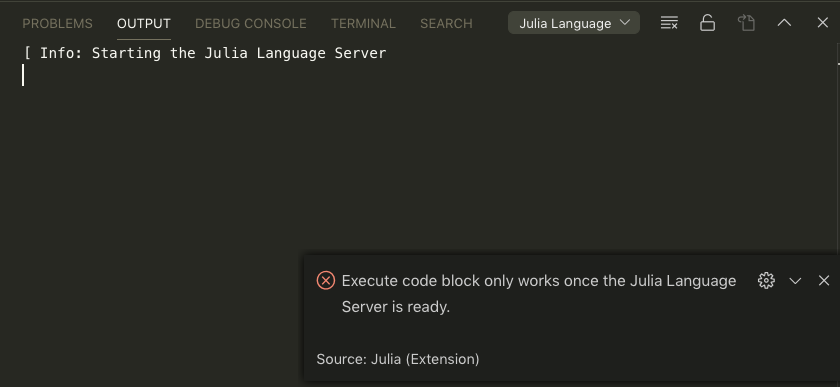
Found that languageServer was missing, then installed it. Not even sure how Julia was accepting alt-enter before this.

 spcogg
on 28 Apr 2020
spcogg
on 28 Apr 2020
You don't need to install the language server package for VS Code, and if you do install it, VS Code will just ignore that version. In general, you don't need to install any Julia packages for the VS Code extension to work, we ship everything we need as part of the extension and never install anything into your user Julia environments.
@spcogg the first screenshot you posted just means that the language server was still starting.
davidanthoff
on 28 Apr 2020
Hello @davidanthoff
I am on Windows 10.
VS code version 1.44.2
Installed Julia extension version 0.15.28
I installed VS Code on my local disk D.
It is also showing same error of "Could not start the julia language server. Make sure the configuration setting julia.executablePath points to the julia binary."
julia.exe was nowhere to be found when I tried to search for it
 Benefit-Zebra
on 4 May 2020
Benefit-Zebra
on 4 May 2020
Just download Julia from julialang.org and install it into the default directory, then the VS Code extension should find it automatically.
davidanthoff
on 4 May 2020
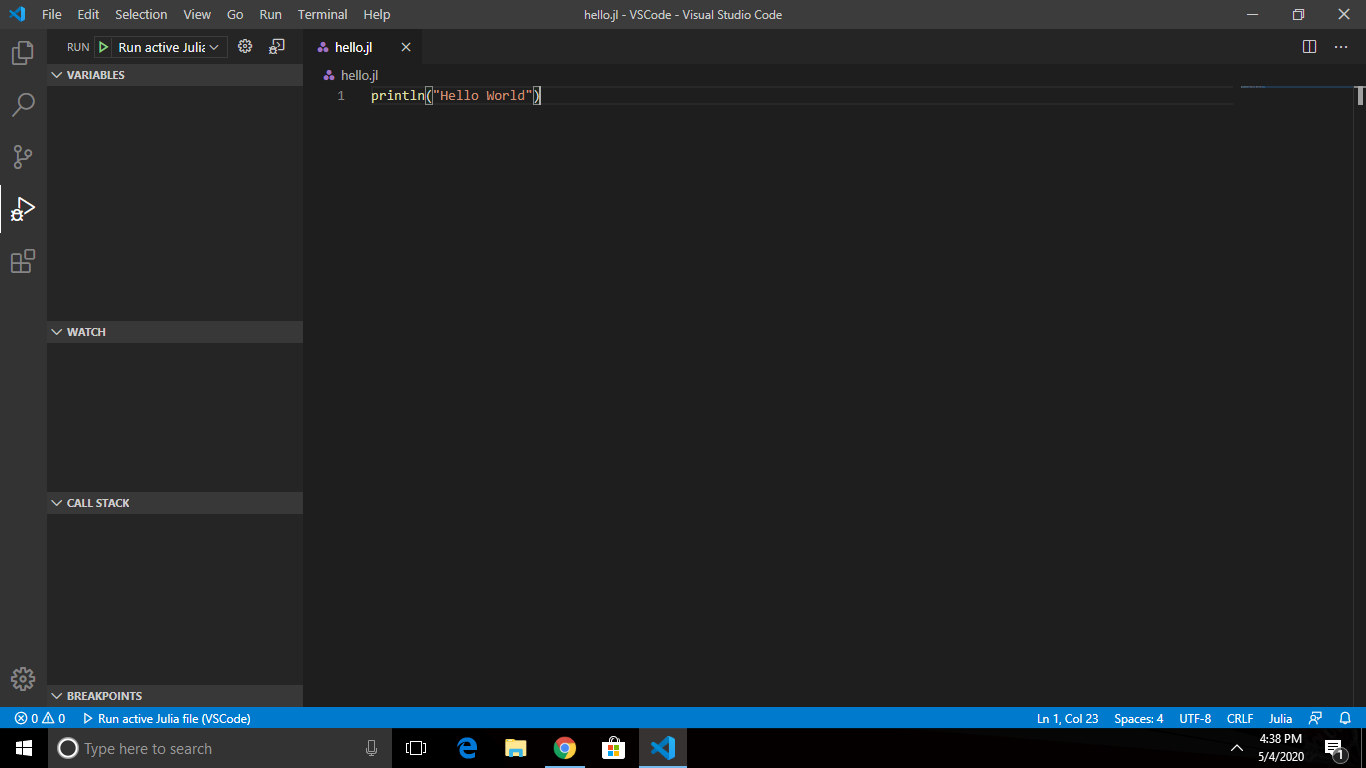
When I try to run file:

When I click on launch.json:

I am getting this error
Benefit-Zebra
on 4 May 2020
I thought the error was Could not start the julia language server. Make sure the configuration setting julia.executablePath points to the julia binary? Are you still getting that error as well?
davidanthoff
on 5 May 2020
Thanks @davidanthoff .Yup! your idea of downloading "_Julia from julialang.org and install it into the default directory_" worked and hence i was no longer getting Could not start the julia language server. Make sure the configuration setting julia.executablePath points to the julia binary.
So then as issue was solved, I tried to run the file and I got error command 'language-julia.debug.getActiveJuliaEnvironment' not found
Benefit-Zebra
on 6 May 2020
@Benefit-Zebra ok. Could you open a new issue with the language-julia.debug.getActiveJuliaEnvironment problem? That is distinct from what this issue here is about.
davidanthoff
on 6 May 2020
@davidanthoff Ok I am opening a new issue.
Benefit-Zebra
on 6 May 2020
Related issues
davidanthoff
·
28Comments
 phlavenk
·
14Comments
phlavenk
·
14Comments
 chrisbrahms
·
26Comments
davidanthoff
·
31Comments
chrisbrahms
·
26Comments
davidanthoff
·
31Comments
 allochi
·
21Comments
allochi
·
21Comments
Most helpful comment
I got the same problem on the 1.0.1 release.