Jtapplecalendar: Single selection calendar - how to deselect a date correctly?
Version: JTAppleCalendar (7.1.7)
allowsMultipleSelection = false
workflow:
- select a date in the calendar (user input)
- deselect it in code using:
calendarView.deselect(dates: [date])by a button (control outside of the calendarView) - select a date in the calendar (user input)
What do I expect:
get deselected delegate call through
func calendar(_ calendar: JTAppleCalendarView, didDeselectDate date: Date, cell: JTAppleCell?, cellState: CellState) once at step 2.
What do I get:
get deselected delegate call 2 times: at step 2 and step 3 (I believe because collection view remembers that the item was selected).
Am I using the wrong method for deselection?
 bivant
All 17 comments
I am able to solve the issue by adding the line in the UserInteractionFunctions.swift:
    public func deselect(dates: [Date], triggerSelectionDelegate: Bool = true) {
        if allowsMultipleSelection {
            selectDates(dates, triggerSelectionDelegate: triggerSelectionDelegate)
        } else {
            let paths = pathsFromDates(dates)
            guard !paths.isEmpty else { return }
            if paths.count > 1 { assert(false, "WARNING: you are trying to deselect multiple dates with allowsMultipleSelection == false. Only the first date will be deselected.")}
            deselectItem(at: paths[0], animated: true)
            collectionView(self, didDeselectItemAt: paths[0])
        }
    }
But maybe I am doing it wrong from the start and should use another method?
bivant
on 4 Apr 2019
checking this out
 patchthecode
on 5 Apr 2019
patchthecode
on 5 Apr 2019
I am not able to reproduce this.
Can you try to replicate it on the sample project i have attached to guthub?
Or can you provide a sample app which demonstrates this?
patchthecode
on 5 Apr 2019
Hello @patchthecode
This one?
bivant
on 5 Apr 2019
You can see unbalanced "deselect" (2 records) in the log if press the "Delete the date" button above the calendar and select a date afterward.
JTAppleCalendarDemo.zip
bivant
on 5 Apr 2019
checking this out now
patchthecode
on 6 Apr 2019
This is not happening with the file you gave me :/
Let me know know when you will be online.
Chat is faster -> https://gitter.im/patchthecode/JTAppleCalendar
patchthecode
on 6 Apr 2019
Hello @patchthecode . I would like to deal with this now if you available
bivant
on 6 Apr 2019
Video with the issue (check the textview at the bottom of the screen)
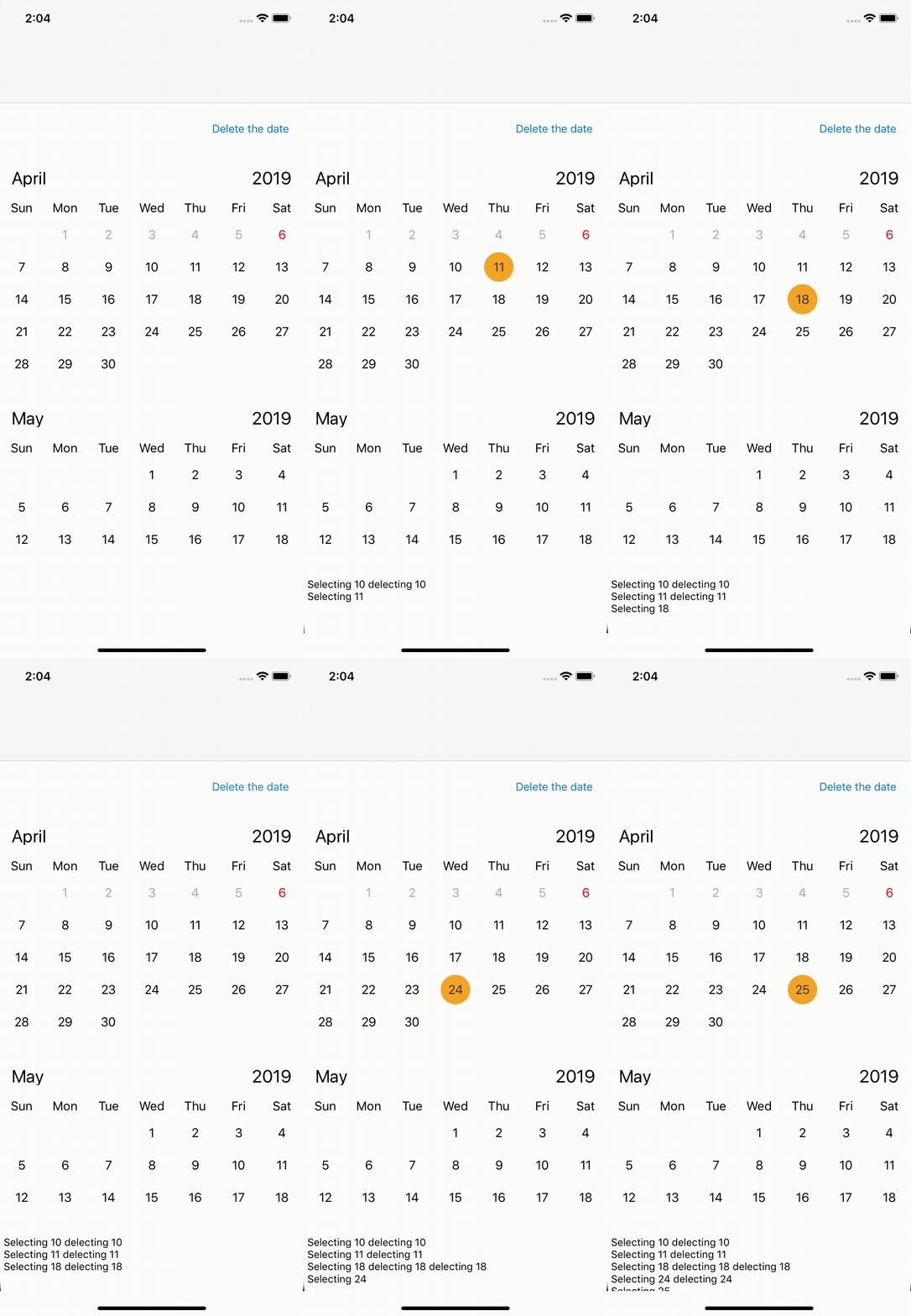
I have updated the pod in the sample project(was 7.1.5, now 7.1.7) and added a textview to see the output.
JTAppleCalendarDemo.zip
Xcode 10.1, iOS simulator 12.1
bivant
on 6 Apr 2019
your issue is recreated.
Checking this now.
patchthecode
on 11 Apr 2019
...bug
patchthecode
on 11 Apr 2019
Fixed on master branch.
Can you check and let me know if it was fixed on master branch for your project?
Follow instructions here to test master branch. Let me know
patchthecode
on 11 Apr 2019
Thank you.
I can not test the fix from master branch right now because of the "old" XCode version (10.1, Swift 4.2).
Cherry pick of the commit over the 7.1.7 tag fixes the issue though.
bivant
on 11 Apr 2019
cool.
patchthecode
on 11 Apr 2019
I am having this issue too. May you help me please
 ekchhuon
on 26 Jun 2019
ekchhuon
on 26 Jun 2019
Hello @ekchhuon
Use the master branch or apply the fix manually. Current tag (7.1.7) does not include the solution of the issue.
By the way, you can check the example for the deselection code from my earlier comment
bivant
on 26 Jun 2019
Exactly what @bivant said is correct.
If you need help let us know. I can help you.
patchthecode
on 26 Jun 2019
Related issues
 Fatalution
·
3Comments
Fatalution
·
3Comments
 zhanswift
·
5Comments
zhanswift
·
5Comments
 blinkmeoff
·
3Comments
blinkmeoff
·
3Comments
 prahaladm
·
3Comments
prahaladm
·
3Comments
 dbmrq
·
5Comments
dbmrq
·
5Comments