Jtapplecalendar: Range with zero spacing between cells issue
Hi
I want to achieve range selection with zero space between cells
But I have white spaces between cells so sometimes cell occurred to be less in width than others
I'm not altering cell size programmatically.
In storyboard I have image with trailing leading bottom and top constraints to cell
in calendar cell width and height is set up to 50
and cell size is 0 (like in example app)
Maybe I'm missing something when using library or maybe there is some issue for calculating cell width and height (I have tried different ratio for calendar width and height: square and rectangles )
Thanks in advance!

 romaHerman
All 19 comments
Yea, the spacing between cells problem is not a calendar issue. It is a UICollectionView issue.
If you try to do a range select on a regular UICollectionView, you will encounter this problem.
This problem occurs because of this:
we have 7 columns, and a fixed width. Therefore if the width is something like say 414. The cell's with will = 414 / 7 = 59.1428571429** recurring. That recurring number is what iscausing the thin line space.
To fix, follow these steps:
- Make sure that the yellow view is set with constraints so that its left and right edge is right up against its superview.
- Have your CalendarView CENTERED with constraints in the middle of the screen
- Set a width constraint on it.
- Create an IBOutlet for the width constraint. Make it = 414 or something.
- In your viewDidLoad, change the same width constraint to your new calculated number.
Your new calculated number is as follows:
let width = self.view.frame.width
var cellSize = CGFloat(width / 7).rounded() // var cellSize = floor(CGFloat(width / 7))
var newWidth = cellSize * 7
- Set the width constraint outlet value to the newly calculated width.
 patchthecode
on 21 Aug 2017
patchthecode
on 21 Aug 2017
Thank you very much for quick reply
I will recheck everything , try and let you know about results!
Update
unfortunately it did not help
I'll continue to search for solution. will post it here if I get something
romaHerman
on 21 Aug 2017
Did not help? hmm
If it is possible you can provide a sample app with that selection screen. I can code the solution.
patchthecode
on 23 Aug 2017
closing this issue.
If the problem is still existing for you, provide a small sample app. I'll re-opern this issue and code the fix.
patchthecode
on 3 Sep 2017
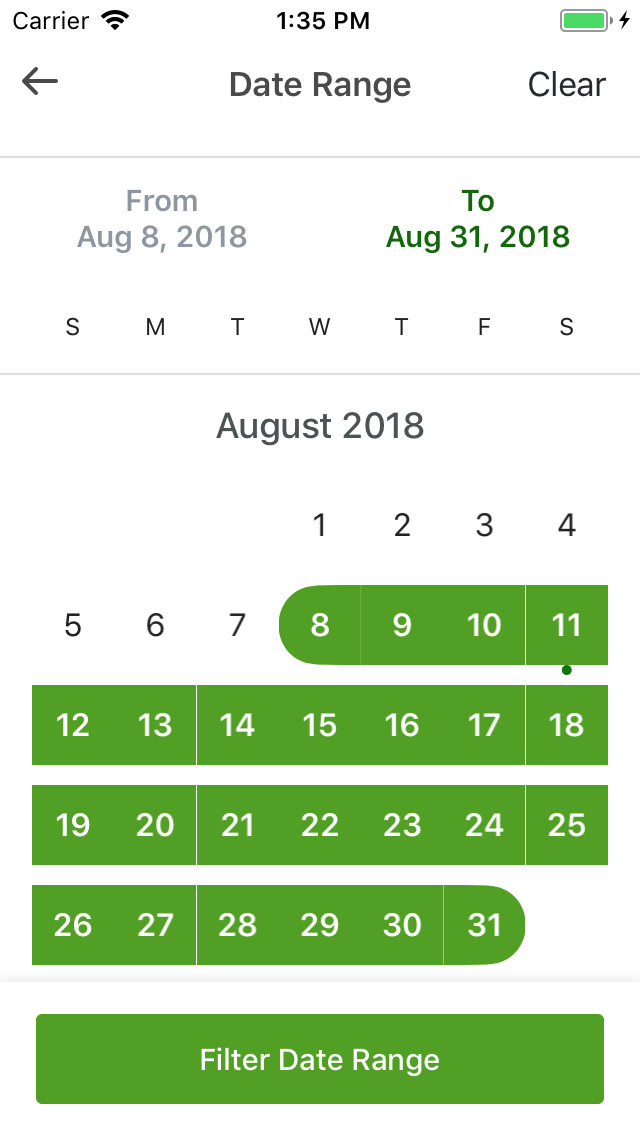
it still happened.
 meanreaksmey
on 11 Aug 2018
meanreaksmey
on 11 Aug 2018
@meanreaksmey
what is the width of the calendarView when the app is run?
patchthecode
on 11 Aug 2018
@patchthecode I set constraint left and right to superview.
meanreaksmey
on 12 Aug 2018
@meanreaksmey yes.
therefore, what is the width of the calendaView when the app is run?
patchthecode
on 12 Aug 2018
@patchthecode I used calendarView.cellSize = 50 and calendarView width depend on screen because I use constraint left right
meanreaksmey
on 12 Aug 2018
Then this will not work.
You must know the width of your calendarView.
And the width when divided by 7 should not have a recurring point.
patchthecode
on 12 Aug 2018
After I divided by 7 I used it for size cell right!.
On Sun, Aug 12, 2018 at 3:30 PM JTAppleCalendar notifications@github.com
wrote:
Then this will not work.
You must know the width of your calendarView.
And the width when divided by 7 should not have a recurring point.—
You are receiving this because you were mentioned.
Reply to this email directly, view it on GitHub
https://github.com/patchthecode/JTAppleCalendar/issues/538#issuecomment-412327426,
or mute the thread
https://github.com/notifications/unsubscribe-auth/ASn9XFt4nDOHtTKhnk0tlRPOSO5TAzfDks5uP-eqgaJpZM4O9Yk2
.
meanreaksmey
on 12 Aug 2018
@meanreaksmey
i do not understand what you mean.
Let me make this most simple.
Please run your app. And put this code in your viewDidLoad() in the controller you have your calendar.
        DispatchQueue.main.asyncAfter(deadline: .now() + 1) {
            print(calendarView.frame.width)
        }
And let me know the width of your calendar view please?
patchthecode
on 13 Aug 2018
@patchthecode
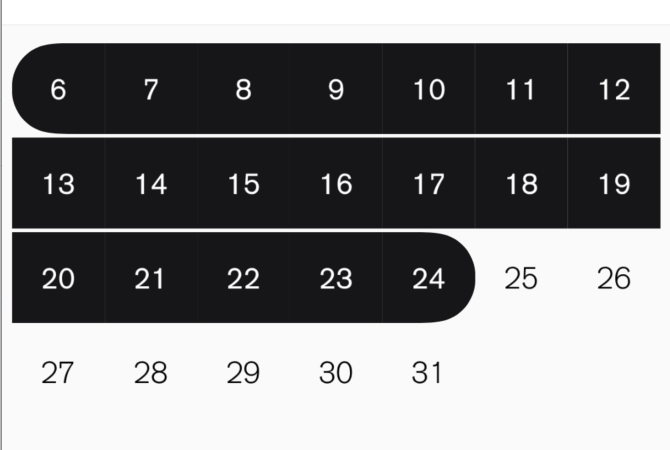
Hi, I have this issue as well, but only on iPhone X
On iPhoneX screenWidth if 375.
Then I set widthConstraint for Calendar:
calendarWidthConstraint.constant = 52 * 7
And in result I have this:
 dbyst
on 6 Sep 2018
dbyst
on 6 Sep 2018
@dbyst

patchthecode
on 6 Sep 2018
@patchthecode
But in my example I have non-recurring decimal value
dbyst
on 6 Sep 2018
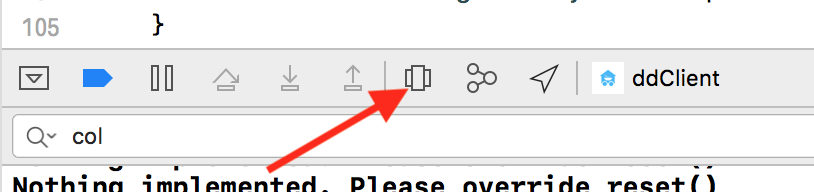
@dbyst When you pause your app on iphonex simulator, and you debug the view hierarchy, what is the width of the calendarView?
Tap on this to debug hierarchy
patchthecode
on 6 Sep 2018
I have an idea. Give us the width of the cells that are being automatically created for us instead of "0". That'd help.
 brandonaskea-mc
on 10 Apr 2019
brandonaskea-mc
on 10 Apr 2019
@brandonaskea-mc but you are in control of the width of the cells via the width of the calendarView.width
Give us the width of the cells that are being automatically created for us instead of "0".
What exactly do i give you? A variable to change the width of the cell?
patchthecode
on 10 Apr 2019
I solved this problem in cell swift file.
After awakeFromNib() method called in cell, I add this code.
let width = UIScreen.main.bounds.width
let selectedViewSide = CGFloat(width/7).rounded() - 0.05
widthConstraint.constant = selectedViewSide
heightConstraint.constant = selectedViewSide
widthConstraint and heightConstraint are connected to selectedView width and height constraint.
 RoKang
on 29 May 2019
RoKang
on 29 May 2019
Related issues
 blinkmeoff
·
3Comments
blinkmeoff
·
3Comments
 Kevinw14
·
3Comments
Kevinw14
·
3Comments
 prahaladm
·
3Comments
prahaladm
·
3Comments
 leo150
·
3Comments
leo150
·
3Comments
 gotamafandy
·
3Comments
gotamafandy
·
3Comments
Most helpful comment
Yea, the spacing between cells problem is not a calendar issue. It is a UICollectionView issue.
If you try to do a range select on a regular UICollectionView, you will encounter this problem.
This problem occurs because of this:
we have 7 columns, and a fixed width. Therefore if the width is something like say
414. The cell's with will = 414 / 7 = 59.1428571429** recurring. That recurring number is what iscausing the thin line space.To fix, follow these steps:
Your new calculated number is as follows: