Jtapplecalendar: Crash occurs when making JTCanlendarView as a new XIB
version: 7.0.6
Hi. When I watch the guide video, the CalendarView is created inside of storyBoard, under the viewController. For the reusability, I created a new XIB file and class file, declared as CalendarView and tried to load this xib from different class, using below code snippet, it occurs crash.
// Codes in other view controller
let aCalendarView = Bundle.main.loadNibNamed("CalendarView", owner: self, options: nil)?.first as? CalendarView // << crash here
self.view.addSubView(aCalendarView)
Crash is occurred in JTAppleCalendarView's init function,
    /// Initializes using decoder object
    required public init?(coder aDecoder: NSCoder) {
        super.init(coder: aDecoder)
        setupNewLayout(from: collectionViewLayout as! JTAppleCalendarLayoutProtocol) // << crash here. Log is "EXC_BAD_ACCESS".
    }
Is there any way to make JTAppleCalendar as separated XIB?
 ahimahas
All 14 comments
I miss understood the usage. forget about it :)
ahimahas
on 2 Aug 2017
cool. glad its sorted out.
 patchthecode
on 2 Aug 2017
patchthecode
on 2 Aug 2017
Facing the exact same issue in the exact same situation. @ahimahas, could you please explain what was the misunderstanding?
 electroqted
on 8 Sep 2017
electroqted
on 8 Sep 2017
@electroqted what crash are you experiencing? error message?
And can you let us know what code you have for the initialization?
patchthecode
on 8 Sep 2017
I have a view controller CalendarViewController in which i have the JTAppleCalendarView
Code for the viewcontroller is this :
public class CalendarViewController: UIViewController, JTAppleCalendarViewDataSource, JTAppleCalendarViewDelegate {

 @IBOutlet weak var MyCalendarView: JTAppleCalendarView!

  override public func viewDidLoad() {
        MyCalendarView.calendarDataSource = self
        MyCalendarView.calendarDelegate = self
        MyCalendarView.register(UINib(nibName: "CalendarCell", bundle: NewActionUITableDataSource.bundle), forCellWithReuseIdentifier: "CalendarCell")
}
It crashes right in the initialization of the viewcontroller class itself, at the '@IBOutlet weak var MyCalendarView: JTAppleCalendarView!' line.
Crashing function is
setupNewLayout(from: collectionViewLayout as! JTAppleCalendarLayoutProtocol) // << "EXC_BAD_ACCESS".
I've also attached a screenshot of the storyboard with the viewcontroller.
Nothing much, only the jtcalendarview
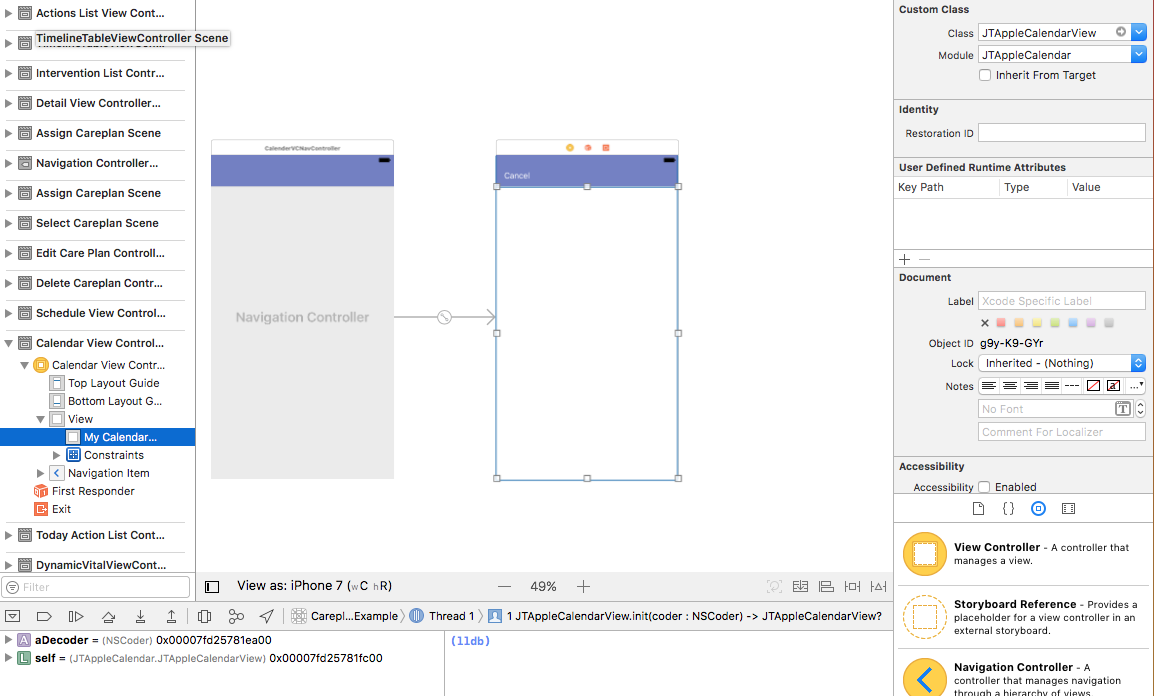
I'm sure it's a very small silly mistake, just can't seem to nail it down though.
electroqted
on 8 Sep 2017
@electroqted since your project is small. Can you zip it and drag it into this chat box? I'll take a look.
patchthecode
on 8 Sep 2017
Found the issue! As I suspected, very small and silly indeed :P
There's one wrong line in the tutorial (or maybe it's just not updated for version 7).
Was making the JTAppleCalendarView out of a UIView as mentioned in the tut. Needed to make it out of a UICollectionView instead! Hence the crash at setting up layout.
Thanks though for the quick response @patchthecode !
Appreciate the help thoroughly.
electroqted
on 8 Sep 2017
@electroqted oh. You were reading the tutorials? I thought you were looking at the video tutorial list located --> Here. It explains many things. Just look at the videos that you need to see, and skip the others.
patchthecode
on 8 Sep 2017
@electroqted @patchthecode I have the very same issue. I'm trying to create my calendar in a .xib instead of storyboard. I also followed the tutorials, and adapted to v7 when needed, but it crashed just like yours did.
Could you please tell me which is the wrong line in the tutorial or instructions on how to fix it? I also opened an issue https://github.com/patchthecode/JTAppleCalendar/issues/642
Thank you very much.
 daviddetena
on 30 Nov 2017
daviddetena
on 30 Nov 2017
videos are private , so cant view
 david-opendna
on 9 Oct 2019
david-opendna
on 9 Oct 2019
@david-opendna private because they would cause more trouble than help.
Library gets updated, but videos cannot.
I instead created tutorials. Have you checked them out? www.patchthecode.com
patchthecode
on 9 Oct 2019
i get Thread 1: EXC_BAD_ACCESS (code=1, address=0x0) on line below when calling setupNewLayout, just recently upgraded to version 7, im using Xcode11 and iOS13
required public init?(coder aDecoder: NSCoder) {
        super.init(coder: aDecoder)
        setupNewLayout(from: collectionViewLayout as! JTAppleCalendarLayoutProtocol)
    }
from call stack this line is called before the crash.
` let cell = tableView.dequeueReusableCell(withIdentifier: MypageCalendarTableViewCell.Identifier) as! MypageCalendarTableViewCell
`
david-opendna
on 10 Oct 2019
what does the log say. Can you paste me the log?
patchthecode
on 10 Oct 2019
there is no log , nothing is printed to console
david-opendna
on 11 Oct 2019
Related issues
 dimitris-c
·
5Comments
dimitris-c
·
5Comments
 blinkmeoff
·
3Comments
blinkmeoff
·
3Comments
 oddpandadesign
·
5Comments
oddpandadesign
·
5Comments
 arn00s
·
3Comments
arn00s
·
3Comments
 Fatalution
·
3Comments
Fatalution
·
3Comments
Most helpful comment
Found the issue! As I suspected, very small and silly indeed :P
There's one wrong line in the tutorial (or maybe it's just not updated for version 7).
Was making the JTAppleCalendarView out of a UIView as mentioned in the tut. Needed to make it out of a UICollectionView instead! Hence the crash at setting up layout.
Thanks though for the quick response @patchthecode !
Appreciate the help thoroughly.