Jtapplecalendar: Making rounded ends properly
i am using 7.0.4
My app works with series of selections and I would like to have rounded corners on both ends of selected cells. I have UI code but logic for making this bugs me. CellView determines the looks of the cell. For now I am passing date and CellState to manipulate UI. How can CellView determine where are the ends? Any ideas? Tips?
 antonijap
All 18 comments
basically, are you saying that you wished that the cellState was attached to the CellView ?
like myCell.cellState.isSelected etc etc?
 patchthecode
on 24 Jun 2017
patchthecode
on 24 Jun 2017
Nope. Here is my new design -> http://d.pr/i/i8pEdw/2k3BgPzP
What I want to do is to have rounded selections if a selection is first/last. I really don't have any idea how to approach this problem.
antonijap
on 24 Jun 2017
UPDATE
So I have managed to get somewhere but still, everything looks broken.
Here is a part of my ugly code:
if state.isSelected {
      let allLefts = CloudManager.instance.periods.map({ $0.startDate })
      let allRights = CloudManager.instance.periods.map({ $0.endDate })

      // FIXME: - Add case when only 1 date is in Period
      if allLefts.contains(state.date) {
           leftSelectedView(opacity: 1.0)
            print("Left for \(state.date)")
       } else if allRights.contains(state.date) {
            rightSelectedView(opacity: 1.0)
       } else {
            middleSelectedView(opacity: 1.0)
       }
This actually does something with the dates. Here how it looks:
http://d.pr/i/YrrdMW/230rdnDK
Code for UI:
extension UIView {
    func roundCorners(_ corners: UIRectCorner, radius: CGFloat) {
        let path = UIBezierPath(roundedRect: self.bounds, byRoundingCorners: corners, cornerRadii: CGSize(width: radius, height: radius))
        let mask = CAShapeLayer()
        mask.path = path.cgPath
        self.layer.mask = mask
    }
}
My questions:
- Why do cells have a greater height that width (they should be 1:1)? (they look like portrait pill)
- Do you know why is this rounding thingy not working properly? I tried this code when I've just set up the calendar and it worked.
antonijap
on 24 Jun 2017
- have you set the cell inset to be zero?
calendarView.minimumLineSpacing = 0
calendarView.minimumInteritemSpacing = 0
- Do you have this in your view did load?
calendarView.isRangeSelectionUsed = true
calendarView.allowsMultipleSelection = true
Then when you want to configure your cell, you do this
if cellState.selectedPosition() == .left {
    // configure the rounded left
} else cellState.selectedPosition() == .right {
...
...
I didn't know about this range selection. Thanks! Now it works very nice http://d.pr/i/GbD85t/3XKlfR9g
Just one more thing. If you will watch this gif then you'll see how each section has some padding on the right. Any ideas why this happens? I checked my constraints and they are okay.
antonijap
on 25 Jun 2017
hmm. There should be no padding.
Did you make sure this?
calendarView.minimumLineSpacing = 0
calendarView.minimumInteritemSpacing = 0
Also, have you accidentally set the itemSize property on interface builder? or in code?
itemSize should be nil.
patchthecode
on 26 Jun 2017
closing issue.
let me know if other help is needed.
patchthecode
on 21 Jul 2017
hmm. I wish you'd send a sample project.
i'll get you those rounded edges
patchthecode
on 21 Jul 2017
No, don't have a problem with round edges. I have a problem with other thing I addressed here. It is weird spacing on the right side of a calendar where you can see selected day in next month.
antonijap
on 21 Jul 2017
if the minimum spacing didnt help. Is it possible you can send a small zipped project with all your secret code removed? I just want to see whats wrong with the selection.
I'm about to release version 7.0.5 over the weekend. I'd love to add what ever fix to your problem in there.
patchthecode
on 21 Jul 2017
Go to my profile and find Period Flow 💃
antonijap
on 22 Jul 2017
hmm. can you provide me the link? i went Here but both those repositories seem to have outdated code. I'm not sure if i went to the right place.
By the way, i looked at your website. Your designs look really good and clean. 👍
patchthecode
on 22 Jul 2017
Thanks!
here it is: https://github.com/antonijap/Period-Flow-2/tree/Development
antonijap
on 22 Jul 2017
Ok found it. The scrolling is off because you might have accidentally set this ->
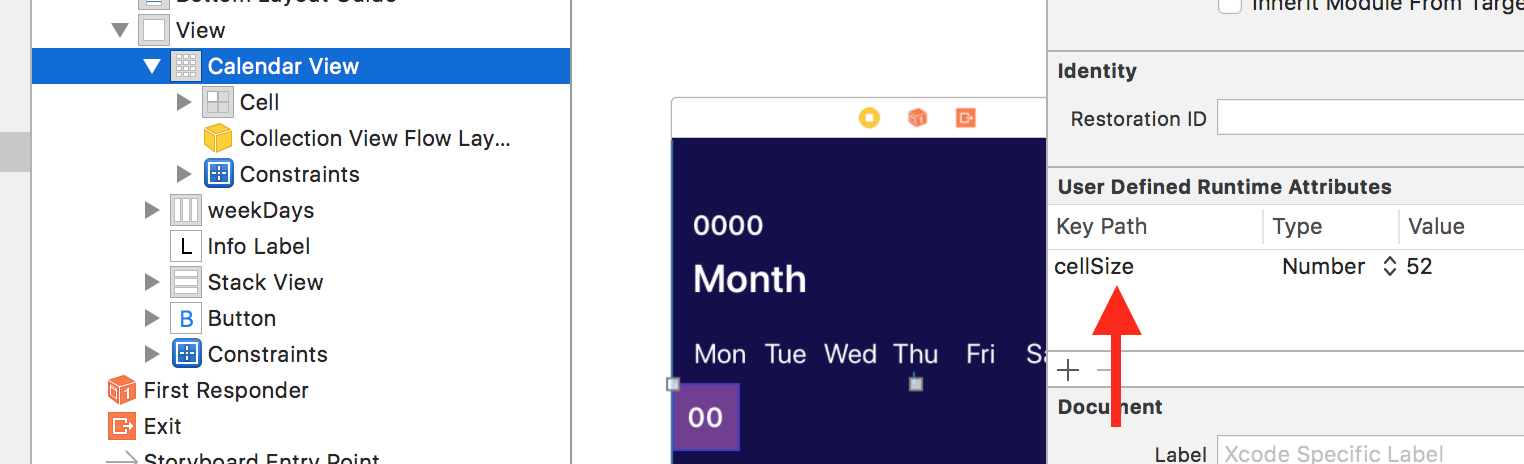
Once deleted, every thing works as expected. 🍻
Any other issues, do let me know. Always a pleasure to help.
patchthecode
on 22 Jul 2017
YAAAAY! Only, this time I've got this http://d.pr/i/9ovqQP/1YbAOQEQ
antonijap
on 22 Jul 2017
Oh, thats because there are no constraints setup in the the cell.
Also the constraints of the CalendarView should be different.
set the ratio to be 7:6 instead of 1:1, because there are 7 columns and 6 rows.
Here is a fixed zip file of the solution ->
Period-Flow-2-Development.zip
Let me know if there is anything else wrong. cheers. 🍻
patchthecode
on 22 Jul 2017
You are my hero!
antonijap
on 23 Jul 2017
Haha. thanks.
patchthecode
on 23 Jul 2017
Related issues
 arn00s
·
3Comments
arn00s
·
3Comments
 nikolalukovic
·
4Comments
nikolalukovic
·
4Comments
 Fatalution
·
3Comments
Fatalution
·
3Comments
 blinkmeoff
·
3Comments
blinkmeoff
·
3Comments
 oddpandadesign
·
5Comments
oddpandadesign
·
5Comments
Most helpful comment
You are my hero!