Jtapplecalendar: scrollToDate() does not account for UICollectionView sectionInset property
First - thanks for all your hard work on this calendar!
I am using JTAppleCalendar 7.02.
Calling calendarView.scrollToDate(Date(), triggerScrollToDateDelegate: true, animateScroll: false)
I noticed that the collection view was stopping between April & May. I played around with the
extraAddedOffset and realized the issue was related to the Section Inset.
The offset amount I needed to move the view into the correct position was 160pt. This is because the offset for each section increases by 40 so for 4 sections (jan through apr), the offset must be increased by 40 for each month (160). I'm not sure if it was intentional or not but thought I should bring it up.
The solution for now is to either not use section inset or to multiply the Integer month by the total inset amount and set that as the extraAddedOffset.

 johnuphoff
All 37 comments
johnuphoff
on 18 May 2017
OK. Let me know if i understand correctly.
- You have a horizontal calendar
- You have a horizontal section inset
- When you call
scrollToDatein this state, the calendar does not properly scroll to the date?
 patchthecode
on 18 May 2017
patchthecode
on 18 May 2017
That is correct - I also tested with a vertical scroll calendar with the same result.
johnuphoff
on 18 May 2017
Same issue here. I can post pull request if you want.
 bernikowich-cedoni
on 25 May 2017
bernikowich-cedoni
on 25 May 2017
I have the same problem. These are the images of the problem.
Todays date = 2017/07/18. If I call scrollToDate Today, this is what it happens.
- Start date = 2017/06/01
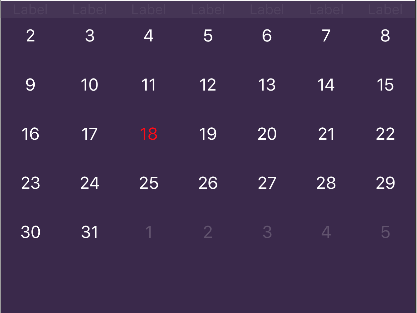
- Start date = 2017/05/01
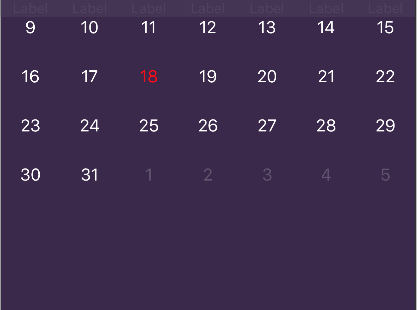
- Start date = 2017/04/01
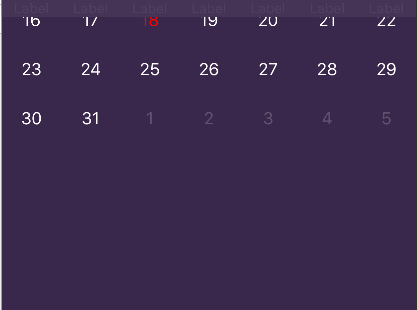
As you can see, further the start dates are from Today, the further the offset gets.
When I tried the start date as 1900/01/01 the collection view was showing somewhere in year 2040.
I think the "cellCache" height information is not updated properly. Has anyone found a solution to this problem?
 jokerham
on 18 Jul 2017
jokerham
on 18 Jul 2017
Just realized that it shows correctly if I call the function twice. Wonder why.
jokerham
on 18 Jul 2017
@jokerham i will investigate this today.
patchthecode
on 18 Jul 2017
Same issue. Hope you will fix it soon @patchthecode
 duyklinsi
on 30 Jul 2017
duyklinsi
on 30 Jul 2017
I got caught up last week.
I'll take a look in 11 hrs today.
patchthecode
on 30 Jul 2017
Same issue, but I'm using vertical scroll. The date cells appear aligned to the left after the scroll, but pop back into place when manually scrolling. @patchthecode
 DominicMDev
on 21 Nov 2017
DominicMDev
on 21 Nov 2017
Seems like the same problem comes up when using scrollToSegment. It does not consider the sectionInset, too.
Im using Swift 4.0 with JTAppleCalendar 7.1.3
 chauss
on 21 Nov 2017
chauss
on 21 Nov 2017
Yes.. this issue is opened, but i never got around to looking at it.
My time is to caught up.
Let me take a look after work today ok.
patchthecode
on 21 Nov 2017
Hi, this issue seems to be still here:
https://www.dropbox.com/s/1wyab52q7vk6zck/JTAppleCalendar_insetsIssue.mp4?dl=0
Could you please fix? This is really important for me to have insets 🙂
 juliensagot
on 29 Dec 2017
juliensagot
on 29 Dec 2017
Hey guys, i have finally gotten around to fixing this.
can you put this in your PodFile and run a pod update command?
pod 'JTAppleCalendar', :git => 'https://github.com/patchthecode/JTAppleCalendar.git', :branch => 'Fixes'
If it works well, i will merge this into the next release.
patchthecode
on 29 Dec 2017
Works in my projet and in the example project 👍
Thank you very much, that was fast!
juliensagot
on 29 Dec 2017
7.1.5 released
patchthecode
on 31 Dec 2017
Still have this issue. Pod version 7.1.7. For now removed insets to avoid UI bugs.
 yuryks
on 6 Mar 2019
yuryks
on 6 Mar 2019
I can confirm, have the same issue on current version
 lsmilek1
on 8 Mar 2019
lsmilek1
on 8 Mar 2019
Can you tell me the setup you have?
What does your inset look like?
I need know what is your exact setup so that i can re-create the UI bug.
patchthecode
on 8 Mar 2019
Hi,
I am currently struggling with scrollToDate on viewDidLoad. What I am
trying is to have fixed cell height and change calendarView height on
scroll (generating cells till end of row to prevent gap between months for
vertical scroll direction). The issue I have:
1) in viewDidLoad I have to set scroll mode to .none, then scroll and set
scroll mode .stopAtEachSection, otherwise it stops somewhere in the middle
of section
2) I want to have top and bottom insets on section (place for shadow
effect). After scroll in viewDidLoad the insets are ignored - view shows up
scrolled, but I have to scroll manually so it snaps correctly with top
inset. Also "extraAddedOffset" is ignored during the scroll in viewDidLoad.
I am sorry if the code is confusing, I am working today already for 14hrs,
I cant think much straight... Hope it helps!
(code in next comment - answering vie email ruined the format)
lsmilek1
on 8 Mar 2019
@lsmilek1
ok... can you provide a sample app with your issue? Just zip the project and drag it into the chat box.
I cannot determine what your problem is from a long code post in chat like this.
patchthecode
on 9 Mar 2019
Sorry for me being so stupid. I can't send you the current project. Please, give me few days to generate a sample with the same UI bug. I will then update this answer.
Update:
I was able to reproduce the issue. Try to navigate for few different months (with different number of weeks and also play with the scrolling mode.
The thing is that I have vertical calendar and I am generating .tillEndOfRow to prevent gaps during vertical scrolling. Might it be that:
1) calling scroll function with .stopAtEachSection I get it misaligned because during the scroll has each month various height (various number of weeks/rows)? In that case would not help to set calendarView height prior to scroll, am I right?
2) and calling scroll with scrollMode .none are somehow the insets ignored?
Investigating it further I noticed two other things:
1) I my app, no matter how I am calling the calendar setup with scrollToDate, I still see flashing old months when the navigation controller shows the scene. This is not happening in the lightweight sample app where I made only one label in the cell. Setting generateOutDates from .endOfRow to .off make that flash almost unnoticable, but is still there. Navigation animation is happening with not scrolled view
2) extraAddedOfset for scrolling gets ignored
lsmilek1
on 9 Mar 2019
@lsmilek1
can you test and let me know if the fixed i pushed to master branch worked?
Instrunctions here
patchthecode
on 11 Mar 2019
@lsmilek1
if it is fixed, i will close this issue
patchthecode
on 11 Mar 2019
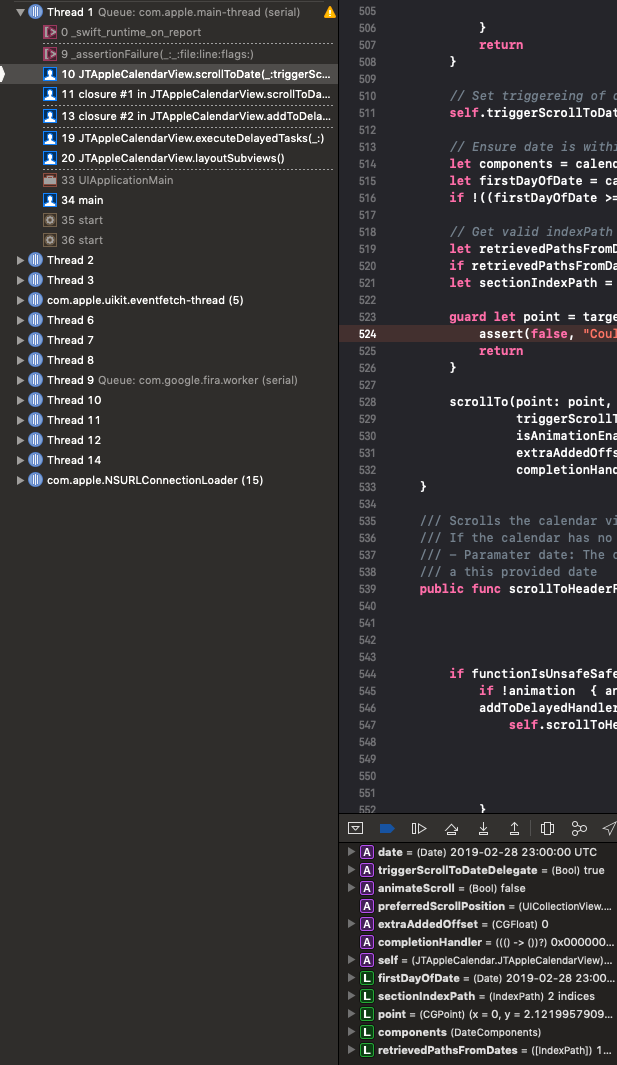
Trying it in the main app and keeping scroll mode first .none and then switching back I got ceash here:
UserInteracionsFunctions.swift, public func scrollToDate, line 524:
guard let point = targetPointForItemAt(indexPath: sectionIndexPath) else {
            assert(false, "Could not determine CGPoint. This is an error. contact developer on github. In production, there will not be a crash, but scrolling will not occur")
            return
        }
keeping scroll mode .stopAtEachSection cause no error, but it still scrolls and appears on viewDidLoad misaligned (Seems like offset is approx. 38pt still to go...). When I use the same scroll function manually after view appears, the calendar scrolls another approx. 10 pt (what could be the value of my top+bottom insets). I will try it later today on the sample app or play with "extraAddedOffset" if it helps for any scroll mode.
What I noticed positive is that the view appears already scrolled without flashing the previous months!
Thank you!
lsmilek1
on 11 Mar 2019
@patchthecode
UPD Forgot switch pod origin to new master branch, will check again in 2-3 hours.
UPD2 pod 'JTAppleCalendar', :git => 'https://github.com/patchthecode/JTAppleCalendar.git' did not resolve issue.
Not fixed for scrollDirection.vertical and scrollToHeaderForDate.
Project example: JTAppleCalendarInsetsErrorDemo.zip
yuryks
on 11 Mar 2019
So... Following is done in simulator... I updated the pod according to your instructions in the sample app I shared above. Here it's how it looks when scrolling mode is .stopAtEachSection and I scroll to 11th August 2019 while startDate of the calendar is 1st January 2017:
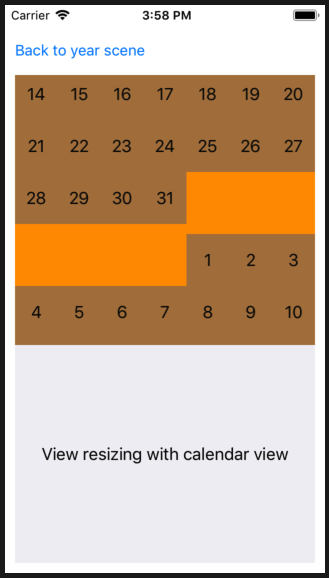
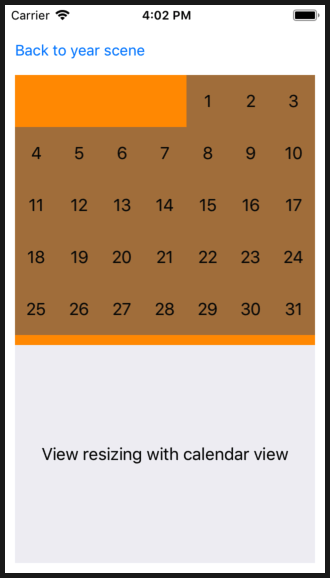
When I try to scroll a little, it snaps all good with insets:
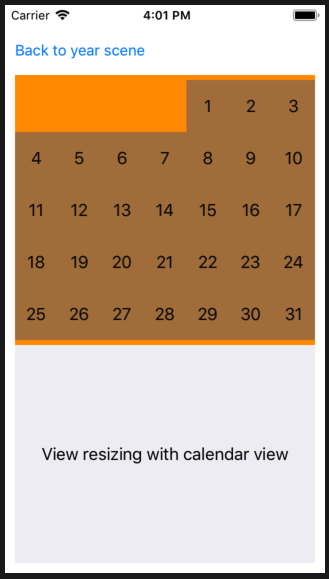
With scroll mode .none and switching back in completion handler to .stopAtEachSection, the august appears better, but still ignoring top inset. And after a little of manual scroll is the position again all good as above.
Interesting is, that I get no crash. But If I try the same in my App (simulator and device) I get a crash while loading if I use .none mode.
If I use .stopAtEachSection I get no crash, but it looks the same like in the sample app
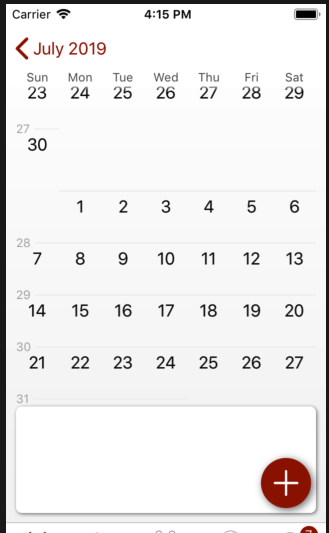
Scrolling to March in viewDidLoad even shows February dates as there is probably a little of previous month visible
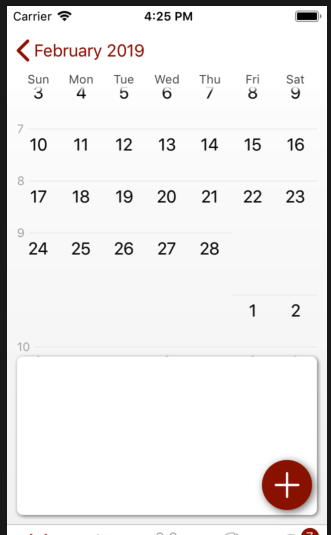
If you want and it would be any help, I can share my screen to show you the behaviour and the code. Thank you!
lsmilek1
on 11 Mar 2019
ok just woke up.
Checking this out again
patchthecode
on 11 Mar 2019
@lsmilek1
Ok something important. Some of the errors you are seeing may be because of cached build. Also, i made a small change to account for the inset on scroll without header. Therefore please do the following and let me know the results.
- make sure you have master branch in the Podfile again, then do the following command again because i made a small update.
pod update
- After doing this, in your Xcode project, make sure you do a
CMD + SHIFT + Kto clean your project. If you do not do this it will use old build code. I scratch my head for about 20 mins before i realized my fix was not being used in your sample project until i cleaned.
Notes:
- Setting scrollmode to none should no longer behave badly. (code here was incomplete when i made the fix for the other scroll mode.)
- Setting the scrollMode to = None, will behave like you showed above. Meaning, it will ignore insets. A scroll mode of none does not respect anything. It is free scrolling.
Let me know the results.
patchthecode
on 11 Mar 2019
@yuryks
Checking into your issue now
patchthecode
on 11 Mar 2019
@yuryks
i think your issue is resolved with the latest fix?
I downloaded your sample project and i didnt see any UI issues.
patchthecode
on 12 Mar 2019
@patchthecode
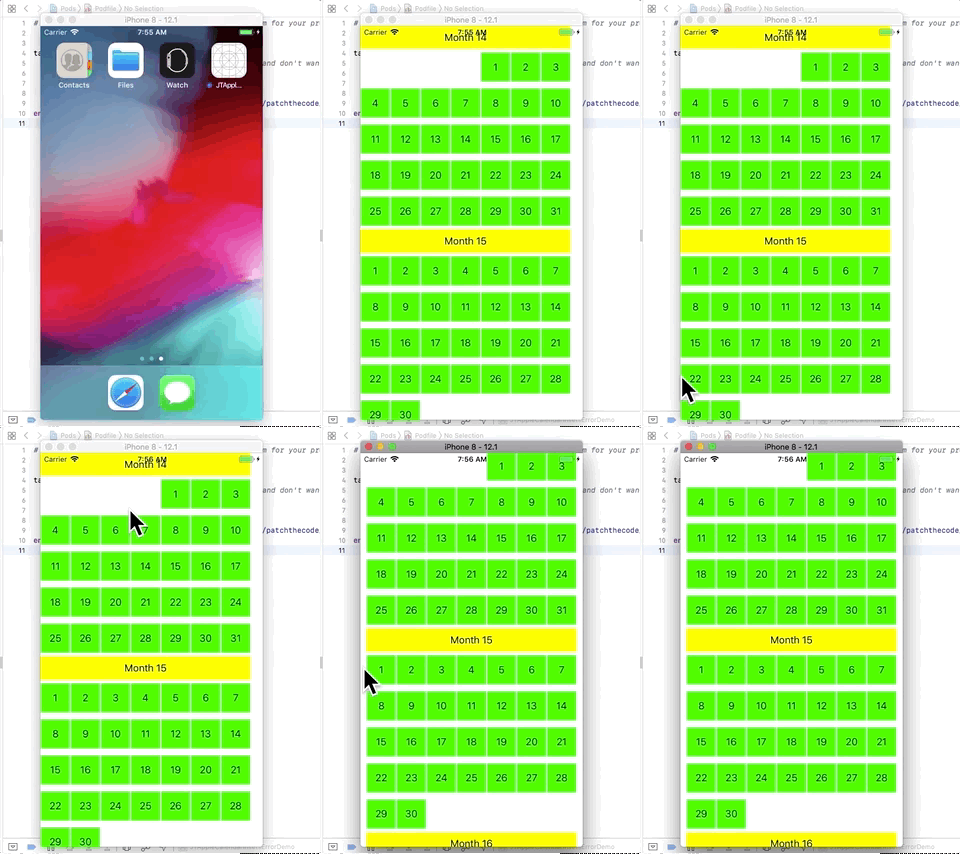
I am still facing insets error (pay attention to left inset before and after scroll). Maybe it is simulator only issue, will check on device later today. (MacOS 10.13.6, Xcode 10.1 (10B61), iOS 12.1 Simulator)
Here is my updated sample project (i have changed background colors for cell and header).
JTAppleCalendarInsetsErrorDemo1.zip
yuryks
on 12 Mar 2019
@yuryks
ok i see it now.
Checking this out.
patchthecode
on 12 Mar 2019
@yuryks
Ok, please do
- pod update
- Xcode Clean (to get rid of cached build)
- Let me know if bug is still there
patchthecode
on 12 Mar 2019
@patchthecode it works now as expected. Thanks.
yuryks
on 12 Mar 2019
I am sending my deepest apologies and a symbolic contribution on https://opencollective.com/JTAppleCalendar for my inexperience omission of cleaning the build, I am still a beginner!
Scrolling mode .stopAtEachSection with a bit of "extraAddedOfsett" works perfect now. Also no flashing of pervious months, no crash. All good!
Thank you very much for your prompt support!
lsmilek1
on 12 Mar 2019
awesome.
glad it worked.
continue using master branch until i release version 7.1.8 shortly
And thank you for the contribution
patchthecode
on 12 Mar 2019
Related issues
 blinkmeoff
·
3Comments
blinkmeoff
·
3Comments
 MoridinBG
·
5Comments
MoridinBG
·
5Comments
 nikolalukovic
·
4Comments
nikolalukovic
·
4Comments
 zhanswift
·
5Comments
zhanswift
·
5Comments
 Kevinw14
·
3Comments
Kevinw14
·
3Comments
Most helpful comment
Yes.. this issue is opened, but i never got around to looking at it.
My time is to caught up.
Let me take a look after work today ok.