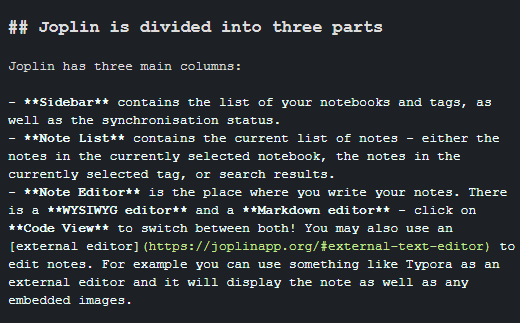
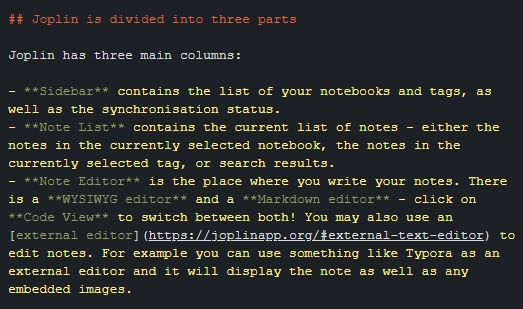
Joplin: Markdown syntax highlighting in the code view with the Dark theme became worse
Environment
Joplin version: 1.1.1 and later
Platform: Windows, possibly others too
OS specifics: Windows 10 Home Single Language version 1809
Steps to reproduce
- Compare the syntax highlighting between v1.1.1 and v1.0.245.
v1.1.1:
v1.0.245:
Describe what you expected to happen
I expected the colors to remain the same. This could be a feature and not a bug, but I don't think so since I believe the old colors look better, and since it is not listed as a feature in the release notes of v1.1.1.
 hb20007
All 4 comments
The new release versions included a move to a new editor component which did not have the same themes available. You can customize the colours however you want with the userchrome.css file.
Take a look at my comment on the forums for some information about customizing further.
If you're really stuck changing the colours yourself, feel free to drop a comment below and I can try to help you out.
 CalebJohn
on 22 Sep 2020
CalebJohn
on 22 Sep 2020
Just to clarify: Does this issue being closed mean that dark theme syntax highlighting will not be part of Joplin in the foreseeable future?
 m-ad
on 6 Oct 2020
m-ad
on 6 Oct 2020
@m-ad Take a look at the link posted by CalebJohn above. In that forum, a user called dpoulton posted some CSS that you can place in the userchrome.css file for more colorful syntax highlighting. As for whether there are plans to make this the default in the future, I don't know.
hb20007
on 6 Oct 2020
Just to clarify, there are no current plans to change the default syntax highlighting.
CalebJohn
on 7 Oct 2020
Related issues
 GingerPapa
·
3Comments
GingerPapa
·
3Comments
 Dharmesh-Poddar
·
3Comments
Dharmesh-Poddar
·
3Comments
 Cybernemo
·
3Comments
Cybernemo
·
3Comments
 christianlupus
·
3Comments
christianlupus
·
3Comments
 Rahulm2310
·
3Comments
Rahulm2310
·
3Comments