Joplin: App crashes when i hit Configuration button
Joplin 1.0.319-rc1 (either 32 or 64 bit, it happens the same way)
Platform: Android
OS: LineageOS 16
Device: Moto G6 Play
Steps:
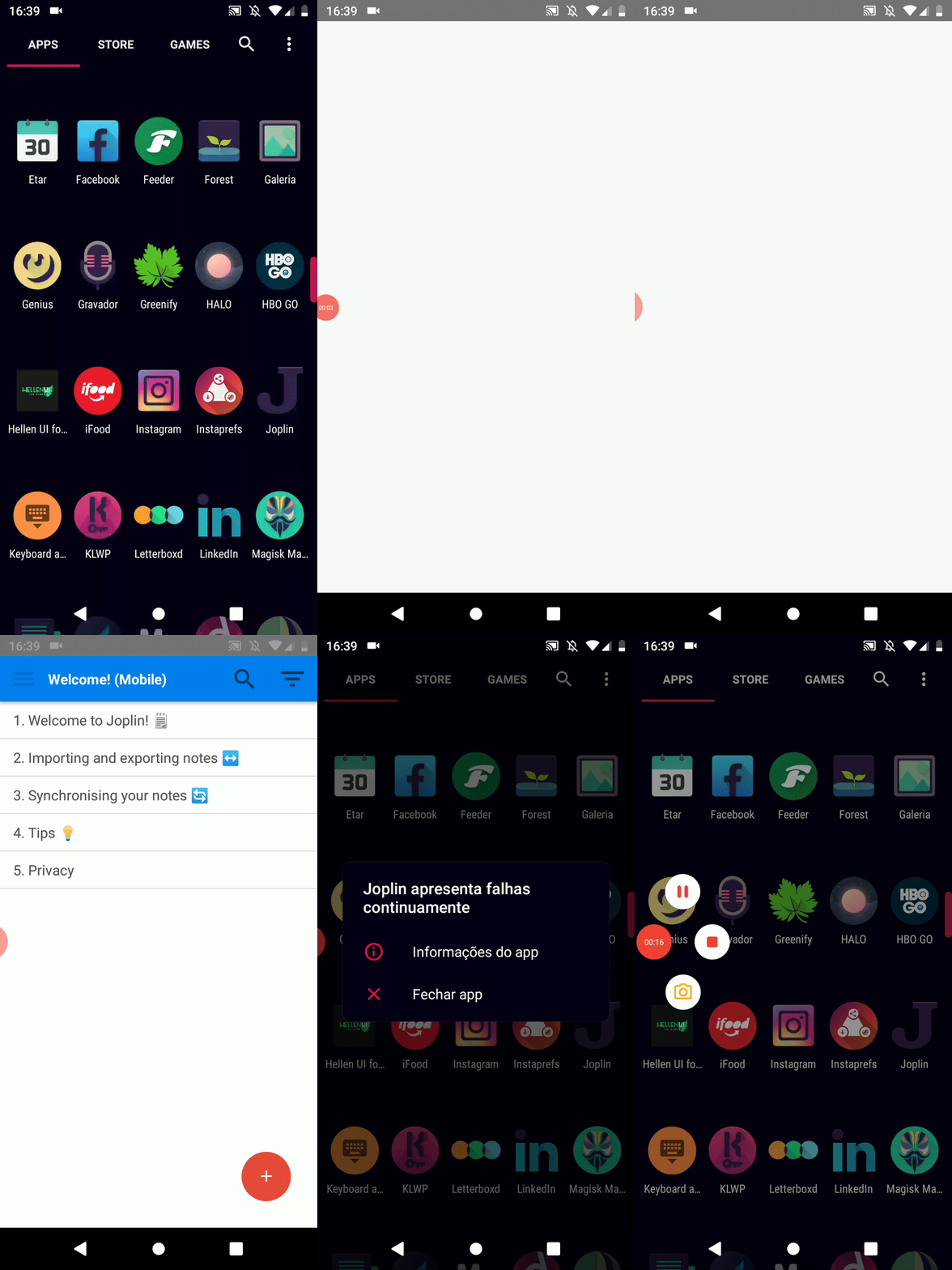
1 - Install app brand new (uninstalled, cleaned cache and storage)
2 - Open
3 - Hit configuration button
4 - App crashes and closes
What i expected to happen: not close, so
i can config it..
Ok, now i followed the template, can anyone help me?
It was ok till last week when i updated the app, now no matter what, it crashes, even if i install a previous version.
I can't attach a debug if the Config button don't work. So please don't go close my issue since i'm not "following" this.
 hrqmonteiro
All 14 comments
The latest version is 1.0.320: https://github.com/laurent22/joplin-android/releases/latest
Can you please try 1.0.320.
 tessus
on 11 Mar 2020
tessus
on 11 Mar 2020
Were any of the LineageOS components updated since last week?
tessus
on 11 Mar 2020
@tessus no, and i'm using a stable version, i don't think lineage16 is getting changes since they are focusing on 17 which is android 10
Im happy with my stable Lineage with Android Pie so i'm not changing a bit neither have an update.
I'm downloading the 1.0.320 and i'll see.
I was using 319 since it was the ono on the readme.md and on Aurora Store.
hrqmonteiro
on 11 Mar 2020
Crash issues are always more complex to debug. A low level debug log might be the only way to find out what's going on.
Should 320 not fix your issue, please have a look at:
https://joplinapp.org/debugging/#creating-a-low-level-bug-report-on-android
This report will hopefully tell us why and where in the code it crashes.
tessus
on 11 Mar 2020
@tessus i install and same thing happened
I'll take a look on the link
hrqmonteiro
on 11 Mar 2020
hrqmonteiro
on 11 Mar 2020
You can attach it here.
tessus
on 11 Mar 2020
Im not on pc, sorry, not on home
and mobile data is very slow
hrqmonteiro
on 11 Mar 2020
Stacktrace:
03-11 16:13:41.083 10229 19031 19031 E AndroidRuntime: FATAL EXCEPTION: main
03-11 16:13:41.083 10229 19031 19031 E AndroidRuntime: Process: net.cozic.joplin, PID: 19031
03-11 16:13:41.083 10229 19031 19031 E AndroidRuntime: com.facebook.react.bridge.JSApplicationIllegalArgumentException: Error while updating property 'minimumTrackTintColor' of a view managed by: RNCSlider
03-11 16:13:41.083 10229 19031 19031 E AndroidRuntime:  at com.facebook.react.uimanager.ViewManagersPropertyCache$PropSetter.updateViewProp(ViewManagersPropertyCache.java:98)
03-11 16:13:41.083 10229 19031 19031 E AndroidRuntime:  at com.facebook.react.uimanager.ViewManagerPropertyUpdater$FallbackViewManagerSetter.setProperty(ViewManagerPropertyUpdater.java:134)
03-11 16:13:41.083 10229 19031 19031 E AndroidRuntime:  at com.facebook.react.uimanager.ViewManagerPropertyUpdater.updateProps(ViewManagerPropertyUpdater.java:54)
03-11 16:13:41.083 10229 19031 19031 E AndroidRuntime:  at com.facebook.react.uimanager.ViewManager.updateProperties(ViewManager.java:48)
03-11 16:13:41.083 10229 19031 19031 E AndroidRuntime:  at com.facebook.react.uimanager.NativeViewHierarchyManager.createView(NativeViewHierarchyManager.java:278)
03-11 16:13:41.083 10229 19031 19031 E AndroidRuntime:  at com.facebook.react.uimanager.UIViewOperationQueue$CreateViewOperation.execute(UIViewOperationQueue.java:179)
03-11 16:13:41.083 10229 19031 19031 E AndroidRuntime:  at com.facebook.react.uimanager.UIViewOperationQueue$DispatchUIFrameCallback.dispatchPendingNonBatchedOperations(UIViewOperationQueue.java:972)
03-11 16:13:41.083 10229 19031 19031 E AndroidRuntime:  at com.facebook.react.uimanager.UIViewOperationQueue$DispatchUIFrameCallback.doFrameGuarded(UIViewOperationQueue.java:943)
03-11 16:13:41.083 10229 19031 19031 E AndroidRuntime:  at com.facebook.react.uimanager.GuardedFrameCallback.doFrame(GuardedFrameCallback.java:28)
03-11 16:13:41.083 10229 19031 19031 E AndroidRuntime:  at com.facebook.react.modules.core.ReactChoreographer$ReactChoreographerDispatcher.doFrame(ReactChoreographer.java:174)
03-11 16:13:41.083 10229 19031 19031 E AndroidRuntime:  at com.facebook.react.modules.core.ChoreographerCompat$FrameCallback$1.doFrame(ChoreographerCompat.java:84)
03-11 16:13:41.083 10229 19031 19031 E AndroidRuntime:  at android.view.Choreographer$CallbackRecord.run(Choreographer.java:947)
03-11 16:13:41.083 10229 19031 19031 E AndroidRuntime:  at android.view.Choreographer.doCallbacks(Choreographer.java:761)
03-11 16:13:41.083 10229 19031 19031 E AndroidRuntime:  at android.view.Choreographer.doFrame(Choreographer.java:693)
03-11 16:13:41.083 10229 19031 19031 E AndroidRuntime:  at android.view.Choreographer$FrameDisplayEventReceiver.run(Choreographer.java:935)
03-11 16:13:41.083 10229 19031 19031 E AndroidRuntime:  at android.os.Handler.handleCallback(Handler.java:873)
03-11 16:13:41.083 10229 19031 19031 E AndroidRuntime:  at android.os.Handler.dispatchMessage(Handler.java:99)
03-11 16:13:41.083 10229 19031 19031 E AndroidRuntime:  at android.os.Looper.loop(Looper.java:193)
03-11 16:13:41.083 10229 19031 19031 E AndroidRuntime:  at android.app.ActivityThread.main(ActivityThread.java:6718)
03-11 16:13:41.083 10229 19031 19031 E AndroidRuntime:  at java.lang.reflect.Method.invoke(Native Method)
03-11 16:13:41.083 10229 19031 19031 E AndroidRuntime:  at com.android.internal.os.RuntimeInit$MethodAndArgsCaller.run(RuntimeInit.java:493)
03-11 16:13:41.083 10229 19031 19031 E AndroidRuntime:  at com.android.internal.os.ZygoteInit.main(ZygoteInit.java:858)
03-11 16:13:41.083 10229 19031 19031 E AndroidRuntime: Caused by: java.lang.reflect.InvocationTargetException
03-11 16:13:41.083 10229 19031 19031 E AndroidRuntime:  at java.lang.reflect.Method.invoke(Native Method)
03-11 16:13:41.083 10229 19031 19031 E AndroidRuntime:  at com.facebook.react.uimanager.ViewManagersPropertyCache$PropSetter.updateViewProp(ViewManagersPropertyCache.java:83)
03-11 16:13:41.083 10229 19031 19031 E AndroidRuntime:  ... 21 more
03-11 16:13:41.083 10229 19031 19031 E AndroidRuntime: Caused by: java.lang.NullPointerException: Attempt to invoke virtual method 'void android.graphics.drawable.Drawable.setColorFilter(int, android.graphics.PorterDuff$Mode)' on a null object reference
03-11 16:13:41.083 10229 19031 19031 E AndroidRuntime:  at com.reactnativecommunity.slider.ReactSliderManager.setMinimumTrackTintColor(ReactSliderManager.java:186)
Not sure what the issue is and why it seems to happen only on your phone. Basically it's the slider component we are using which tries to set a colour on a sub-component, but it fails because that sub-component doesn't exist.
I'm not familiar with LineageOS - is it possible it's missing some UI components that would be expected in a "standard" Android system?
 laurent22
on 12 Mar 2020
laurent22
on 12 Mar 2020
Reported upstream: https://github.com/react-native-community/react-native-slider/issues/161
laurent22
on 12 Mar 2020
@laurent22 any workaround?
hrqmonteiro
on 12 Mar 2020
Could you try this version? https://github.com/laurent22/joplin-android/releases/download/android-v1.0.321/joplin-v1.0.321.apk
laurent22
on 12 Mar 2020
@laurent22 yes, i'll try soon as i get home
hrqmonteiro
on 12 Mar 2020
@laurent22 it worked! thanks yall
hrqmonteiro
on 12 Mar 2020
Related issues
 kopfuss
·
3Comments
kopfuss
·
3Comments
 yschutz
·
3Comments
yschutz
·
3Comments
 deftdawg
·
3Comments
deftdawg
·
3Comments
 jacobgonzales20
·
3Comments
jacobgonzales20
·
3Comments
 jmcastagnetto
·
3Comments
jmcastagnetto
·
3Comments