Joplin: Keep original image rather than compressing, please
Operating system
- Windows
- iOS
Application
- Desktop
- Mobile
Description
As I tested on windows and ios client, all inserted images will be compressed and the clarity downgrades. E.g. a 5000x5000 image will be compressed into 1920x1920 (on windows client, and likely on ios). This makes me feel bad of losing image quality. Some others of my images become unclear after compression (even 1:1).
I'd hope that Joplin could keep the original images (as default or optional), because usually we care more about quality rather than space problem on own server or TB-level web disks.
PS: I've been searching for a note-taking app like this for a long time, thank you contributors all.
 sczhg
sczhg
All 47 comments
The file in .resource is compressed or is it just the limitation of screen space on app? Have you tried <img src="link" width=5000 height=5000>?
 subi54
on 18 Feb 2019
subi54
on 18 Feb 2019
The file in .resource is compressed or is it just the limitation of screen space on app? Have you tried
<img src="link" width=5000 height=5000>?
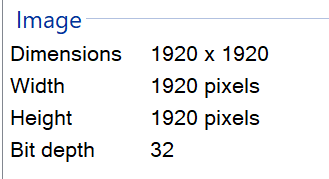
I found the file in .configjoplin-desktopresources, and confirmed this image file is compressed.
sczhg
on 18 Feb 2019
I found the reason of it in ./ReactNativeClient/lib/shim-init-node.js:141-148:
if (resource.mime == 'image/jpeg' || resource.mime == 'image/jpg' || resource.mime == 'image/png') {
    const result = await resizeImage_(filePath, targetPath, resource.mime);
} else {
    ...
}
resizeImage_ limits the images max size to 1920x1920, and resizes image even though the image doesn't exceed the limitation. This function may also be the reason of losing image quality with a 1:1 compression (or conversion).
sczhg
on 18 Feb 2019
There is some value to this feature, but it should be a configurable option rather than an always-on function, even if it defaults to enabled. Image compression is useful for reducing storage size, especially on mobile platforms, however it is intuitive to trust Joplin to store and retrieve resources in their exact form and this is desirable for certain use cases such as archiving images in notes or log entries for later external use.
 tsumare
on 26 Feb 2019
tsumare
on 26 Feb 2019
1035 is related.
tsumare
on 28 Feb 2019
I'd like to see this as an interactive option similar to Microsoft's Paste-Special (_paste-then-modifer-key-to-choose-type_). It wouldn't matter to me which is the default, original or compressed (and/or _user-prefs-max-size_).
 maphew
on 23 Apr 2019
maphew
on 23 Apr 2019
I can't use Joplin because of this.
I often need to save long text screenshots on my phone, and they end up compressed in Joplin to the point of the text being unreadable.
It's too bad since Joplin is such a brilliant app.
For the time being I use Carnet which does not compress pictures
 bipox
on 10 May 2019
bipox
on 10 May 2019
Can't you attach the image as a regular file? In that case, it's simply limited to 10MB
 laurent22
on 10 May 2019
laurent22
on 10 May 2019
I tried it but the picture gets reduced as well, from 1.32MB to 0.2
bipox
on 10 May 2019
I wonder what would be the UI for this? Asking the user every time an image is attached seems annoying. Any suggestion on how it could be done (or maybe how it's done in other apps)?
laurent22
on 10 May 2019
Maybe an "always on", "always off", "always ask" type of thing?
Hey and a big thank you for developing Joplin, it's awesome. Merci !
bipox
on 11 May 2019
@laurent22 I can create a PR for this. I'd suggest to create an option in settings where people can turn resizing off and on (and maybe even always ask, but I really think that nobody would ever choose this b/c it would be very, very annoying to get a pop up every time)
There are other ways to handle this as well, although more complicated to implement: specifying the threshold in MB or dimensions. e.g. if image > 5 MB -> resize. or if image > 3000px -> resize
Maybe as a first step, I can implement the on/off switch and later, if it's still wanted/needed, we could work on the threshold stuff.
 tessus
on 9 Jun 2019
tessus
on 9 Jun 2019
From user perspective I would like:
- default: Resize smaller if bigger than X
- This notebook: store original /or/ resize if {...} . (Could also be
'this page/section/...') - This time: (e.g. this paste) store original regardless of default
The last is probably unrealistic as it would require each object to have
it's own setting.
maphew
on 9 Jun 2019
@maphew I don't understand what you mean by
- This notebook: store original /or/ resize if {...} . (Could also be 'this page/section/...')
- This time: (e.g. this paste) store original regardless of default
How would you put that in an option in settings?
tessus
on 9 Jun 2019
@laurent22 I could also work on an on/off setting for this today. let me know.
tessus
on 9 Jun 2019
No on/off setting at the moment, let's think through this.
laurent22
on 9 Jun 2019
@laurent22 Until this is fixed, it's basically not possible to attach images (unless you don't care about your images). And I would really like to attach images. I'm sure I'm not the only one. This issue has been open for 4 months and this behavior warrants a fix - quickly. I understand that you are busy, which is why I suggested this quick fix. It's not a big change, it's not going to mess up your code, but it will allow people to attach images without having to fear they are resized and messed with by Joplin.
Full disclosure: For me it doesn't really matter, because I build my own version of Joplin anyway (added export option to allow letter format so that I can export to PDF).
tessus
on 9 Jun 2019
A proper solution for this "bug" (which has been a feature since day one) would most likely involves quite a bit of UI development so there's no quick fix here. That's why I say we need to think through it and not rush to add options.
There's an element of UX as well - if people disable image resizing they might end up adding very large images to their notes, which might crash the mobile app, make decryption take a very long time, etc. Not everyone is very technical and will understand the consequences of disabling this.
In many cases it's also unnecessary to add big images to notes - Joplin is not an image gallery app, it doesn't allow editing pictures, it doesn't preserve EXIF data, etc. It's not the tool for that basically. I understand that in some cases it's good to have the full image, but in that case you might just have to use a different tool for now.
laurent22
on 9 Jun 2019
@laurent22
In many cases it's also unnecessary to add big images to notes - Joplin is not an image gallery app,
I agree with you here - 100%.
But, I was talking about a small image less than 650kb. I don't want to add huge images, but when I add images I want them to be unaltered and without their integrity compromised.
if people disable image resizing they might end up adding very large images to their notes, which might crash the mobile app, make decryption take a very long time, etc.
This argument is hardly valid, because you don't mess with PDF files or zip files either. In fact you only "educate" people when it is a .jpg or a .png file. What about gifs and tiffs? Tiffs are notoriously large, but nothing happens there.
As mentioned before, I agree with you 100% that Joplin is not a content management system or a gallery. This does not mean Joplin has the right to resize my images, especially if it leaves all other files untouched.
tessus
on 9 Jun 2019
I meant in terms of imaeg resolution. Gallery apps work but creating thumbnails of various dimensions for the images. Joplin doesn't do this, it display the full image. So if you have many 5000x5000 pixels it will display them all at that size, which might crash the app on mobile. It will take much longer to reach this limit with resizing.
TIFF or BMP aren't displayed, and neither are pdf or zip files so this issue doesn't apply for them.
laurent22
on 10 Jun 2019
which might crash the app on mobile.
Ah, I see. IMO it still would the better to display the image in the dimensions the device can handle and leave the file intact. I really object against changing users' files without their consent.
But at least I somehow understand the reasoning a bit better.
tessus
on 10 Jun 2019
@maphew I don't understand what you mean by
- This notebook: store original /or/ resize if {...} . (Could also be 'this page/section/...')
By 'this notebook' I mean a setting where one could say "let images in this notebook be their original size" (or "only shrink images larger than _nnnn_ px"), while all other notebooks would use the system default.
- This time: (e.g. this paste) store original regardless of default
Ignore this one. Thinking more, it adds too much complication for not much gain.
How would you put that in an option in settings?
I don't know enough about Joplin to suggest something appropriate. Perhaps (pseudo code):
[Resource Settings]
image_threshold = 1200  ; global default, max pixels in any dimension
Exceptions = ['Big Notes', '...'] ; list notebooks that can disobey defaults

[Exceptions]
[Big Notes] ; a specific notebook
image_threshold = 5000  ; local default, max pixels in any dimension
Or even better: each notebook has it's own optional .config, stored within the file. If present it's settings override the system defaults. Basically the same paradigm as for user accounts on 'nix OSes.
maphew
on 11 Jun 2019
@maphew now I understand. The threshold is certainly possible. The exceptions are a bit more complicated to handle. e.g. you could have 2 folder names with the name Big Notes.
Also, there's no config file, thus all this must be implemented in the settings dialog, which makes an exception-per-notebook approach even more complex. How would you build a UI for this?
(Whatever you come up with will be too complicated to implement, just to fix such a simple problem.)
In any case, I'm afraid it might take a while before a solution will be available.
tessus
on 11 Jun 2019
Another possible solution could be the following: include the resized images in the note (so that mobile app doesn't crash) but also save the original image.
The resized one is used in the Joplin viewer, while the original is used when you right-click to open or save it.
 desk7
on 14 Jun 2019
desk7
on 14 Jun 2019
Can original image be kept at least when it is smaller than recompressed?
Example: https://upload.wikimedia.org/wikipedia/commons/3/33/DNA_Transposon.png
This image is 3413 x 4313px, 214582 bytes
Joplin recompresses it to 1519 x 1920px, 273476 bytes
This seems unreasonable.
 Self-Perfection
on 8 Jul 2019
Self-Perfection
on 8 Jul 2019
@Self-Perfection, eventually we'll probably need to have thumbnails and in that case we can handle any image size. In the meantime, there might indeed be edge cases like this where the compressed images is larger than the original.
laurent22
on 8 Jul 2019
In terms of implementation, I'm thinking a local thumbnail cache would be simpler. Each app will build it and they won't be synced across devices. The advantage is that it would mean a lot less data to sync, but the disadvantage is that each app will have to build that cache, and I'm not sure mobile apps will be able to. Probably something to investigate.
laurent22
on 8 Jul 2019
Ok, so who defines which dimensions the thumnails with have? Also, afaik we don't support resizing images in markdown.
I'm happy with my own solution that images are not touched at all. I haven't had any issues yet. The only problem with my fix is that I can't use it on mobile, since I'm using the official releases on mobile.
Thus I only attach images with my desktop app.
tessus
on 8 Jul 2019
Ok, so who defines which dimensions the thumnails with have? Also, afaik we don't support resizing images in markdown.
It would be a reasonable default, maybe 640 max. If it's a thumbnail anyway it's always possible to click on it to view the full picture.
laurent22
on 8 Jul 2019
If it's a thumbnail anyway it's always possible to click on it to view the full picture.
Now that's the info that was missing. ;-) Cheers.
tessus
on 8 Jul 2019
So if you have many 5000x5000 pixels it will display them all at that size, which might crash the app on mobile.
Do we have much reason to believe this will actually be the case?
Please forgive any ignorance, I'm not nearly as familiar with the project as you are, but the mobile clients essentially use the mobile systems built-in web rendering view, right?
These views are very stable and have no stability issues displaying lots of 5000x5000 pictures. They aren't even going to be displaying the whole picture, as it'll be down-scaled due to screen resolution/DPI. Also, these webviews lazy-load content. They'll evict loaded content if it's not on screen and resources are running low (this is true of desktop and mobile).
 ndbeals
on 9 Jul 2019
ndbeals
on 9 Jul 2019
see also #1998 for refference
 rallek
on 17 Oct 2019
rallek
on 17 Oct 2019
I really appreciate all your work on this, it's solid and I know this is going to sound ungrateful but...
Is this going to be added as an option any time soon? It makes Joplin (an otherwise amazing piece of software) unusable for me and I would imagine a lot of other people. I understand having image compression, even if it's enabled by default, but having it hardcoded to 1920 and no way to customise it at all without forking the whole project seems insane. By all means, bury the option away in the UI behind a big red warning sign if you don't trust people to not unintentionally add large images, but please, add the option somewhere.
 zakeryooo
on 16 Dec 2019
zakeryooo
on 16 Dec 2019
@zakeryooo I remember that Laurent didn't want to add an option for that.
But if you can create a release yourself, you can have a look at my tweaks branch. I can't reference a commit hash, because I force-push that branch.
Look for the commit add setting: image.noresizing.
tessus
on 17 Dec 2019
While full-resolution images are critical for some users, the down-sampled images are "nice to have" for the majority; clearly both are important.
A thumbnail cache would be a reasonable way to implement this, but would involve a fair bit of coding effort and inclusion of multiple new UI options - legitimate concerns.
Another option, _requiring less effort_ I think, would be using a placeholder icon indicating "large image 'screenshot.png', click/tap to load". I've seen this _already implemented_ in Joplin for images whose .resource files are pending synchronization via the Android app:
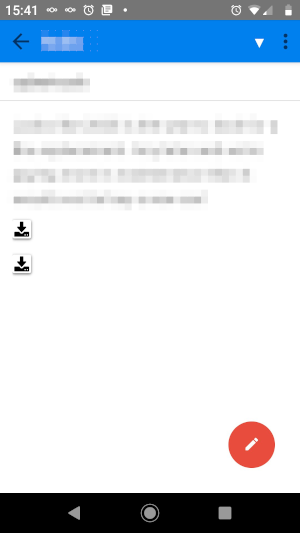
It would require exposing only one new option in the Settings UI: "Always optimize images" (default on). This maintains the current behavior for anyone who's content with it. Optionally, when optimization is disabled, allow users to "always load large images" at their peril.
This approach prevents handling thumbnails (annoying) and allows full-res images to be employed by users who require it and have the necessary device resources. It does not add much UI complexity.
My use case for full-res images: a very good way to capture a webpage precisely as it has rendered in the browser is not via the clipper, which often mangles the content somewhat, but instead via the browser's screenshot tool (in firefox, ctrl+shift+k for the console, and type ":screenshot filename --fullpage"). These screenshots are very crisp and accurate, but only if they are uncompressed. When they are compressed, they are often illegible as notes.
 roleohibachi
on 29 Dec 2019
roleohibachi
on 29 Dec 2019
Brainstorming where a feature like "click to load large image" (above) could lead, in time. This involves added complexity and would not be necessary for core functionality.
Long-press/right-click the image placeholder to select context menu options:
- "load image" (self explanatory, and perhaps the only option at first)
- "always load this image"
- set a markdown tag, like autoload=true, which the application respects.
- added bonus: users with low-resource devices, etc, may prefer to use autoload=false for their images of any size by specifying it manually.
- "save image to disk"
- "optimize image"
- perform default optimization, or run a user-defined command
- user-defined command allows users to customize the optimization to their diverse use cases, so devs don't have to please everyone.
- In documentation and/or user forums, a few "recipes" can be provided for different types of optimizations.
- Example: convert to halftone (document "scanning")
- Users may "hack" this to provide exotic features, for instance OCR, by calling outside applications. That's a good thing!
roleohibachi
on 29 Dec 2019
also, was this fixed or split off into a new bug ticket? i feel like if you attach anything as a file it should not touch it
https://github.com/laurent22/joplin/issues/1232#issuecomment-491422675
 mgrandi
on 17 Jan 2020
mgrandi
on 17 Jan 2020
Another vote for this. I didn't realize that Joplin was doing this!
I was super confused that it is actually making the filesize larger.
Just tried another image; it feels like it lost some sharpness, the dimensions stayed the same @ 1080x1361, but the filesize went from 316 KB (original) to 570 KB (Joplin).
I'd really prefer the ability to keep the original, unaltered image.
 Merrit
on 11 Feb 2020
Merrit
on 11 Feb 2020
Why did you close this issue? I have the same problem here. It would be great if there is an option to activate "Reduce attachements" or even not...
 AndreasPantle
on 4 Mar 2020
AndreasPantle
on 4 Mar 2020
It's not closed.
tessus
on 4 Mar 2020
It should provide an option for user at least. Importing resized image quietly is totally not make sense
 crackevil
on 23 Mar 2020
crackevil
on 23 Mar 2020
The alternative would be a button on the task row for a binary update. No processing is done then.
 christianlupus
on 23 Mar 2020
christianlupus
on 23 Mar 2020
This issue seems was fixed in the latest 1.0.201 version.
When I attached a large image, it showed a dialog to ask if I want to keep the original image. 😀
Perfect! This is a great notebook. Thank you so much!
 lyutian
on 25 Apr 2020
lyutian
on 25 Apr 2020
Doesn't it compress all images rather than just large ones?
On Sat, Apr 25, 2020, 00:33 Reynold Liu notifications@github.com wrote:
This issue seems was fixed in the latest 1.0.201 version.
When I attached a large image, it showed a dialog to ask if I want to keep
the original image. 😀Perfect! This is a great notebook. Thank you so much!
—
You are receiving this because you commented.
Reply to this email directly, view it on GitHub
https://github.com/laurent22/joplin/issues/1232#issuecomment-619335896,
or unsubscribe
https://github.com/notifications/unsubscribe-auth/AAGD7YQ5VNBIAVHRIMD6OADROKG25ANCNFSM4GYAPHUQ
.
mgrandi
on 5 May 2020
Yes this is indeed fixed now as it's possible to select if you want to compress the image or keep the original when attaching an image.
laurent22
on 7 May 2020
I say this because i just tried it on the latest version, by dragging and dropping an image onto the joplin window, it did _not_ ask me if i wanted to compress or keep the original
does it only say it if its a large file? i did do a sha1 hash sum on the original and the one in the joplin resources directory and it is the same file
sorry, just want to make sure :)
mgrandi
on 8 May 2020
Yes it only asks if the image is larger than 1920p
laurent22
on 8 May 2020
Related issues
laurent22
·
3Comments
 okoetter
·
3Comments
okoetter
·
3Comments
 LifeIsAParadox
·
3Comments
LifeIsAParadox
·
3Comments
 smhearty
·
3Comments
smhearty
·
3Comments
 v-marinkov
·
3Comments
v-marinkov
·
3Comments
Most helpful comment
Maybe an "always on", "always off", "always ask" type of thing?
Hey and a big thank you for developing Joplin, it's awesome. Merci !