Joplin: Inconvenient auto scroll when editing note
Operating system
- Windows
Application
- Desktop
First thanx for this great software.
I use a lot of code in my notes. I noticed that when I use piece of code
of this kind
or when I insert images
and when my notes are longer than one screen, the editing screen regularly scrolls to the top (step by step). But finally it scrolls in such a way that the line with the cursor moves above the top of the screen. So the line where the cursor is currently focused disappears above the top and will reappear when I start typing again. After a few more typing it will scroll again above the top and so forth.
In appearance parameter I did not select any Editor font family.
 GuyOlivier
All 37 comments
There is no auto-scroll in Joplin.
 tessus
on 22 May 2019
tessus
on 22 May 2019
I record a video to demonstrate the issue I meet.
showmore.com
You can skip the first 45 seconds to see directly the issue.
GuyOlivier
on 23 May 2019
There is no auto-scroll in Joplin.
It is this feature where Note editor and Note viewer try to match up where they have scrolled. There is some kind of issue there.
It happened to me as well, although I didn't study it this carefully. I just felt it was jumping around when there were codeblocks involved.
 i-need-to-tell-you-something
on 23 May 2019
i-need-to-tell-you-something
on 23 May 2019
@GuyOlivier Thanks for the video. I tried the same thing, but still couldn't reproduce it.
Let's see if @laurent22 has an idea what is happening here.
tessus
on 23 May 2019
@tessus Did you also try it at the upper edge of the displayed text area?
i-need-to-tell-you-something
on 23 May 2019
Hello, thanx for taking a look at my issue.
@i-need-to-tell-you-something I do not understand what you mean by:
Did you also try it at the upper edge of the displayed text area?
I am already at the top edge of the displayed area.
Here is an easy step by step to reproduce the issue.
- Get my Joplin note at github.com/GuyOlivier, switch to edit mode and copy the markdown
- Create a new note in Joplin and paste the markdown
- Scroll the text to "line 4" at the top of the screen
- Start typing text, the issue is reproduced.
I recorded a video of these steps to reproduce the error: reproduce issue video
You wonder why I am always editing the line at the top of the screen (I could move my editing line in the middle of the screen). It is because step by step the text move to the top. So when typing a quite long piece of text I will end up editing the line at the top of the screen.
GuyOlivier
on 24 May 2019
@i-need-to-tell-you-something I do not understand what you mean by:
@GuyOlivier Sorry I meant that as a question to tessus. I thought quotation would be enough for that and I forgot to use the @ tag.
i-need-to-tell-you-something
on 24 May 2019
@i-need-to-tell-you-something
Did you also try it at the upper edge of the displayed text area?
Yes, but I can still not reproduce the problem. As mentioned before, I think @laurent22 might be able to shed some light on this.
tessus
on 25 May 2019
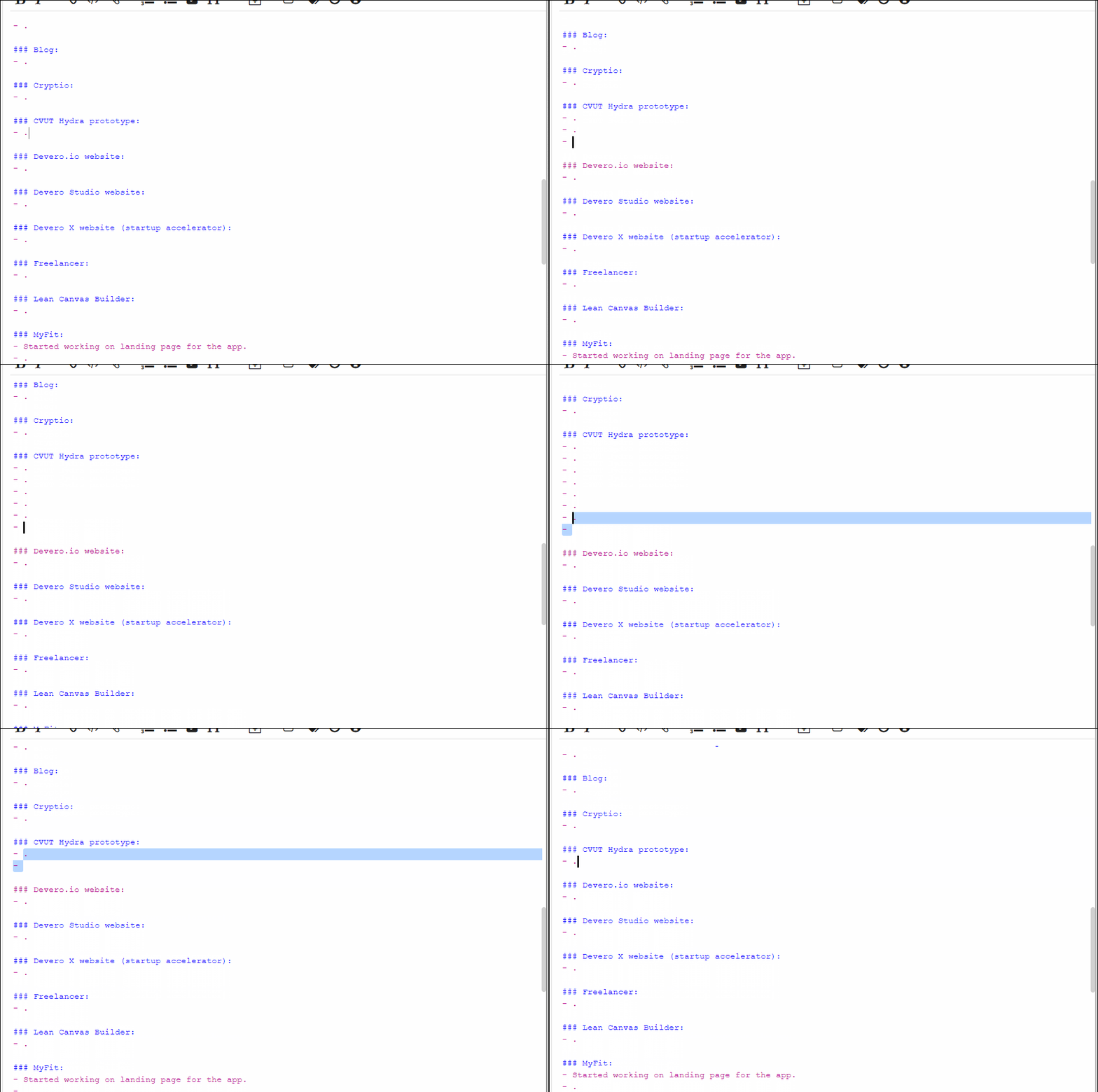
I am experiencing the same issue. In a file with enough content to show scrollbar, when I add or remove a line, editor will automatically scroll up or down a little bit.
 alexdevero
on 9 Jun 2019
alexdevero
on 9 Jun 2019
Ok, I finally found a note where I could reproduce this issue.
I believe it has something to do with how Joplin saves the cursor position, but I'm not sure.
@laurent22, shall I export the note and attach it here, or have you seen this behavior before?
tessus
on 3 Jul 2019
@laurent22 this is happening more and more often now and it makes editing a note almost impossible. The only way to edit a note, which exhibits this behavior, is to use an external editor.
tessus
on 12 Jul 2019
There was a recent PR which, among other things, changed something to scrolling, in relation to link anchors but maybe it introduced this bug too.
 laurent22
on 12 Jul 2019
laurent22
on 12 Jul 2019
If you can share a note where it always happen it might help
laurent22
on 12 Jul 2019
@laurent22 here you go: git.jex.txt (remove the .txt extension....)
tessus
on 12 Jul 2019
Oh, and the OP also shared his note: https://github.com/GuyOlivier/Joplin/blob/master/Procedure/Upgrade%20DB%20PYX%20schema.md
tessus
on 12 Jul 2019
I confirm the issue is still present in v1.0.165.
This is making really difficult to write long notes as at some point we cannot see anymore the test we are editing.
Sorry, but I am not familiar enough with electron app to help on this.
 doc75
on 8 Sep 2019
doc75
on 8 Sep 2019
I'm seeing this problem as well while editing notes with code blocks. Practically impossible to use with this behavior.
 carlosedp
on 25 Sep 2019
carlosedp
on 25 Sep 2019
@laurent22 have you been able to reproduce this issue? it's really hard to edit a note when this happens. As mentioned before, I believe it has to do with how Joplin saves the cursor position. But maybe I'm wrong.
tessus
on 25 Sep 2019
+1 (v1.0.170) sometimes while I am editing, the line being edited jumps around erratically as I type and then moves completely off the screen!
It would be ok if the display pane moves around (a little), but I think it would be nicer if the editing pane did not.
 mic704b
on 14 Nov 2019
mic704b
on 14 Nov 2019
I have several notes that exhibit this behavior, but it seems that notes that are either very long or that have lots of code blocks make it worse
 mgrandi
on 21 Nov 2019
mgrandi
on 21 Nov 2019
Yes, I too can confirm this behavior is still happening on 1.0.174 and it drives me crazy. Joplin keeps scrolling with every new line until it has scrolled right off the screen. It really disrupts the workflow, I have actually started using a regular text editor outside of Joplin and pasting the work into Joplin in blocks. This way I can still get the benefit of backing up and securing the data but it means that basically Joplin is unusable for taking these notes and this is far from an ideal workaround.
 ioogithub
on 3 Jan 2020
ioogithub
on 3 Jan 2020
@ioogithub For a better workaround instead of copy-pasting the text, can't you just use the external editor option? You can point to the path of the executable you wish to use in Options > General > Text Editor Command. The default hotkey to use it then when a note is selected is Ctrl+E.
i-need-to-tell-you-something
on 3 Jan 2020
Hey, just wanted to say that this issue is still alive and well.
Here is a short video showing it: https://streamable.com/gzd82#
I'm on Joplin 1.0.179.
Platform: Linux
OS: Manjaro
This is a very long note, is has chemical notation in it and a few images. Restarting Joplin seems to make the issue go away, at least for the moment.
 Vitorvlv
on 28 Jan 2020
Vitorvlv
on 28 Jan 2020
I'm experiencing the same issue on my Windows machine, adding the fact that the editor hangs for a second each time the preview screen is updated.
 Nowasky
on 7 Feb 2020
Nowasky
on 7 Feb 2020
I can confirm that I am experiencing this same issue.
Joplin Desktop Version: 1.0.179
OS: MacOS (Catalina) 10.15.2
 scottwilliambeasley
on 21 Feb 2020
scottwilliambeasley
on 21 Feb 2020
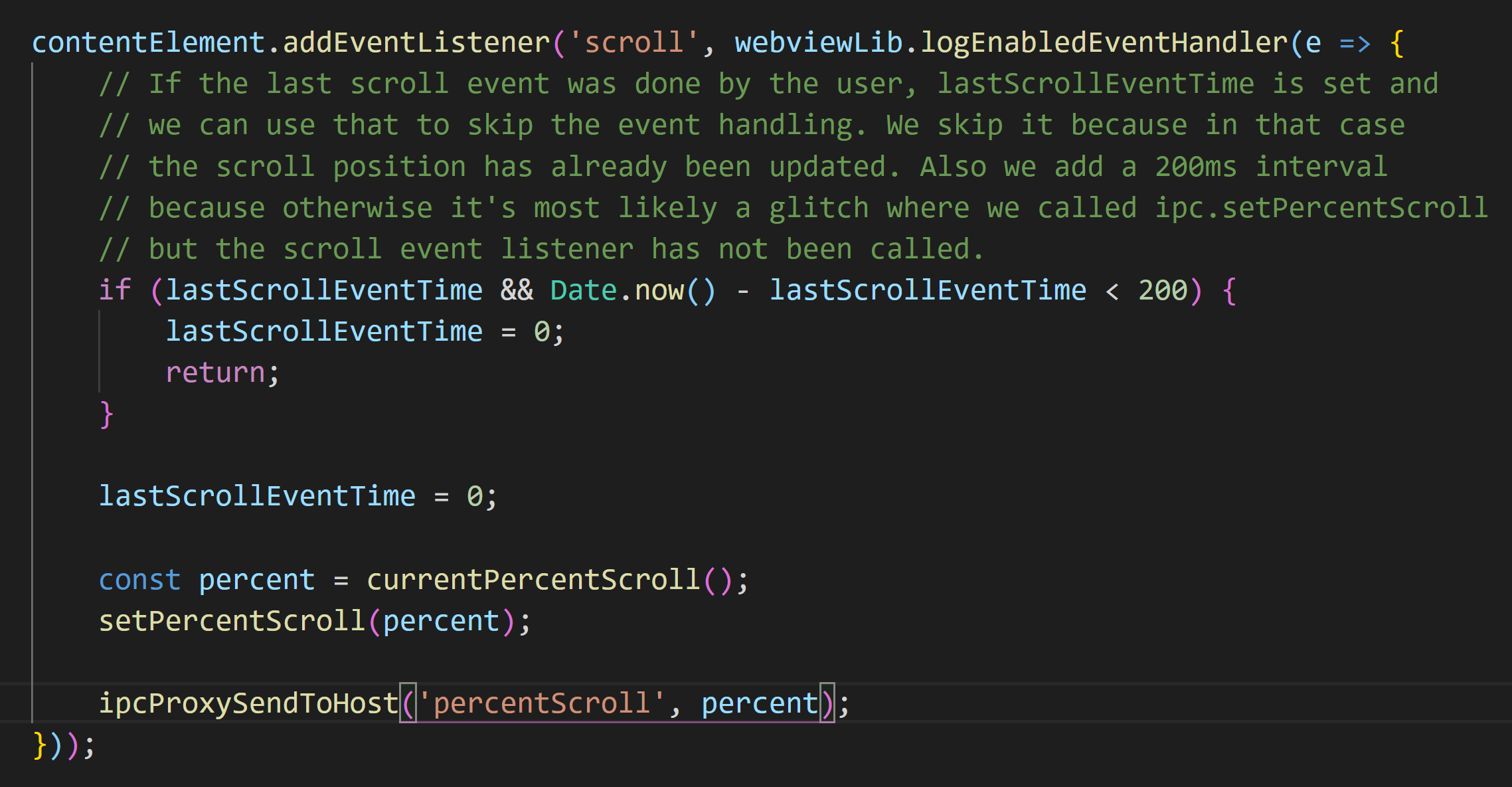
Hey, @tessus . I am debugging this issue. This issue might be caused by scroll events listener.
If several lines are written into a long text, the onScroll event will be triggered. Then the editor window will be reset according to the current scroll position. However, editor window position isn't calculated accurately because of the precision of float in Javascript. Idealy, the longer the text is, the severer the problem is. I try to comment out the last line of these codes, which is to reset scroll position, and this issue is solved, and no new related bug is found currently. I have no idea what scenario is these codes aim at. At the most of the time when scrolling, the function will return directly(return; in line 4).
 Liuhaai
on 2 Mar 2020
Liuhaai
on 2 Mar 2020
@Liuhaai I always had the feeling that it had something to do with cursor position handler somehow. I'm not familiar with this part of the code at all. Maybe @mic704b or @laurent22 can help you out here.
tessus
on 2 Mar 2020
Sorry for the late feedback. The scroll event might be triggered by some text input in the editor. I fixed this issue by a workaround. The editor position will not change when the user edit in the editor. That is, there are some changes on the content length.
Liuhaai
on 11 Mar 2020
@Liuhaai if your change fixes this problem, please submit a PR.
tessus
on 11 Mar 2020
I have the same issue. Joplin keeps on scrolling up whenever I stop typing in the editor and this only happens when I include the mermaid syntax in one of my notes.
 Yobel16
on 19 Apr 2020
Yobel16
on 19 Apr 2020
I have the same issue. Joplin keeps on scrolling up whenever I stop typing in the editor and this only happens when I include the mermaid syntax in one of my notes.
I can confirm the same thing. After disabling mermaid syntax, Joplin works as it should, otherwise this erratic autoscroll makes it so hard to edit notes
 akittas
on 19 Apr 2020
akittas
on 19 Apr 2020
I have the same issue. Joplin keeps on scrolling up whenever I stop typing in the editor and this only happens when I include the mermaid syntax in one of my notes.
I can confirm the same thing. After disabling mermaid syntax, Joplin works as it should, otherwise this erratic autoscroll makes it so hard to edit notes
Is there a fix on this? Being able to use mermaid syntax and having no problem.
Yobel16
on 19 Apr 2020
I don't think it has anything to do with mermaid syntax. Nor does it require alot of text to create this issue.
If I reduce the size of my window, insert a line space and proceed to add content above this line space. The editing page moves on it's own as the content on the right plane updates.
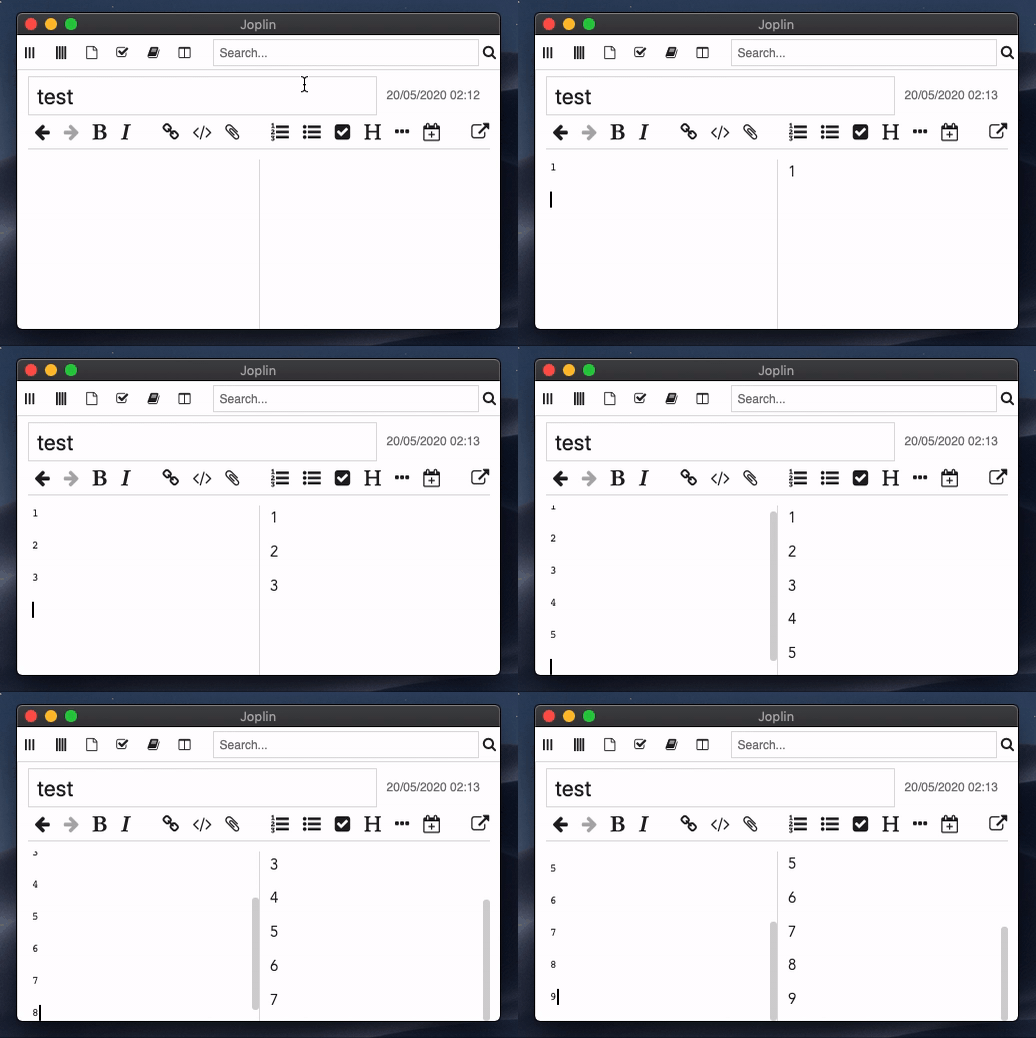
I'm not a programmer but it feels like the viewer is adjusting relative to be bottom of content rather than locking on to the content at the top of the viewer.
 5inful1
on 19 May 2020
5inful1
on 19 May 2020
I can confirm in version:
Joplin 1.0.201 (prod, win32)
Sync Version: 1
Profile Version: 28
Revision: e65af8c1 (master)
that the behavior exists and I was able to reproduce it with these steps:
- created a massive wall of Lorem Ipsum (no issues)
- added basic MD objects, e.g. bulleted list, checkboxes, headings, etc (no issues)
- added some KaTeX for giggles (no issues)
- added a mermaid class diagram (now I have the page scrolling issue)
For every new character inserted in any block the rendered page (and therefore the raw MD) scrolls up by at least a line.
TL;DR at least in my case it is isolated to after I add the first instance of a mermaid block.
 koelschlaeger
on 19 May 2020
koelschlaeger
on 19 May 2020
OMG Thankyou!! I think this issue has been fixed!
Device: Mac
Version: Joplin 1.0.216 ( although the fix may have been implemented before this version)
I'm so happy, can anyone else confirm this.
I just tried editing in my one of my longest notes filled with mermaid syntax and javascript syntax the editor doesn't budge awesome. (unless I start typing at the bottom of the file which would be expected).
Thank you again to whomever fixed this.
5inful1
on 8 Jun 2020
Hey there, it looks like there has been no activity on this issue recently. Has the issue been fixed, or does it still require the community's attention? This issue may be closed if no further activity occurs. You may comment on the issue and I will leave it open. Thank you for your contributions.
![stale[bot] picture](https://avatars3.githubusercontent.com/in/1724?v=4&s=40) stale[bot]
on 10 Jul 2020
stale[bot]
on 10 Jul 2020
Closing this issue after a prolonged period of inactivity. If this issue is still present in the latest release, please feel free to create a new issue with up-to-date information.
stale[bot]
on 17 Jul 2020
Related issues
 jacobgonzales20
·
3Comments
jacobgonzales20
·
3Comments
 deftdawg
·
3Comments
deftdawg
·
3Comments
 v-marinkov
·
3Comments
v-marinkov
·
3Comments
 jurgenhaas
·
3Comments
jurgenhaas
·
3Comments
 LifeIsAParadox
·
3Comments
LifeIsAParadox
·
3Comments
Most helpful comment
I'm seeing this problem as well while editing notes with code blocks. Practically impossible to use with this behavior.