Jitsi-meet: Jitsi Meet quick install instructions don't work any more
I have successfully deployed Jitsi Meet several times a week ago, following https://github.com/jitsi/jitsi-meet/blob/master/doc/quick-install.md
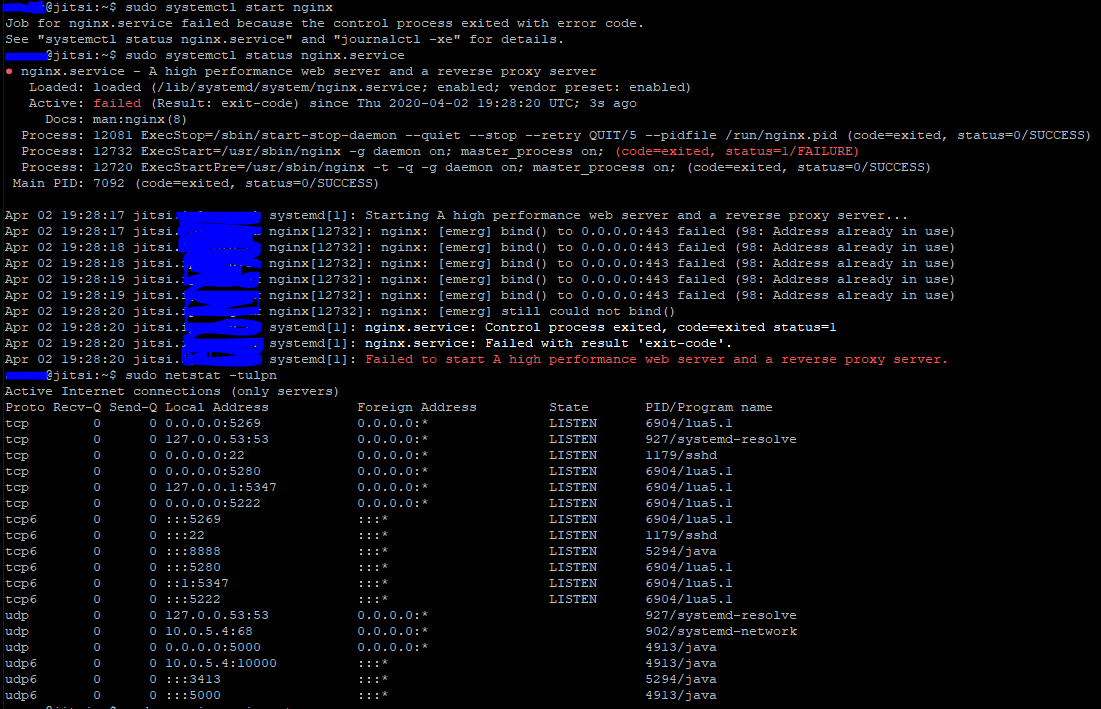
but something is broken now, nginx doesnt start (complaining about port, but its not used)
I use blank Ubuntu 18.04, without anything on it
 anvaruk
All 9 comments
We have seen the same, still debugging. /etc/hosts /etc/hostname might be cursed.
 fwolfst
on 2 Apr 2020
fwolfst
on 2 Apr 2020
We have seen the same, still debugging. /etc/hosts /etc/hostname might be cursed.
unfortunately this doesn't seem to be the culprit, at least both files look unsuspicious.
lsof -i :443 also doesn't show any result.
Vanilla Debian 10 here.
 sjjh
on 2 Apr 2020
sjjh
on 2 Apr 2020
Same issue here...
 R0GGER
on 2 Apr 2020
R0GGER
on 2 Apr 2020
Have you tried with latest release(from today)? Should not have this problem.
Otherwise, try deleting /etc/nginx/modules-enabled/60-jitsi-meet.conf and restart nginx.
 damencho
on 2 Apr 2020
damencho
on 2 Apr 2020
Have you tried with latest release(from today)? Should not have this problem.
Used latest stable release, which does not work.
Otherwise, try deleting /etc/nginx/modules-enabled/60-jitsi-meet.conf and restart nginx.
That works. thx. Will the (correct) file be re-enabled with the next update?
sjjh
on 2 Apr 2020
Have you tried with latest release(from today)? Should not have this problem.
I was just following quick install instructions an hour ago
Otherwise, try deleting /etc/nginx/modules-enabled/60-jitsi-meet.conf and restart nginx.
it helped, thanks!
anvaruk
on 2 Apr 2020
The latest stable will scan enabled virtual hosts and if there is one with 443 enabled will skip configuring turnserver.
damencho
on 2 Apr 2020
Have you tried with latest release(from today)? Should not have this problem.
I was just following quick install instructions an hour ago
Otherwise, try deleting /etc/nginx/modules-enabled/60-jitsi-meet.conf and restart nginx.
it helped, thanks!
Hum, maybe it is not fully fixed in latest as the link will still be created 🤦♂
damencho
on 2 Apr 2020
Have you tried with latest release(from today)? Should not have this problem.
Otherwise, try deleting /etc/nginx/modules-enabled/60-jitsi-meet.conf and restart nginx.
Can confirm this works (removing that file), also fixed letsencrypt cert issues. Tried setting up 3 seperate times before checking issues section. Thank you @damencho
 realmrealm
on 3 Apr 2020
realmrealm
on 3 Apr 2020
Related issues
 quantumbeat
·
68Comments
quantumbeat
·
68Comments
 adammarketing
·
90Comments
adammarketing
·
90Comments
 Janhouse
·
99Comments
Janhouse
·
99Comments
 kinnla
·
40Comments
kinnla
·
40Comments
 niallmurphy-ie
·
45Comments
niallmurphy-ie
·
45Comments
Most helpful comment
Have you tried with latest release(from today)? Should not have this problem.
Otherwise, try deleting /etc/nginx/modules-enabled/60-jitsi-meet.conf and restart nginx.