Jitsi-meet: [Feature request/Improvement] Urgently needed: configurable default (start-up) lower video resolution
re: https://community.jitsi.org/t/change-default-resolution-of-the-jitsi-camera/15994/2
It appears - please correct me, if I am wrong - that there is currently no possibilty to set up a certain (for example: low video with audio) video resolution for all new incoming users.
In the current corona-crisis driven upcoming usage of "jitsi" meetings and with respect to energy and bandwidth, I wish to reduce the (default) bandwidth when starting up a meeting.
From the above mentioned forum entry I understand, that this cannot be easily done at the moment.
As a newcomer to jitsi (I like that very much) I kindly ask you to find a solution and I am willing to
help testing.
 Wikinaut
All 22 comments
@damencho please can you help here? We want to start jitsi for users with LD video quality as default.
How?
Wikinaut
on 19 Mar 2020
There is no such option at the moment.
 damencho
on 20 Mar 2020
damencho
on 20 Mar 2020
@damencho Perhaps, can you think about a solution so that admins allover the world can reduce the worldwide video stream traffic at least by such a default setting?
I really wish that you present an ad-hoc solution, which I can implement quickly. This is really urgent.
Corona #KlimafactorInternet #SaveBandwidth
Wikinaut
on 20 Mar 2020
You can configure these settings in your deployiment: https://github.com/jitsi/jitsi-meet/blob/master/config.js#L106-L125 you could seett it to 480 and then every participant would only send up to VGA resolution instead of 720p HD.
The call quality slider only applies to reception, so if you cut on the sending as I mentioned above you'd be sort of killing 2 birds with a single stone.
 saghul
on 20 Mar 2020
saghul
on 20 Mar 2020
@saghul I take it you mean the constraints setting (starting at L111), not the resolution setting, correct?
 setpill
on 20 Mar 2020
setpill
on 20 Mar 2020
Both. Firefox currently follows the resolution setting.
saghul
on 20 Mar 2020
@saghul Before posting this issue,I had already set https://github.com/jitsi/jitsi-meet/blob/master/config.js#L109 to "480" but did not notice, that the slider is set to LD or SD. But I will check again, together with what @setpill said and report back here.
Wikinaut
on 20 Mar 2020
I would love a selectable resolution, too. My computer only shows a video pausing every other second, maybe due to the cameras full HD resolution.. It would be great to be able to select a lower resolution. Don't care if it would be on server side or on the client side...
 burka
on 24 Mar 2020
Wikinaut
on 29 Mar 2020
burka
on 24 Mar 2020
Wikinaut
on 29 Mar 2020
You can configure these settings in your deployiment: https://github.com/jitsi/jitsi-meet/blob/master/config.js#L106-L125 you could seett it to 480 and then every participant would only send up to VGA resolution instead of 720p HD.
The call quality slider only applies to reception, so if you cut on the sending as I mentioned above you'd be sort of killing 2 birds with a single stone.
@saghul as mentioned at https://github.com/jitsi/jitsi-meet/issues/5808#issuecomment-614766270 I'll start experimenting with the settings and measuring the upload/download rates.
Something I couldn't confirm from the docs, from a client perspective:
- resolution: is related to download rates? (assumed as per https://github.com/jitsi/jitsi-meet/blob/bf50a110c7f7db83d57a06ee29a83c906fdf375e/react/features/video-quality/components/VideoQualityLabel.web.js#L40-L44
- constraints.video: are related to upload rates? (as per your comment above)
Did I get it right?
 WolfganP
on 16 Apr 2020
WolfganP
on 16 Apr 2020
You have to also either make same adjustments for the p2p mode or disable p2p mode altogether. Otherwise the first two participants will continue to stream with 720p
 geraldmwangi
on 25 Apr 2020
geraldmwangi
on 25 Apr 2020
I noticed problems, when after a successful connection of 2 persons then when a third person joins, the video is not correctly shown at one of the first two persons.
Can this be related, caused by switching from p2p to mix mode?
Wikinaut
on 25 Apr 2020
You have to also either make same adjustments for the p2p mode or disable p2p mode altogether. Otherwise the first two participants will continue to stream with 720p
You mean adding config.p2p.enabled=false&config.enableP2P=false to the config as well?
WolfganP
on 25 Apr 2020
only config.p2p.enabled=false. Since then Its been working great. The video resolution is now 180p or 240p, depending on the webcam.
Only the android app doesn't respekt the resolution config, I'm looking into this
geraldmwangi
on 27 Apr 2020
Is there any chance the low resolution options will be available to be set on mobile without use of a computer?
 hardlycode
on 3 May 2020
hardlycode
on 3 May 2020
This is currently my URL for low res conferences (it keeps traffic and CPU low) https://meet.jit.si/[RoomName]#config.disableAudioLevels=true&config.p2p.enabled=false&interfaceConfig.DISABLE_VIDEO_BACKGROUND=true&config.resolution=360&config.constraints.video.width.max=320&config.constraints.video.height.max=180&config.constraints.video.frameRate.max=10 but didn't test if it also affects the mobile apps the same intended way.
WolfganP
on 3 May 2020
Thank you so much for this. I didn't see documentation for runtime/url parameters on jitsi.org, where did you find these?
hardlycode
on 9 May 2020
Thank you so much for this. I didn't see documentation for runtime/url parameters on jitsi.org, where did you find these?
I started experimenting with some examples I read on the forums and then expanded to test additional parameters from W3C specs as per https://github.com/jitsi/jitsi-meet/issues/5808#issuecomment-614766270
WolfganP
on 9 May 2020
I just found this linked in the community forums:
Quality reading for anyone needing to tweek the public server...
hardlycode
on 10 May 2020
inside config.js:
the codes below are using for web browser only? Is there a way to config for mobile client ?
constraints: {
video: {
aspectRatio: 16 / 9,
frameRate: {
max: 10
},
height: {
ideal: 360,
max: 360,
min: 240
},
width: {
ideal: 640,
max: 640,
min: 426
}
}
}
 yxzhaoo
on 6 Jun 2020
yxzhaoo
on 6 Jun 2020
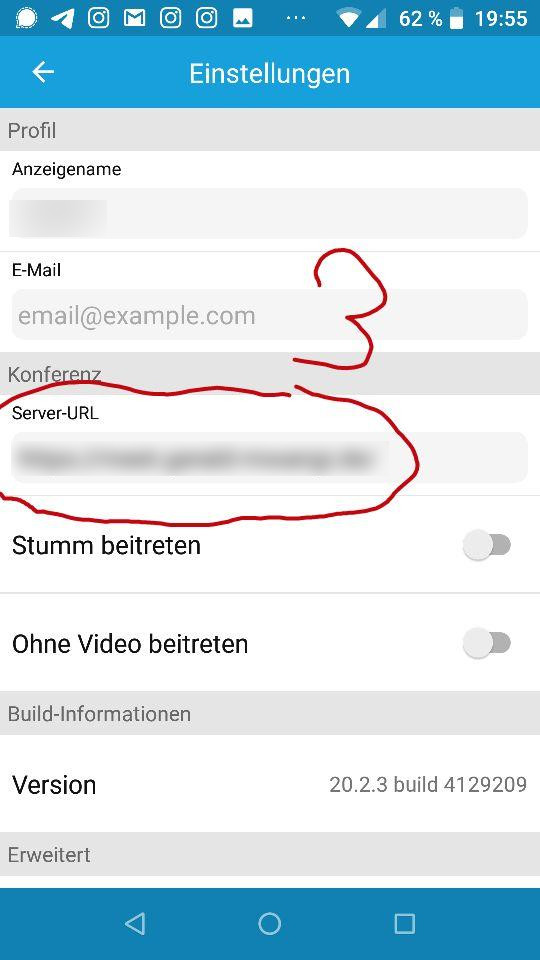
The App does respekt the servers constraints, however only when you set your server as the default server:
1 go to settings
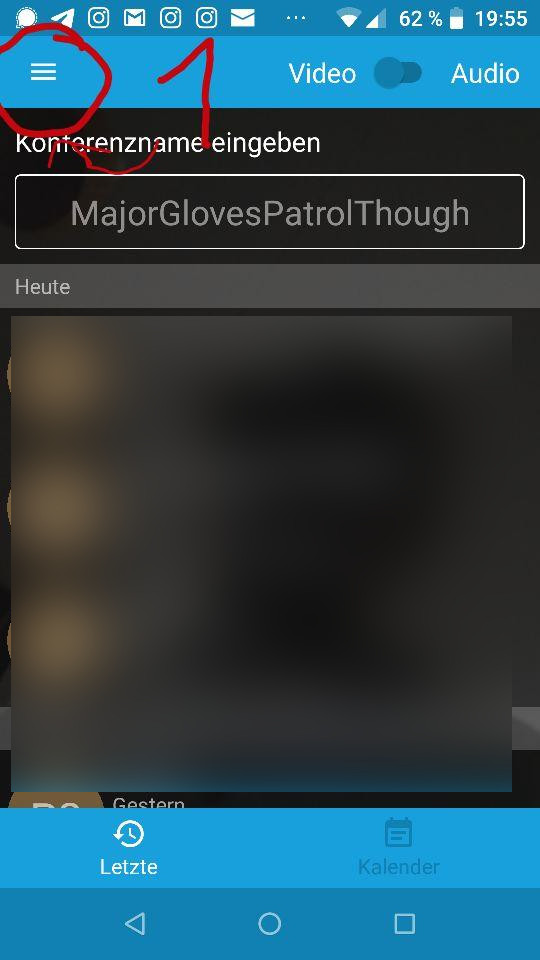
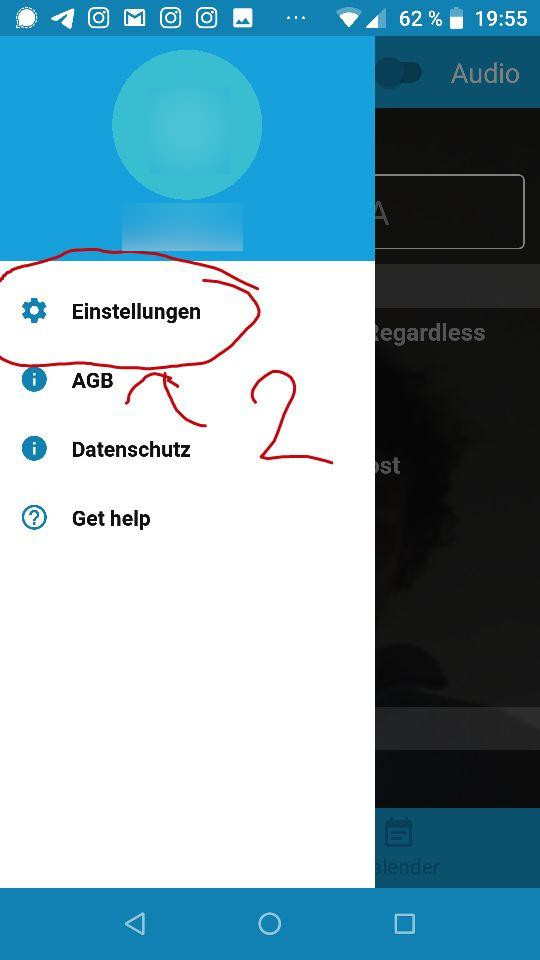
2 In server-url enter your server's FQDN (Fully qualified Domain Name, e.g https://myserver.com)
geraldmwangi
on 7 Jun 2020
This issue has been automatically marked as stale because it has not had recent activity. It will be closed if no further activity occurs. Thank you for your contributions.
![stale[bot] picture](https://avatars3.githubusercontent.com/in/1724?v=4&s=40) stale[bot]
on 5 Sep 2020
stale[bot]
on 5 Sep 2020
Related issues
 svtagt
·
55Comments
svtagt
·
55Comments
 shellshocker
·
47Comments
shellshocker
·
47Comments
 quantumbeat
·
68Comments
quantumbeat
·
68Comments
 JpTiger
·
50Comments
JpTiger
·
50Comments
 kerpan
·
52Comments
kerpan
·
52Comments