 stephenstephen
All 28 comments

No response for Start Recording
stephenstephen
on 14 Oct 2019
any error in the console?
 damencho
on 14 Oct 2019
damencho
on 14 Oct 2019
And please use the community forum before opening new issues.
damencho
on 14 Oct 2019
stephenstephen
on 14 Oct 2019
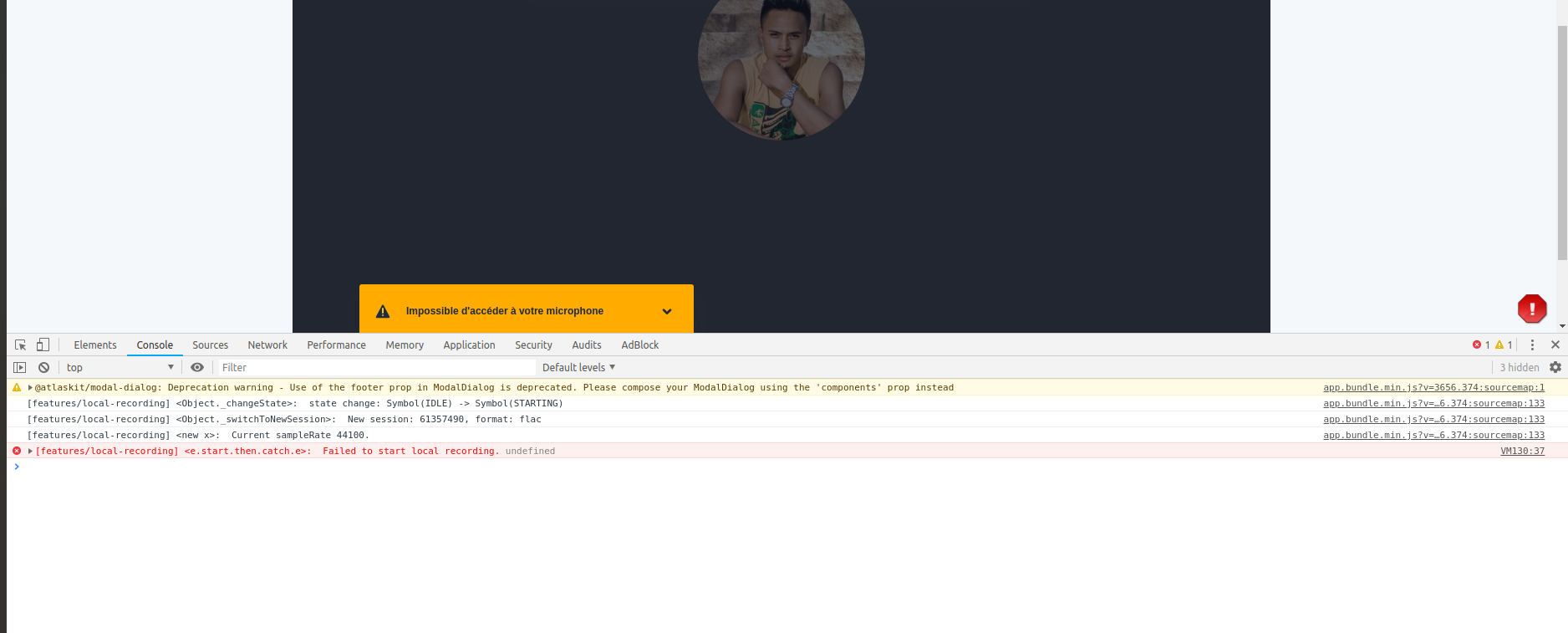
My french is not so good :) but isn't that a notification that there is no access to your microphone?
damencho
on 14 Oct 2019
Yes, I do not have a microphone and webcam, but recording with dropbox works well even without microphone and webcam
stephenstephen
on 14 Oct 2019
Does the local recording need microphone and webcam to work?
stephenstephen
on 14 Oct 2019
The recording to dropbox is done on another machine, I think for this one you need as this is a local recording from your microphone, if there is no mic where will it get the input from.
This feature records locally and the other participants do the same and then send the initiator the files which he then can combine.
damencho
on 14 Oct 2019
OK thanks a lot
stephenstephen
on 14 Oct 2019
Even with a microphone, there is no answer :(
stephenstephen
on 14 Oct 2019
VM32:37 [features/local-recording]
stephenstephen
on 14 Oct 2019
These needs more debugging, cannot give you any advice at the moment.
Are you trying to start it when there is more than one participant in the room?
damencho
on 14 Oct 2019
I tested on two participants
stephenstephen
on 14 Oct 2019
Hi, I also have the same problem, I can not record the video locally in my laptop,
 rjimmya777
on 15 Oct 2019
rjimmya777
on 15 Oct 2019
Local recording is audio-only.
damencho
on 15 Oct 2019
Is that so.
But in my case, even the audio does not work, there is no response on click the link Start recording.
stephenstephen
on 15 Oct 2019
Same for me, voice recording does not work :(
rjimmya777
on 15 Oct 2019
Hey, @ztl8702 can you take a look?
damencho
on 15 Oct 2019
@damencho
I think the code for local recording might have eroded over time -- because I didn't write tests for it. But I will take a look within this week.
 ztl8702
on 15 Oct 2019
ztl8702
on 15 Oct 2019
Thanks
damencho
on 15 Oct 2019
Thanks you
stephenstephen
on 16 Oct 2019
So I just tested locally (built from master) with macOS 10.15 and Chrome 77.0.3865.120, and local recording works for me.
@stephenstephen Can you provide more details: your browser version, OS version, and which version of jitsi-meet you were running (was it self-deployed or using the public server?)
(Meanwhile let me investigate why the error would be undefined)
https://github.com/jitsi/jitsi-meet/blob/5a934c071a5cbe64de275a25d0ed62d8193cdd03/react/features/local-recording/controller/RecordingController.js#L587
ztl8702
on 21 Oct 2019
I'm using Chrome Version 71.0.3578.98 on Ubuntu 18.04.1 LTS with https://meet.jit.si/
stephenstephen
on 21 Oct 2019
And how did you override config.js to enable local recording? Was it by embedding meet.jit.si in an iframe and setting configOverwrite?
EDIT: ^ I believe that's what you attempted to do. That's unsupported at the moment.
I can reproduce your issue now. The _real problem_ is that I never tested or designed local recording to work under Jitsi External API. The only set up for local recording that has been tested is to deploy your own Jitsi Meet instance and modify config.js on the server. I would recommend you do that for now.
Meanwhile, it might be nice to make local recording work for folks using the External API. But let me first figure out why it fails. I suspect something to do with browser API limitations inside an iframe.
ztl8702
on 21 Oct 2019
Here is my source code
const domain = 'meet.jit.si';
const options = {
    roomName: 'Meeting25',
    parentNode: document.querySelector('#meet'),
    onload : function(e){
        //
    },
    interfaceConfigOverwrite: {
        SETTINGS_SECTIONS: [ 'devices', 'language', 'calendar'],
        TOOLBAR_BUTTONS: [
            'microphone', 'camera', 'closedcaptions', 'desktop', 'fullscreen',
            'fodeviceselection', 'profile', 'chat',
            'etherpad', 'settings', 'raisehand',
            'videoquality', 'filmstrip', 'feedback',
            'tileview', 'localrecording',  'recording'
        ]
    },
    configOverwrite: {
         localRecording: {
             enabled: true,
         },
         fileRecordingsServiceEnabled: true,
         fileRecordingsEnabled: true,
     },

};
This issue has been automatically marked as stale because it has not had recent activity. It will be closed if no further activity occurs. Thank you for your contributions.
![stale[bot] picture](https://avatars3.githubusercontent.com/in/1724?v=4&s=40) stale[bot]
on 20 Jan 2020
stale[bot]
on 20 Jan 2020
Localrecording works here. As mentioned above, it records only your own audio track. This should be probably explained in the recording dialog box before starting it. or rephrase
"dialogTitle": "Record your own audio track and mix later",
 rasos
on 14 Mar 2020
rasos
on 14 Mar 2020
Same problem here even you use public Jitsi server.
 SushantGautam
on 6 Jun 2020
SushantGautam
on 6 Jun 2020
Related issues
 kangzhe0000
·
39Comments
kangzhe0000
·
39Comments
 saghul
·
106Comments
saghul
·
106Comments
 andres934
·
54Comments
andres934
·
54Comments
 svtagt
·
55Comments
svtagt
·
55Comments
 julianfoad
·
66Comments
julianfoad
·
66Comments
Most helpful comment
Localrecording works here. As mentioned above, it records only your own audio track. This should be probably explained in the recording dialog box before starting it. or rephrase
"dialogTitle": "Record your own audio track and mix later",