Jitsi-meet: Library not loaded: @rpath/JitsiMeet.framework/JitsiMeet - Reason: image not found
I have Checked the Issue #1878 , but there the answer is to check the example app given in Git hub. I have used the same and getting the same error. When I initially run the app I got a Linker error and I had to change the 'Enable bit code ' to false to proceed running.
Attaching screenshot of error

how can I fix this? I am using Xcode 9.2 and Running app in iPhone 5s
 FaizalMalik
All 2 comments
After some Work Around, this workaround works for me...!
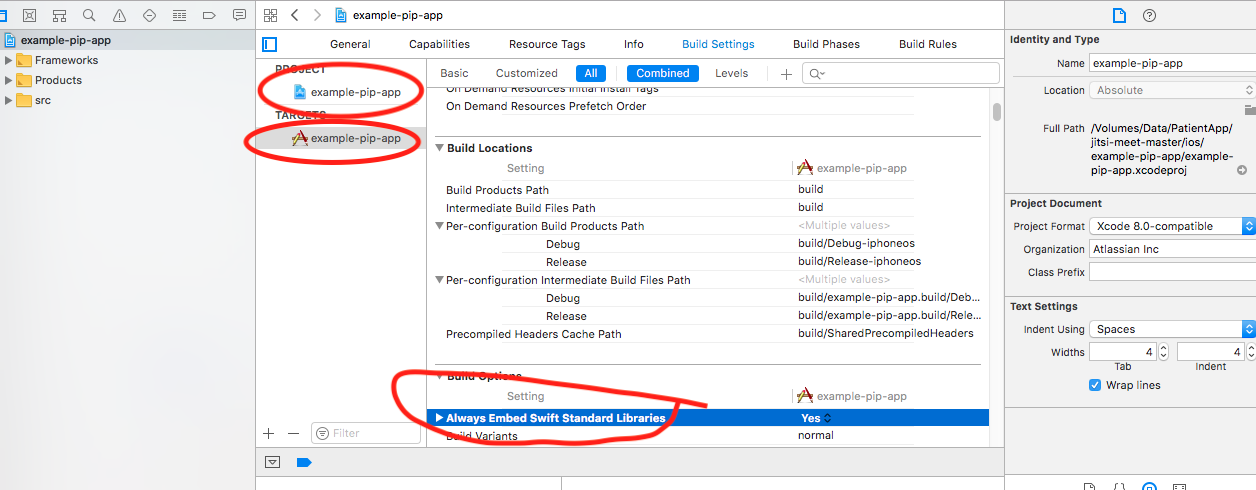
Search 'ALWAYS_EMBED_SWIFT_STANDARD_LIBRARIES' . in build settings and set as True for Both Project and Target --
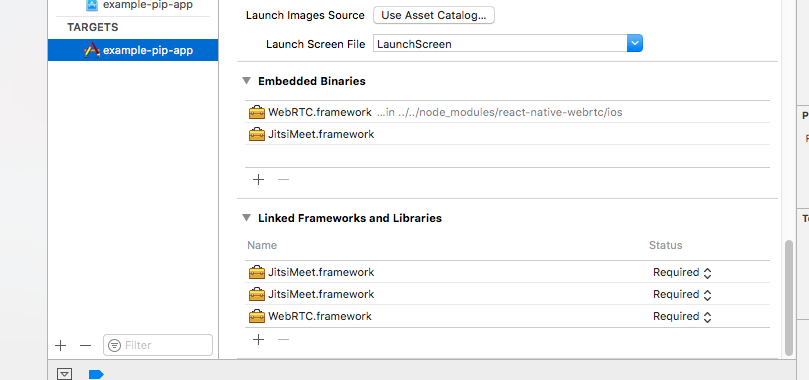
Make sure 'your both frameworks are added in Embedded libraries section ' ---
Clean the code and delete Xcode derived data, then Run..!
FaizalMalik
on 26 Jul 2018
I am unable to see second linked lib while searching. What could be wrong?
 AbhijitGite28
on 17 Sep 2018
AbhijitGite28
on 17 Sep 2018
Related issues
 adammarketing
·
90Comments
adammarketing
·
90Comments
 svtagt
·
55Comments
svtagt
·
55Comments
 JpTiger
·
50Comments
JpTiger
·
50Comments
 kangzhe0000
·
39Comments
kangzhe0000
·
39Comments
 kinnla
·
40Comments
kinnla
·
40Comments
Most helpful comment
After some Work Around, this workaround works for me...!
Search 'ALWAYS_EMBED_SWIFT_STANDARD_LIBRARIES' . in build settings and set as True for Both Project and Target --
Make sure 'your both frameworks are added in Embedded libraries section ' ---
Clean the code and delete Xcode derived data, then Run..!