Jitsi-meet: black screen for more than two people at a time
I am running jitsi on a restricted access machine, I have to request each ports to be open for it to function. Currently jitsi deployed in my server only works for two people (it gives black screen for more than two), however I have only two open ports. How many ports do I need exactly?
 aditya6992
All 29 comments
You generally need 2: 443/tcp (for web traffic) and 10000/udp (for audio / video). Do you have those open?
 saghul
on 24 Nov 2017
saghul
on 24 Nov 2017
Yes I have opened 10000 as udp and 443. It works fine for two people, two people can see each other's video. But when the third person joins, I get the following from my browser error logs:
Logger.js:125 [modules/xmpp/ChatRoom.js] <t.value>: entered [email protected]/3c5ec7a7 {show: "", affiliation: "none", role: "participant", jid: "[email protected]/d9dd65f6-9389-4509-ab4e-9c5c73562f86", isFocus: false, …}
Logger.js:124 [conference.js] <n.<anonymous>>: USER %s connnected 3c5ec7a7 e {_jid: "[email protected]/3c5ec7a7", _id: "3c5ec7a7", _conference: r, _displayName: undefined, _supportsDTMF: false, …}
Logger.js:125 [JitsiConference.js] <r._maybeStartOrStopP2P>: Will stop P2P with: [email protected]/ec516197
Logger.js:125 [JitsiConference.js] <r._removeRemoteTracks>: Removing remote P2P track: RemoteTrack[ec516197, audio, p2p: true]
Logger.js:124 [modules/UI/videolayout/RemoteVideo.js] <i.removeRemoteStreamElement>: Audio removed ec516197 [audio#remoteAudio_c707447a-e371-4897-b9ef-23c4003a3c1d, context: document, selector: "#remoteAudio_c707447a-e371-4897-b9ef-23c4003a3c1d"]
Logger.js:125 [JitsiConference.js] <r._removeRemoteTracks>: Removing remote P2P track: RemoteTrack[ec516197, video, p2p: true]
Logger.js:124 [modules/UI/videolayout/RemoteVideo.js] <i.removeRemoteStreamElement>: Video removed ec516197 [video#remoteVideo_e1283443-2ea5-47f2-a34f-52a8095a8b22, context: document, selector: "#remoteVideo_e1283443-2ea5-47f2-a34f-52a8095a8b22"]
Logger.js:125 [JitsiConference.js] <r._stopP2PSession>: Stopping remote stats for P2P connection
Logger.js:125 [JitsiConference.js] <r._stopP2PSession>: Stopping CallStats for P2P connection
Logger.js:125 [modules/xmpp/JingleSessionPC.js] <t.value>: Sending session-terminate <iq to="[email protected]/ec516197" type="set" xmlns="jabber:client" id="baa957a8-0cc1-4883-938d-b65374ecc958:sendIQ">…</iq>
Logger.js:125 [modules/xmpp/JingleSessionPC.js] <t.value>: Session terminated JingleSessionPC[p2p=true,initiator=true,sid=a271476fe21b] undefined undefined
Logger.js:125 [modules/RTC/TraceablePeerConnection.js] <r.close>: Closing TPC[2,p2p:true]...
Logger.js:125 [JitsiConference.js] <r._setP2PStatus>: Peer to peer connection closed!
Logger.js:125 [JitsiConference.js] <r._stopP2PSession>: Not adding remote JVB tracks - no session yet
Logger.js:124 [modules/UI/videolayout/LargeVideoManager.js] <>: hover in %s ec516197
Logger.js:125 [modules/xmpp/JingleSessionPC.js] <t.value>: The session has ended - cancelling action: oniceconnectionstatechange
Logger.js:125 [modules/xmpp/strophe.jingle.js] <o.value>: on jingle session-terminate from [email protected]/ec516197 <iq xmlns="jabber:client" type="set" to="[email protected]/6895dacc-2824-4c37-bd2a-7542ed06b562" from="[email protected]/ec516197" id="NTIyN2YyOTktYWQwZS00NTY3LWJmYWYtNjZjYjBlMzJkNTFkQGppdHNpLmp1c3RkaXMuY29tLzY4OTVkYWNjLTI4MjQtNGMzNy1iZDJhLTc1NDJlZDA2YjU2MgBjYmMxMWQ5My1kM2UyLTQ0ZjYtYTFhMi0zZjc0M2M0ZmJkZTA6c2VuZElRAFDVU5RoyabBO5ckZJYpSBo=">…</iq>
Logger.js:125 [modules/xmpp/strophe.jingle.js] <o.value>: invalid session id <iq xmlns="jabber:client" type="set" to="[email protected]/6895dacc-2824-4c37-bd2a-7542ed06b562" from="[email protected]/ec516197" id="NTIyN2YyOTktYWQwZS00NTY3LWJmYWYtNjZjYjBlMzJkNTFkQGppdHNpLmp1c3RkaXMuY29tLzY4OTVkYWNjLTI4MjQtNGMzNy1iZDJhLTc1NDJlZDA2YjU2MgBjYmMxMWQ5My1kM2UyLTQ0ZjYtYTFhMi0zZjc0M2M0ZmJkZTA6c2VuZElRAFDVU5RoyabBO5ckZJYpSBo=">…</iq>
With two it works, cause it connects P2P. When it needs to switch to jvb connection, seems like something is wrong.
Can you check jicofo logs, are there any exceptions when you try adding the third participant or any exceptions on jicofo startup?
 damencho
on 24 Nov 2017
damencho
on 24 Nov 2017
I do notice the same issue. The P2P call works fine, but when the third participant is added, we get the black screen. In our case, we manually compiled the stable version of Jitsi Meet, Jicofo and JVB (i.e. latest tag 2635) and installed on server. Everything was fine with previous stable tag 2467. I believe, it is something to do with Jicofo connecting to Prosody XMPP server as it's not finding the valid certificate for the domain that we are using.
Here is the Jicofo log showing the related error.
Caused by: sun.security.validator.ValidatorException: PKIX path building failed: sun.security.provider.certpath.SunCertPathBuilderException: unable to find valid certification path to requested target
at sun.security.validator.PKIXValidator.doBuild(PKIXValidator.java:387)
at sun.security.validator.PKIXValidator.engineValidate(PKIXValidator.java:292)
at sun.security.validator.Validator.validate(Validator.java:260)
at sun.security.ssl.X509TrustManagerImpl.validate(X509TrustManagerImpl.java:324)
at sun.security.ssl.X509TrustManagerImpl.checkTrusted(X509TrustManagerImpl.java:229)
at sun.security.ssl.X509TrustManagerImpl.checkServerTrusted(X509TrustManagerImpl.java:124)
at sun.security.ssl.ClientHandshaker.serverCertificate(ClientHandshaker.java:1491)
... 13 more
Caused by: sun.security.provider.certpath.SunCertPathBuilderException: unable to find valid certification path to requested target
at sun.security.provider.certpath.SunCertPathBuilder.build(SunCertPathBuilder.java:141)
at sun.security.provider.certpath.SunCertPathBuilder.engineBuild(SunCertPathBuilder.java:126)
at java.security.cert.CertPathBuilder.build(CertPathBuilder.java:280)
at sun.security.validator.PKIXValidator.doBuild(PKIXValidator.java:382)
... 19 more
Jicofo 2017-11-24 21:12:52.237 WARNING: [50] org.jivesoftware.smack.AbstractXMPPConnection.callConnectionClosedOnErrorListener() Connection XMPPTCPConnection[not-authenticated] (0) closed with error
javax.net.ssl.SSLHandshakeException: sun.security.validator.ValidatorException: PKIX path building failed: sun.security.provider.certpath.SunCertPathBuilderException: unable to find valid certification path to requested target
at sun.security.ssl.Alerts.getSSLException(Alerts.java:192)
at sun.security.ssl.SSLSocketImpl.fatal(SSLSocketImpl.java:1949)
at sun.security.ssl.Handshaker.fatalSE(Handshaker.java:302)
at sun.security.ssl.Handshaker.fatalSE(Handshaker.java:296)
at sun.security.ssl.ClientHandshaker.serverCertificate(ClientHandshaker.java:1509)
at sun.security.ssl.ClientHandshaker.processMessage(ClientHandshaker.java:216)
at sun.security.ssl.Handshaker.processLoop(Handshaker.java:979)
at sun.security.ssl.Handshaker.process_record(Handshaker.java:914)
at sun.security.ssl.SSLSocketImpl.readRecord(SSLSocketImpl.java:1062)
at sun.security.ssl.SSLSocketImpl.performInitialHandshake(SSLSocketImpl.java:1375)
at sun.security.ssl.SSLSocketImpl.startHandshake(SSLSocketImpl.java:1403)
at sun.security.ssl.SSLSocketImpl.startHandshake(SSLSocketImpl.java:1387)
at org.jivesoftware.smack.tcp.XMPPTCPConnection.proceedTLSReceived(XMPPTCPConnection.java:798)
at org.jivesoftware.smack.tcp.XMPPTCPConnection.access$1200(XMPPTCPConnection.java:150)
at org.jivesoftware.smack.tcp.XMPPTCPConnection$PacketReader.parsePackets(XMPPTCPConnection.java:1055)
at org.jivesoftware.smack.tcp.XMPPTCPConnection$PacketReader.access$300(XMPPTCPConnection.java:982)
at org.jivesoftware.smack.tcp.XMPPTCPConnection$PacketReader$1.run(XMPPTCPConnection.java:998)
at java.lang.Thread.run(Thread.java:745)
Caused by: sun.security.validator.ValidatorException: PKIX path building failed: sun.security.provider.certpath.SunCertPathBuilderException: unable to find valid certification path to requested target
at sun.security.validator.PKIXValidator.doBuild(PKIXValidator.java:387)
at sun.security.validator.PKIXValidator.engineValidate(PKIXValidator.java:292)
at sun.security.validator.Validator.validate(Validator.java:260)
at sun.security.ssl.X509TrustManagerImpl.validate(X509TrustManagerImpl.java:324)
at sun.security.ssl.X509TrustManagerImpl.checkTrusted(X509TrustManagerImpl.java:229)
at sun.security.ssl.X509TrustManagerImpl.checkServerTrusted(X509TrustManagerImpl.java:124)
at sun.security.ssl.ClientHandshaker.serverCertificate(ClientHandshaker.java:1491)
... 13 more
Caused by: sun.security.provider.certpath.SunCertPathBuilderException: unable to find valid certification path to requested target
at sun.security.provider.certpath.SunCertPathBuilder.build(SunCertPathBuilder.java:141)
at sun.security.provider.certpath.SunCertPathBuilder.engineBuild(SunCertPathBuilder.java:126)
at java.security.cert.CertPathBuilder.build(CertPathBuilder.java:280)
at sun.security.validator.PKIXValidator.doBuild(PKIXValidator.java:382)
... 19 more
 amagadum
on 25 Nov 2017
amagadum
on 25 Nov 2017
@aditya6992 if you see the same exception as @amagadum, check out my comment https://github.com/jitsi/jitsi-meet/issues/1899#issuecomment-346913814 for resolution.
damencho
on 25 Nov 2017
I think I am running into the same issue. As soon as a third person connects to a room the video goes blank, the audio also seems to drop. I have attached excerpts from console and jicofo logs for the moment when a third person connects.
Edit: I don't have any of the certificate related errors mentioned above.
 philwrenn
on 26 Nov 2017
philwrenn
on 26 Nov 2017
@philwrenn You can see in the jicofo log, that there is no jvb, so you have a different problem. Checking the logs of jicofo to see which health check marked jvb as unhealthy can reveal more for your problem, this should be somewhere before the conference. Restarting jvb will fix it temporarily.
damencho
on 27 Nov 2017
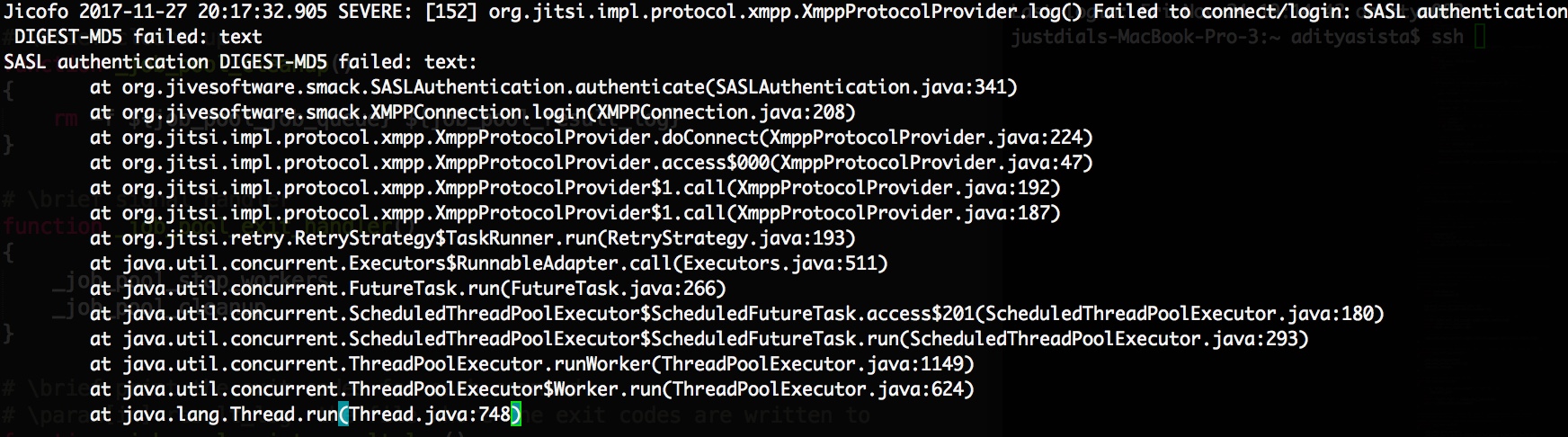
Hi, sorry for the late response, but here is the jicofo log's last few lines:
aditya6992
on 27 Nov 2017
Your jicofo password is not correct. The one that is passed using the --user_password option.
damencho
on 27 Nov 2017
@damencho Have resolved the issue that was causing the health check to fail, however the conference is exhibiting the same behavior, i.e. loosing the conference when the 3rd person connects. I have attached updated logs from the time of failure. (If I should open another issue please let me know)
philwrenn
on 27 Nov 2017
Hum, this is strange @philwrenn . You are defining in config.js:
bridge: 'videobridge.meet...',
Why do you need to specify it? Did you also changed the parameters when starting jvb so it will not use the default jitsi-videobridge subdomain for the component address.
You do not need to specify anything in the config.js for the videobridge, jicofo will be discovering those. I suspect that if you specify it wrong it mess up stuff, basically overriding the discovery (not sure about that need to look at jicofo code to verify my suspicion).
damencho
on 27 Nov 2017
I am starting JVB like this:
jvb.sh --host=127.0.0.1 --port=5347 --domain=meet.philwrenn.com --subdomain=videobridge --secret=XXXXXXXXX --min-port=49152 --max-port=65535
Should I remove the subdomain flag and remove bridge: 'videobridge.meet...', from config.js?
philwrenn
on 27 Nov 2017
Well, you are doing it right :( So it seems a strange issue.
Do you see any jvb errors?
damencho
on 27 Nov 2017
Attached file with everything from jvb log that wasn't INFO or FINE.
philwrenn
on 28 Nov 2017
Hi, im pretty sure my password is correct, I created a docker image for all this and ran everything according to https://github.com/jitsi/jitsi-meet/blob/master/doc/manual-install.md, so basically I created a random password and stored it in a variable and used it.
Also, is it necessary to have 10000 as udp? I am using the port 8000 as udp which is mapped to 10000 inside the docker container, is this causing any problems?
I was thinking maybe the javascript that handles all the video conference part in the front end is trying to communicate with my server on 10000, but it can only do so on 8000 udp, but I haven't found where I can specify the udp port. Am I right on this?
aditya6992
on 28 Nov 2017
You can double check the password, it is in /var/lib/prosody/auth%2ejitsi%2ejustdis%2ecom/focus.dat, where the folder name is your auth... domain that you pass with --user_domain option (just the dots are replaced with %2e) and the name of the file is the value you pass with option --user_name.
Yes, the port is a problem if you haven't change it in jvb config as jvb will announce 10000 and clients will be sending to 10000. You can configure this with a property:
https://github.com/jitsi/jitsi-videobridge/blob/master/doc/single-port.md#configuration
If your jvb is behind nat you also need to configure the addresses, if you haven't done so:
https://github.com/jitsi/jitsi-meet/blob/master/doc/quick-install.md#advanced-configuration
damencho
on 28 Nov 2017
Hey @philwrenn I think I just found a problem in jicofo, where it doesn't reconnect to prosody on prosody restart. We will be working on fixing that, but can you check whether jicofo restart fixes the problem for you?
damencho
on 28 Nov 2017
@damencho After restating jicofo I am prompted to login as the host again. I do that and then as the 3rd participant reconnects it all dies again.
philwrenn
on 28 Nov 2017
You have in jicofo sip-communicator.properties: org.jitsi.jicofo.auth.URL=XMPP:your_domain?
damencho
on 28 Nov 2017
@damencho Yes, I have org.jitsi.jicofo.auth.URL=XMPP:meet... in /etc/jitsi/jicofo/sip-communicator.properties
philwrenn
on 29 Nov 2017
Okay my problem is solved, here is how it worked for me:
1) running inside docker container (debian:stretch) at port 80 for jitsi meet nginx
2) add jitsi.org to source list and install everything using apt-get update and apt-get install
3) copy all the given config files (modify accordingly) given in manual-install.md into docker container
4) follow manual-install.md to write dockerfile and a shell script to run inside the docker
5) you need to expose two ports as mentioned earlier, not one (many existing jitsi docker images simply expose one port, that doesnt work), one for http to serve the web page and one for udp for audio and video.
6) Nat harvester local address is the ip address of the docker container (use docker inspect
7) Nat harvester public address is the public ip address of the machine that contains this docker container
8) use google stun server "stun.l.google.com:19302" or if you have one use that
aditya6992
on 29 Nov 2017
@aditya6992
Thanks for your solution. I need to test it, but I think our problems were related. I configured the NAT Local and Public addresses for the harvester, but not correctly. I used my server's LAN IP as the internal address instead of the Docker container's IP.
philwrenn
on 29 Nov 2017
I'm using host networking for my videobridge container, so the LAN IP and Docker IP are the same. Not sure where things are going wrong for me.
philwrenn
on 30 Nov 2017
@philwrenn it is really strange.
Can you enable in the js console showing the timestamp and send the log from js console (or use the save as option when you right click in the console, the important thing is to have and timestamps in the resulting log file so it can be compared with the time from the other logs), jvb and jicofo for the whole call, before joining the first participant and after joining the 3rd one. All the logs with no filtering, cause its hard to see anything in just fragments of logs, from different calls.
damencho
on 30 Nov 2017
@damencho (logs attached)
console.log
jicofo.log
videobridge.log
Edited: Added timestamps.
philwrenn
on 1 Dec 2017
So the problem is that there is no video or audio passing when using the videobridge, right?
(I had an impression of another problem, sorry, but we mixed different problems in the same issue and I got confused).
I cannot see any ip addresses in the logs :( to confirm that my self. But if this is the case, have you properly set the private and public address as stated in: https://github.com/jitsi/jitsi-meet/blob/master/doc/quick-install.md#advanced-configuration ?
The private address is the local address (ipconfig) on the machine where jvb runs, while public is the one where participants can reach the jvb over internet, the address in case of NAT where you have forwarded the ports.
The addresses of the jvb, private and public are seen in the setRemoteDescription section of the page chrome://webrtc-internals, this is how I will debug it if I have access to a deployment.
Your jvb and jicofo logs are with the same content, by the way.
damencho
on 1 Dec 2017
I was getting the same problem. When the third person connected, the screen went dark.
After looking at the jicofo.logfile, it was apparent that I was getting the exceptions related to having invalid certificates. I even manually reloaded the certificate store as suggested above, but it did not help.
However, I completely forgot that I was using Oracle's Java (and not OpenJDK). And apparently Oracle's Java uses a different certificate store than OpenJDK which meant that jicofo was rejecting Prosody's certificates.
So I removed Oracle's Java and installed OpenJDK and the system now works. Hopefully this also helps someone else.
 djelenc
on 8 Dec 2017
djelenc
on 8 Dec 2017
Thanks for sharing this.
damencho
on 8 Dec 2017
Would anyone be willing to share their working Docker image/Dockerfile?
 tiredofit
on 15 Dec 2017
tiredofit
on 15 Dec 2017
Related issues
 julianfoad
·
66Comments
julianfoad
·
66Comments
 kangzhe0000
·
39Comments
kangzhe0000
·
39Comments
 Janhouse
·
99Comments
saghul
·
106Comments
Janhouse
·
99Comments
saghul
·
106Comments
 kinnla
·
40Comments
kinnla
·
40Comments
Most helpful comment
Okay my problem is solved, here is how it worked for me: to find out)
1) running inside docker container (debian:stretch) at port 80 for jitsi meet nginx
2) add jitsi.org to source list and install everything using apt-get update and apt-get install
3) copy all the given config files (modify accordingly) given in manual-install.md into docker container
4) follow manual-install.md to write dockerfile and a shell script to run inside the docker
5) you need to expose two ports as mentioned earlier, not one (many existing jitsi docker images simply expose one port, that doesnt work), one for http to serve the web page and one for udp for audio and video.
6) Nat harvester local address is the ip address of the docker container (use docker inspect
7) Nat harvester public address is the public ip address of the machine that contains this docker container
8) use google stun server "stun.l.google.com:19302" or if you have one use that