Jetpack: Comments: Comment field sizing is broken, text is hidden.
Steps to reproduce the issue
- Found on WordPress.com - Activate a newer theme, like Twenty Twenty One, or Twenty Twenty, or Twenty Nineteen, or any Varia based theme.
- Enable comments on a post, publish the post, visit the post, view the comment form.
What I expected
The Comment form/field to be legible and visible on the page.
What happened instead
The comment form/field is squished, and the text is not legible, making the field obscured to visitors.
Screenshots
Twenty Twenty One:

Twenty Twenty:

Spearhead:

 scosgro
All 17 comments
Came here to report this issue as I received some comments on it. :)
It also appears to affect non-WordPress.com themes too; this one is Ashe.
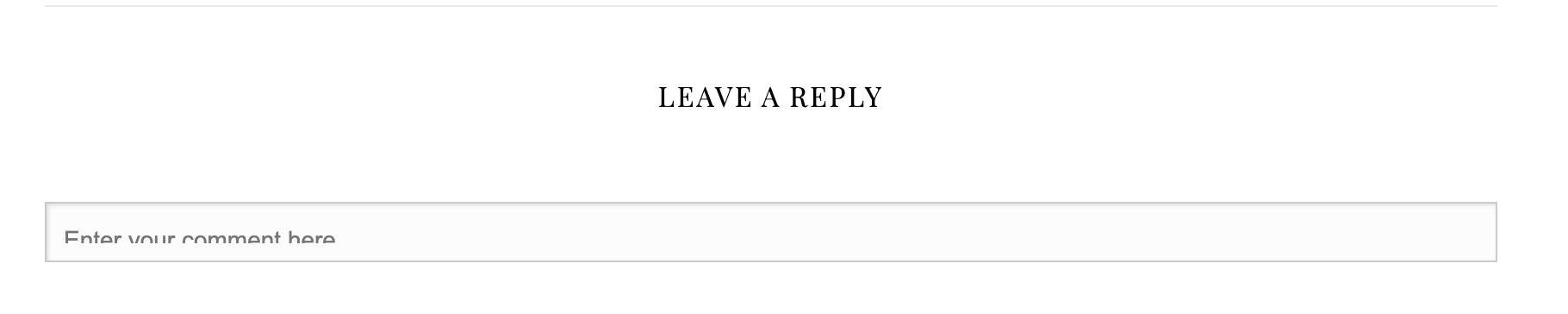
I don't think it's a theme issue, to be honest. Even with the direct iFrame link, the issue is still present.

 Aurorum
on 14 Jan 2021
Aurorum
on 14 Jan 2021
@sgomes Could it be caused by r219199-wpcom?
 jeherve
on 14 Jan 2021
jeherve
on 14 Jan 2021
Also reported here:
https://wordpress.org/support/topic/enter-your-comment-here-message-is-cut-off-in-comments-box/
jeherve
on 14 Jan 2021
@jeherve It's possible that it's related, I'll investigate.
 sgomes
on 14 Jan 2021
sgomes
on 14 Jan 2021
That does indeed appear to be what's causing the issue. I'll prepare a fix.
sgomes
on 14 Jan 2021
Fix ready for review at D55356-code. This should not affect Jetpack code.
sgomes
on 14 Jan 2021
The fix is now live! Closing the issue, as it should be fixed, but please feel free to reopen if there are any further issues.
sgomes
on 15 Jan 2021
Hello, this was fixed (I last checked yesterday). But this morning, the same issue seems to be back.
 firdousebareen
on 20 Jan 2021
firdousebareen
on 20 Jan 2021
Thanks for letting me know, @firdousebareen! Can you give me an example of a site where the issue pops up? I can't seem to reproduce it in my test page.
sgomes
on 20 Jan 2021
Ah ok that's interesting. I've noticed it on my site: https://www.samwoolfe.com/ I've attached a screenshot as well.
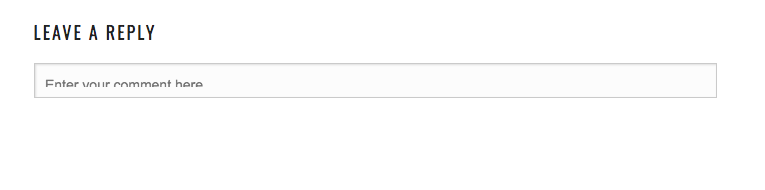
firdousebareen
on 20 Jan 2021
Thank you, @firdousebareen! 👍 I'll investigate.
sgomes
on 20 Jan 2021
Thank you! Much appreciated :)
firdousebareen
on 20 Jan 2021
It appears that the comments box doesn't resize correctly when it's inside of an iframe. However, I can't find any connection between this and any of my changes. Continuing to investigate.
sgomes
on 20 Jan 2021
The issue turned out to be related to my code indeed. It was a tricky scheduling issue between jQuery and non-jQuery code. D55685-code has the fix.
sgomes
on 20 Jan 2021
The issue should now be fixed again. Could you please confirm that's the case for you. @firdousebareen?
sgomes
on 20 Jan 2021
Hi @sgomes It's working! Thanks for fixing that.
firdousebareen
on 20 Jan 2021
No worries, @firdousebareen! Thank you for letting me know it was broken again 🙂
sgomes
on 20 Jan 2021
Related issues
jeherve
·
3Comments
 beaulebens
·
3Comments
beaulebens
·
3Comments
beaulebens
·
3Comments
beaulebens
·
3Comments
 dougaitken
·
3Comments
dougaitken
·
3Comments
 BinaryMoon
·
3Comments
BinaryMoon
·
3Comments
Most helpful comment
Fix ready for review at D55356-code. This should not affect Jetpack code.