Jetpack: Stats: Weekly/Monthly Stats showing single day in tooltip
Steps to reproduce the issue
- Go to Jetpack > Site Stats in wp-admin
- Click on the 'Weeks' or 'Months' tabs
- Hover over the stats for a week/month
- See the tooltip from the 'Days' tab.
What I expected
The tooltip should indicate the relevant date range.
What happened instead
It indicates a specific day, which corresponds to the 'Days' tab.
Screenshots
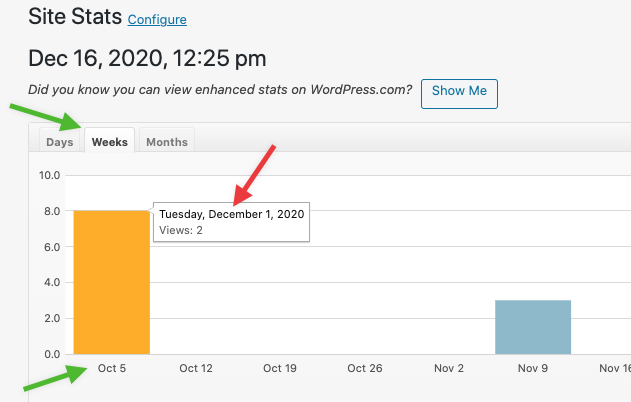
Reported in https://wordpress.org/support/topic/tooltips-on-stats-pages-wrong/
 danjjohnson
All 5 comments
3622193-zen
 htdat
on 6 Jan 2021
htdat
on 8 Jan 2021
htdat
on 6 Jan 2021
htdat
on 8 Jan 2021
 mzakariya
on 14 Jan 2021
mzakariya
on 14 Jan 2021
I'm working on a potential fix for this in D55329-code.
 kbrown9
on 14 Jan 2021
kbrown9
on 14 Jan 2021
This bug was caused by a problem with the script coming from WPCOM, and we've fixed the script in D55329-code. This bug should now be fixed, so I'm closing this issue.
Let us know if you encounter any problems!
kbrown9
on 18 Jan 2021
🚀2
Was this page helpful?
0 / 5 - 0 ratings
Related issues
 Viper007Bond
·
3Comments
Viper007Bond
·
3Comments
 crunnells
·
3Comments
crunnells
·
3Comments
 ockham
·
3Comments
ockham
·
3Comments
 abidhahmed
·
3Comments
abidhahmed
·
3Comments
 chrisaldrich
·
3Comments
chrisaldrich
·
3Comments
Most helpful comment
This bug was caused by a problem with the script coming from WPCOM, and we've fixed the script in D55329-code. This bug should now be fixed, so I'm closing this issue.
Let us know if you encounter any problems!