Jetpack: Modules: Option to disable Jetpack Blocks
Is your feature request related to a problem? Please describe.
This user feels like the Jetpack blocks are overtaking the edit screen:
https://wordpress.org/support/topic/disable-gutenberg-blocks/
Describe the solution you'd like
Offer an option in Modules and on the Writing page to disable Jetpack Blocks if wanted
Describe alternatives you've considered
There may be some custom code way of doing it, but giving folks an option could be better.
Additional context
Found while working in the forums at WordPress.org.
 supernovia
All 6 comments
You should be able to disable all Jetpack blocks at once by adding the following code snippet to your site:
add_filter( 'jetpack_gutenberg', '__return_false' );
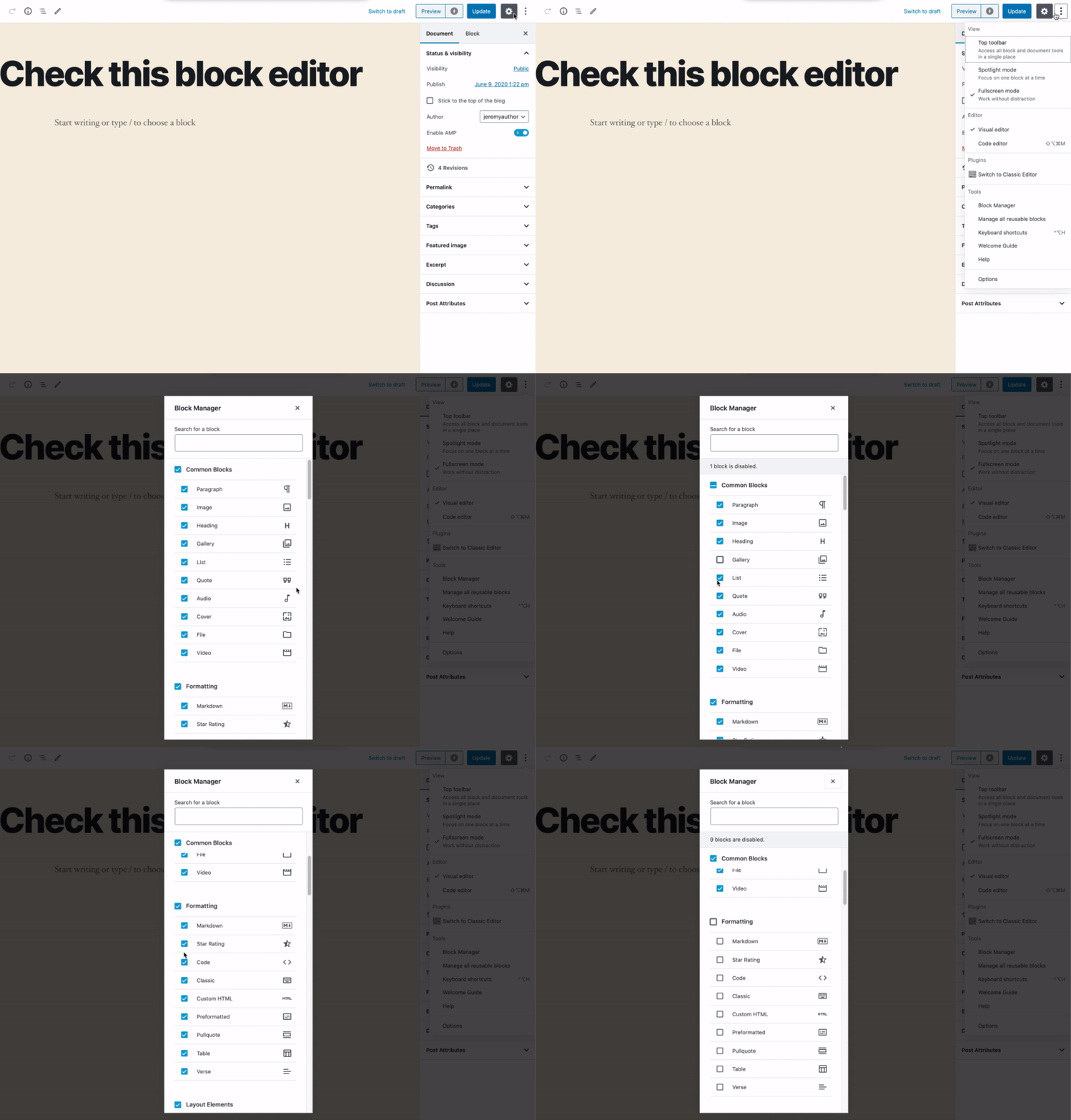
Alternatively, you can the block manager that is available in WordPress itself to disable all blocks you don't need:
For this reason, we most likely won't implement a global toggle in Jetpack settings.
 jeherve
on 10 Jun 2020
jeherve
on 10 Jun 2020
Alternatively, you can the block manager that is available in WordPress itself to disable all blocks you don't need.
Please note that the block manager only disables blocks for that user. If you want these blocks disabled for all users, you should add the code snippet to your theme code.
 matthewmcvickar
on 9 Jul 2020
matthewmcvickar
on 9 Jul 2020
Alternatively, you can the block manager that is available in WordPress itself to disable all blocks you don't need:
@jeherve For me, I'm not seeing the jetpack blocks in the deactivate dialogue. For that reason, I'd ask that you consider opening this again. Even in your screen shot, the jetpack blocks are not shown.
 snow1776
on 12 Nov 2020
snow1776
on 12 Nov 2020
I'm not seeing the jetpack blocks in the deactivate dialogue. For that reason, I'd ask that you consider opening this again. Even in your screen shot, the jetpack blocks are not shown.
If you do not see the Jetpack blocks in the dialogue, that should mean that the blocks are already not available for your user on your site.
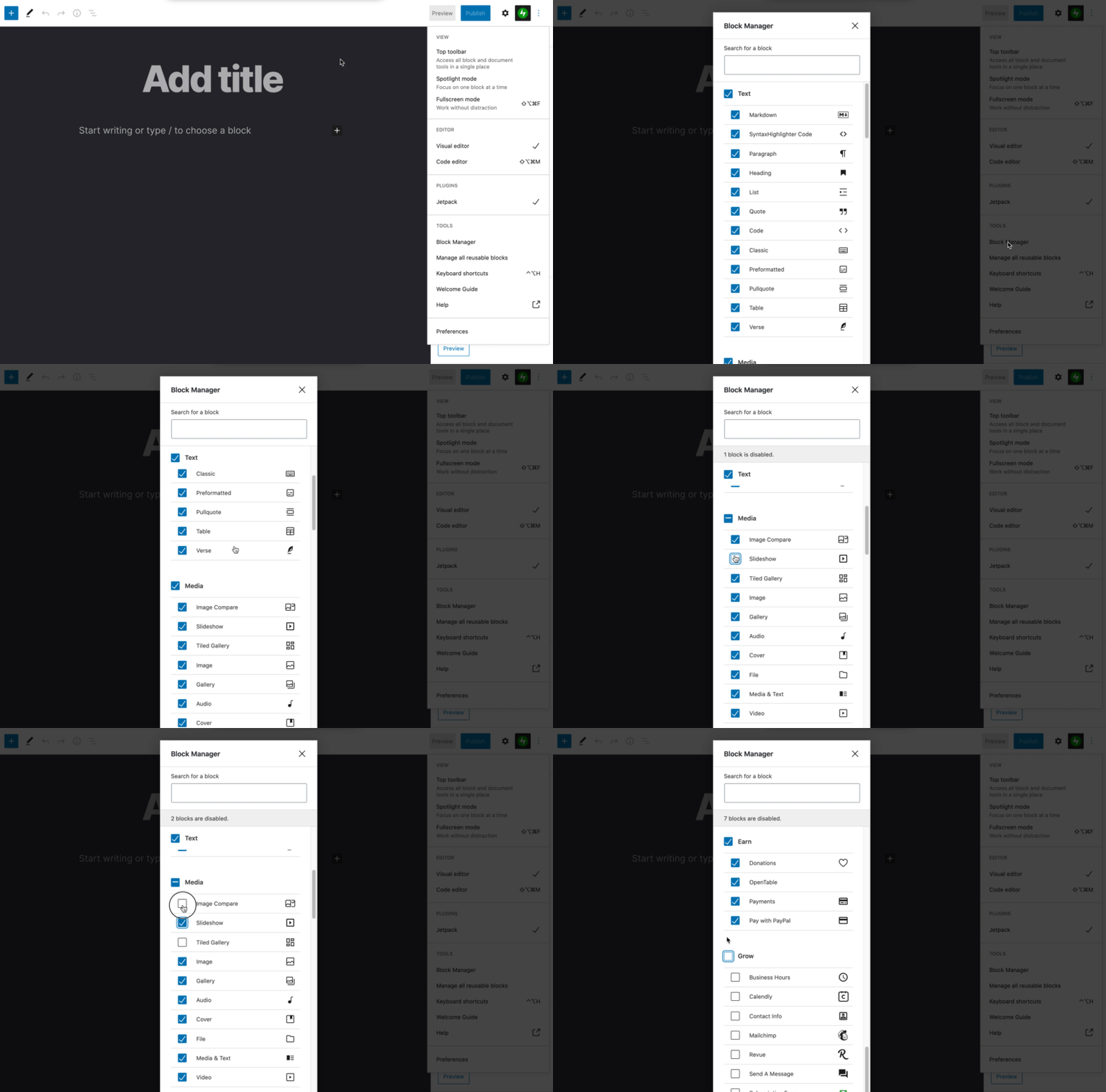
My screenshot showed how things looked like with an older version of Jetpack. Since then we've made some changes to the way our blocks are categorized; you'll find some of the Jetpack blocks in the categories at the top of the manager (Markdown in the Text category, Tiled Gallery in Media for example), and you'll find other Jetpack blocks in their own categories at the bottom of the manager (Earn and Grow):
jeherve
on 12 Nov 2020
you'll find some of the Jetpack blocks in the categories at the top of the manager (Markdown in the Text category, Tiled Gallery in Media for example), and you'll find other Jetpack blocks in their own categories at the bottom of the manager (Earn and Grow):
Thanks for such a quick and detailed reply. I see my mistake.
I have the Stackable blocks installed and they appear in the block library (?) as well as the block manager as multi-coloured icons. I wrongly assumed that since the jetpack icons were green in the block _library_ they would also appear green in the block _manager_. For me, they are black like the built in blocks. Maybe that could change so things were more consistent and it would be easier to deactivate them as a group.
I guess I was also looking for a section called Jetpack in the manager as there is in the library.
Thanks again!
snow1776
on 12 Nov 2020
I wrongly assumed that since the jetpack icons were green in the block library they would also appear green in the block manager. For me, they are black like the built in blocks. Maybe that could change so things were more consistent and it would be easier to deactivate them as a group.
That's a good point. I created #17789 to track this.
I guess I was also looking for a section called Jetpack in the manager as there is in the library.
That's a good point. I think it would make for a good improvement to the block manager as a whole; as we all install more and more blocks on our sites, the full list becomes harder and harder to quickly parse and some filtering options would be useful I think.
I commented here to bring that piece of feedback to the contributors working on the block editor:
https://github.com/WordPress/gutenberg/issues/15121
Thanks for your feedback!
jeherve
on 12 Nov 2020
Related issues
 kraftbj
·
3Comments
kraftbj
·
3Comments
 NicktheGeek
·
3Comments
NicktheGeek
·
3Comments
 MichaelArestad
·
3Comments
MichaelArestad
·
3Comments
 BinaryMoon
·
3Comments
BinaryMoon
·
3Comments
 abidhahmed
·
3Comments
abidhahmed
·
3Comments
Most helpful comment
You should be able to disable all Jetpack blocks at once by adding the following code snippet to your site:
Alternatively, you can the block manager that is available in WordPress itself to disable all blocks you don't need:
For this reason, we most likely won't implement a global toggle in Jetpack settings.