Jetpack: Jetpack causing strange behavior with Twenty Twenty menu
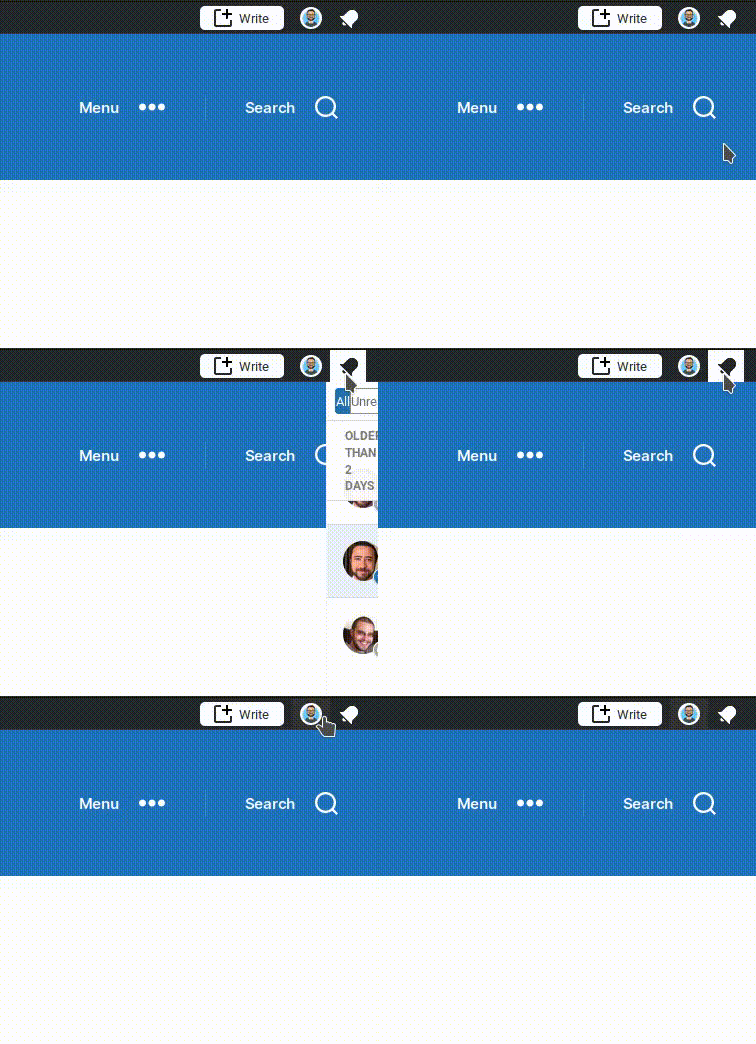
When Jetpack is active the Twenty Twenty primary menu breaks when selecting menu items that cause hidden menu containers to appear:

This does not happen when Jetpack is not active.
Further, when the WordPress.com toolbar feature is active, notifications do not fully expand:
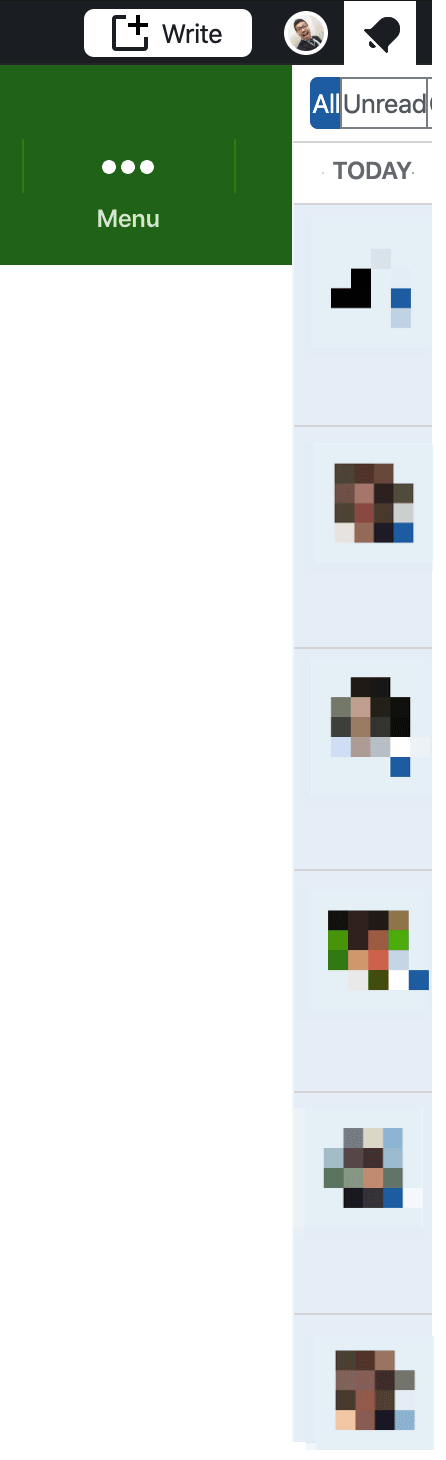
Steps to reproduce the issue
- Make sure Twenty Twenty is your active theme and only Jetpack is active
- Activate WordPress.com Toolbar (Jetpack > Settings > Writing )
- Change header and footer background color so the behavior is easier to spot (Appearance > Customize > Colors)
- While still logged in, visit the site's homepage and select Menu or Search from the primary menu
- Watch the primary menu break as pictured above
- Again, while still logged in, select the WordPress.com notification bell icon
- The notifications container does not fully expand as pictured above
What I expected
The theme primary menu should not change when hidden menus appear. And notifications should fully expand.
This was originally reported in 2691533-zen. I was able to test and confirm the bug on my test site.
 chickenn00dle
All 4 comments
Watch the primary menu break as pictured above
Could you clarify on this? I am not sure I understand the issue, I must be missing something obvious. Can you record a little video maybe?
The notifications container does not fully expand as pictured above
This may be related to #14263.
 jeherve
on 5 Feb 2020
jeherve
on 5 Feb 2020
Could you clarify on this? I am not sure I understand the issue, I must be missing something obvious. Can you record a little video maybe?
Sure thing!
Here is a recording of the behavior while Jetpack is active:
Image link: https://d.pr/i/8KBd7i
And while Jetpack is not active:
Image link: https://d.pr/i/Pc7Nbp
chickenn00dle
on 5 Feb 2020
Hello, I was the one who requested assistance from the Jetpack support group on this issue. There is also an additional issue with the "alerts" flyout with the WordPress.com toolbar.
 ndegruchy
on 11 Feb 2020
ndegruchy
on 11 Feb 2020
For the menu, the issue is tied to CSS linked to the .admin-bar class -- when the menu or search bar is revealed, an in-line position: fixed; is added to the html element. Jetpack uses a position: inherit !important; to set the .admin-bar class' position, so once that in-line class is added by the theme, everything goes sideways.
To fix that, I used the following CSS:
/* fix site position when modal is active in twenty twenty */
.admin-bar {
    position: unset !important;
}
I haven't noticed any odd side-effects of using that yet, but I'll update if I find something is broken.
For the notifications iframe, there's an in-line width: 77px being added to the #wpnt-notes-iframe2.wide element for some reason -- I don't know where that's coming from, but adding this CSS to my site resolved that:
/* fix wordpress.com notification iframe width */
iframe#wpnt-notes-iframe2.wide {
    width: auto !important;
}
 edequalsawesome
on 24 Feb 2020
edequalsawesome
on 24 Feb 2020
Related issues
 Viper007Bond
·
3Comments
Viper007Bond
·
3Comments
 abidhahmed
·
3Comments
abidhahmed
·
3Comments
 BinaryMoon
·
3Comments
jeherve
·
3Comments
BinaryMoon
·
3Comments
jeherve
·
3Comments
 ockham
·
3Comments
ockham
·
3Comments
Most helpful comment
For the menu, the issue is tied to CSS linked to the
.admin-barclass -- when the menu or search bar is revealed, an in-lineposition: fixed;is added to thehtmlelement. Jetpack uses aposition: inherit !important;to set the.admin-barclass' position, so once that in-line class is added by the theme, everything goes sideways.To fix that, I used the following CSS:
I haven't noticed any odd side-effects of using that yet, but I'll update if I find something is broken.
For the notifications iframe, there's an in-line
width: 77pxbeing added to the#wpnt-notes-iframe2.wideelement for some reason -- I don't know where that's coming from, but adding this CSS to my site resolved that: