Jetpack: Twitter timeline width overflow (iPhone)
Steps to reproduce the issue
1.- Activate Twenty Fourteen on a test site (It also happens on some other themes)
2.- Add the Twitter Timeline Widget
3.- Add parmafansww as the username
4.- Check the site on an iPhone (Checked with iPhone 5/ SE and 7)
What I expected
Tweets in the timeline to be correctly displayed

What happened instead
Tweets in the timeline are wider than the widget DIV

(In this image I added 2 Twitter widgets, one for the above mentioned user and another one for mine rantoncuadrado -that is working properly-.
Screenshots
If applicable, add screenshots to help explain your problem.
A CSS fix was proposed in p9cu9o-1xJ-p2 but it doesn't really fix the problem:
@media (max-width: 600px){
.content-sidebar iframe#twitter-widget-0,
.content-sidebar > *,
a#clustrmaps-widget-v2,
#clustrmaps-widget-v2 > *,
.clustrmaps-map-container > * {
    width: auto !important;
}

.site {
       overflow-x: hidden;
}
}
The overflow-x: hidden; doesn’t necessarily fix the issue but at least doesn’t show that bar anymore.
I used 2 twiter timelines mine and user’s to be sure it has to do with the particular picture they have. And it seems so (Mine rantoncuadrado is the first twitter timeline, user’s the 2nd)
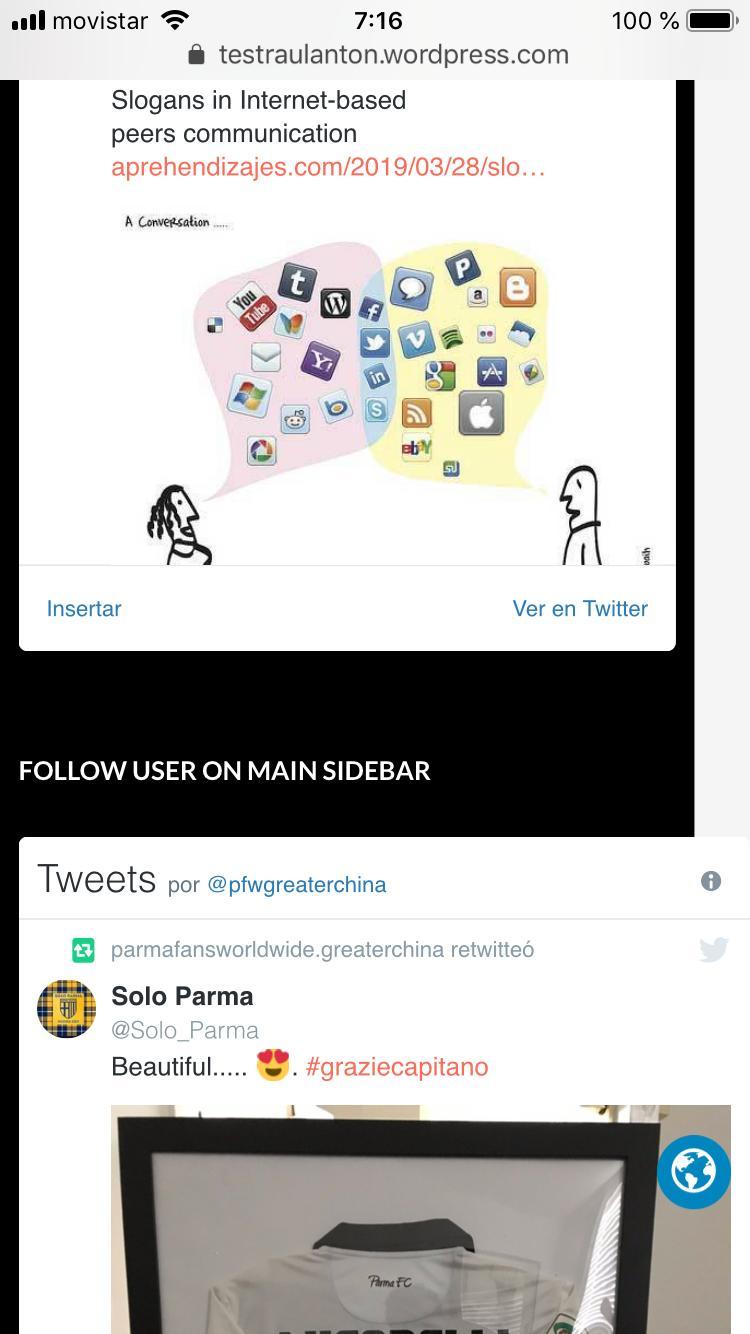
After applying the CSS code both timelines are impacted
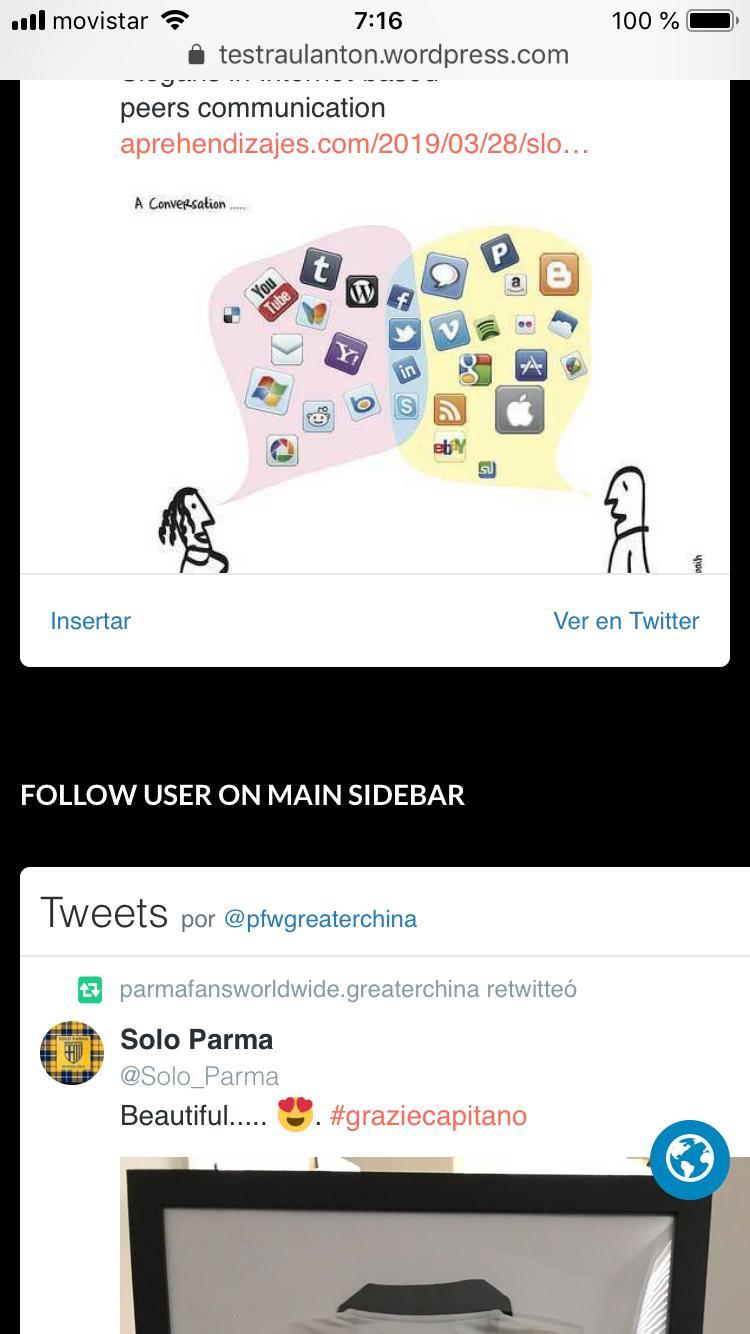
Note You can’t reproduce the weird behavior in a computer even with http://quirktools.com/screenfly/ or so. You can just see the bug on a real iPhone
Test2: Has it to do with a given tweet?
The tweet that seems to be causing the issue is the t-shirt retweet… Well, I also retweeted it on my Twitter account, but cannot reproduce the problem. It is still properly displayed on my profile, but not so in the user’s

Test3: Is it browser related?
Browsers behavior (iPhone 7):
Chrome, Safari, Opera Mini and Brave: same issue
Puffin: WORKS PROPERLY!
Firefox: Doesn’t show the tweets (?)
Puffin picture:

Test4: Is it theme related? It doesn't seem so.
I changed the theme to Apostrophe2 and the issue is still there on iPhone… well it is even worse. In Firefox the Widget is not showing the time line at all, in Chrome, this is what we get:
 rantoncuadrado
All 9 comments
I am experiencing a similar issue. The debugging I have done so far has not produced any leads.
Can be viewed on this site.
 yelly
on 5 Apr 2019
yelly
on 5 Apr 2019
Also facing this issue, and seemingly managing for now with the following CSS
.twitter-timeline {
    width: 100vw !important;
}
 darrin-rambillo
on 7 Jul 2019
darrin-rambillo
on 7 Jul 2019
Looks like this issue isn't resolved 14633184-hc
@jeherve Any news on this?
Can confirm that Darrin's CSS worked
 jjchrisdiehl
on 17 Aug 2019
jjchrisdiehl
on 17 Aug 2019
Another report of this here 13693797-hc
Gave them CSS fix in the meantime
 brookewp
on 17 Aug 2019
brookewp
on 17 Aug 2019
Any news on this?
Not yet, but we'll update this issue when we start working on this.
 jeherve
on 21 Aug 2019
jeherve
on 21 Aug 2019
This bug affects iOS Safari in general, not just iPhones, and is a longstanding issue.
This solution worked for me. For reference, you assign to the iframe a min-width: 100% !important and a width:10px !important (or something that is less than 100%).
The AMP project solved this issue in basically the same way: https://github.com/ampproject/amphtml/issues/11133
 wunc
on 30 Aug 2019
wunc
on 30 Aug 2019
116927-hc
Provided CSS workaround.
 cecoates
on 1 Oct 2019
cecoates
on 1 Oct 2019
I couldn't reproduce this issue on mobile (both Chrome and Safari) on iPhone XS and iPhone 7.
cc: @rantoncuadrado
 omkarscode
on 5 Oct 2019
omkarscode
on 5 Oct 2019
This issue has been marked as stale. This happened because:
- It has been inactive in the past 6 months.
- It hasn’t been labeled `[Pri] Blocker`, `[Pri] High`.
No further action is needed. But it's worth checking if this ticket has clear reproduction steps and it is still reproducible. Feel free to close this issue if you think it's not valid anymore — if you do, please add a brief explanation.
![stale[bot] picture](https://avatars.githubusercontent.com/in/1724?v=4&s=40) stale[bot]
on 2 Apr 2020
stale[bot]
on 2 Apr 2020
Related issues
 ockham
·
3Comments
ockham
·
3Comments
 NicktheGeek
·
3Comments
jeherve
·
3Comments
NicktheGeek
·
3Comments
jeherve
·
3Comments
 beaulebens
·
3Comments
beaulebens
·
3Comments
 htdat
·
3Comments
htdat
·
3Comments