Jetpack: Photon JS: Remove dependency to jQuery
(Edited description to match the current scope of the issue)
Steps to reproduce the issue
- Create a new WordPress, using Twenty Nineteen, and observe that on the frontend of the site, jQuery is not loaded/required.
- Install/activate Jetpack
- Go to the module list, activate Photon
- Now on the frontend of the site, observe that jQuery is being loaded
What I expected
Photon to not unnecessarily load additional resources. photon.js currently uses jQuery, but it doesn't look like there's much there that needs it. It can be re-written to vanilla js.
What happened instead
See above -- core's copy of jQuery is enqueued/loaded. To make matters worse, that version of jQuery has a known vulnerability (nothing to do with Jetpack, but that's what flagged this for me). https://snyk.io/vuln/npm:jquery?lh=1.12.4&utm_source=lighthouse&utm_medium=ref&utm_campaign=audit
 beaulebens
All 7 comments
Hm, that's interesting. I wasn't able to reproduce it with JN and local docker install. I do see jQuery requests (query.js?ver=1.12.4, jquery-migrate.min.js?ver=1.4.1) in network tab when only Photon module is enabled(https://github.com/Automattic/jetpack/blob/master/class.photon.php#L1019-L1033). I'm not sure if this is a correct way to do. How did you check that jQuery is loaded?
 brbrr
on 23 Jan 2019
brbrr
on 23 Jan 2019
It's worth noting that even if you deactivate all modules, Jetpack still loads quite a few things, that are not linked to a specific module:
https://github.com/Automattic/jetpack/blob/ba02eabd81f42596fc1ba35afc46a342fd5a90f2/modules/module-extras.php#L8
Responsive Videos, for example, rely on jQuery and are loaded as soon as Jetpack is active, if your theme declares supports for it, and if it does not support Core Responsive embeds (which Twenty Nineteen does, so that would not be what caused the issue in your case).
Do you still have access to the site? If so, could you try to remove those extras, one at a time, and see if one of them seems to cause the issue?
 jeherve
on 23 Jan 2019
jeherve
on 23 Jan 2019
I've just tried to reproduce this now, and I'm seeing the following; (TL;DR, can't reproduce).
With a completely empty JN site (fresh creation);
- Entirely deactivate the Jetpack plugin; jQuery _is not_ loaded on the front-end.
- Activate (do _not_ connect) Jetpack; jQuery _is not_ loaded on the front-end.
- Connect Jetpack (Free), but go and turn off all modules (Debug > Full List > Select All > Deactivate); jQuery _is not_ loaded on the front-end.
- Install FakerPress, generate 10 fake posts, remove FakerPress; jQuery is _still not loaded_
Sorry for the false alarm; I have no idea what was triggering it on the previous site.
I might open a separate issue though, to look at some of the other resources that definitely are loaded (Jetpack CSS, Devicepx) or are not minified (Twenty Nineteen compat CSS).
beaulebens
on 23 Jan 2019
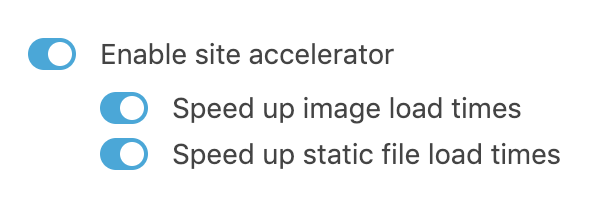
I did notice that enabling Site Accelerator definitely does enqueue jQuery (which I wouldn't expect):

beaulebens
on 23 Jan 2019
I might open a separate issue though, to look at some of the other resources that definitely are loaded (Jetpack CSS, Devicepx) or are not minified (Twenty Nineteen compat CSS).
- For devicepx: #1850
- For
jetpack.css: I am afraid this is the way concatenation works today; the file is not aware of what modules and features are active or not, so it is always enqueued, just in case. That concatenated file includes CSS for the Responsive Videos theme tool for example, that may be in use on your site even if you don't have any module active. #1258 is a related issue. - Twenty Nineteen compat CSS not minified: that's definitely something we should fix; none of the compat CSS files are minified today. Tracking this in #11185
I did notice that enabling Site Accelerator definitely does enqueue jQuery (which I wouldn't expect):
Photon does indeed rely on jQuery:
https://github.com/Automattic/jetpack/blob/518984760e16cdcf24c52e5f8770adf7ee0f8ae4/class.photon.php#L1024
jeherve
on 23 Jan 2019
Photon looks like the culprit here, and that lines up with what I was testing, so I must have had it enabled when I saw jQuery previously.
beaulebens
on 23 Jan 2019
I don't see anything in photon.js that _needs_ jQuery here. Looks like a somewhat easy refactor to vanilla js.
 dereksmart
on 23 Jan 2019
dereksmart
on 23 Jan 2019
Related issues
 abidhahmed
·
3Comments
abidhahmed
·
3Comments
 tyxla
·
3Comments
tyxla
·
3Comments
 crunnells
·
3Comments
crunnells
·
3Comments
 ockham
·
3Comments
ockham
·
3Comments
 aheckler
·
3Comments
aheckler
·
3Comments
Most helpful comment
I don't see anything in photon.js that _needs_ jQuery here. Looks like a somewhat easy refactor to vanilla js.