Jetpack: Lazy Load doesn’t work when image ID is not used as class
After recent update images don’t load using lazy load unless you specify the exact image ID with a class wp-image-* For example wp-image-172626.
For example:
This will never load:
<img class="aligncenter size-full" src="#" alt="random" width="1100" height="800" />
It must be in order to load images:
<img class="aligncenter size-full wp-image-172626" src="#" alt="random" width="1100" height="800" />
That’s not really a good way to load images because not everyone uses those IDs for images especially if they are in sidebar, widgets or elsehwere. They are there for default but I have removed them for many images as they serve no purpose in many cases.
 puikinsh
All 24 comments
Thanks for the report!
@ebinnion Any chance you could look at this?
 jeherve
on 11 Oct 2018
jeherve
on 11 Oct 2018
Possibly it could be made so that Lazy Images ignores these images and loads them right away but right now you get blanks which is not acceptable.
puikinsh
on 11 Oct 2018
Possibly related to #10054
jeherve
on 11 Oct 2018
Also reported in 1486231-zen
 danjjohnson
on 11 Oct 2018
danjjohnson
on 11 Oct 2018
I haven't been able to reproduce yet on a test site.
After switching to data-lazy-srcset, there was an issue where images would appear as if they hadn't loaded because they were being processed by devicepx too early. That should have been fixed in #10087.
@puikinsh – Do you currently have any content live that is experiencing this issue? If so, what is the URL?
 ebinnion
on 11 Oct 2018
ebinnion
on 11 Oct 2018
Also reported in 1485455-zen and in the WordPress.org forums by @puikinsh
 chaselivingston
on 11 Oct 2018
chaselivingston
on 11 Oct 2018
In the forums, @puikinsh mentioned this URL:
https://colorlib.com/wp/wordpress-themes-for-translation-agencies-language-schools/
Is this where you were running into the issue?
jeherve
on 11 Oct 2018
Yes, that’s the url but I had to disable it altogether because too many
posts were affected and there is millions of visitors so keeping it that
way wasn’t an option.
Maybe can provide a temporary access to test it.
puikinsh
on 11 Oct 2018
I am still not able to reproduce this issue, on my test site or on a jurassic.ninja site. I have tried using only the modules listed on colorlib.com as well as the theme mentioned in 1485455-zen, but have had no luck. I have also been sure to remove the wp-* class from the images.
@puikinsh - Do you have any more information that may be useful? Or, do you perhaps have a staging site that we could test against?
ebinnion
on 11 Oct 2018
Also reported in 1486711-zen
 joeboydston
on 12 Oct 2018
joeboydston
on 12 Oct 2018
@joeboydston Could you try to gather more information on your ticket, as per the above?
Thank you!
jeherve
on 12 Oct 2018
Did a little more testing. It acts like that only when images are loaded from CDN (not Jetpack one), so that's why it wasn't possible to easily replicate it. In my case images are loaded from domain cdn.colorlib.com. Hope it helps.
puikinsh
on 12 Oct 2018
I'm currently testing at http://ericbinnion.com/test-lazy-images-10301/
On that post, I've got the following post content:
<a href="http://ericbinnion.com/test-lazy-images-10301/education-center-training-courses-wordpress-theme-1/" rel="attachment wp-att-483"><img src="http://ericbinnion.com/wp-content/uploads/2018/10/education-center-training-courses-wordpress-theme-1.jpg" alt="" width="1100" height="800" class="alignnone size-full wp-image-483" /></a>

<a href="http://ericbinnion.com/test-lazy-images-10301/education-center-training-courses-wordpress-theme-1/" rel="attachment wp-att-483"><img src="https://cdn.colorlib.com/wp/wp-content/uploads/sites/2/education-center-training-courses-wordpress-theme-1.jpg" alt="" width="1100" height="800" class="alignnone size-full" /></a>

<img src="https://cdn.colorlib.com/wp/wp-content/uploads/sites/2/education-center-training-courses-wordpress-theme-1.jpg" alt="" width="1100" height="800" class="alignnone size-full" />
The first image here is a copy of one of your images that I am loading directly from my site. This image has the markup that is used directly from adding the media to the editor.
The second image is using an image from your CDN and it remove the wp-* class.
The third image removes the anchor wrap and is using an image from your CDN and has the wp-* class removed.
After loading the page with that markup, all three images are still loading for me. I've tried with both photon enabled and disabled.
@puikinsh – Am I missing something to reproduce?
ebinnion
on 12 Oct 2018
@ebinnion
Thank you so much for your effort. All looks good to me except it still doesn't work for me :)
I have enabled Lazy images on the site so you can see that they won't load:
Edited: site moved to staging environment: https://staging-colorlib.kinsta.com/wp/wordpress-themes-for-translation-agencies-language-schools/
First image load perfectly since the IDs are there and added them back manually.
puikinsh
on 12 Oct 2018
To confirm, is the site broken for you right now? I'm seeing all of the images loading.
 kraftbj
on 12 Oct 2018
kraftbj
on 12 Oct 2018
@kraftbj
They are working on the main site because I had to disable Lazy images due to very high traffic for the site and significant loss of revenue because of this error.
Please check the staging site instead: https://staging-colorlib.kinsta.com/wp/wordpress-themes-for-translation-agencies-language-schools/
puikinsh
on 12 Oct 2018
Thank you for the help @puikinsh. After looking at the source for one of the broken images, I am seeing this:
<img class="aligncenter size-full jetpack-lazy-image jetpack-lazy-image--handled" src="https://cdn.colorlib.com/wp/wp-content/uploads/sites/2/translang-translation-services-language-courses.jpg?is-pending-load=1" alt="translang-translation-services-language-courses" width="1100" height="800" srcset="data:image/gif;base64,R0lGODlhAQABAIAAAAAAAP///yH5BAEAAAAALAAAAAABAAEAAAIBRAA7" data-lazy-loaded="1" scale="0">
In this case, the image is showing up blank because srcset is still set to an empty image. But, interestingly, the data-lazy-loaded attribute is set to true. That at least gives me an idea of how it's broken. So, I'll try and work backwards from there. Thank you 🙇
ebinnion
on 15 Oct 2018
Hi @puikinsh – From what I can tell, it looks like the lazy images JavaScript file that's being loaded on your site is from Jetpack 6.5.
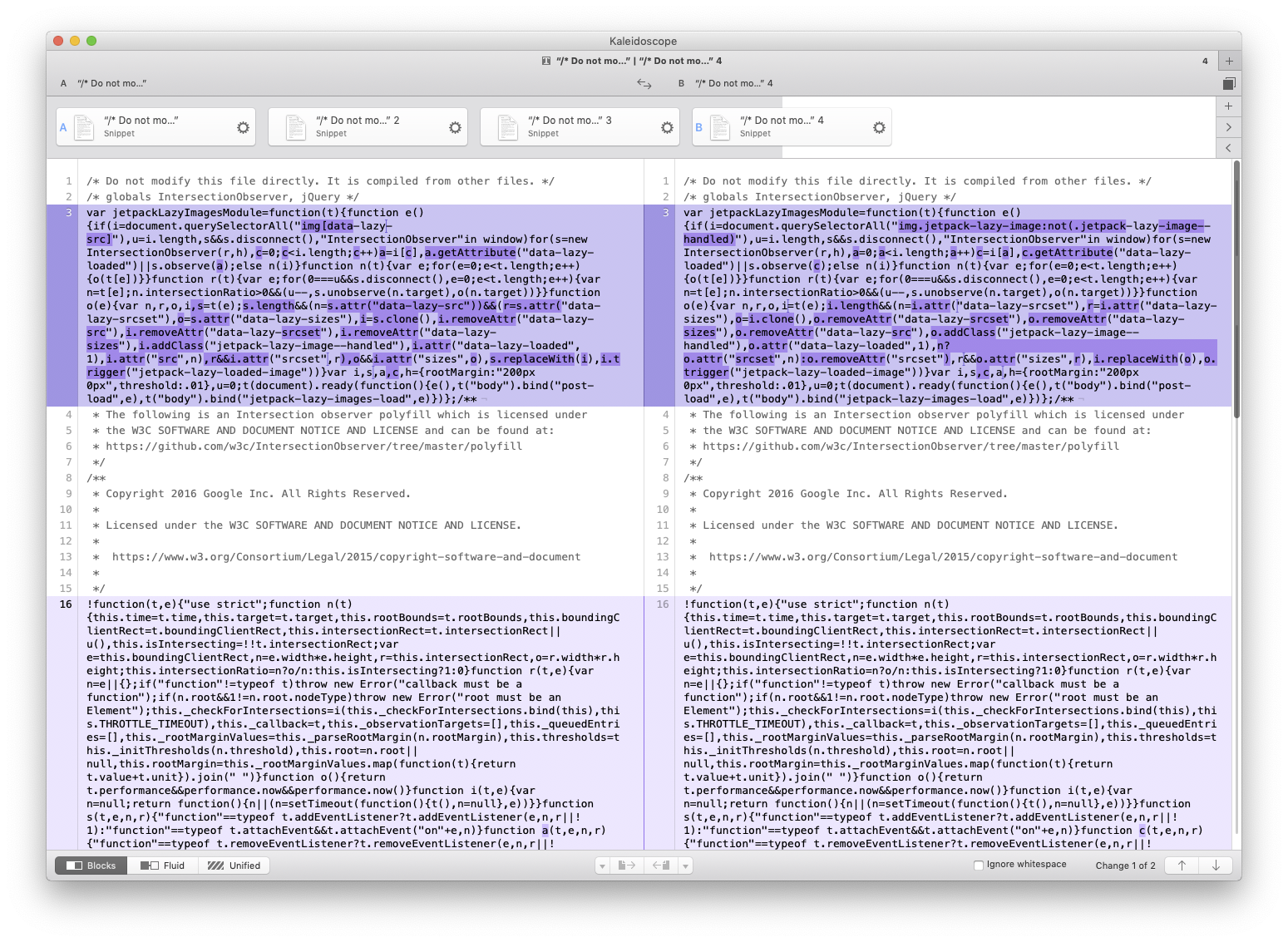
Here's a diff where I compare the lazy-images.min.js file from your site (on the left) to the lazy-images.min.js file from Jetpack version 6.6.1.
The big difference between the two versions is that we changed how we loaded the image. In version 6.5 and before, we set the src attribute to a blank image. In 6.6, we started putting a base-64 encoded image in the srcset attribute. The idea being that the image would still load when printing, etc.
I tested the markup that's being generated for one of your broken images against the new JS in codepen and it loaded correctly, so I think the issue is the incorrect version of the lazy-images.min.js file.
I'm not 100% sure why your site is not serving the latest JavaScript. First, I would probably start by deleting and reinstalling the Jetpack plugin to see if that clears things up.
To a12s:
- To check if the previous JavaScript file is being loaded, you should be able to view source, load the
lazy-images.jsorlazy-images.min.jsfile, and see ifdocument.querySelectorAll( "img[data-lazy-src]ordocument.querySelectorAll( 'img[data-lazy-src]are in the file
ebinnion
on 15 Oct 2018
@ebinnion
Thank you so much for your help! Reinstalling the plugin did the trick.
Thank you! I highly appriciate it!
puikinsh
on 15 Oct 2018
@danjjohnson @joeboydston Could you follow up with the affected users and ask them to try reinstalling the plugin, and maybe clear their site's cache if they use a caching plugin?
Thank you!
jeherve
on 15 Oct 2018
Noting we seem to be running into a similar issue here:
https://wordpress.org/support/topic/images-not-loading-88/
The latest two posts (presumably published after the update) are working alright, but previous posts are not. I'm asking them to reinstall to see if that helps.
 supernovia
on 15 Oct 2018
supernovia
on 15 Oct 2018
1486231-zen (already mentioned above) reports that reinstalling and clearing caches didn't fix it.
 richardmtl
on 16 Oct 2018
richardmtl
on 16 Oct 2018
I'm not sure we should continue working off of this issue.
@richardmtl – Would you please gather more information? I don't see much in that ticket other than the site's URL. When I go to the URL, the images load, I imagine that could be because the user turned off lazy images.
It would be helpful if we had at least one of these:
- The user left lazy images on
- We got temporary admin access and were allowed to turn on lazy images temporarily to debug
- The user gave us the "view source" markup before JavaScript changed the markup as well as markup from dev tools after Lazy Images processed the image
ebinnion
on 16 Oct 2018
I'm going to go ahead and close this since it was such a specific report. As Eric mentions, for any further Lazy Load Images, please open a new issue.
chaselivingston
on 16 Oct 2018
Related issues
 beaulebens
·
3Comments
jeherve
·
3Comments
kraftbj
·
3Comments
beaulebens
·
3Comments
jeherve
·
3Comments
kraftbj
·
3Comments
 BinaryMoon
·
3Comments
BinaryMoon
·
3Comments
 crunnells
·
3Comments
crunnells
·
3Comments