Jetpack: Likes: en.ca Doesn't Exist
Steps to reproduce the issue
- Enable the Likes module.
- Go to Settings → General.
- Change the site language to English (Canada).
- Load a post. Notice the following pop up:
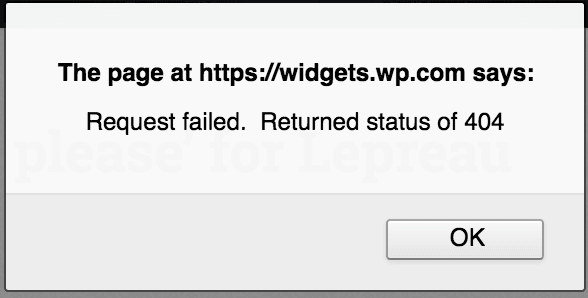
- Also a 404 error in the console for the GET request to https://widgets.wp.com/languages/en-ca.json?ver=20171126.
@richardmtl helped to test this one and also got this weird error in the console at one point:
https://s0.wp.com/_static/??/wp-content/js/postmessage.js,/wp-content/js/jed/jed.js,/wp-content/js/wpcom-proxy-request.js,/wp-content/js/likes-rest-nojquery.js?m=20180221
Now change the site language to English (US). No more errors.
Reported here: https://wordpress.org/support/topic/jetpack-plugin-causing-404-error-2/
Similar to #2791
 tmmbecker
All 23 comments
Also in 1115767-zen
 jeherve
on 25 Apr 2018
jeherve
on 25 Apr 2018
1123868-zen
 richardmtl
on 27 Apr 2018
richardmtl
on 27 Apr 2018
1056460-zen (Woo ticket)
 stephhjacq
on 29 Apr 2018
stephhjacq
on 29 Apr 2018
2919836-hc
Site language: es-AR
 sarahcada
on 2 May 2018
sarahcada
on 2 May 2018
Also reported on 1132971-zen, very similar as #2791 .
Site language: en-au
 edwinho89
on 2 May 2018
edwinho89
on 2 May 2018
Also in 1133240-zen, site language is en-AU
 StefMattana
on 2 May 2018
StefMattana
on 2 May 2018
Also in 3288854-hc
jeherve
on 2 May 2018
Another report: 1133443-zen
site language: nl_BE
 sjaved87
on 2 May 2018
sjaved87
on 2 May 2018
2129281-hc, site language was en_CA
 treibalen
on 2 May 2018
treibalen
on 2 May 2018
Came across two such Atomic sites as well. :/
 ehti
on 2 May 2018
ehti
on 2 May 2018
1133975-zen (Atomic)
Language: en_AU
 eduardozulian
on 2 May 2018
eduardozulian
on 2 May 2018
Also in 3304896-HC.
Site language was in Norwegian.
 synora
on 2 May 2018
synora
on 2 May 2018
to confirm the language is being parsed by our languages 404 handler.
 georgestephanis
on 2 May 2018
georgestephanis
on 2 May 2018
Left a ping for @akirk on Slack in #i18n about this.
georgestephanis
on 2 May 2018
Here as well: 3024025-HC
Site language: Eng-US
 jeremyb1
on 3 May 2018
jeremyb1
on 3 May 2018
3308571-HC
Site language: EN
 aportbury
on 3 May 2018
aportbury
on 3 May 2018
1996605-hc
Site Language: en-ca
 htdat
on 3 May 2018
htdat
on 3 May 2018
2869631-hc
English (Australia)
 goblinartificer
on 3 May 2018
goblinartificer
on 3 May 2018
1118635-hc
htdat
on 3 May 2018
I've deployed server-side code that removes the alert() dialog. The 404 is not too bad because the fallback is English but the alert box makes it seem like there is a problem. We'll still look into avoiding the 404 in the first place but this should have solved the user-facing issue.
 akirk
on 3 May 2018
akirk
on 3 May 2018
Just to note, the JS file with the alert() in it might still be cached on users' computers, so suggesting to them to clear their browser caches can be a step in order to resolve the issue.
akirk
on 3 May 2018
To clarify:
- The fix is now available on WordPress.com sites.
- It is not, however, available on self-hosted WordPress sites using the Jetpack plugin (that includes Atomic sites). It will become available on those sites as soon as we release Jetpack 6.1.1, most likely around May 22.
If you use the Jetpack plugin and experience this issue, you will need to wait until the next version of Jetpack is released. Until then, you can deactivate the Likes feature under Jetpack > Settings > Sharing in your dashboard.
jeherve
on 3 May 2018
1176269-zen
Site language: NB
 jesscga
on 22 May 2018
jesscga
on 22 May 2018
Related issues
jeherve
·
3Comments
 beaulebens
·
3Comments
beaulebens
·
3Comments
 NicktheGeek
·
3Comments
NicktheGeek
·
3Comments
 crunnells
·
3Comments
crunnells
·
3Comments
 tyxla
·
3Comments
tyxla
·
3Comments
Most helpful comment
To clarify:
If you use the Jetpack plugin and experience this issue, you will need to wait until the next version of Jetpack is released. Until then, you can deactivate the Likes feature under Jetpack > Settings > Sharing in your dashboard.