Jetpack: Sidebar Widgets: MailChimp Subscriber Pop-Up Disables Ability to Add Woo Customers
Steps to reproduce the issue
- Add the MailChimp Subscriber Pop-up widget - with a connection to a MailChimp list - to a site that uses WooCommerce
- In WooCommerce -> Settings -> Account, make sure that "Enable registration on the "My Account" page" is enabled.
- Go to the "My Account" page for the site.
- Try to register as a new customer.
What I expected
We should be able to add customers without any interference from Jetpack.
What happened instead
The Register button disabled as soon as I started typing a password.
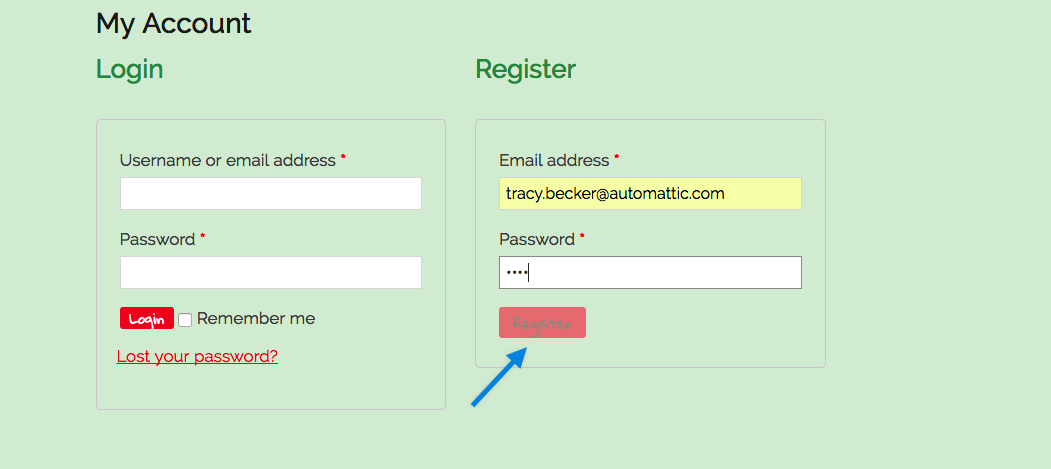
I've left this up on my site if you'd like to see it in action. It's a live site, but not in use at the moment.
https://deerdash.com/my-account/
Internal reference: 606355-zen
cc @pmciano
 tmmbecker
All 2 comments
Update: this bug is happening when any Jetpack module is activated (not just the Extra Sidebar Widgets module).
 mbhthompson
on 28 Jul 2017
mbhthompson
on 28 Jul 2017
This is not a Jetpack issue. To start with, I deactivated Jetpack and tested. Same issue happened.
I checked it and found that it's related to pass length. Looked up the scripts loaded in the page and saw there's the password strength meter from core and one that uses it in WooCommerce. The relevant code is
https://github.com/woocommerce/woocommerce/blob/master/assets/js/frontend/password-strength-meter.js#L32
 eliorivero
on 29 Jul 2017
eliorivero
on 29 Jul 2017
Related issues
 tyxla
·
3Comments
tyxla
·
3Comments
 kraftbj
·
3Comments
kraftbj
·
3Comments
 crunnells
·
3Comments
crunnells
·
3Comments
 aheckler
·
3Comments
aheckler
·
3Comments
 ockham
·
3Comments
ockham
·
3Comments
Most helpful comment
This is not a Jetpack issue. To start with, I deactivated Jetpack and tested. Same issue happened.
I checked it and found that it's related to pass length. Looked up the scripts loaded in the page and saw there's the password strength meter from core and one that uses it in WooCommerce. The relevant code is
https://github.com/woocommerce/woocommerce/blob/master/assets/js/frontend/password-strength-meter.js#L32