Jetpack: WordPress.com Toolbar: hamburger icon overlapping issue on tablet view
Steps to reproduce the issue
- Use a test Jetpack site with WordPress.com Toolbar module enabled.
- Navigate to
/wp-admin/users.phpfor example. - Switch to tablet view size (between 480px and 782px).
- Click on WordPress icon on top to open up the My Sites menu.
What I expected
Hamburger icon should not be visible in front of the menu.
What happened instead
Hamburger icon overlaps the My Sites menu.
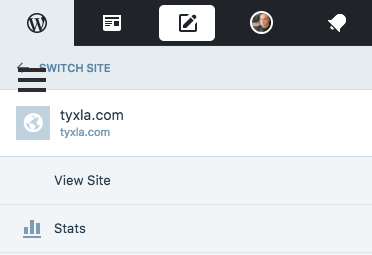
Also, the hamburger icon overlaps the page content if there is no main heading on the page.
 vindl
vindl
All 5 comments
I haven't found this issue. However, I did fix the issue of the icon overlapping the Jetpack logo here
https://github.com/Automattic/jetpack/pull/7418
 eliorivero
on 1 Jul 2017
eliorivero
on 1 Jul 2017
Thanks @eliorivero! I'm still able to reproduce this on Ubuntu 16.04 LTS and Chrome Version 57.0.2987.133 though (tried busting the cache too).
vindl
on 3 Jul 2017
The previous description was not entirely correct since this only happens on tablet view size (in this case between 480px and 782px).
vindl
on 3 Jul 2017
Resolved in D6245-code.
vindl
on 3 Jul 2017
🎉1
👍1
Fixes the problem for me!
 zinigor
on 3 Jul 2017
zinigor
on 3 Jul 2017
Was this page helpful?
0 / 5 - 0 ratings
Related issues
 beaulebens
·
3Comments
beaulebens
·
3Comments
 jeherve
·
3Comments
jeherve
·
3Comments
jeherve
·
3Comments
jeherve
·
3Comments
 htdat
·
3Comments
htdat
·
3Comments
 NicktheGeek
·
3Comments
NicktheGeek
·
3Comments
Most helpful comment
Resolved in D6245-code.