Jellyfin-web: Arbitrary low bandwidth limit on iOS
Describe The Bug
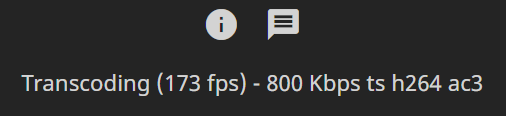
The iOS App and Browser have a bandwidth limit of 800 Kbps.
This prevents direct streams and forces transcodes to 800 Kbps.
Offending line:
https://github.com/jellyfin/jellyfin-web/blob/800e5166831ebd9022bba2798fa9432557d7178a/src/components/appRouter.js#L254
Using 10.6.0, it didn't want to start the transcode at all, so i had to revert back to 10.5.5. Thats why the following examples are based on 10.5.5. 10.6.0 showed a similar log for the bandwidth limit, but stopped direct playback after 0 seconds and didn't try to transcode after that.
Steps To Reproduce
- Remove bandwidth limits lower than 800 Kbps
- Play anything with iOS (App or Browser)
- Bandwidth is too low for direct play and transcode is limited to 800 Kbps
Expected Behavior
It direct plays or transcodes with any bitrate.
Screenshots
System (please complete the following information):
- Platform: iPhone
- Browser: App and Safari (iOS)
- Jellyfin Version: 10.5.5 and 10.6.0
Logs
[2020-07-25 12:54:37.689 +02:00] [INF] GetPostedPlaybackInfo profile: DeviceProfile { Name: null, Id: null, Identification: null, FriendlyName: null, Manufacturer: null, ManufacturerUrl: null, ModelName: null, ModelDescription: null, ModelNumber: null, ModelUrl: null, SerialNumber: null, EnableAlbumArtInDidl: False, EnableSingleAlbumArtLimit: False, EnableSingleSubtitleLimit: False, SupportedMediaTypes: "Audio,Photo,Video", UserId: null, AlbumArtPn: null, MaxAlbumArtWidth: 0, MaxAlbumArtHeight: 0, MaxIconWidth: null, MaxIconHeight: null, MaxStreamingBitrate: 120000000, MaxStaticBitrate: 100000000, MusicStreamingTranscodingBitrate: 192000, MaxStaticMusicBitrate: null, SonyAggregationFlags: null, ProtocolInfo: null, TimelineOffsetSeconds: 0, RequiresPlainVideoItems: False, RequiresPlainFolders: False, EnableMSMediaReceiverRegistrar: False, IgnoreTranscodeByteRangeRequests: False, XmlRootAttributes: [], DirectPlayProfiles: [DirectPlayProfile { Container: "mp4,m4v", AudioCodec: "ac3,eac3,mp3,aac,flac", VideoCodec: "h264,h265,hevc", Type: Video }, DirectPlayProfile { Container: "mp3", AudioCodec: "mp3", VideoCodec: null, Type: Audio }, DirectPlayProfile { Container: "aac", AudioCodec: null, VideoCodec: null, Type: Audio }, DirectPlayProfile { Container: "m4a,m4b", AudioCodec: "aac", VideoCodec: null, Type: Audio }, DirectPlayProfile { Container: "flac", AudioCodec: null, VideoCodec: null, Type: Audio }, DirectPlayProfile { Container: "alac", AudioCodec: null, VideoCodec: null, Type: Audio }, DirectPlayProfile { Container: "m4a,m4b", AudioCodec: "alac", VideoCodec: null, Type: Audio }, DirectPlayProfile { Container: "wav", AudioCodec: null, VideoCodec: null, Type: Audio }], TranscodingProfiles: [TranscodingProfile { Container: "aac", Type: Audio, VideoCodec: null, AudioCodec: "aac", Protocol: "hls", EstimateContentLength: False, EnableMpegtsM2TsMode: False, TranscodeSeekInfo: Auto, CopyTimestamps: False, Context: Streaming, EnableSubtitlesInManifest: False, MaxAudioChannels: "2", MinSegments: 2, SegmentLength: 0, BreakOnNonKeyFrames: True }, TranscodingProfile { Container: "aac", Type: Audio, VideoCodec: null, AudioCodec: "aac", Protocol: "http", EstimateContentLength: False, EnableMpegtsM2TsMode: False, TranscodeSeekInfo: Auto, CopyTimestamps: False, Context: Streaming, EnableSubtitlesInManifest: False, MaxAudioChannels: "2", MinSegments: 0, SegmentLength: 0, BreakOnNonKeyFrames: False }, TranscodingProfile { Container: "mp3", Type: Audio, VideoCodec: null, AudioCodec: "mp3", Protocol: "http", EstimateContentLength: False, EnableMpegtsM2TsMode: False, TranscodeSeekInfo: Auto, CopyTimestamps: False, Context: Streaming, EnableSubtitlesInManifest: False, MaxAudioChannels: "2", MinSegments: 0, SegmentLength: 0, BreakOnNonKeyFrames: False }, TranscodingProfile { Container: "wav", Type: Audio, VideoCodec: null, AudioCodec: "wav", Protocol: "http", EstimateContentLength: False, EnableMpegtsM2TsMode: False, TranscodeSeekInfo: Auto, CopyTimestamps: False, Context: Streaming, EnableSubtitlesInManifest: False, MaxAudioChannels: "2", MinSegments: 0, SegmentLength: 0, BreakOnNonKeyFrames: False }, TranscodingProfile { Container: "mp3", Type: Audio, VideoCodec: null, AudioCodec: "mp3", Protocol: "http", EstimateContentLength: False, EnableMpegtsM2TsMode: False, TranscodeSeekInfo: Auto, CopyTimestamps: False, Context: Static, EnableSubtitlesInManifest: False, MaxAudioChannels: "2", MinSegments: 0, SegmentLength: 0, BreakOnNonKeyFrames: False }, TranscodingProfile { Container: "aac", Type: Audio, VideoCodec: null, AudioCodec: "aac", Protocol: "http", EstimateContentLength: False, EnableMpegtsM2TsMode: False, TranscodeSeekInfo: Auto, CopyTimestamps: False, Context: Static, EnableSubtitlesInManifest: False, MaxAudioChannels: "2", MinSegments: 0, SegmentLength: 0, BreakOnNonKeyFrames: False }, TranscodingProfile { Container: "wav", Type: Audio, VideoCodec: null, AudioCodec: "wav", Protocol: "http", EstimateContentLength: False, EnableMpegtsM2TsMode: False, TranscodeSeekInfo: Auto, CopyTimestamps: False, Context: Static, EnableSubtitlesInManifest: False, MaxAudioChannels: "2", MinSegments: 0, SegmentLength: 0, BreakOnNonKeyFrames: False }, TranscodingProfile { Container: "ts", Type: Video, VideoCodec: "h264", AudioCodec: "ac3,eac3,mp3,aac", Protocol: "hls", EstimateContentLength: False, EnableMpegtsM2TsMode: False, TranscodeSeekInfo: Auto, CopyTimestamps: False, Context: Streaming, EnableSubtitlesInManifest: False, MaxAudioChannels: "2", MinSegments: 2, SegmentLength: 0, BreakOnNonKeyFrames: True }, TranscodingProfile { Container: "mp4", Type: Video, VideoCodec: "h264", AudioCodec: "ac3,eac3,mp3,aac,flac", Protocol: "http", EstimateContentLength: False, EnableMpegtsM2TsMode: False, TranscodeSeekInfo: Auto, CopyTimestamps: False, Context: Static, EnableSubtitlesInManifest: False, MaxAudioChannels: null, MinSegments: 0, SegmentLength: 0, BreakOnNonKeyFrames: False }], ContainerProfiles: [], CodecProfiles: [CodecProfile { Type: Video, Conditions: [ProfileCondition { Condition: NotEquals, Property: IsAnamorphic, Value: "true", IsRequired: False }, ProfileCondition { Condition: EqualsAny, Property: VideoProfile, Value: "high|main|baseline|constrained baseline", IsRequired: False }, ProfileCondition { Condition: LessThanEqual, Property: VideoLevel, Value: "51", IsRequired: False }], ApplyConditions: [], Codec: "h264", Container: null }], ResponseProfiles: [ResponseProfile { Container: "m4v", AudioCodec: null, VideoCodec: null, Type: Video, OrgPn: null, MimeType: "video/mp4", Conditions: [] }], SubtitleProfiles: [SubtitleProfile { Format: "vtt", Method: External, DidlMode: null, Language: null, Container: null }] }
[2020-07-25 12:54:37.696 +02:00] [INF] User policy for "timo". EnablePlaybackRemuxing: True EnableVideoPlaybackTranscoding: True EnableAudioPlaybackTranscoding: True
[2020-07-25 12:54:37.697 +02:00] [INF] Bitrate exceeds DirectStream limit: media bitrate: 1479531, max bitrate: 800000
[2020-07-25 12:54:37.698 +02:00] [INF] Profile: "Unknown Profile", Path: "[path redacted].mp4", isEligibleForDirectPlay: True, isEligibleForDirectStream: False
[2020-07-25 12:54:37.699 +02:00] [INF] RemoteClientBitrateLimit: 35000000, RemoteIp: "[ip redacted]", IsInLocalNetwork: False
[2020-07-25 12:54:37.701 +02:00] [INF] Bitrate exceeds DirectStream limit: media bitrate: 1479531, max bitrate: 800000
[2020-07-25 12:54:37.702 +02:00] [INF] Profile: "Unknown Profile", Path: "[path redacted].mp4", isEligibleForDirectPlay: True, isEligibleForDirectStream: False
[2020-07-25 12:54:37.703 +02:00] [INF] RemoteClientBitrateLimit: 35000000, RemoteIp: "[ip redacted]", IsInLocalNetwork: False
[2020-07-25 12:54:37.704 +02:00] [INF] Bitrate exceeds DirectStream limit: media bitrate: 1479531, max bitrate: 800000
[2020-07-25 12:54:37.704 +02:00] [INF] Profile: "Unknown Profile", Path: "[path redacted].mp4", isEligibleForDirectPlay: True, isEligibleForDirectStream: False
[2020-07-25 12:54:38.588 +02:00] [INF] Current HLS implementation doesn't support non-keyframe breaks but one is requested, ignoring that request
[2020-07-25 12:54:38.590 +02:00] [INF] /usr/lib/jellyfin-ffmpeg/ffmpeg -f mov,mp4,m4a,3gp,3g2,mj2 -i file:"[path redacted].mp4" -map_metadata -1 -map_chapters -1 -threads 0 -map 0:0 -map 0:1 -map -0:s -codec:v:0 libx264 -pix_fmt yuv420p -preset veryfast -crf 23 -maxrate 592134 -bufsize 1184268 -profile:v high -level 4.1 -x264opts:0 subme=0:me_range=4:rc_lookahead=10:me=dia:no_chroma_me:8x8dct=0:partitions=none  -force_key_frames:0 "expr:gte(t,0+n_forced*3)" -g 72 -keyint_min 72 -sc_threshold 0 -vf "scale=trunc(min(max(iw\,ih*dar)\,640)/2)*2:trunc(ow/dar/2)*2" -start_at_zero -vsync -1 -codec:a:0 ac3 -ac 2 -ab 207866  -copyts -avoid_negative_ts disabled -f hls -max_delay 5000000 -hls_time 3 -individual_header_trailer 0 -hls_segment_type mpegts -start_number 0 -hls_segment_filename "/var/lib/jellyfin/transcodes/b7309ac61ac17df7584820a50fe2fd68%d.ts" -hls_playlist_type vod -hls_list_size 0 -y "/var/lib/jellyfin/transcodes/b7309ac61ac17df7584820a50fe2fd68.m3u8"
 timo95
All 9 comments
@anthonylavado I can confirm this, I have been processing all videos through ffmpeg down to below 800kbs for months just to get them to direct play on ios without transcoding.
 Bellusterra
on 5 Oct 2020
Bellusterra
on 5 Oct 2020
Yes, and this caused https://github.com/jellyfin/jellyfin/issues/3957
 gnattu
on 25 Oct 2020
gnattu
on 25 Oct 2020
I edited the following function in /jellyfin/web/components/appRouter.js
From
function getMaxBandwidthIOS() {
        return 8e5
    }
to
function getMaxBandwidthIOS() {
    return null
}
this fixed my issue on IOS 14.* for my iPhone devices.
 Wepwawetcode
on 26 Oct 2020
Wepwawetcode
on 26 Oct 2020
I have been having this same issue. I’m on iOS 14.1 and access my content remotely usually. However, this problem also occurs when on the same internal network.
I am having no issues with flac files, only mp3 files with 320kbps and 48000hz. These files work on a pc within the same internal network accessing via the same means (wifi).
I have tried in the native iOS app, and on the following browsers - brave, chrome, Firefox, safari.
I have found the issue with at least 3 files now.
The issue continues even with the amendments made to the docker container appRouter.is as suggested by @Wepwawetcode
Each time I test I am saving my settings and restarting the docker container to ensure a restart has been pushed through.
I have also attempted with audio transcode on and off over all browsers with wifi and cellular to no avail.
Any other tips or confirmation would be appreciated.
Edit:
I can actually see in the logs whether my remote access and remote transcoding is on or not that I’m having a section of the error advising
EnableRedirection=true&EnableRemoteMedia=false
I’ve also attempted and replicated this on the admin and a user account
 RemoteMedia
on 28 Oct 2020
RemoteMedia
on 28 Oct 2020
Edit 2: @RemoteMedia it does work on docker after all I’m not sure if it was something held in cache, maybe restarting nginx if you have it behind that.
And you will want to create a volume for that file so it is persistent with jellyfin updates. but hopefully this will be fixed in the next release and you will not need to.
for reference for others using docker the location of the file after you docker exec -it container-name /bin/bashis /jellyfin/jellyfin-web/components/appRouter.js if using nano Ctrl + w to find the "getMaxBandwidthIOS" as it is minified and should help you find it faster. Thank you @Wepwawetcode
Bellusterra
on 28 Oct 2020
Edit 2: @RemoteMedia it does work on docker after all I’m not sure if it was something held in cache, maybe restarting nginx if you have it behind that.
And you will want to create a volume for that file so it is persistent with jellyfin updates. but hopefully this will be fixed in the next release and you will not need to.
for reference for others using docker the location of the file after you
docker exec -it container-name /bin/bashis/jellyfin/jellyfin-web/components/appRouter.jsif using nano Ctrl + w to find the "getMaxBandwidthIOS" as it is minified and should help you find it faster. Thank you @Wepwawetcode
@Bellusterra are you saying 48000hz .mp3 files work on your iOS device? I’m not having issues with any other .mp3 or .flac files since amending approuter.js only with 48000hz .mp3 files playing back on iOS devices
RemoteMedia
on 28 Oct 2020
That I couldn’t tell you, I have only now tested it with .mp4 video files over 800 Kbps. Which now, with the change suggested by @Wepwawetcode, direct play on iOS devices when they didn’t before.
Bellusterra
on 29 Oct 2020
Thanks, I’m having no issues with these files now as we since modifying as suggested.
It’s only the .mp3 codec sampled at 48000hz which I have opened an issue for
RemoteMedia
on 29 Oct 2020
just tried this fix to appRouter.js on Windows and still having issues with some video playback on iPhone 6s - i.e. bitrate 1655 kbps
 flyinRyan424
on 23 Nov 2020
flyinRyan424
on 23 Nov 2020
Related issues
 Anan5a
·
3Comments
Anan5a
·
3Comments
 arhamqureshi
·
5Comments
arhamqureshi
·
5Comments
 peioe
·
4Comments
peioe
·
4Comments
 therhenals
·
5Comments
therhenals
·
5Comments
 chnaski
·
3Comments
chnaski
·
3Comments
Most helpful comment
I edited the following function in /jellyfin/web/components/appRouter.js
From
function getMaxBandwidthIOS() {
        return 8e5
    }
to
this fixed my issue on IOS 14.* for my iPhone devices.