Jellyfin-web: Disappearing Buttons in Playback Menu
There is a bug on the Jellyfin Android app and also on the web version of Jellyfin on Chrome for Android. When pausing the video and letting the buttons menu fade away, it causes the last pressed button to also disappear. Best shown using screenshots:
All buttons are present. In this screenshot I have paused the episode.
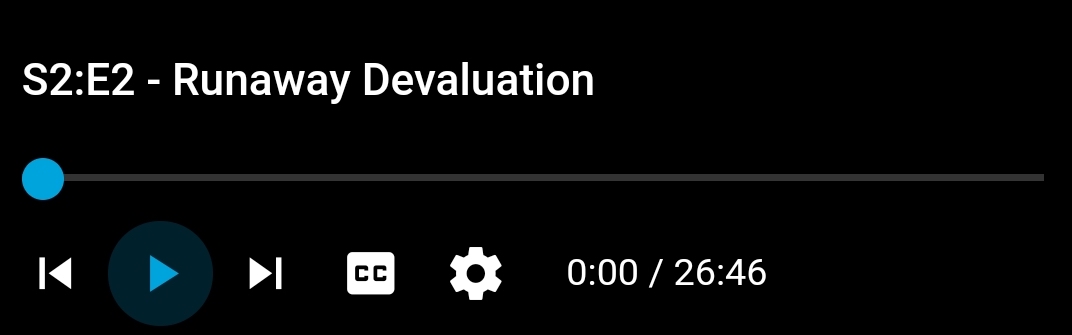
I let the menu with all the buttons fade awayI tap the screen to hide the menu/controls bar, and after tapping on the screen again the menu reappears with one less button (the last button I pressed, in this case the pause/play)

I was able to replicate this with all of the buttons in the bottom menu, and they've all now disappeared.

The screenshots are from the latest Jellyfin app on Android, however I was able to replicate the same issues via Chrome on my Android Device.
EDIT: Better (smaller) screenshots..
EDIT2:
How To Replicate:
- Start playback
- Press pause/play, and let controls auto fade
- Tap screen to show controls
- Hit play, and hide the controls manually by tapping the screen again
- Tap the screen once more to show controls. Pause/play is now missing
 arhamqureshi
All 5 comments
This looks to be a jellyfin-web issue (though most likely in the part which is mobile-specific), so transferred.
ping @dkanada
 JustAMan
on 15 Oct 2019
JustAMan
on 15 Oct 2019
I hadn't seen this before, but I was able to reproduce it by exiting and entering the app during video playback. Are you sure you were able to trigger the issue simply by letting the controls disappear?
 dkanada
on 17 Oct 2019
dkanada
on 17 Oct 2019
I hadn't seen this before, but I was able to reproduce it by exiting and entering the app during video playback. Are you sure you were able to trigger the issue simply by letting the controls disappear?
I just tried it again, you are correct that it indeed does not happen when it fades away. However, the bug is present if you pause/play the video and then tap the screen to hide/show the controls bar. I will make the edit in the initial issue. My apologies.
EDIT:
How To Replicate:
- Start playback
- Press pause/play, and let controls auto fade
- Tap screen to show controls
- Hit play, and hide the controls manually by tapping the screen again
- Tap the screen once more to show controls. Pause/play is now missing
arhamqureshi
on 17 Oct 2019
I can easily reproduce the bug in latest Android app by
- pause the video
- tap screen to hide controls
- tap again to reveal and the play button is gone.
 dausruddin
on 2 Dec 2019
dausruddin
on 2 Dec 2019
I run into this issue multiple times a day using the latest Android app. I could have sworn that I could reproduce this just by rotating the screen vertically then horizontally, but I haven't found consistent reproduction steps. It's happened to me while the video was paused or playing.
 evanfoster
on 9 Dec 2019
evanfoster
on 9 Dec 2019
Related issues
 97carmine
·
5Comments
97carmine
·
5Comments
 SenorSmartyPants
·
4Comments
SenorSmartyPants
·
4Comments
 Anan5a
·
3Comments
Anan5a
·
3Comments
 therhenals
·
5Comments
therhenals
·
5Comments
 hamburglar2160
·
5Comments
hamburglar2160
·
5Comments
Most helpful comment
I can easily reproduce the bug in latest Android app by