Iridium: Prevent autoplay no longer working
As in the subject, the option to prevent videos from autoplaying isn't working, just started today.
Edit: Actually, it seems that a lot of the extension isn't working right now, the setting that changes the link for the youtube logo to go to your subscriptions isn't working, for example.
 deusexcalamus
All 13 comments
Looks like a lot of internals have changed recently, will have to take a deep look at it
 ParticleCore
on 30 Oct 2018
ParticleCore
on 30 Oct 2018
Initially videos were autoplaying for me. However, now prevent autoplay is working.
Can anyone else browse around youtube a bit and test?
 dan019
on 31 Oct 2018
dan019
on 31 Oct 2018
Initially videos were autoplaying for me. However, now prevent autoplay is working.
Can anyone else browse around youtube a bit and test?
It was working for me earlier too, but it's not anymore.
deusexcalamus
on 31 Oct 2018
It is still not preventing autoplay. It stopped working at some point about 12h ago, and it continues the same way.
 iPaulis
on 31 Oct 2018
iPaulis
on 31 Oct 2018
It has stopped working for me since yesterday. Appears to be a pretty recent change. youtube-dl was also experiencing issues and its author commented in an issue thread that YouTube has now begun obfuscating its scripts in some way.
 navin09
on 31 Oct 2018
navin09
on 31 Oct 2018
It doesn't work on page load but it still works on next video autoplay when in a playlist. Workaround for disabling autoplay not working on page load in Firefox is to use a few about:config tweaks that stops autoplay most times, e.g. setting media.autoplay.default to 1 (instead of default _0_) and media.autoplay.allow-muted to false (instead of default _true_) on Firefox 63.
 juozaspo
on 31 Oct 2018
juozaspo
on 31 Oct 2018
@navin09 I see no difference in the code they used to serve (YouTube). Can you link to where the author is saying that?
ParticleCore
on 31 Oct 2018
I can confirm there has been code changes, this current_config = player_api.getUpdatedConfigurationData(); no longer works. https://github.com/ParticleCore/Iridium/blob/c274563d752b4cd88104dc6800a41a363b4a40d4/src/Userscript/Iridium.user.js#L610
 deepesh-agarwal
on 31 Oct 2018
deepesh-agarwal
on 31 Oct 2018
Just to add to this. Videos opened in a new tab are autoplaying then pausing 200-1500ms into the video where as links directly followed are working as expected. The video wont auto play until you focus the tab, to which it'll play for half a second and pause. The video doesn't seem to load or start pre-caching until you tab to it.
Tested with the Chrome Addon in latest Vivaldi and Chrome browsers.
 Morphello
on 1 Nov 2018
Morphello
on 1 Nov 2018
It does not behave like that for me in Firefox.
Videos opened in a new tab just hold there without autoplaying (but that is not because of the plugin), and after focusing the tab it inmediatly autoplays, and that's all, it continues playing as usual.
So essentially it behaves as if there wasn't any plugin at all to prevent anything.
Edit: If another video is loaded in the same tab, then autoplay is prevented successfully.
iPaulis
on 2 Nov 2018
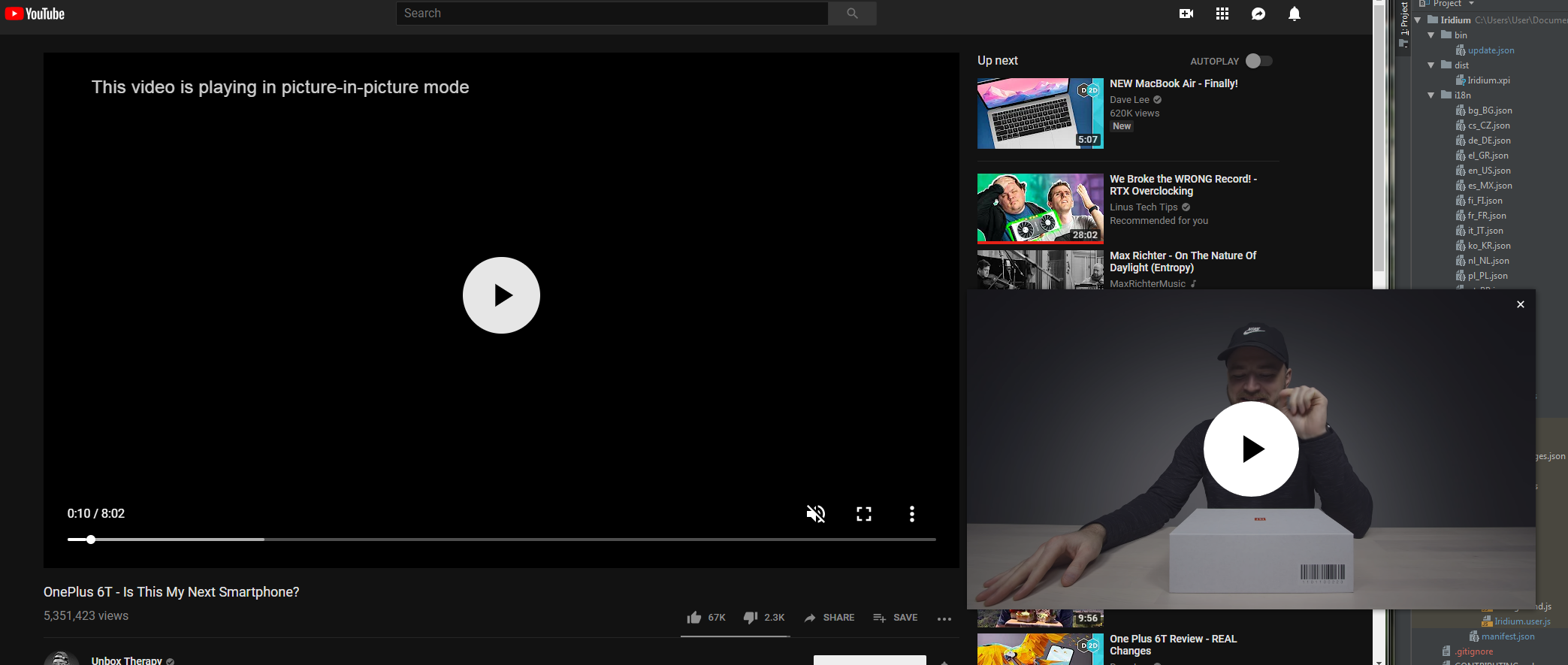
Good news, I am getting close to having this fixed.
More good news, YouTube has already a working native AOT PIP (always on top picture-in-picture) mode that works on desktop, however this is still available only for the mobile version of the player. Nevertheless it means it can be done better than using a pop-up window.
ParticleCore
on 4 Nov 2018
This was briefly fixed in v0.2.3, but seems to be broken again in v0.2.4.
 olliebean
on 5 Nov 2018
olliebean
on 5 Nov 2018
@olliebean It's still working correctly on my end in 0.2.4, if you are having issues please follow the instructions for reporting an issue: https://github.com/ParticleCore/Iridium/wiki/Report-a-bug
ParticleCore
on 6 Nov 2018
Related issues
 Ash258
·
3Comments
ParticleCore
·
5Comments
juozaspo
·
3Comments
Ash258
·
3Comments
ParticleCore
·
5Comments
juozaspo
·
3Comments
 Piter432
·
4Comments
Piter432
·
4Comments
 MattSturgeon
·
3Comments
MattSturgeon
·
3Comments
Most helpful comment
Looks like a lot of internals have changed recently, will have to take a deep look at it