Ios: Some Photos broken after autoupload (3.0.6.6)
Expected behaviour
New photos on the iPhone should be automatically and correctly be uploaded if autoupload is configured.
Actual behaviour
Sometimes autouploaded photos are broken in media preview, the also do not work in the nextcloud browser and are broken on PC's where they sync to.
IMG_1456 and IMG_1457 are both taken within a few seconds. The iPhone was all the time in the home WiFi. They have been auto-uploaded, and the result in the nextcloud view in the browser shows IMG_1456 with 0 bytes:

The same view in the Nextcloud app on the iPhone shows the pic with 1.9MB, but also broken:
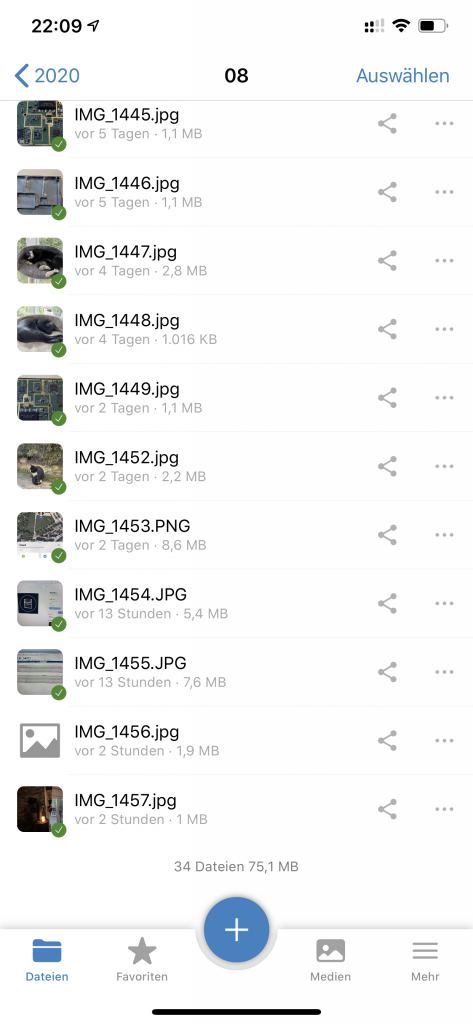
After deleting the file and manually uploading the picture from the iPhone to Nextcloud it works and shows a real size of 2.4MB:

Steps to reproduce
Just having autoupload enabled. Some photos break with the described behavior. I saw if the first time in the 3.0.6 testflight branch. App is set to convert the photos to JPG.
Reasoning or why should it be changed/implemented?
Photos should always be correctly uploaded. If the upload does not work or does not complete it must be repeated and not leave a broken (partial?) file on the server ... and it may not tag the picture as uploaded in the database of the nextcloud app in the iPhone which prevents the picture from being uploaded again.
iOS version
13.6
App version
3.0.6.6
Server configuration
Operating system:
Ubuntu 18.04 LTS
Web server:
Apache
Database:
MariaDB
PHP version:
7.3 (FPM)
Nextcloud version: (see Nextcloud admin page)
19.0.1
 jacotec
All 16 comments
This is probably related to https://github.com/nextcloud/server/issues/7995. If files get uploaded with a client which uses chunked transfers, Nextcloud will sometimes not store the file correctly. This happens with all clients I've tried so far. If you are handling sensitive or important data with your nextcloud, I'd suggest you to take frequent backups (these corruptions can happen on file modifications, too) and create a cronjob which periodicly checks for corrupted files.
 Subito
on 27 Aug 2020
Subito
on 27 Aug 2020
@Subito Nextcloud iOS do not use the chunked ... but maybe, @jacotec you use also Android ?
 marinofaggiana
on 27 Aug 2020
marinofaggiana
on 27 Aug 2020
I saw the same bug appear when I tried to upload 20k of pictures with the iOS client to my nextcloud instance. It corrupted about 10% of the pictures. Some additional reporting is here: https://github.com/nextcloud/server/issues/3056. Are you sure th iOS App does not use the Transfer-Encoding: chunked Header with PUT Requests? Because that was my only explanation on why my photos got corrupted - because it fit the description in the bugs mentioned above. https://github.com/nextcloud/ios/issues/1395 Seems to be the same problem?
Subito
on 27 Aug 2020
@Subito Nextcloud iOS do not use the chunked ... but maybe, @jacotec you use also Android ?
Nope, only iDevices here 🙂
jacotec
on 27 Aug 2020
I have the same problem. Constantly. 5 out of 9 pictures are broken. Thats a joke... data corruption is a no no.
 dffvb
on 1 Sep 2020
dffvb
on 1 Sep 2020
Found two today as well.
Interesting: In the file view of the autouploading device itself, the files do have some size (1.x MB) shown. On all other devices and the web interface these files are shown with 0 Bytes.
jacotec
on 1 Sep 2020
Try with the last 3.0.7 build 3 in TestFlight
marinofaggiana
on 1 Sep 2020
Just updated a minute ago ...
jacotec
on 1 Sep 2020
thanks for the quick response. I have just installed Testflight, and it looks good so far 👍
dffvb
on 1 Sep 2020
you have to look at the logs otherwise find the issue is impossible 👌🏻
marinofaggiana
on 1 Sep 2020
Ah sorry, already deleted the regular app. I had a look a couple of days, but couldnt find anything suspicious. If it happens again, I will post the log here.
dffvb
on 1 Sep 2020
In the version 3.0.7 (build 4) I have added the size in log as this example:
[LOG] Upload complete https://nextcloud.xxxxxxxxx.org/remote.php/webdav/0/20-09-02 10-54-07 0015.jpg of size: 91107
marinofaggiana
on 2 Sep 2020
For me its only reproducable on a low-latency Connection. Unfortunatly I don't have access to one right now but I will test the TestFlight Version once I have.
Subito
on 2 Sep 2020
Nextcloud TestFlight
marinofaggiana
on 2 Sep 2020
I have find a possible issue please test with the last 3.0.7 (build 6)
marinofaggiana
on 3 Sep 2020
I close, reopen if happen yet
marinofaggiana
on 5 Sep 2020
Related issues
 k-matti
·
4Comments
k-matti
·
4Comments
 MorrisJobke
·
5Comments
MorrisJobke
·
5Comments
 oxivanisher
·
4Comments
oxivanisher
·
4Comments
 AxelGard
·
4Comments
AxelGard
·
4Comments
 rakekniven
·
4Comments
rakekniven
·
4Comments
Most helpful comment
This is probably related to https://github.com/nextcloud/server/issues/7995. If files get uploaded with a client which uses chunked transfers, Nextcloud will sometimes not store the file correctly. This happens with all clients I've tried so far. If you are handling sensitive or important data with your nextcloud, I'd suggest you to take frequent backups (these corruptions can happen on file modifications, too) and create a cronjob which periodicly checks for corrupted files.