Ios: Background upload causes never-finished upload
- I use the "upload in background" upload of photos via wi-fi
- from time to time it happens that there are pending uploads in the "transfer" section
- expected: they vanish once they are uploaded
- actual:
- I checked the upload directory on the server and those files are actually uploaded
- the uploads stop at 100% - they never get removed or get any error
- I guess that this is caused by the automatic upload in the background, because when I try to reproduce this by shooting a photo and checking the transfers then the upload properly finishes
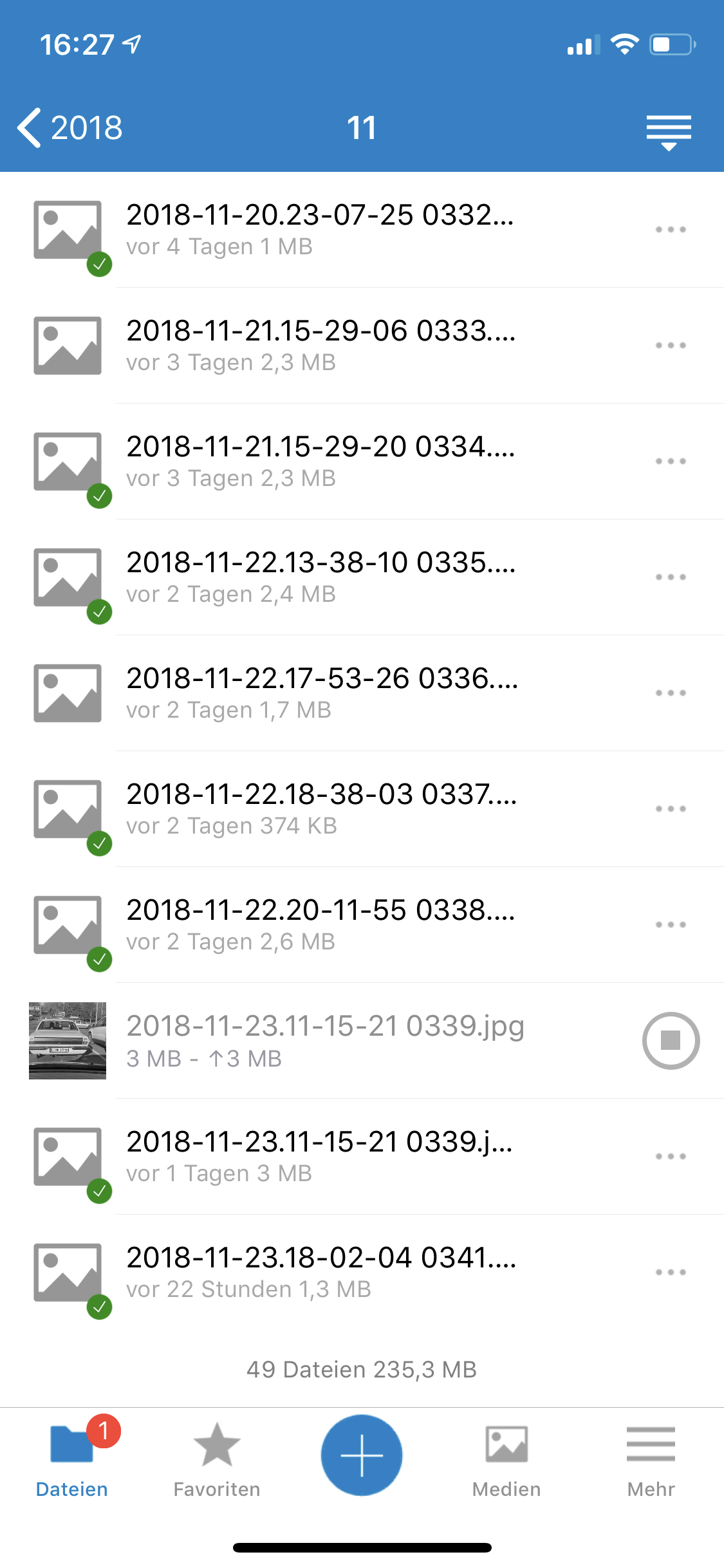
Here is the transfer section (even waiting multiple minutes doesn't change anything and the network is stable):

This is the folder it uploads to (check out the entry below which has the same file name):
 MorrisJobke
All 5 comments
Note for me: redesign with collectionView
(check read file on server for state upload != k_metadataStatusNormal)
(file name <> file name fileID)
 marinofaggiana
on 27 Nov 2018
marinofaggiana
on 27 Nov 2018
I have similar problems. Seems as if when an error occured, the files are not tried to be uploaded again. Or, if the number of files ready for upload (first 5 for parallel upload?) are blocked with files with an error, no more uploads are tried at all.
 ne20002
on 26 Dec 2018
ne20002
on 26 Dec 2018
Same here as ne20002 (no more uploads due to five erroneous uploads blocking queue). Unfortunately, the rogue uploads also cannot be cancelled, so they've been stuck there for almost two weeks!
 veddox
on 4 Jan 2019
veddox
on 4 Jan 2019
Similar issue for me: there are 5 parallel upload streams, but they upload the same 5 files again and again which is particularly annoying if one of them is a 1 GB video.
I also notice what has been described above: if one of the 5 upload slots has an error, it's stuck and the slot won't be reused.
 DrMurx
on 31 Jan 2019
DrMurx
on 31 Jan 2019
This is not happening anymore.
MorrisJobke
on 27 May 2019
Related issues
 AxelGard
·
4Comments
AxelGard
·
4Comments
 Alphakilo
·
3Comments
Alphakilo
·
3Comments
 MarkusKepert
·
4Comments
marinofaggiana
·
5Comments
MarkusKepert
·
4Comments
marinofaggiana
·
5Comments
 zigulle
·
3Comments
zigulle
·
3Comments
Most helpful comment
I have similar problems. Seems as if when an error occured, the files are not tried to be uploaded again. Or, if the number of files ready for upload (first 5 for parallel upload?) are blocked with files with an error, no more uploads are tried at all.