Ios: Images with zero bytes are in my Nextcloud after uploading from iPhone
Expected behaviour
Nextcloud iOS uploads all new photos from my camera roll to my Nextcloud instance.
All the images have a size > 0 bytes.
Actual behaviour
Nextcloud iOS uploads all new photos from my camera roll to my Nextcloud instance.
Approximately every 5. to 10. images is uploaded with zero bytes size and therefore not usable.
This happens since approx. 1-2 month.
Please also see the communication.log exported from iOS.
Maybe this is unrelated, but I also get a lot of errors in my upload list, practically during _every_ upload. See screenshot of this in this other ticket.
Steps to reproduce
- Take a bunch of photos with your camera or a screenshot
- Wait until uploaded
- Look into the web interface of Nextcloud, inspect the folder where the images are stored to. Sort by size ascending.
In my case, several zero-byte-sized images are not on top of the list.
Here is an example of what it looks like for me:

Reasoning or why should it be changed/implemented?
As of now, this behaviour basically trashes the core use case for me (uploading my taken photos to my Nextcloud instance).
iOS version
13.6.1
App version
3.0.5.8
Server configuration
Operating system:
Ubuntu (Linux 5.3.0-1032-aws x86_64)
Web server:
I'm using Snappy.
Database:
MySQL 5.7.31, I'm using Snappy.
PHP version:
7.3.21, I'm using Snappy.
Nextcloud version: (see Nextcloud admin page)
19.0.1, installed via Snappy
 UweKeim
All 59 comments
I just stumbled over this things while researching an issue.
Same ios and app and main server version, I have no other information about the server as I dont have access to it, its rented as SAAS from a provider.
Please let me know if there is anything i can do to help debug or solve this issue. (unfortunately I have no ios programming skills, but interested to get started with that).
 henning
on 25 Aug 2020
henning
on 25 Aug 2020
For know what happens I need a test ambient with this issue ... otherwise for me it's impossible.
 marinofaggiana
on 25 Aug 2020
marinofaggiana
on 25 Aug 2020
@marinofaggiana I can provide you with a user on my instance if you like.
UweKeim
on 25 Aug 2020
Thanks but I have look your communication.log and I don't have find an error ...
marinofaggiana
on 25 Aug 2020
@marinofaggiana Any idea if I can provide any coding/debugging on my side to solve this issue?
UweKeim
on 25 Aug 2020
Try to look the syslog in your FS server use the date on upload image for search some problem (nextcloud log / apache log)
Note. In your communication.log I don't find the upload ... re-send here the communication.log after the upload with 0 len
marinofaggiana
on 25 Aug 2020
OK, will try. Thanks for your kind replies!
One thing I did not mention until now, but _may_ be relevant to know:
I have all my file storage in an Amazon AWS _Simple Storage Service_ ("S3") container as described here in the Nextcloud documentation.
UweKeim
on 25 Aug 2020
I believe my provider is also using S3 for storage on the server.
I will try to verify this. They are collaborating with me to solve the issue.
Also, it's possible that it's a server issue - there have been cases like that in the past, see
- https://github.com/nextcloud/server/issues/15489
- https://github.com/nextcloud/server/issues/3056
- https://help.nextcloud.com/t/files-become-zero-bytes/7214/57
Because using the client on iOS to sync my photos makes 99.9% of my usage, I cannot say for sure if it's really the iOS client or the server.
I mainly started to realize the problem, because my two desktop clients began to give me errors when syncing, as the nextcloud server seems to have a problem with syncing 0byte files.
What is strange is that today when the error occured, I actually have two images on the server with 0kb, but there must have happened a successful sync activity because on my Linux client I have the proper image in full size. But on the iOS device the images are 0kb, just as on the server.
It's still unclear if it's the server breaking the images, or if it is the iOS client that first uploads them successfully, and then somehow destroy them to 0kb, and syncs the change to the server, which takes it, and from then on has problems syncing to other devices due to it's own 0kb syncing bug (https://github.com/nextcloud/server/issues/22029).
I will try to throw some photos in the folder on another client(I can test Linux and Mac) and see if this triggers the error as well.
henning
on 25 Aug 2020
Please keep me updated here, @henning, so will I do.
UweKeim
on 25 Aug 2020
Now I do again have two zero-byte files:
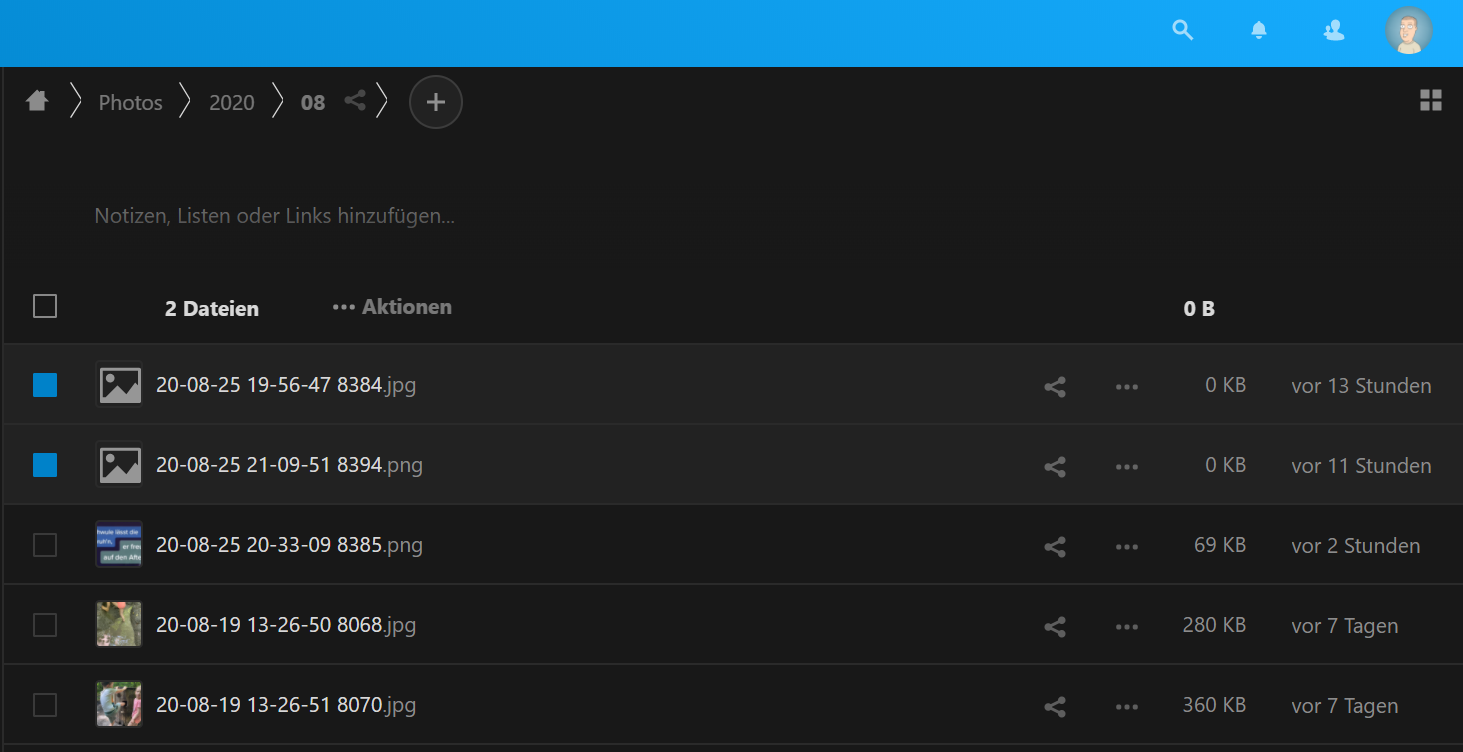
The communication.log now spans the whole date range but still I don't even see the files/file names.
Is it possible that the communication log doesn't include file names at all?
UweKeim
on 26 Aug 2020
Hello,
i am the Provider (more the Support) of @henning .
Yes, we use our own S3-Storage.
As far as i can recall, issues like this startet only a month ago with one customer, now at 3. The rest of our nextclouds are running fine or they didnt reached to us out yet.
We also saw the Issue-Post about 0kB files and the Sync Error, but don't know why its corrupting the files to 0kB.
Last of the logs regarding this problem:
` "reqId": "XuKc7MCUOHCvaF0OIzPm",
"level": 3,
"time": "2020-08-25T13:13:10+00:00",
"remoteAddr": "xxx",
"user": "xx",
"app": "PHP",
"method": "GET",
"url": "/index.php/apps/files/ajax/download.php?dir=%2FPhotos%2F2020%2F08&files=%5B%2220-08-25%2010-33-17%209243.jpg%22%2C%2220-08-25%2010-43-34%209251.jpg%22%5D&downloadStartSecret=xxx",
"message": "fopen(): failed to open stream: HTTP request failed! HTTP/1.1 416 Requested Range Not Satisfiablern at /var/www/nextcloud/lib/private/Files/ObjectStore/S3ObjectTrait.php#73",
"userAgent": "Mozilla/5.0 (X11; Ubuntu; Linux x86_64; rv:79.0) Gecko/20100101 Firefox/79.0",
"version": "19.0.1.1"
}
{
"reqId": "XuKc7MCUOHCvaF0OIzPm",
"level": 3,
"time": "2020-08-25T13:13:10+00:00",
"remoteAddr": "xxx",
"user": "xxx",
"app": "PHP",
"method": "GET",
"url": "/index.php/apps/files/ajax/download.php?dir=%2FPhotos%2F2020%2F08&files=%5B%2220-08-25%2010-33-17%209243.jpg%22%2C%2220-08-25%2010-43-34%209251.jpg%22%5D&downloadStartSecret=xxx",
"message": "fopen(httpseek://): failed to open stream: "OC\Files\Stream\SeekableHttpStream::stream_open" call failed at /var/www/nextcloud/lib/private/Files/Stream/SeekableHttpStream.php#67",
"userAgent": "Mozilla/5.0 (X11; Ubuntu; Linux x86_64; rv:79.0) Gecko/20100101 Firefox/79.0",
"version": "19.0.1.1"
}
{
"reqId": "XuKc7MCUOHCvaF0OIzPm",
"level": 3,
"time": "2020-08-25T13:13:10+00:00",
"remoteAddr": "xxx",
"user": "xx",
"app": "PHP",
"method": "GET",
"url": "/index.php/apps/files/ajax/download.php?dir=%2FPhotos%2F2020%2F08&files=%5B%2220-08-25%2010-33-17%209243.jpg%22%2C%2220-08-25%2010-43-34%209251.jpg%22%5D&downloadStartSecret=xxxx",
"message": "fclose() expects parameter 1 to be resource, bool given at /var/www/nextcloud/lib/private/legacy/OC_Files.php#196",
"userAgent": "Mozilla/5.0 (X11; Ubuntu; Linux x86_64; rv:79.0) Gecko/20100101 Firefox/79.0",
"version": "19.0.1.1"
}
{
"reqId": "XuKc7MCUOHCvaF0OIzPm",
"level": 3,
"time": "2020-08-25T13:13:11+00:00",
"remoteAddr": "x.x.x.x
"user": "xxx",
"app": "PHP",
"method": "GET",
"url": "/index.php/apps/files/ajax/download.php?dir=%2FPhotos%2F2020%2F08&files=%5B%2220-08-25%2010-33-17%209243.jpg%22%2C%2220-08-25%2010-43-34%209251.jpg%22%5D&downloadStartSecret=xxx",
"message": "fopen(xxx): failed to open stream: HTTP request failed! HTTP/1.1 416 Requested Range Not Satisfiablern at /var/www/nextcloud/lib/private/Files/ObjectStore/S3ObjectTrait.php#73",
"userAgent": "Mozilla/5.0 (X11; Ubuntu; Linux x86_64; rv:79.0) Gecko/20100101 Firefox/79.0",
"version": "19.0.1.1"
}
{
"reqId": "XuKc7MCUOHCvaF0OIzPm",
"level": 3,
"time": "2020-08-25T13:13:11+00:00",
"remoteAddr": "xxx",
"user": "xxx",
"app": "PHP",
"method": "GET",
"url": "/index.php/apps/files/ajax/download.php?dir=%2FPhotos%2F2020%2F08&files=%5B%2220-08-25%2010-33-17%209243.jpg%22%2C%2220-08-25%2010-43-34%209251.jpg%22%5D&downloadStartSecret=xxx",
"message": "fopen(httpseek://): failed to open stream: "OC\Files\Stream\SeekableHttpStream::stream_open" call failed at /var/www/nextcloud/lib/private/Files/Stream/SeekableHttpStream.php#67",
"userAgent": "Mozilla/5.0 (X11; Ubuntu; Linux x86_64; rv:79.0) Gecko/20100101 Firefox/79.0",
"version": "19.0.1.1"
`
"reqId": "XuKc7MCUOHCvaF0OIzPm",
"level": 3,
"time": "2020-08-25T13:13:11+00:00",
"remoteAddr": "xxxx",
"user": "xxx",
"app": "PHP",
"method": "GET",
"url": "/index.php/apps/files/ajax/download.php?dir=%2FPhotos%2F2020%2F08&files=%5B%2220-08-25%2010-33-17%209243.jpg%22%2C%2220-08-25%2010-43-34%209251.jpg%22%5D&downloadStartSecret=xxx",
"message": "fclose() expects parameter 1 to be resource, bool given at /var/www/nextcloud/lib/private/legacy/OC_Files.php#196",
"userAgent": "Mozilla/5.0 (X11; Ubuntu; Linux x86_64; rv:79.0) Gecko/20100101 Firefox/79.0",
"version": "19.0.1.1"
`
This one is interesting, because some of the output is different to normal errors(e.g. last bit). Will investigate more.
I also get Errors about bool Values being wrong, (latest logs of said user)
"reqId": "Tewls8ywicvtMOSre4V1",
  "level": 3,
  "time": "2020-08-26T09:18:22+00:00",
  "remoteAddr": "xx",
  "user": "xxx",
  "app": "PHP",
  "method": "REPORT",
  "url": "/remote.php/caldav/calendars/$USER/xxxx/",
  "message": "Trying to access array offset on value of type bool at /var/www/nextcloud/apps/dav/lib/CalDAV/CalDavBackend.php#1320",
  "userAgent": "Evolution/3.36.4",
  "version": "19.0.1.1"
Going to check if this is affecting the Server connection and may be responsible for corrupting the files
If you want more information, config-file etc im doing my best to provide.
 Corinari
on 26 Aug 2020
Corinari
on 26 Aug 2020
hi @Corinari you must open an issue on Nextcloud server, not here.
marinofaggiana
on 26 Aug 2020
@marinofaggiana i think he posted that to help debug this issue, and as long as it is not clear if the client or the server or both it might be a good idea to have an issue in both projects.
As I said I want to help with debugging.
Could you please give me a hint which parts of the code are responsible for the uploads?
Are there automated tests in the codebase that verify the proper behaviour of the actions that could be related to this issue?
henning
on 27 Aug 2020
Has anybody the same error with other data, like files? Or is it just about pictures on your side?
 gcommit
on 10 Sep 2020
gcommit
on 10 Sep 2020
@gcommit Having iOS, until now I discovered PNG, JPEG and MP4 files to have zero bytes size from time to time.
UweKeim
on 10 Sep 2020
Should be solved, try the version in TestFlight
marinofaggiana
on 10 Sep 2020
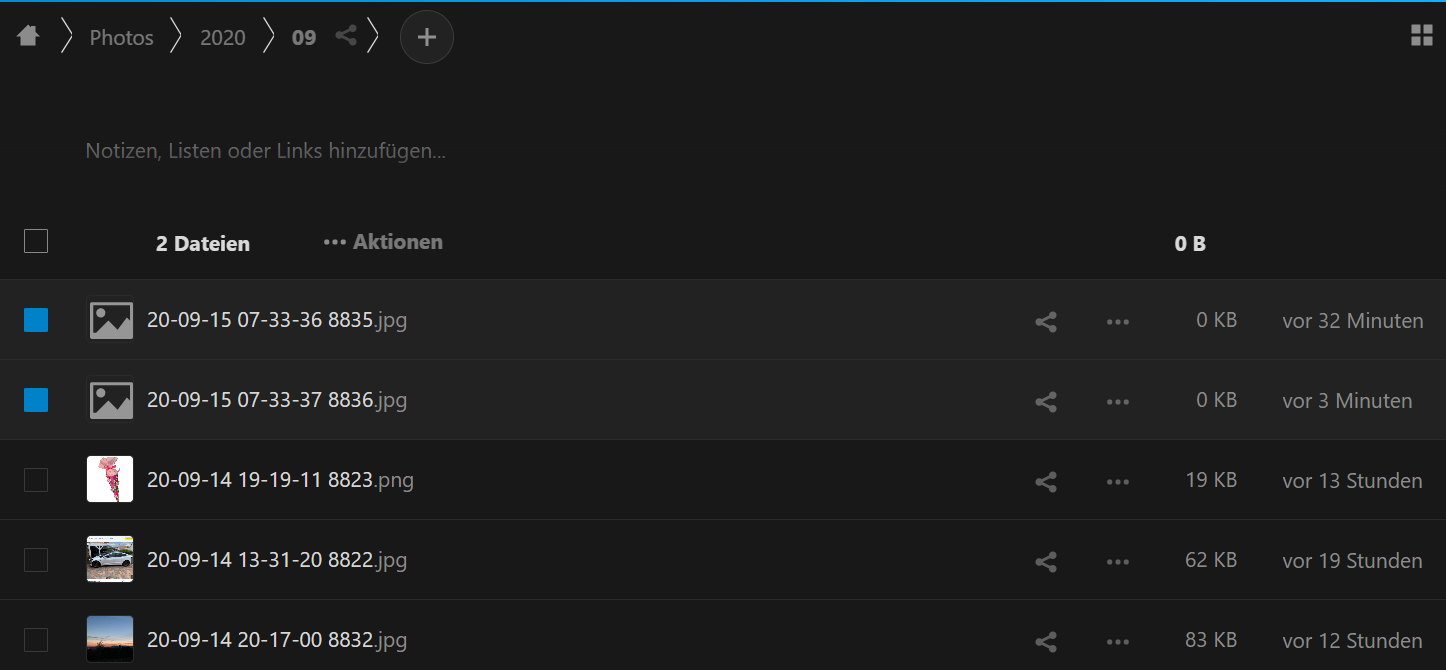
Working successfully for several days with the TestFlight version, I now have zero byte sized images again 😢:
Yesterday, Nextcloud also updated itself to 19.0.3snap1:
UweKeim
on 15 Sep 2020
Please verify in log iOS if the upload of images has 0 Len or not
marinofaggiana
on 15 Sep 2020
Thank you. From a quick look, I found no zero lengths.
I've just increased the log level to max. and will inspect the next time a new zero byte size upload is happening.
Update:
I actually _did_ found some zero byte sizes:
2020-09-15 08:03:38 Upload complete
https://cloud.uwe.co/remote.php/webdav/Photos/2020/09/20-09-15 07-33-36 8835.jpg, result: success(0 bytes)
and
2020-09-15 08:05:14 Upload complete
https://cloud.uwe.co/remote.php/webdav/Photos/2020/09/20-09-15 07-33-37 8836.jpg, result: success(0 bytes)
So yes, these are the files of my above screenshot.
UweKeim
on 15 Sep 2020
ok, now verify if, for example, before:
2020-09-15 08:03:38 Upload complete https://cloud.uwe.co/remote.php/webdav/Photos/2020/09/20-09-15 07-33-36 8835.jpg, result: success(0 bytes)
exists another upload of https://cloud.uwe.co/remote.php/webdav/Photos/2020/09/20-09-15 07-33-36 8835.jpg
marinofaggiana
on 15 Sep 2020
Yes, it seems so (again an excerpt from above attached uploaded log):
2020-09-15 08:03:18 Auto upload, no new assets found
2020-09-15 08:03:24 Network start upload file: https://cloud.uwe.co/remote.php/webdav/Photos/2020/09/20-09-15 07-33-36 8835.jpg
2020-09-15 08:03:30 Network start upload file: https://cloud.uwe.co/remote.php/webdav/Photos/2020/09/20-09-15 07-33-36 8835.jpg
2020-09-15 08:03:31 Network start upload file: https://cloud.uwe.co/remote.php/webdav/Photos/2020/09/20-09-15 07-33-36 8835.jpg
2020-09-15 08:03:31 Network start upload file: https://cloud.uwe.co/remote.php/webdav/Photos/2020/09/20-09-15 07-33-37 8836.jpg
2020-09-15 08:03:38 Upload complete https://cloud.uwe.co/remote.php/webdav/Photos/2020/09/20-09-15 07-33-36 8835.jpg, result: success(2275118 bytes)
2020-09-15 08:03:38 Network completed upload file: https://cloud.uwe.co/remote.php/webdav/Photos/2020/09/20-09-15 07-33-36 8835.jpg
2020-09-15 08:03:38 Upload complete https://cloud.uwe.co/remote.php/webdav/Photos/2020/09/20-09-15 07-33-34 8834.jpg, result: success(2440141 bytes)
2020-09-15 08:03:38 Network completed upload file: https://cloud.uwe.co/remote.php/webdav/Photos/2020/09/20-09-15 07-33-34 8834.jpg
2020-09-15 08:03:38 Upload complete https://cloud.uwe.co/remote.php/webdav/Photos/2020/09/20-09-15 07-33-36 8835.jpg, result: success(0 bytes)
2020-09-15 08:03:38 Network completed upload file: https://cloud.uwe.co/remote.php/webdav/Photos/2020/09/20-09-15 07-33-36 8835.jpg
2020-09-15 08:03:38 Upload complete https://cloud.uwe.co/remote.php/webdav/Photos/2020/09/20-09-15 07-33-37 8836.jpg, result: success(2278295 bytes)
2020-09-15 08:03:38 Network completed upload file: https://cloud.uwe.co/remote.php/webdav/Photos/2020/09/20-09-15 07-33-37 8836.jpg
2020-09-15 08:03:38 Upload complete https://cloud.uwe.co/remote.php/webdav/Photos/2020/09/20-09-15 07-33-36 8835.jpg, result: success(0 bytes)
2020-09-15 08:03:38 Network completed upload file: https://cloud.uwe.co/remote.php/webdav/Photos/2020/09/20-09-15 07-33-36 8835.jpg
2020-09-15 08:03:38 PROCESS-AUTO-UPLOAD find 2 items
2020-09-15 08:03:38 End 20 sec. perform Fetch With Completion Handler
So to me it _seems_ that it first uploaded successfully, then again with zero bytes size.
UweKeim
on 15 Sep 2020
mmm this is the issue .... ok, thanks for now.
marinofaggiana
on 15 Sep 2020
I also have this issue.
I'm storing code projects in my nextcloud, and I found that filenames that exist multiple times in my storage, like files named "__init__.py" or files in .git folders, are more likely to encounter this issue.
I'm also using a "S3 bucket" as storage but it's from digital ocean (called "space").
Otherwise I'm using a snap install and desktop and iOS client.
 Maximilian-Fuchs
on 20 Sep 2020
Maximilian-Fuchs
on 20 Sep 2020
Still got this with the latest (or was it the previous-latest?) Test Flight version again:
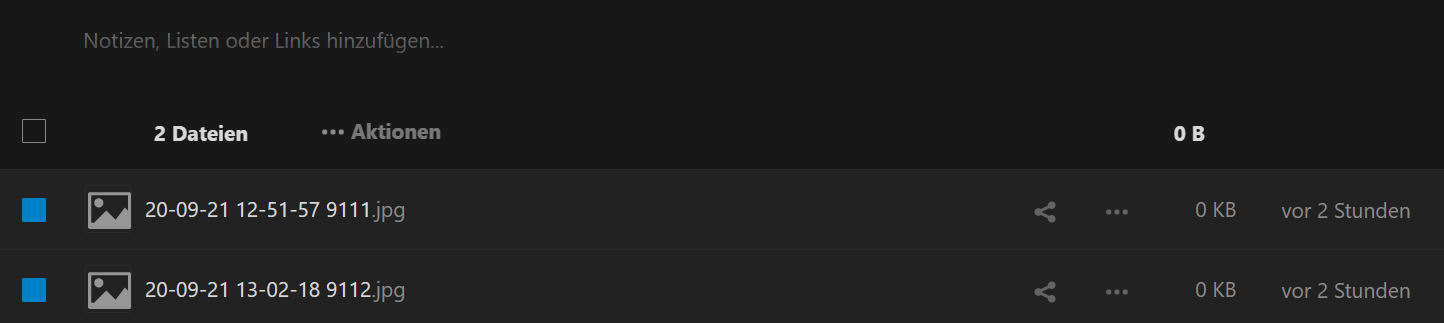
Excerpt from the communication.log:
2020-09-21 15:00:55 Network completed upload file: https://cloud.uwe.co/remote.php/webdav/Photos/2020/09/20-09-21 14-29-06 9108.jpg
2020-09-21 15:00:55 PROCESS-AUTO-UPLOAD find 5 items
2020-09-21 15:00:55 Network start upload file: https://cloud.uwe.co/remote.php/webdav/Photos/2020/09/20-09-21 12-21-13 9110.jpg
2020-09-21 15:00:56 Network start upload file: https://cloud.uwe.co/remote.php/webdav/Photos/2020/09/20-09-21 12-51-57 9111.jpg
2020-09-21 15:00:56 Network start upload file: https://cloud.uwe.co/remote.php/webdav/Photos/2020/09/20-09-21 12-51-57 9111.jpg
2020-09-21 15:00:56 Network start upload file: https://cloud.uwe.co/remote.php/webdav/Photos/2020/09/20-09-21 12-51-57 9111.jpg
2020-09-21 15:00:56 Network start upload file: https://cloud.uwe.co/remote.php/webdav/Photos/2020/09/20-09-21 13-02-18 9112.jpg
2020-09-21 15:00:59 Upload complete https://cloud.uwe.co/remote.php/webdav/Photos/2020/09/20-09-21 12-21-13 9110.jpg, result: success(131656 bytes)
2020-09-21 15:00:59 Network completed upload file: https://cloud.uwe.co/remote.php/webdav/Photos/2020/09/20-09-21 12-21-13 9110.jpg
2020-09-21 15:00:59 Upload complete https://cloud.uwe.co/remote.php/webdav/Photos/2020/09/20-09-21 12-51-57 9111.jpg, result: success(90759 bytes)
2020-09-21 15:00:59 Network completed upload file: https://cloud.uwe.co/remote.php/webdav/Photos/2020/09/20-09-21 12-51-57 9111.jpg
2020-09-21 15:00:59 Upload complete https://cloud.uwe.co/remote.php/webdav/Photos/2020/09/20-09-21 12-51-57 9111.jpg, result: success(0 bytes)
2020-09-21 15:00:59 Network completed upload file: https://cloud.uwe.co/remote.php/webdav/Photos/2020/09/20-09-21 12-51-57 9111.jpg
2020-09-21 15:00:59 Upload complete https://cloud.uwe.co/remote.php/webdav/Photos/2020/09/20-09-21 12-51-57 9111.jpg, result: success(0 bytes)
2020-09-21 15:00:59 Network completed upload file: https://cloud.uwe.co/remote.php/webdav/Photos/2020/09/20-09-21 12-51-57 9111.jpg
2020-09-21 15:01:00 Upload complete https://cloud.uwe.co/remote.php/webdav/Photos/2020/09/20-09-21 13-02-18 9112.jpg, result: success(366871 bytes)
2020-09-21 15:01:00 Network completed
BTW: After sending me the communication.log (maximum verbosity) from my iPhone to my PC it seems that the line breaks are broken. There was no line break at all before a new log entry (i.e. before each "2020-09-21...").
UweKeim
on 21 Sep 2020
Still happening with yesterday's Test Flight version 3.0.7 (18):

Excerpt from the communication log:
2020-09-22 12:29:43 Network start upload file: https://cloud.uwe.co/remote.php/webdav/Photos/2020/09/20-09-22 11-54-23 9129.jpg
2020-09-22 12:29:49 Network start upload file: https://cloud.uwe.co/remote.php/webdav/Photos/2020/09/20-09-22 11-54-23 9129.jpg
2020-09-22 12:29:49 Network start upload file: https://cloud.uwe.co/remote.php/webdav/Photos/2020/09/20-09-22 11-54-23 9129.jpg
2020-09-22 12:29:49 Network start upload file: https://cloud.uwe.co/remote.php/webdav/Photos/2020/09/20-09-22 11-54-27 9130.jpg
2020-09-22 12:29:55 Upload complete https://cloud.uwe.co/remote.php/webdav/Photos/2020/09/20-09-22 11-54-27 9130.jpg, result: success(0 bytes)
2020-09-22 12:29:55 Network completed upload file: https://cloud.uwe.co/remote.php/webdav/Photos/2020/09/20-09-22 11-54-27 9130.jpg
2020-09-22 12:29:55 Upload complete https://cloud.uwe.co/remote.php/webdav/Photos/2020/09/20-09-22 11-54-23 9129.jpg, result: success(0 bytes)
2020-09-22 12:29:55 Network completed upload file: https://cloud.uwe.co/remote.php/webdav/Photos/2020/09/20-09-22 11-54-23 9129.jpg
2020-09-22 12:29:56 Network completed upload file: https://cloud.uwe.co/remote.php/webdav/Photos/2020/09/20-09-22 11-54-23 9129.jpg with error code 423 and error description 423: WebDAV gesperrt: Zugriffsversuch auf eine gesperrte Ressource
2020-09-22 12:29:57 Upload complete https://cloud.uwe.co/remote.php/webdav/Photos/2020/09/20-09-22 11-54-23 9129.jpg, result: success(0 bytes)
2020-09-22 12:29:57 Network completed upload file: https://cloud.uwe.co/remote.php/webdav/Photos/2020/09/20-09-22 11-54-23 9129.jpg
2020-09-22 12:29:58 End 20 sec. perform Fetch With Completion Handler
2020-09-22 12:29:59 Start handle Events For Background URLSession: com.nextcloud.session.upload.background
2020-09-22 12:29:59 Upload complete

...

2020-09-22 12:31:40 Network start upload file: https://cloud.uwe.co/remote.php/webdav/Photos/2020/09/20-09-22 11-54-23 9129.jpg
@UweKeim I have added new information LOG in the next Build 19, if re-happen can you share the LOG, thanks
marinofaggiana
on 22 Sep 2020
Don't know whether this is the right place to report the Test Flight version 3.0.7 (20):
It keeps uploading files:
- See 17 notifications at the Nextcloud app icon on my home screen
- Open Nextcloud app
- Go to transfers list
- Wait until the lists is being uploaded and finally empty
Now after some time (minutes? hours?) the above steps repeat (without having taken photos since then). The number is not always 17, sometimes it is e.g. 13 or something like this.
UweKeim
on 23 Sep 2020
This is interesting:

The Image ("...9177.jpg") was first being zero bytes.
But after some time, it now has the correct size.
Following is the log excerpt that deals with this "...9177.jpg" image. "..." means omitted, unrelated lines.
2020-09-24 08:08:53 AutoUpload Photo Library added file 20-09-24 06-35-11 9177.jpg with Identifier FFFA3B33-599C-414F-8200-4F778B8CB5CA/L0/001
2020-09-24 08:08:53 AutoUpload Photo Library added file 20-09-24 06-35-11 9177.jpg with Identifier FFFA3B33-599C-414F-8200-4F778B8CB5CA/L0/001
2020-09-24 08:08:53 AutoUpload Photo Library added file 20-09-24 06-35-11 9177.jpg with Identifier FFFA3B33-599C-414F-8200-4F778B8CB5CA/L0/001

...

2020-09-24 08:14:35 PROCESS-AUTO-UPLOAD find 5 items
2020-09-24 08:14:35 Network start upload file: https://cloud.uwe.co/remote.php/webdav/Photos/2020/09/20-09-24 06-35-11 9177.jpg
2020-09-24 08:14:35 Network start upload file: https://cloud.uwe.co/remote.php/webdav/Photos/2020/09/20-09-24 06-35-11 9177.jpg
2020-09-24 08:14:35 Network start upload file: https://cloud.uwe.co/remote.php/webdav/Photos/2020/09/20-09-23 17-00-09 9166.jpg
2020-09-24 08:14:36 Network start upload file: https://cloud.uwe.co/remote.php/webdav/Photos/2020/09/20-09-23 15-16-04 9165.jpg
2020-09-24 08:14:36 Network start upload file: https://cloud.uwe.co/remote.php/webdav/Photos/2020/09/20-09-23 18-14-22 9168.jpg
2020-09-24 08:14:37 Network completed upload file: https://cloud.uwe.co/remote.php/webdav/Photos/2020/09/20-09-24 06-35-11 9177.jpg with error code 423 and error description 423: WebDAV gesperrt: Zugriffsversuch auf eine gesperrte Ressource
2020-09-24 08:14:37 Upload complete https://cloud.uwe.co/remote.php/webdav/Photos/2020/09/20-09-24 06-35-11 9177.jpg, result: success(0 bytes)
2020-09-24 08:14:37 Network completed upload file: https://cloud.uwe.co/remote.php/webdav/Photos/2020/09/20-09-24 06-35-11 9177.jpg

...

2020-09-24 10:44:42 Network start upload file: https://cloud.uwe.co/remote.php/webdav/Photos/2020/09/20-09-24 06-35-11 9177.jpg
2020-09-24 10:50:35 Start handle Events For Background URLSession: com.nextcloud.session.upload.background
2020-09-24 10:50:35 Upload complete https://cloud.uwe.co/remote.php/webdav/Photos/2020/09/20-09-23 11-27-25 9151.jpg, result: success(2377298 bytes)
2020-09-24 10:50:35 Network completed upload file: https://cloud.uwe.co/remote.php/webdav/Photos/2020/09/20-09-23 11-27-25 9151.jpg
2020-09-24 10:50:35 Upload complete https://cloud.uwe.co/remote.php/webdav/Photos/2020/09/20-09-24 06-35-11 9177.jpg, result: success(338423 bytes)
2020-09-24 10:50:35 Network completed upload file: https://cloud.uwe.co/remote.php/webdav/Photos/2020/09/20-09-24 06-35-11 9177.jpg

...

2020-09-24 08:08:53 AutoUpload Photo Library added file 20-09-24 06-35-11 9177.jpg with Identifier FFFA3B33-599C-414F-8200-4F778B8CB5CA/L0/001
2020-09-24 08:08:53 AutoUpload Photo Library added file 20-09-24 06-35-11 9177.jpg with Identifier FFFA3B33-599C-414F-8200-4F778B8CB5CA/L0/001
2020-09-24 08:08:53 AutoUpload Photo Library added file 20-09-24 06-35-11 9177.jpg with Identifier FFFA3B33-599C-414F-8200-4F778B8CB5CA/L0/001

...

2020-09-24 08:14:35 Network start upload file: https://cloud.uwe.co/remote.php/webdav/Photos/2020/09/20-09-24 06-35-11 9177.jpg
2020-09-24 08:14:35 Network start upload file: https://cloud.uwe.co/remote.php/webdav/Photos/2020/09/20-09-24 06-35-11 9177.jpg
2020-09-24 08:14:35 Network start upload file: https://cloud.uwe.co/remote.php/webdav/Photos/2020/09/20-09-23 17-00-09 9166.jpg
2020-09-24 08:14:36 Network start upload file: https://cloud.uwe.co/remote.php/webdav/Photos/2020/09/20-09-23 15-16-04 9165.jpg
2020-09-24 08:14:36 Network start upload file: https://cloud.uwe.co/remote.php/webdav/Photos/2020/09/20-09-23 18-14-22 9168.jpg
2020-09-24 08:14:37 Network completed upload file: https://cloud.uwe.co/remote.php/webdav/Photos/2020/09/20-09-24 06-35-11 9177.jpg with error code 423 and error description 423: WebDAV gesperrt: Zugriffsversuch auf eine gesperrte Ressource
2020-09-24 08:14:37 Upload complete https://cloud.uwe.co/remote.php/webdav/Photos/2020/09/20-09-24 06-35-11 9177.jpg, result: success(0 bytes)
2020-09-24 08:14:37 Network completed upload file: https://cloud.uwe.co/remote.php/webdav/Photos/2020/09/20-09-24 06-35-11 9177.jpg

...

2020-09-24 10:44:42 Network start upload file: https://cloud.uwe.co/remote.php/webdav/Photos/2020/09/20-09-24 06-35-11 9177.jpg
2020-09-24 10:50:35 Start handle Events For Background URLSession: com.nextcloud.session.upload.background
2020-09-24 10:50:35 Upload complete https://cloud.uwe.co/remote.php/webdav/Photos/2020/09/20-09-23 11-27-25 9151.jpg, result: success(2377298 bytes)
2020-09-24 10:50:35 Network completed upload file: https://cloud.uwe.co/remote.php/webdav/Photos/2020/09/20-09-23 11-27-25 9151.jpg
2020-09-24 10:50:35 Upload complete https://cloud.uwe.co/remote.php/webdav/Photos/2020/09/20-09-24 06-35-11 9177.jpg, result: success(338423 bytes)
2020-09-24 10:50:35 Network completed upload file: https://cloud.uwe.co/remote.php/webdav/Photos/2020/09/20-09-24 06-35-11 9177.jpg
Maybe this is because of the recent behaviour, that the files get uploaded multiple times now (see above comment).
UweKeim
on 24 Sep 2020
I haven't been able to find any logs for this happening either, but maybe my configuration can help narrow the search scope?
I run my own Nextcloud server on my own hardware and all file storage is backed by local disks (so S3 isn't the cause in my case).
Server: Nextcloud Server 19.0.3
Client: Nextcloud Coherence for iOS 3.0.6.8
It's also been happening on my setup for a few months now, although I didn't notice exactly when it started happening.
It does seem like it only happens on auto upload, though. I've never had a problem manually uploading the failed files later, but then of course I need to keep track of them and rename them manually.
The problem seems hard to replicate. For example I tried doing 2 rounds of testing where I took 25 pictures and waited for the photos to be uploaded. But in both rounds none of the pictures were empty on upload. I had my last failed upload 13 hours ago, so I don't think anything has changed.
I have "Most Compatible" mode enabled to convert from HEIC to JPEG. Don't know if that's relevant.
I also have "Live Photo" enabled. Don't know if that's relevant either since I can't remember when that feature arrived or if it at all coincides with the upload issue.
 Pectojin
on 27 Sep 2020
Pectojin
on 27 Sep 2020
@Pectojin try subscribing to the Test Flight Version. Solved it in my case.
UweKeim
on 27 Sep 2020
Just when I thought everything goes well, it doesn't.
Got today again two new zero-byte files with the latest Test Flight version:
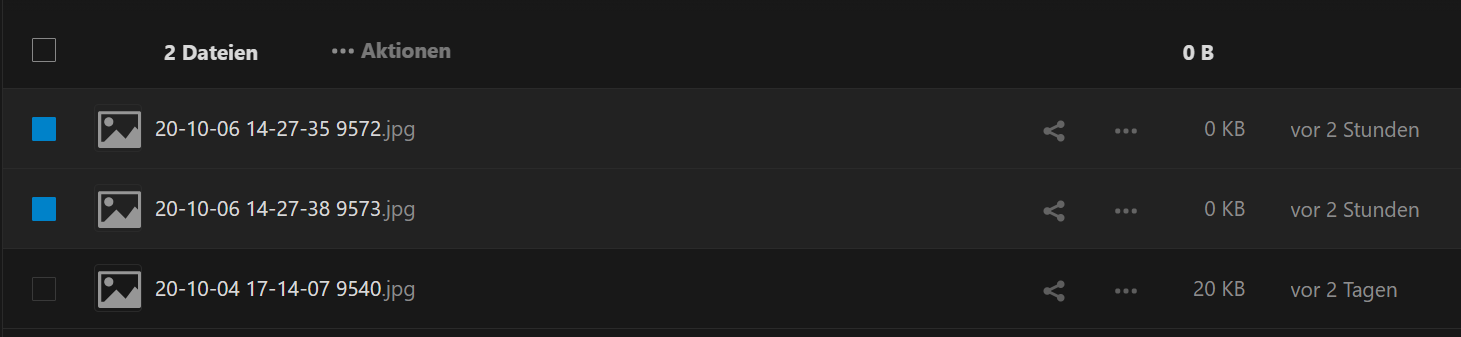
Here is the excerpt from the log regarding the two files:
...
2020-10-06 14:33:54 PROCESS-AUTO-UPLOAD find 2 items
2020-10-06 14:33:54 Network start upload file: https://cloud.uwe.co/remote.php/webdav/Photos/2020/10/20-10-06 14-27-38 9573.jpg
2020-10-06 14:33:54 Network start upload file: https://cloud.uwe.co/remote.php/webdav/Photos/2020/10/20-10-06 14-27-35 9572.jpg
2020-10-06 14:33:54 Upload complete https://cloud.uwe.co/remote.php/webdav/Photos/2020/10/20-10-06 14-27-38 9573.jpg, result: success(0 bytes)
2020-10-06 14:33:54 Network completed upload file: https://cloud.uwe.co/remote.php/webdav/Photos/2020/10/20-10-06 14-27-38 9573.jpg
2020-10-06 14:33:54 Upload complete https://cloud.uwe.co/remote.php/webdav/Photos/2020/10/20-10-06 14-27-35 9572.jpg, result: success(0 bytes)
2020-10-06 14:33:54 Network completed upload file: https://cloud.uwe.co/remote.php/webdav/Photos/2020/10/20-10-06 14-27-35 9572.jpg
2020-10-06 14:33:55 Network request started: GET https://cloud.uwe.co/ocs/v2.php/cloud/user?format=json
2020-10-06 14:33:55 Network request headers: ["Content-Type": "application/x-www-form-urlencoded", "Authorization": "Basic YWRtaW46S2ZqYTNqSVhYdDZVUkpEbHpEVEV6U0V2UFB5bXY0ekdYSGZYRUUzak91bGFid25RMnFrblJtakxPSGtDTFpPdFF0dzI4N3ph", "User-Agent": "Mozilla/5.0 (iOS) Nextcloud-iOS/3.0.10", "OCS-APIRequest": "true"]
2020-10-06 14:33:55 Network request body: None
2020-10-06 14:33:55 Network request started: GET https://cloud.uwe.co/status.php
...
My app version ist "Nextcloud Coherence for iOS 3.0.10.5"
My Nextcloud version is "Nextcloud Server 19.0.3"
Update
I've just startet Test Flight manually to see yet a newer Nextcloud iOS version "3.0.10 (7)".
Maybe this one fixes the above issue finally (although the release notes do not mention it).
UweKeim
on 6 Oct 2020
Hi , this was an autoumatic auto upload? If yes can you put the log from detect the upload ? Look previous fileName in the log
marinofaggiana
on 6 Oct 2020
Hello, I experience the same issue.
iOS app: 3.0.8
NC: 19.0.3 (docker hub nextcloud:production image)
Mariadb: 10.3.22 (docker hub jsurf/rpi-mariadb image)
HW: Raspberry Pi 4B with 4GB RAM
Here is my docker-compose.yml
 version: '3.3'

 services:

   db:
     image: jsurf/rpi-mariadb
     container_name: nextcloud-mariadb
     command: --transaction-isolation=READ-COMMITTED --binlog-format=ROW
     restart: always
     volumes:
       - ./data/mariadb/data:/var/lib/mysql
       - ./my.cnf:/etc/mysql/my.cnf
       - ./docker-entrypoint.sh:/usr/local/bin/docker-entrypoint.sh
     environment:
       - MYSQL_ROOT_PASSWORD=
       - MYSQL_ALLOW_EMPTY_PASSWORD=true
       - MYSQL_PASSWORD=nextcloud
       - MYSQL_USER=nextcloud
       - MYSQL_DATABASE=nextcloud
       - MYSQL_START_TIMEOUT=900

   nextcloud:
     image: nextcloud:production
     container_name: nextcloud
     restart: always
     ports:
       - 8080:80
     volumes:
       - ./data/nextcloud/html:/var/www/html
       - ./data/files_shared:/var/www/html/data
     environment:
       - MYSQL_DATABASE=nextcloud
       - MYSQL_USER=nextcloud
       - MYSQL_PASSWORD=nextcloud
       - MYSQL_HOST=db
     depends_on:
       - db
mariadb conf file:
 [mysqld]
 pid-file            = /var/run/mysqld/mysqld.pid
 socket              = /var/run/mysqld/mysqld.sock
 # Where the database files are stored inside the container
 datadir             = /var/lib/mysql

 # My applicati on special configuration
 max_allowed_packet  = 32M

 # Accept connections from any IP address
 bind-address        = 0.0.0.0

 skip-grant-tables
The iOS app would crash sometimes on whole camera roll uploads with ~1400 photos, which results in 0kb files on /Photos directory.
 john-yan
on 6 Oct 2020
john-yan
on 6 Oct 2020
Hi , this was an autoumatic auto upload? If yes can you put the log from detect the upload ? Look previous fileName in the log
Yes, it was from an automatic auto upload.
I've attached here the communication.log with 2 days before the excerpt in my previous comment happend:
Is this too broad or still helpful. I can strip it down further if I better understand what you are looking for.
Sorry for all the trouble and thanks again for helping me on this.
UweKeim
on 6 Oct 2020
Just got yet another zero-byte file with the newest Test Flight version 3.0.10 (14):
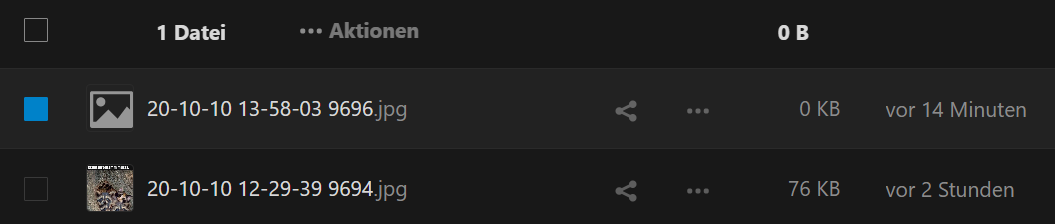
Excerpt from the communication.log:
2020-10-10 14:10:09 Network request body: None
2020-10-10 14:10:09 Network request started: MKCOL https:/cloud.uwe.co/remote.php/webdav/Photos/2020/10
2020-10-10 14:10:09 Network request headers: ["OCS-APIRequest": "true", "User-Agent": "Mozilla/5.0 (iOS) Nextcloud-iOS/3.0.10", "Content-Type": "application/x-www-form-urlencoded", "Authorization": "Basic YWRtaW46S2ZqYTNqSVhYdDZVUkpEbHpEVEV6U0V2UFB5bXY0ekdYSGZYRUUzak91bGFid25RMnFrblJtakxPSGtDTFpPdFF0dzI4N3ph"]
2020-10-10 14:10:09 Network request body: None
2020-10-10 14:10:09 Automatic upload added 20-10-10 13-58-00 9695.heic (2656074 bytes) with Identifier A01B7602-9379-40E8-9436-9D7CBCE07EEA/L0/001
2020-10-10 14:10:10 Automatic upload added 20-10-10 13-58-03 9696.heic (2231924 bytes) with Identifier B95651CE-94F7-4348-9C15-FF5F0FA3A57A/L0/001
2020-10-10 14:10:10 Network request started: GET https://cloud.uwe.co/ocs/v2.php/cloud/user?format=json
2020-10-10 14:10:10 Network request headers: ["Content-Type": "application/x-www-form-urlencoded", "OCS-APIRequest": "true", "Authorization": "Basic YWRtaW46S2ZqYTNqSVhYdDZVUkpEbHpEVEV6U0V2UFB5bXY0ekdYSGZYRUUzak91bGFid25RMnFrblJtakxPSGtDTFpPdFF0dzI4N3ph", "User-Agent": "Mozilla/5.0 (iOS) Nextcloud-iOS/3.0.10"]
2020-10-10 14:10:10 Network request body: None
2020-10-10 14:10:10 Network request started: GET https://cloud.uwe.co/status.php
2020-10-10 14:10:10 Network request headers: ["Content-Type": "application/x-www-form-urlencoded", "OCS-APIRequest": "true", "Authorization": "Basic YWRtaW46S2ZqYTNqSVhYdDZVUkpEbHpEVEV6U0V2UFB5bXY0ekdYSGZYRUUzak91bGFid25RMnFrblJtakxPSGtDTFpPdFF0dzI4N3ph", "User-Agent": "Mozilla/5.0 (iOS) Nextcloud-iOS/3.0.10"]
2020-10-10 14:10:10 Network request body: None
2020-10-10 14:10:10 Network response result: 2020-10-10 14:10:10 [Request]: GET https://cloud.uwe.co/status.php
    [Headers]:
        Authorization: Basic YWRtaW46S2ZqYTNqSVhYdDZVUkpEbHpEVEV6U0V2UFB5bXY0ekdYSGZYRUUzak91bGFid25RMnFrblJtakxPSGtDTFpPdFF0dzI4N3ph
        Content-Type: application/x-www-form-urlencoded
        OCS-APIRequest: true
        User-Agent: Mozilla/5.0 (iOS) Nextcloud-iOS/3.0.10
    [Body]: None
[Response]:
    [Status Code]: 200
    [Headers]:
        Access-Control-Allow-Origin: *
        Cache-Control: no-store, no-cache, must-revalidate
        Connection: Keep-Alive
        Content-Security-Policy: default-src 'self'; script-src 'self' 'nonce-WElCQXhmQnBBNTVrQXJFMUR2N1h1OE9SOWRTVi9DTVE3RWtSU3NmUmZERT06Rk85cjhjUXNhTXMrU01sdFlveXU0L0xMeE8za2lFcGFuQ2NnSTVHRk5WYz0='; style-src 'self' 'unsafe-inline'; frame-src *; img-src * data: blob:; font-src 'self' data:; media-src *; connect-src *; object-src 'none'; base-uri 'self';
        Content-Type: application/json
        Date: Sat, 10 Oct 2020 12:10:10 GMT
        Expires: Thu, 19 Nov 1981 08:52:00 GMT
        Keep-Alive: timeout=5, max=99
        Pragma: no-cache
        Referrer-Policy: no-referrer
        Server: Apache
        Strict-Transport-Security: max-age=63072000; includeSubdomains
        Transfer-Encoding: Identity
        X-Content-Type-Options: nosniff
        X-Download-Options: noopen
        X-Frame-Options: SAMEORIGIN
        X-Permitted-Cross-Domain-Policies: none
        X-Robots-Tag: none
        X-XSS-Protection: 1; mode=block
    [Body]:
        {"installed":true,"maintenance":false,"needsDbUpgrade":false,"version":"19.0.3.1","versionstring":"19.0.3","edition":"","productname":"Nextcloud","extendedSupport":false}
[Network Duration]: 0.2643129825592041s
[Serialization Duration]: 0.00012575008440762758s
[Result]: success({
    edition = "";
    extendedSupport = 0;
    installed = 1;
    maintenance = 0;
    needsDbUpgrade = 0;
    productname = Nextcloud;
    version = "19.0.3.1";
    versionstring = "19.0.3";
})
2020-10-10 14:10:10 Network response all headers: 2020-10-10 14:10:10 Optional([AnyHashable("Content-Type"): application/json, AnyHashable("Content-Security-Policy"): default-src 'self'; script-src 'self' 'nonce-WElCQXhmQnBBNTVrQXJFMUR2N1h1OE9SOWRTVi9DTVE3RWtSU3NmUmZERT06Rk85cjhjUXNhTXMrU01sdFlveXU0L0xMeE8za2lFcGFuQ2NnSTVHRk5WYz0='; style-src 'self' 'unsafe-inline'; frame-src *; img-src * data: blob:; font-src 'self' data:; media-src *; connect-src *; object-src 'none'; base-uri 'self';, AnyHashable("Transfer-Encoding"): Identity, AnyHashable("X-Download-Options"): noopen, AnyHashable("Strict-Transport-Security"): max-age=63072000; includeSubdomains, AnyHashable("Expires"): Thu, 19 Nov 1981 08:52:00 GMT, AnyHashable("X-Content-Type-Options"): nosniff, AnyHashable("Access-Control-Allow-Origin"): *, AnyHashable("Referrer-Policy"): no-referrer, AnyHashable("Connection"): Keep-Alive, AnyHashable("Server"): Apache, AnyHashable("X-Robots-Tag"): none, AnyHashable("Keep-Alive"): timeout=5, max=99, AnyHashable("X-XSS-Protection"): 1; mode=block, AnyHashable("Cache-Control"): no-store, no-cache, must-revalidate, AnyHashable("Pragma"): no-cache, AnyHashable("X-Frame-Options"): SAMEORIGIN, AnyHashable("X-Permitted-Cross-Domain-Policies"): none, AnyHashable("Date"): Sat, 10 Oct 2020 12:10:10 GMT])
2020-10-10 14:10:13 PROCESS-AUTO-UPLOAD find 2 items
2020-10-10 14:10:13 Network start upload file: https://cloud.uwe.co/remote.php/webdav/Photos/2020/10/20-10-10 13-58-03 9696.jpg
2020-10-10 14:10:13 Network start upload file: https://cloud.uwe.co/remote.php/webdav/Photos/2020/10/20-10-10 13-58-00 9695.jpg
2020-10-10 14:10:15 Upload complete https://cloud.uwe.co/remote.php/webdav/Photos/2020/10/20-10-10 13-58-03 9696.jpg, result: success(0 bytes)
2020-10-10 14:10:15 Network completed upload file: https://cloud.uwe.co/remote.php/webdav/Photos/2020/10/20-10-10 13-58-03 9696.jpg
2020-10-10 14:10:16 Network response result: 2020-10-10 14:10:16 [Request]: GET https://cloud.uwe.co/ocs/v2.php/cloud/user?format=json
    [Headers]:
        Authorization: Basic YWRtaW46S2ZqYTNqSVhYdDZVUkpEbHpEVEV6U0V2UFB5bXY0ekdYSGZYRUUzak91bGFid25RMnFrblJtakxPSGtDTFpPdFF0dzI4N3ph
        Content-Type: application/x-www-form-urlencoded
        OCS-APIRequest: true
        User-Agent: Mozilla/5.0 (iOS) Nextcloud-iOS/3.0.10
    [Body]: None
[Response]:
    [Status Code]: 200
    [Headers]:
        Cache-Control: no-cache, no-store, must-revalidate
        Connection: Keep-Alive
        Content-Length: 618
        Content-Security-Policy: default-src 'none';base-uri 'none';manifest-src 'self'
        Content-Type: application/json; charset=utf-8
        Date: Sat, 10 Oct 2020 12:10:10 GMT
        Expires: Thu, 19 Nov 1981 08:52:00 GMT
        Feature-Policy: autoplay 'none';camera 'none';fullscreen 'none';geolocation 'none';microphone 'none';payment 'none'
        Keep-Alive: timeout=5, max=97
        Pragma: no-cache
        Referrer-Policy: no-referrer
        Server: Apache
        Strict-Transport-Security: max-age=63072000; includeSubdomains
        X-Content-Type-Options: nosniff
        X-Download-Options: noopen
        X-Frame-Options: SAMEORIGIN
        X-Permitted-Cross-Domain-Policies: none
        X-Robots-Tag: none
        X-XSS-Protection: 1; mode=block
    [Body]:
        {"ocs":{"meta":{"status":"ok","statuscode":200,"message":"OK"},"data":{"enabled":true,"storageLocation":"\/var\/snap\/nextcloud\/common\/nextcloud\/data\/admin","id":"admin","lastLogin":1602331810000,"backend":"Database","subadmin":[],"quota":{"free":-2,"used":1405913439410,"total":-2,"relative":0,"quota":-3},"email":"[email protected]","phone":"00491703109369","address":"R\u00fcckertstra\u00dfe 28, 73054 Eislingen","website":"https:\/\/uwe.co","twitter":"@elemob_de","groups":["admin"],"language":"de","locale":"de_DE","backendCapabilities":{"setDisplayName":true,"setPassword":true},"display-name":"Uwe Keim"}}}
[Network Duration]: 5.404796004295349s
[Serialization Duration]: 0.000247625051997602s
[Result]: success({
    ocs =     {
        data =         {
            address = "R\U00fcckertstra\U00dfe 28, 73054 Eislingen";
            backend = Database;
            backendCapabilities =             {
                setDisplayName = 1;
                setPassword = 1;
            };
            "display-name" = "Uwe Keim";
            email = "[email protected]";
            enabled = 1;
            groups =             (
                admin
            );
            id = admin;
            language = de;
            lastLogin = 1602331810000;
            locale = "de_DE";
            phone = 00491703109369;
            quota =             {
                free = "-2";
                quota = "-3";
                relative = 0;
                total = "-2";
                used = 1405913439410;
            };
            storageLocation = "/var/snap/nextcloud/common/nextcloud/data/admin";
            subadmin =             (
            );
            twitter = "@elemob_de";
            website = "https://uwe.co";
        };
        meta =         {
            message = OK;
            status = ok;
            statuscode = 200;
        };
    };
})
Search for 03 9696 to see occurrances of that zero-byte-sized file.
UweKeim
on 10 Oct 2020
Hi ! from this information do not depend from iOS.
marinofaggiana
on 10 Oct 2020
Hi ! from this information do not depend from iOS.
Sorry, I do not fully understand this sentence.
In case you want me to post my iOS version, it is 14.0.1.
UweKeim
on 10 Oct 2020
Because from your LOG don't exists an issue so:
1) 2020-10-10 14:10:10 Automatic upload added 20-10-10 13-58-03 9696.heic (2231924 bytes) with Identifier B95651CE-94F7-4348-9C15-FF5F0FA3A57A/L0/001
2) 2020-10-10 14:10:13 Network start upload file: https://cloud.uwe.co/remote.php/webdav/Photos/2020/10/20-10-10 13-58-03 9696.jpg
3) 2020-10-10 14:10:15 Upload complete https://cloud.uwe.co/remote.php/webdav/Photos/2020/10/20-10-10 13-58-03 9696.jpg, result: success(0 bytes)
No errors, the server response with success but 0 bytes, whats else ?
marinofaggiana
on 10 Oct 2020
Note. But where is the 20-10-10 13-58-00 9695.jpg ?
marinofaggiana
on 10 Oct 2020
This is the full communication log I downloaded just after getting the zero-byte file:
I do find three occurances for the 9695 file:
...

2020-10-10 14:10:09 Automatic upload added 20-10-10 13-58-00 9695.heic (2656074 bytes) with Identifier A01B7602-9379-40E8-9436-9D7CBCE07EEA/L0/001

...

2020-10-10 14:10:13 Network start upload file: https://cloud.uwe.co/remote.php/webdav/Photos/2020/10/20-10-10 13-58-00 9695.jpg

...

2020-10-10 14:10:17 Upload complete https://cloud.uwe.co/remote.php/webdav/Photos/2020/10/20-10-10 13-58-00 9695.jpg, result: success(4297942 bytes)

...
Actually this file was transfered successfully.
UweKeim
on 10 Oct 2020
(I am really very sorry to bother you with this issue for so long, I do hope you are not being upset because of this)
UweKeim
on 10 Oct 2020
Nooo, no problem !! This is important not only for you ! it's important :-) but I can't know why the server response with success and 0 bytes, from this log don't exists nothing problem.
marinofaggiana
on 10 Oct 2020
Thank you ♥. Should I try to look for a server log file to get more information?
Any of these logfiles of interest for you?
https://github.com/nextcloud/nextcloud-snap/wiki/Where-to-find-logs-of-components
UweKeim
on 10 Oct 2020
yes, I think that the problem is server side, but keep posting your logs here.
marinofaggiana
on 10 Oct 2020
Thank you ♥. Should I try to look for a server log file to get more information?
Any of these logfiles of interest for you?
https://github.com/nextcloud/nextcloud-snap/wiki/Where-to-find-logs-of-components
I can't take care of the server side, only iOS
marinofaggiana
on 10 Oct 2020
How about kind of a workaround:
If an upload returned with zero-bytes size, try again one/two more times to upload, then fail with an error.
Not ideal but maybe good enough for a real-world scenario?
UweKeim
on 10 Oct 2020
I can't take care of the server side, only iOS
Hello, I found that when the iOS app experience a crash when uploading the full camera roll, a 0kb file will be appear on the server. If I reopen the app, it will continue to upload the rest of the file but the failed 0kb file will not be uploaded again.
john-yan
on 11 Oct 2020
@UweKeim try the next 3.0.10 (18) and look the LOG for :
If an upload returned with zero-bytes size, try again one/two more times to upload, then fail with an error.
Let's try
marinofaggiana
on 12 Oct 2020
@UweKeim every now look at your logs for find 0
marinofaggiana
on 14 Oct 2020
I've just took a look at communication.log and found _no_ "(0 bytes)" entries so far since the last update.
Will check again in a few days.
UweKeim
on 14 Oct 2020
Did a check of communication.log again, still no "(0 bytes)". Will try again later.
UweKeim
on 15 Oct 2020
Did again today a check of communication.log again, still no "(0 bytes)". Will try again later.
UweKeim
on 18 Oct 2020
same on my side from time to time this issue occurred:
nextcloud v19.0.4
mariadb:
mariadb-gssapi-server-10.3.17-1.module_el8.1.0+257+48736ea6.x86_64
mariadb-connector-c-3.0.7-1.el8.x86_64
mariadb-10.3.17-1.module_el8.1.0+257+48736ea6.x86_64
mariadb-server-10.3.17-1.module_el8.1.0+257+48736ea6.x86_64
mariadb-connector-c-config-3.0.7-1.el8.noarch
mariadb-errmsg-10.3.17-1.module_el8.1.0+257+48736ea6.x86_64
mariadb-server-utils-10.3.17-1.module_el8.1.0+257+48736ea6.x86_64
mariadb-common-10.3.17-1.module_el8.1.0+257+48736ea6.x86_64
mariadb-backup-10.3.17-1.module_el8.1.0+257+48736ea6.x86_64
OS: CentOS Linux release 8.2.2004 (Core)
PHP: 7.4
IOS nextcloud app: 3.0.8
- it is really strange because I must check which photo was uploaded and is not zero kb
 whoamiUNIX
on 20 Oct 2020
whoamiUNIX
on 20 Oct 2020
Waiting some more days, I did find a zero-byte file ("20-10-24 14-09-30 0074.jpg"), that was actually fixed automatically during another upload (if I do unterstand it correctly).
Here is a communication.log excerpt:
...

2020-10-24 14:28:14 Automatic upload added 20-10-24 14-09-30 0074.heic (1228991 bytes) with Identifier FEAC8E87-79E2-421A-8498-D26B19834598/L0/001
2020-10-24 14:28:15 Automatic upload added 20-10-24 14-09-30 0074.heic (1228991 bytes) with Identifier FEAC8E87-79E2-421A-8498-D26B19834598/L0/001
2020-10-24 14:28:15 Automatic upload added 20-10-24 14-09-30 0074.heic (1228991 bytes) with Identifier FEAC8E87-79E2-421A-8498-D26B19834598/L0/001

...

2020-10-24 14:28:16 PROCESS-AUTO-UPLOAD find 5 items
2020-10-24 14:28:17 Network start upload file: https://cloud.uwe.co/remote.php/webdav/Photos/2020/10/20-10-24 14-09-30 0074.jpg

...

2020-10-24 14:28:38 End 20 sec. perform Fetch With Completion Handler
2020-10-24 14:28:38 Upload error 0 length https://cloud.uwe.co/remote.php/webdav/Photos/2020/10/20-10-24 14-09-30 0074.jpg, result: success(0 bytes)
2020-10-24 14:28:38 Network completed upload file: https://cloud.uwe.co/remote.php/webdav/Photos/2020/10/20-10-24 14-09-30 0074.jpg
2020-10-24 14:28:43 Start handle Events For Background URLSession: com.nextcloud.session.upload.background

...

2020-10-24 14:28:48 PROCESS-AUTO-UPLOAD find 1 items
2020-10-24 14:28:48 Network start upload file: https://cloud.uwe.co/remote.php/webdav/Photos/2020/10/20-10-24 14-09-30 0074.jpg
2020-10-24 14:31:16 Upload complete https://cloud.uwe.co/remote.php/webdav/Photos/2020/10/20-10-24 14-09-30 0074.jpg, result: success(2403486 bytes)
2020-10-24 14:31:16 Network completed upload file: https://cloud.uwe.co/remote.php/webdav/Photos/2020/10/20-10-24 14-09-30 0074.jpg
2020-10-24 14:36:37 Start perform Fetch With Completion Handler

...
Just for entertainment purposes, this is the image in question:

(It's my 6-year old girl Ina, proudly showing a picture she has just drawn and cut out)
So it seems that while the zero-byte files still occur, it is now mitigated by your changes.
Looking further down the communication.log file, I found no other zero-byte entry. So there was only one single zero-byte file within approximately two weeks, while heavily using the upload functionality.
Thank you _very_ much ♥
UweKeim
on 30 Oct 2020
Hello,
The problem is that sometimes the photo is sent several times.

Some people have the same problems
 JorisBodin
on 30 Oct 2020
JorisBodin
on 30 Oct 2020
The
 shw26y10
on 31 Oct 2020
shw26y10
on 31 Oct 2020
Hi, has this issue been resolved? I'm another person affected by the problem. Is the fix in a Testflight build? Thanks :)
 meewgumi
on 26 Dec 2020
meewgumi
on 26 Dec 2020
@meewgumi Why not give it a try?
I'm currently on:
- Nextcloud iOS 3.2.0.11 (via Testflight)
- Nextcloud Server 20.0.4 (via Snap)
As of now, the issue did _not_ occur anymore, as far as I can say.
UweKeim
on 26 Dec 2020
I was having this issue and the iOS app (app version 3.1.0.7, server version 20.0.4) listed in the logs a lot of errors
error code 413, file too big even though the photos I was trying to upload were like 2MB each
I realized later it was a problem of the nginx reverse proxy I use with docker repository here.
I fixed the issue by creating a uploadsize.conf file with the following content
client_max_body_size 10G;
proxy_request_buffering off;
And mounting it as a volume of the nginx-proxy container at path /etc/nginx/conf.d/uploadsize.conf
This fixed my upload problems from iOS
 Nimayer
on 28 Dec 2020
Nimayer
on 28 Dec 2020
Related issues
 MarkusKepert
·
4Comments
MarkusKepert
·
4Comments
 AxelGard
·
4Comments
AxelGard
·
4Comments
 rakekniven
·
4Comments
rakekniven
·
4Comments
 MorrisJobke
·
5Comments
MorrisJobke
·
4Comments
MorrisJobke
·
5Comments
MorrisJobke
·
4Comments
Most helpful comment
@UweKeim try the next 3.0.10 (18) and look the LOG for :
Let's try