Expected behaviour
I can log in to the iOS app.
Actual behaviour
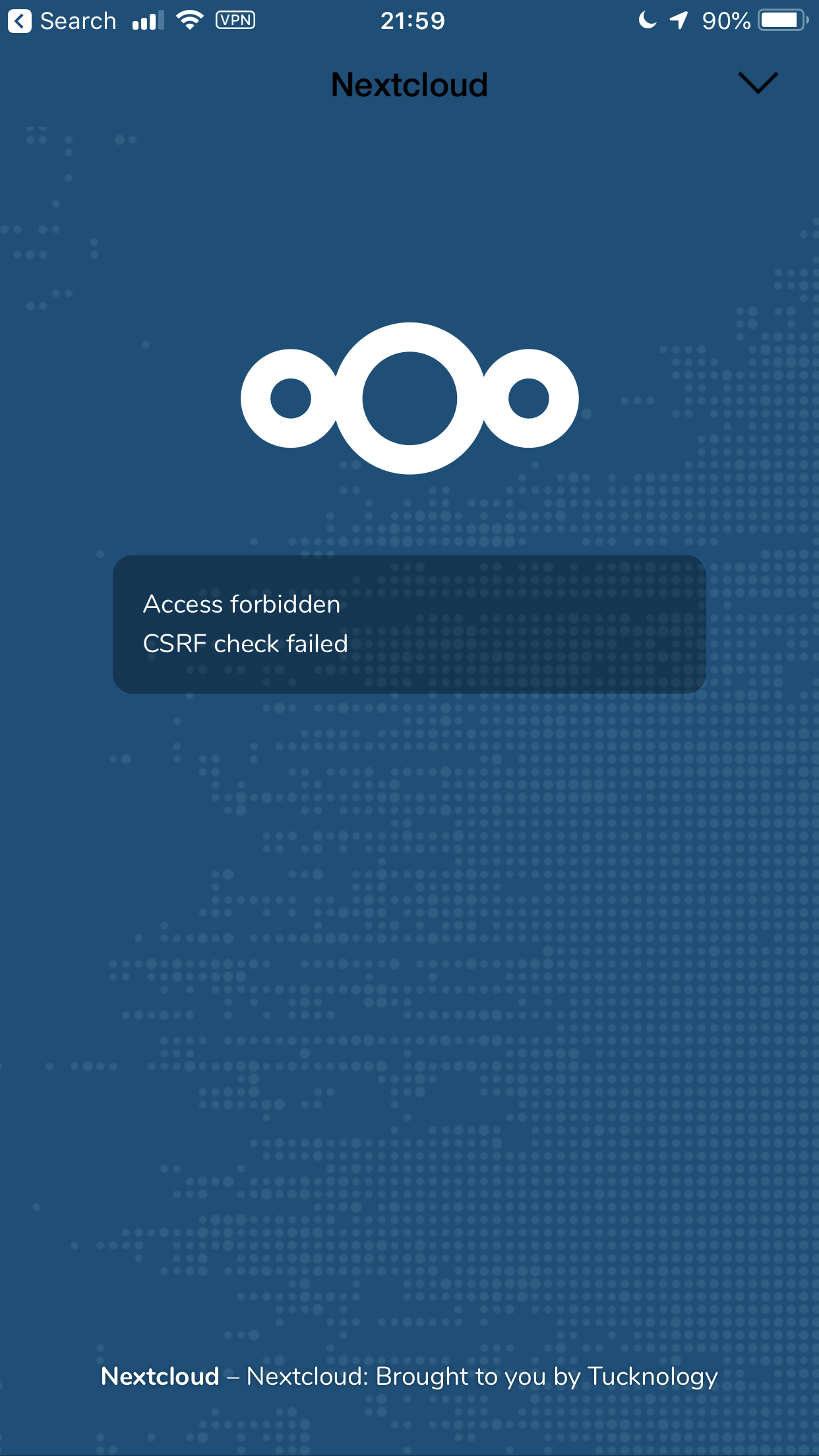
- Receive error message
Access forbidden CSRF check failed - Only able to login using 'old method'
Steps to reproduce
- Download iOS app.
- Open the app.
- Tap Log In button.
- Enter URL for server
- Enter credentials.
- See error message.
iOS version
12.1.2
App version
2.22.7.4
Server configuration
Docker on Ubuntu, using this example
Operating system:
Ubuntu 18.04.1 LTS
Web server, Database, PHP:
Based on docker example
Nextcloud version:
Nextcloud 15.0.2
 tucknology
All 30 comments
tucknology
on 15 Jan 2019
I can confirm it.
 egeu5
on 19 Jan 2019
egeu5
on 19 Jan 2019
Me too, no login method is working. Same message for both
 WeirdCircumstances
on 22 Jan 2019
WeirdCircumstances
on 22 Jan 2019
At the bottom is a link to the old login method. It's working here, the issue is only in the new method
WeirdCircumstances
on 22 Jan 2019
Failing with fresh installation - even old way doesn't work.
Revision: Old way does work, but only without 2FA.
 mko-x
on 24 Jan 2019
mko-x
on 24 Jan 2019
Ditto here. Even the token way didn't work for me, with the same error. Is there any logs we could provide that would help?
 bnjbvr
on 26 Jan 2019
bnjbvr
on 26 Jan 2019
Failing with fresh installation - even old way doesn't work.
Revision: Old way does work, but only without 2FA.
And now login loop with linux client
mko-x
on 26 Jan 2019
Ditto here. Even the token way didn't work for me, with the same error. Is there any logs we could provide that would help?
Logs from the ngnix proxy and the nextcloud server could help :)
 AndrewwHummer
on 30 Jan 2019
AndrewwHummer
on 30 Jan 2019
Maybe a false lead, but to add a bit of context for my case: I had Nextcloud 14.0.2 running and the latest iOS app at that time. I uninstalled the app for a few month without logging out.
I upgraded to Nextcloud 15.0.2 and then reinstalled the iOS app. I cannot log in since then, whether it is through my current user log-in or using "the old way". Creating an application password does not seem to solve the issue.
 thibaultamartin
on 1 Feb 2019
thibaultamartin
on 1 Feb 2019
Hey folks,
when I had my setup done for Nextcloud using docker-compose everything was running fine except for the authentication using the iOS app. Only "the old way" worked as described by you guys already. I used it in first place to get productive but then one of my friends i've shared a MP3 with came up with a screenshot where the embedded player of Nextcloud could not access the MP3.
I use Nextcloud behind an Nginx proxy using the jwilder/nginx docker image.
Then I had a closer look and I saw that my Nextcloud tried to access the MP3 via http but I set up https for my instance. So I read around and found a solution where I have to add the following properties to my config.php to enforce the usage of https and to use the correct base URL with https.
(replace the url with yours)
<?php
$CONFIG = array (
  ... (removed to save space)
  'overwrite.cli.url' => 'https://home.secret-domain.com',
  'overwriteprotocol' => 'https',
  ... (removed to save space)
After adding overwrite.cli.url and overwriteprotocol my MP3 could load via https without getting the error about violating the content security policy and also the "new" login works now on iOS. Also the app code authentication works fine now.
I hope it helps someone.
 fuxx
on 1 Feb 2019
fuxx
on 1 Feb 2019
@fuxx
That makes sense, my initial thought was a missing http header not being sent to Nextcloud. I believe your solution would work except I’m running my Nextcloud server behind a reverse proxy that’s providing SSL/TLS. Unless I misunderstood you and you have yours behind a reverse proxy as well.
 alienp4nda
on 1 Feb 2019
alienp4nda
on 1 Feb 2019
For what it's worth, @fuxx solution did solve issues on my server as well, even though I'm using an Nginx reserve-proxy that provides TLS.
bnjbvr
on 1 Feb 2019
For what it's worth, @fuxx solution did solve issues on my server as well, even though I'm using an Nginx reserve-proxy that provides TLS.
@fuxx
That makes sense, my initial thought was a missing http header not being sent to Nextcloud. I believe your solution would work except I’m running my Nextcloud server behind a reverse proxy that’s providing SSL/TLS. Unless I misunderstood you and you have yours behind a reverse proxy as well.
I will edit my comment, I am using Nextcloud behind nginx too. I use jwilder/nginx + letsencrypt companion and Nextcloud is behind the nginx proxy :)
fuxx
on 1 Feb 2019
Sweet, going to do that right now. I use the same proxy, greatly appreciate.
@fux if I could send you a box of cookies I would, it worked. I didn’t even have to add 443 as an exposed port to the docker container.
alienp4nda
on 1 Feb 2019
@fuxx Thanks that worked for me!
tucknology
on 3 Feb 2019
I just want to confirm that I'm running into this exact same issue on my iPad mini running ios 12.1.3. I receive the CSRF error using the normal login, but the old login style works fine.
Hopefully this will be fixed very soon!
Edit: Duh, I somehow missed the fix posted by @fuxx . I've just applied the overwrite.cli.url and overwriteprotocol change to my config.php file and now it's all working fine through my Sophos UTM web application firewall.
 Ddog800
on 4 Feb 2019
Ddog800
on 4 Feb 2019
I'm getting this too, but can login fine from macOS, Windows and Android so isn't a server configuration problem. Why is this bug closed?
 markshep
on 9 Feb 2019
markshep
on 9 Feb 2019
The server-config solves the issue. So it is a server issue. I tested the solution from fluxx to and it is working on NC-App on Ipad and Talk-App on Ipad.
egeu5
on 9 Feb 2019
@fuxx Thanks that also worked for me!
 christianbumann
on 19 Feb 2019
christianbumann
on 19 Feb 2019
I have exactly the same issue since NC12 (meanwhile I'm at NC15), only the "old method" works for login. Even though this is a workaround, I'm a bit annoyed how long this bug is towed thru several NC versions.
fuxx's solution did not change anything for me (I'm running nginx as a reverse proxy as well).
 LittleNo
on 11 Mar 2019
LittleNo
on 11 Mar 2019
@LittleNo Please post you're config.php and we will have a look ;-)
egeu5
on 11 Mar 2019
thanks ;-)
<?php
$CONFIG = array (
  'instanceid' => 'removed_due_to_privacy',
  'passwordsalt' => 'removed_due_to_privacy/l',
  'secret' => 'removed_due_to_privacy',
  'trusted_domains' =>
  array (
    0 => 'removed_due_to_privacy',
    1 => 'removed_due_to_privacy',
  ),
  'datadirectory' => '/var/clouddata',
  'overwrite.cli.url' => 'https://removed_due_to_privacy.com/nextcloud',
  'overwriteprotocol' => 'https',
  'forcessl' => true,
  'dbtype' => 'mysql',
  'version' => '15.0.5.3',
  'dbname' => 'nextcloud_db',
  'dbhost' => 'localhost',
  'dbport' => '',
  'dbtableprefix' => 'oc_',
  'dbuser' => 'nextcloud_db_user',
  'dbpassword' => 'removed_due_to_privacy',
  'logtimezone' => 'Europe/Berlin',
  'installed' => true,
  'memcache.local' => '\\OC\\Memcache\\APCu',
  'maintenance' => false,
  'mail_smtpmode' => 'smtp',
  'mail_smtpsecure' => 'ssl',
  'mail_from_address' => 'noreply',
  'mail_domain' => 'removed_due_to_privacy.com',
  'mail_smtpauth' => 1,
  'mail_smtpauthtype' => 'LOGIN',
  'mail_smtpname' => 'noreply@removed_due_to_privacy.com',
  'mail_smtppassword' => 'removed_due_to_privacy',
  'mail_smtphost' => 'smtp.removed_due_to_privacy.com',
  'mail_smtpport' => '465',
  'loglevel' => 0,
  'updater.release.channel' => 'production',
  'filelocking.enabled' => 'true',
  'memcache.locking' => '\\OC\\Memcache\\Redis',
  'redis' =>
  array (
    'host' => '/var/run/redis/redis.sock',
    'port' => 0,
    'dbindex' => 0,
    'timeout' => 1.5,
  ),
);
sorry, I had a typo in "overwriteprotocol" entry, and indeed it works for now 👍
LittleNo
on 11 Mar 2019
And now the "bug" is gone with nginx to.
I did not found an entry in the manual. We should add an entry for using NC with a reverse proxy. Any suggestions where we should add it?
egeu5
on 11 Mar 2019
Hey,
I know that this issue is closed but I get the same issue on my iPad. I used this docker-compose exemples
https://github.com/nextcloud/docker/tree/master/.examples/docker-compose/with-nginx-proxy/mariadb-cron-redis/apache
I tried to modify the redis.config.php but I still doesn't work

Thanks for your help
 Aurnytoraink
on 15 Mar 2019
Aurnytoraink
on 15 Mar 2019
@fuxx You are a life-saver! The iOS App started working right after I applied your settings!
My Nextcloud sits behind an OPNsense Firewall with nginx plugin to proxy and to provide SSL.
 FastFelix771
on 8 Apr 2019
FastFelix771
on 8 Apr 2019
Hey guys,
gut the same Problem. Cannot login normally nor via App Token. Any ideas why?
I tried the overwrite setting but I also want to access the nextcloud instance locally without https.
Running nextcloud in docker behind Traefik container.
 thomas126
on 30 May 2019
thomas126
on 30 May 2019
Ok, seems this bug is closed but run into it, just to make sure someone else gets my situation and can help: I was using an Apache reverse proxy, which was masquerading the client IP. mod_rpaf lets Apache bypass client's IP to the real server, wich was to original problem.
It finally got solved combining @fuxx arrangement plus activating the apache mod_rpaf , following this article: http://sysadminnotebook.blogspot.com/2014/07/preserving-client-ip-with-apache.html
And resinstalling nextcloud. I could see that there's 2 places where the basename of the domain is fixed, in config.php, but also inside the database (don't know where exactly but I found it with a simple grep that found my domain in the SQLite database). So maybe someone needs a more surgical solution may inspect into the tables to get where in the config there is the basename of the domain, and change it with an appropriate SQL sentence.
 emieza
on 26 Jul 2019
emieza
on 26 Jul 2019
So i am having the same issue. Frankly I cannot add the overwrite parameter because I want to access nextcloud locally via local ip which will be overwritten to external domain when set. Any ideas?
thomas126
on 30 Aug 2019
For what it's worth, @fuxx solution did solve issues on my server as well, even though I'm using an Nginx reserve-proxy that provides TLS.
@fuxx
That makes sense, my initial thought was a missing http header not being sent to Nextcloud. I believe your solution would work except I’m running my Nextcloud server behind a reverse proxy that’s providing SSL/TLS. Unless I misunderstood you and you have yours behind a reverse proxy as well.I will edit my comment, I am using Nextcloud behind nginx too. I use jwilder/nginx + letsencrypt companion and Nextcloud is behind the nginx proxy :)
Great!! Thank you!!
 van7ish
on 21 Oct 2020
van7ish
on 21 Oct 2020
Related issues
 Alphakilo
·
3Comments
Alphakilo
·
3Comments
 oxivanisher
·
4Comments
oxivanisher
·
4Comments
 koarlmichael
·
3Comments
koarlmichael
·
3Comments
 MorrisJobke
·
5Comments
MorrisJobke
·
5Comments
 jancborchardt
·
5Comments
jancborchardt
·
5Comments
Most helpful comment
Hey folks,
when I had my setup done for Nextcloud using docker-compose everything was running fine except for the authentication using the iOS app. Only "the old way" worked as described by you guys already. I used it in first place to get productive but then one of my friends i've shared a MP3 with came up with a screenshot where the embedded player of Nextcloud could not access the MP3.
I use Nextcloud behind an Nginx proxy using the jwilder/nginx docker image.
Then I had a closer look and I saw that my Nextcloud tried to access the MP3 via http but I set up https for my instance. So I read around and found a solution where I have to add the following properties to my config.php to enforce the usage of https and to use the correct base URL with https.
(replace the url with yours)
After adding
overwrite.cli.urlandoverwriteprotocolmy MP3 could load via https without getting the error about violating thecontent security policyand also the "new" login works now on iOS. Also the app code authentication works fine now.I hope it helps someone.