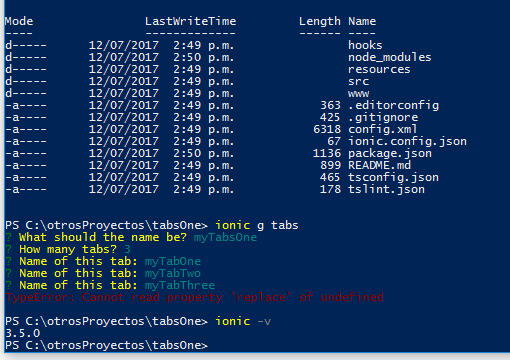
Ionic-cli: generators: TypeError: Cannot read property 'replace' of undefined
 CristianG540
All 14 comments
Same here
 tscislo
on 12 Jul 2017
tscislo
on 12 Jul 2017
@CristianG540 @tscislo Fill out the issue template, please.
Also, which starter did you use?
 imhoffd
on 12 Jul 2017
imhoffd
on 12 Jul 2017
@dwieeb sorry i don't know what do you mean by wich starter i use , i'm too new, but look:
Description:
After upgrading to ionic-cli 3.5.0 i'm having problems generating tabs using the CLI, i try to generate some tabs but the CLI throw this error "TypeError: Cannot read property 'replace' of undefined"
Steps to Reproduce:

My ionic info:
global packages:
@ionic/cli-utils : 1.5.0
Ionic CLI        : 3.5.0
local packages:
@ionic/app-scripts              : 2.0.1
@ionic/cli-plugin-ionic-angular : 1.3.2
Ionic Framework                 : ionic-angular 3.5.0
System:
Node       : v6.11.0
OS         : Windows 10
Xcode      : not installed
ios-deploy : not installed
ios-sim    : not installed
npm        : 3.10.10
@CristianG540 Can you run the command with --verbose? It will show the stack trace.
For the starter, I am just asking which template you used with ionic start? Was it tabs, blank, or super?
imhoffd
on 12 Jul 2017
@dwieeb ok sorry look, i'm using ionic start with tabs

CristianG540
on 12 Jul 2017
@CristianG540 That's ionic g, not ionic start.
Does this file exist in your app: src/app/app.module.ts?
imhoffd
on 12 Jul 2017
@dwieeb yep i know, i only highlight the command that i use with verbose, i start the project with the tabs template, and yes i have that file in my app look:

CristianG540
on 12 Jul 2017
you can intent with
ionic generate tabs
 havo07
on 13 Jul 2017
havo07
on 13 Jul 2017
@CristianG540 Odd. Do you mind if you paste the contents of app.module.ts? There's something that the CLI doesn't like about that file
imhoffd
on 13 Jul 2017
@dwieeb of course, i'm going to put all the steps and the contents of app.module.ts:

 -
-
import { NgModule, ErrorHandler } from '@angular/core';
import { BrowserModule } from '@angular/platform-browser';
import { IonicApp, IonicModule, IonicErrorHandler } from 'ionic-angular';
import { MyApp } from './app.component';

import { AboutPage } from '../pages/about/about';
import { ContactPage } from '../pages/contact/contact';
import { HomePage } from '../pages/home/home';
import { TabsPage } from '../pages/tabs/tabs';

import { StatusBar } from '@ionic-native/status-bar';
import { SplashScreen } from '@ionic-native/splash-screen';

@NgModule({
  declarations: [
    MyApp,
    AboutPage,
    ContactPage,
    HomePage,
    TabsPage
  ],
  imports: [
    BrowserModule,
    IonicModule.forRoot(MyApp)
  ],
  bootstrap: [IonicApp],
  entryComponents: [
    MyApp,
    AboutPage,
    ContactPage,
    HomePage,
    TabsPage
  ],
  providers: [
    StatusBar,
    SplashScreen,
    {provide: ErrorHandler, useClass: IonicErrorHandler}
  ]
})
export class AppModule {}
Hi @CristianG540, I think we're on to something. I believe there is a bug.
imhoffd
on 13 Jul 2017
Soo I have a PR in place to fix this in app-scripts. This was an oversight on my part, sorry 😄
 mhartington
on 14 Jul 2017
mhartington
on 14 Jul 2017
still persist.
executed steps:
- npx create-nx-workspace simpleWorkspace
- Empty project
- ng add @nrwl/angular --defaults
##..........
Installed packages for tooling via npm.
Cannot read property 'replace' of undefined
Windows 10/CMD/PowerShell/
 iam3fun
on 3 Oct 2019
iam3fun
on 3 Oct 2019
@iam3fun your commands have no references to ionic, not sure if it is related to this issue. This issue is over 2 years old
mhartington
on 3 Oct 2019
Related issues
 jgw96
·
3Comments
jgw96
·
3Comments
 bazigatabassum
·
3Comments
bazigatabassum
·
3Comments
 zarko-tg
·
3Comments
zarko-tg
·
3Comments
 petermetz
·
3Comments
petermetz
·
3Comments
 phyr0s
·
3Comments
phyr0s
·
3Comments
Most helpful comment
Soo I have a PR in place to fix this in app-scripts. This was an oversight on my part, sorry 😄