Inav: [FEATURE REQUEST] RTH Offset Capability
Current Behavior
On power application iNav will start initialization and use the actual GPS coordinates as the RTH location. For all drones this initialization point is usually on the runway center line with the craft pointed in the takeoff direction. This results in establishing a circular orbit over the center line of the runway when RTH is activated; with up to 50% of the orbit usually intruding into a 'no fly' zone.
Desired Behavior
iNav should be capable of preventing overflight of the runway and intrusion into 'no fly' zones.
This will essentially create an 'electric fence' to prevent drones, that can not hover, from overflying the runway and intruding into 'no fly' zones
.
Suggested Solution
Please add the capability to 'offset' the RTH initialization point by degree (1 deg increment) and distance (1 meter/foot) . This will allow the aircraft to fly an orbit offset from the actual RTH coordinates; thus preventing overflight of the runway and intrusion into 'no fly' zones. I believe the capability to adjust the orbit size is already implemented in iNav.
Who does this impact? Who is this for?
This feature will be useful to all iNav users using GPS and RTH.
 plainpylut
All 9 comments
Issue-Label Bot is automatically applying the label Feature request to this issue, with a confidence of 0.99. Please mark this comment with :thumbsup: or :thumbsdown: to give our bot feedback!
Links: app homepage, dashboard and code for this bot.
![issue-label-bot[bot] picture](https://avatars2.githubusercontent.com/in/27079?v=4&s=40) issue-label-bot[bot]
on 2 Oct 2019
issue-label-bot[bot]
on 2 Oct 2019
Actually that idea has several associated problems. Since most planes does not have magnetomerer the degrees are not of much help. Even if you have the nose bearing the degrees offset is dependant on the initial position and orientation, its not an absolute position. If for some reason ithe plane is rotated before gps fix the offset zone will be in a completely different location, converting a safety feature in a very dangerous one.
Your best bet is to get the initial fix on the offset home position or use the 'new home position' in case you want an alternate position.
 Mateyhv
on 2 Oct 2019
Mateyhv
on 2 Oct 2019
Mateyhv,
Since you cited 'several problems' in your comment, I'm stumped. I only find one issue and that is you stating most planes don't have mag compasses. All of my flight controllers have them. I could care less about aircraft heading! I want to be able to initialize the aircraft on the runway and have a RTH positioned relative to the initialization point. It has nothing to do with heading of the aircraft. You can have the user enter actual Lat/Long coordinates, offset values from the Lat/Long coords, or range and bearing from the initial point. If I have GPS and a valid lock on several satellites, I know the GPS can determine it's location and if I give it coordinates for the RTH point, it should be able to fly to that point when I hit the RTH button and the 'offset RTH' box is checked.
plainpylut
on 3 Oct 2019
If you read carefuly you will see I pointed out two issues not one although just as an example and not as an extensive list. There are several more problems
Improvements are not on a personal basis, they should work for the whole comunity and all possibilities must be checked beforehand in order to be a safe feature for everyone.
The offset based on Lat/Long is better suited but need some kind of second check on a moving map as a safety measure. A single digit error can be catastrophic. That is not too complex but requires some additional work on GUI. Then should it be a hard offset or should be set per flight? That requires connecting every flight to the FC. If its hard codes how would you know if you fly in a diffrent location and you forgot to erase it or set a new location? Should the FC automatically invalidate it if you are too far away from the previous offset location to prevent a fly away? As I said there are many issues to be solved beforehand.
Mateyhv
on 3 Oct 2019
Ok, I guess understood what is being requested. Create two new CLI variables:
set nav_rth_home_offset_distance = 25 # meters
set nav_rth_home_offset_direction = 180 # degrees: 0 = north, 90 = east, 180 = south, 270 = west
So every time you call RTH, it'll actually return to a point 25 meters south of the home point.
I believe few people actually need this feature... But I see no reason to not implement it. The default can be "0" meters and this way RTH will work the same way as it is today.
 danarrib
on 6 Nov 2019
danarrib
on 6 Nov 2019
If one habitually flies at an old school flying club where there is s fixed "runway" and an anal adherence to a "flight line", this is an obvious and useful safety feature.
 stronnag
on 18 Nov 2019
stronnag
on 18 Nov 2019
Example of usage:
set nav_rth_home_offset_distance = 70
set nav_rth_home_offset_direction = 270
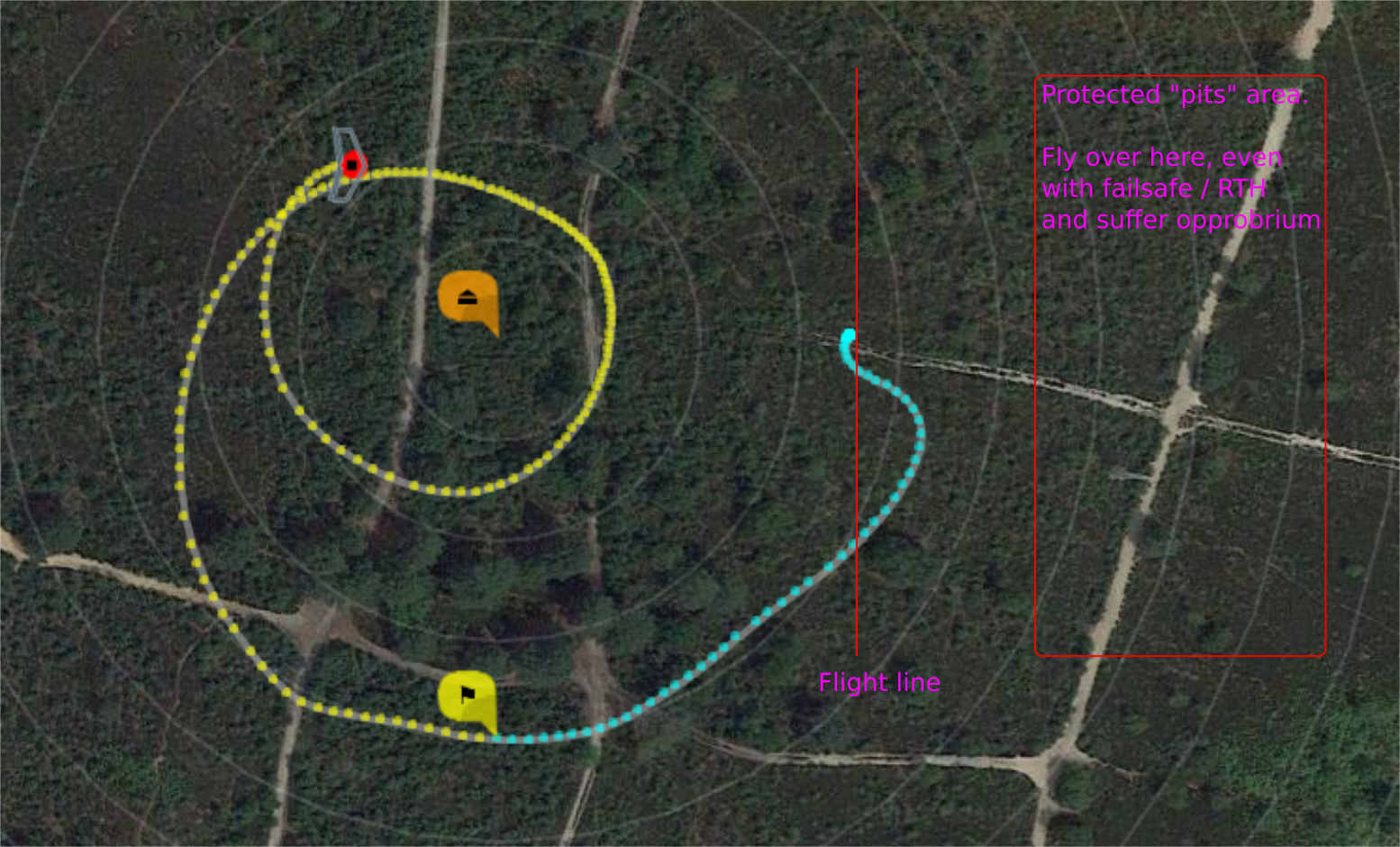
- Machine armed, launched in acro at flight line into SE wind (20knots)
- Orange icon is RTH Home position, offset from arming by 70m W
- RTH is initated (yellow icon)
- Machine returns to and loiters around offset home, removing the risk that the pilot violates the protected area behind the flight line.
- Loitering over arming position would have caused an incursion to the no-fly area (prior behaviour).
stronnag
on 22 Nov 2019
@stronnag Great feature.
This is very useful for many that fly from clubs.
But in the case that we want to fly at another location and need a quick change of these settings without a PC. Any chance of adding it to the mode switch selection and/or CMS?
 Jetrell
on 24 Nov 2019
Jetrell
on 24 Nov 2019
5220 has been merged into development, so this issue can be closed.
stronnag
on 24 Dec 2019
Related issues
 peteoz
·
3Comments
Jetrell
·
4Comments
peteoz
·
3Comments
Jetrell
·
4Comments
 aa-calvo
·
3Comments
aa-calvo
·
3Comments
 hrrr
·
4Comments
hrrr
·
4Comments
 ghost
·
4Comments
ghost
·
4Comments
Most helpful comment
Example of usage: