Imgbrd-grabber: Why is my grabber downloading unspecified tags?
Currently using this as the folder/filename structure
%artist%/%md5%.%ext%
I added about 10 artists to download using just their artist tags as the search. Gelbooru/Danbooru as the sources. Then I just let it go assuming that it will just download images that contain that artist's work as well as any collaborators. However, it ends up downloading tons of other artists too that I didn't specify and I get folders made that aren't even the artists that I wanted.
For clarification I'm not talking about how it will make a folder for artist1+artist2, It will just be a brand new folder for just a different artist. For that matter though, how would I go about making it just put artist1+artist2 into a single folder instead?
What can I do to exclude the non searched for artists from my grab?
 Lil-Sassy
All 4 comments
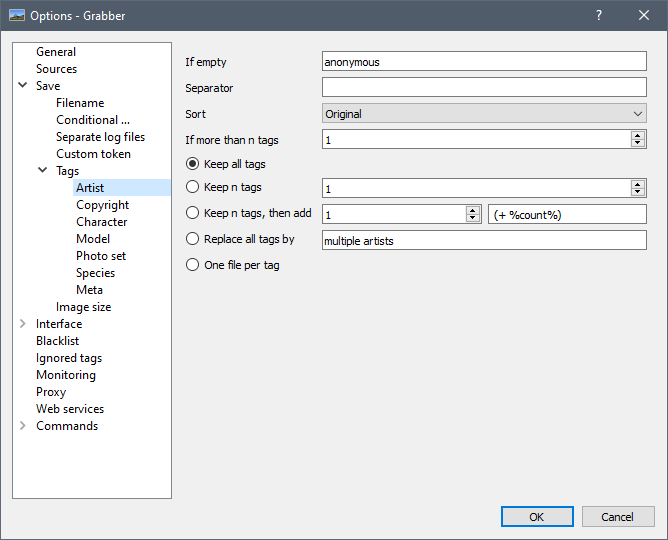
What settings do you use under "Save > Tags > Artist"?
This kind of thing can happen if you choose "one file per tag", but from what you say that sounds unlikely.
I get folders made that aren't even the artists that I wanted.
You mean the images inside have absolutely no relationship with the actual search? Do you have an example?
That sounds very strange 🤔
Also, you said you used both Gelbooru and Danbooru, does this happen on both sources or only one? It can be checked easily by adding %websitename%/ at the beginning of your filename for example (to separate them into two directories).
 Bionus
on 22 Aug 2020
Bionus
on 22 Aug 2020
What settings do you use under "Save > Tags > Artist"?
Thank you for the reply, I really appreciate it.
I actually was using one file per tag so I imagine that was the cause of the issue. I just wanted to avoid having folders that were artist1+artist2 when I only wanted one folder of artist1 with any collaboration pieces inside of that folder. I had wrongly assumed that one file per tag would just drop the second artist tag. When I said I was getting folders of artists that I didn't want, I just meant that new folders were being created for different artists than the one that I had as the searched for tag.
I switched it to keep n tags and have it set to 1. I assume that will just drop off the 2nd artist as that's the functionality that I'm really looking for.
Lil-Sassy
on 22 Aug 2020
You may be interested in using %search% in your filename pattern, as that is pretty much the only way to determine a "primary artist" - otherwise grabber will just choose the lexicographically first.
 FichteFoll
on 22 Aug 2020
FichteFoll
on 22 Aug 2020
That completely fixes my problem. Thank you so much.
Lil-Sassy
on 22 Aug 2020
Related issues
Bionus
·
8Comments
 MasterPetrik
·
10Comments
MasterPetrik
·
10Comments
 SakurabaKiyoka
·
10Comments
SakurabaKiyoka
·
10Comments
 maskkulin
·
7Comments
maskkulin
·
7Comments
 FirstDagger
·
3Comments
FirstDagger
·
3Comments
Most helpful comment
You may be interested in using
%search%in your filename pattern, as that is pretty much the only way to determine a "primary artist" - otherwise grabber will just choose the lexicographically first.