Imgbrd-grabber: Bug: "save" function works very strange and some other problems with this function
1. When you try to "save"image via rightclisk meny from results grid, in fact it not saves:
- you click "save" on some image in results grid.
- image is not saved.
- you open this image in preview window
- in this moment image saves in the folder
- if you will not open it in preview window, image will not be saved
2. And another problem:
after you saves image via "save" in grid, when you open this image in preview window, there are will be button "save" instead of "delete" button, but if you will go to previousnext image and back or just reopen preview window for this image, button will became "delete".
3. And another problem:
after image is saved via "save" from results grid, while another opening of rightclick menu there are still will be "save" option, more logicaly switch it to "delete" option after saving

How often does this problem occur?
100% reprodusable
What version of the program are you using? On what operating system?
5.3.2 win 7
Please provide any additional information below
here is the video of the process
https://drive.google.com/open?id=0B3SK4Pf9wsnmZU42TmlvZklkMUE
 MasterPetrik
All 10 comments
I could only reproduce in this situation:
- Open the image in preview window
- Close the preview window
- Click "Save" in the results
- Image is not saved
- Open preview window
- Image is saved
Steps 1 and 2 (opening the preview window first) were necessary to reproduce on my end.
I just pushed a fix for it.
after you saves image via "save" in grid, when you open this image in preview window, there are will be button "save" instead of "delete" button, but if you will go to previousnext image and back or just reopen preview window for this image, button will became "delete".
It's a side-effect of the same issue.
 Bionus
on 23 May 2017
Bionus
on 23 May 2017
It's a side-effect of the same issue.
Indeed, that's why I posted it in this topic.
I just pushed a fix for it.
Well, lets see will it completely fix it. If not, I will tell you)
BTW, can you update translation files before you relese 5.3.3? maybe I can make a translation update before patch.
MasterPetrik
on 24 May 2017
BTW, can you update translation files before you relese 5.3.3? maybe I can make a translation update before patch.
Here you go. 👍
Make sure to check in the develop branch.
Bionus
on 24 May 2017
@Bionus need to reopen, by many reasons.
I could only reproduce in this situation:
Open the image in preview window
Close the preview window
Click "Save" in the results
Image is not saved
Open preview window
Image is saved
This way still reproduse the bug. Nothing changed with it.
in fact, whole issue was undone:
- first problem isn't fixed
- second problem depends of first, so it isn't fixed too.
- third problem even wasn't tried to be fixed(
- and even russian translation isn't updated in 5.3.3. I don't know why .ts file in your repo is OK but 5.3.3 installer installs old RU version, can you check this too?
MasterPetrik
on 25 May 2017
BTW, I have a little suggestion about icons in this menu.
current hash icon is:
- too big
- too bold
- too black
all other icons in this menu are in blue colors so this is a big contrast. And I'm just a bit changed your hash icon to make it more suitable:

current icon:

new icon:

I think the new one it's a much better, hehe)
Feel free to use it if you like.
BTW, to determine, does RU version updated you can just switch language to RU and see at this right click menu: If it's in english then it's still an old translation.
MasterPetrik
on 26 May 2017
Thats a good change to work better with the dark theme/'
On Thu, May 25, 2017 at 8:01 PM, MasterPetrik notifications@github.com
wrote:
BTW, I have a little suggestion about icons in this menu.
current hash icon is:
- too big
- too bold
- too black
all other icons in this menu are in blue colors so this is a big contrast.
And I'm just a bit changed your hash icon to make it more suitable:
[image: sgs]
https://cloud.githubusercontent.com/assets/22294259/26475146/637f615a-41be-11e7-8e94-9814cb7b4373.pngcurrent icon:
[image: hash]
https://cloud.githubusercontent.com/assets/22294259/26475231/0bba7e90-41bf-11e7-9af0-5fd4206bc618.png
new icon:
[image: has h]
https://cloud.githubusercontent.com/assets/22294259/26475236/19dcb79a-41bf-11e7-9c93-749bf3fe0e31.pngI think the new one it's a much better, hehe)
Feel free to use it if you like.BTW, to determine, does RU version updated you can just switch language to
RU and see at this right click menu: If it's in english then it's still an
old translation.—
You are receiving this because you are subscribed to this thread.
Reply to this email directly, view it on GitHub
https://github.com/Bionus/imgbrd-grabber/issues/926#issuecomment-304155959,
or mute the thread
https://github.com/notifications/unsubscribe-auth/AS2t8E5Vv7z9fBqUCGSkkO4QrsD03DH-ks5r9hZwgaJpZM4Nhub2
.
 Zekken01
on 26 May 2017
Zekken01
on 26 May 2017
Indeed, that icon is better.
I actually initially just used the first result for "hash icon" on Google images. 😛
BTW, to determine, does RU version updated you can just switch language to RU and see at this right click menu: If it's in english then it's still an old translation.

Bionus
on 26 May 2017
well, if it work for you then ok.
Anyway I can compile .qm file for me manually from .ts source. QT linguist indeed a great tool)
P.S. I see a great Great enthusiasm in you about Grabber in last two days, it makes me happy.
Who knows, maybe you even add the most expected function for me(https://github.com/Bionus/imgbrd-grabber/issues/886) in 5.4.0 with this energy, who knows...
MasterPetrik
on 26 May 2017
P.S. I see a great Great enthusiasm in you about Grabber in last two days, it makes me happy.
Because I have lots of free time :smile:
Who knows, maybe you even add the most expected function for me(#886) in 5.4.0 with this energy, who knows...
😋
Bionus
on 26 May 2017
I guess minus sign is a wrong icon, minus means removeing from something(after adding)
and cross means deleting (after saving), it's more logical.
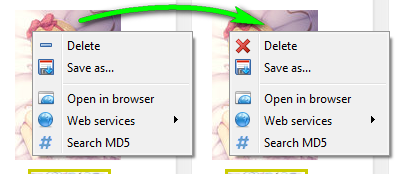
all other about this issue work well now, thx
MasterPetrik
on 17 Jun 2017
Related issues
Bionus
·
8Comments
 TheGho7t
·
4Comments
TheGho7t
·
4Comments
 maskkulin
·
3Comments
maskkulin
·
3Comments
 FirstDagger
·
3Comments
FirstDagger
·
3Comments
 help-me-please
·
4Comments
help-me-please
·
4Comments
Most helpful comment
Because I have lots of free time :smile:
😋