Imgbrd-grabber: Grabber refuses to open in macOS Catalina
When I installed the latest update for Grabber, I tried opening it for the first time. Naturally, macOS felt "suspicious" of the program and redirected me to my Security to allow it to open. Upon doing so, I've attempted to open it again. It then tells me that QtConcurrent.framework wasn't verified, so I've attempted to pass through it by allowing it to open. upon doing so, I get about two pop-ups telling me that it cannot be verified, regardless of being able to ignore it, and second, that the application itself crashed. I also tried the nightly build, but it would seem that it is broken.

 sonic0207
All 18 comments
I have no idea what would cause that, however I can clearly see that the nightly build is broken (the app is missing the binary 😱).
I'll first try to fix nightly and hopefully the original issue will be also gone in there.
EDIT 1: Errors can be seen in the build log:
cp: build/gui/Grabber: No such file or directory
ERROR: Could not find bundle binary for "Grabber.app"
ERROR: "/Applications/Xcode-9.4.1.app/Contents/Developer/Toolchains/XcodeDefault.xctoolchain/usr/bin/objdump: '': No such file or directory\n"
ERROR: "/Applications/Xcode-9.4.1.app/Contents/Developer/Toolchains/XcodeDefault.xctoolchain/usr/bin/objdump: '': No such file or directory\n"
ERROR: "/Applications/Xcode-9.4.1.app/Contents/Developer/Toolchains/XcodeDefault.xctoolchain/usr/bin/objdump: '': No such file or directory\n"
WARNING:
WARNING: Could not find any external Qt frameworks to deploy in "Grabber.app"
WARNING: Perhaps macdeployqt was already used on "Grabber.app" ?
WARNING: If so, you will need to rebuild "Grabber.app" before trying again.
ERROR: Could not find bundle binary for "Grabber.app"
ERROR: "error: /Applications/Xcode-9.4.1.app/Contents/Developer/Toolchains/XcodeDefault.xctoolchain/usr/bin/strip: can't open file:  (No such file or directory)\n"
ERROR: ""
EDIT 2: actually the program doesn't even build on Mac currently for some reason, but still tries to package the app:
make[2]: *** [gui/CMakeFiles/gui.dir/src/updater/update-dialog.cpp.o] Error 1
make[2]: *** Waiting for unfinished jobs....
make[1]: *** [gui/CMakeFiles/gui.dir/all] Error 2
make: *** [all] Error 2
 Bionus
on 20 May 2020
Bionus
on 20 May 2020
I just pushed a fix for the MacOS build, so the DMG for nightly should now hopefully be correct:
https://github.com/Bionus/imgbrd-grabber/releases/nightly
I don't have a Mac at hand right now so I can't test it, but do tell me if it fixes (or not) the issue!
In case the nightly acts up again, here's a backup of the DMG for 4617acd0400aff2de580adf7d88c99d00b1d57bf (put in a ZIP so that Github allows me to upload it): Grabber_nightly.zip.
Bionus
on 21 May 2020
Unfortunately, it doesn't fix the issue. I''m still getting the qt-concurrent security issue and the crashing of the app in general.
sonic0207
on 21 May 2020
Arf, thanks for the info!
I'll try to find a Catalina VM somewhere to try to reproduce and fix this.
Bionus
on 21 May 2020
I am running the app on Catalina, though it took me quite some 'allow this' and 'allow that's before my computer allowed the application to fully open.
Generally, with unsigned apps or apps from unidentified developers, opening only requires one such confirmation, but this one requires a confirmation for every framework in the Frameworks directory, as well as some (if not all) plugins as well as the application itself.
If you are unable to get a certificate for being an identified developer (which would be the best solution, I think), then at least 'packing' all those confirmations into one would allow users to reasonably be able to open the application.
Please let me know if I can help you build or test something.
 TheYsconator
on 29 May 2020
TheYsconator
on 29 May 2020
This same issue still rises on my mac and I have no idea dealing with it.
 Kinnoo
on 7 Jun 2020
Kinnoo
on 7 Jun 2020
I am running the app on Catalina, though it took me quite some 'allow this' and 'allow that's before my computer allowed the application to fully open.
Generally, with unsigned apps or apps from unidentified developers, opening only requires one such confirmation, but this one requires a confirmation for every framework in the Frameworks directory, as well as some (if not all) plugins as well as the application itself.
If you are unable to get a certificate for being an identified developer (which would be the best solution, I think), then at least 'packing' all those confirmations into one would allow users to reasonably be able to open the application.
Please let me know if I can help you build or test something.
Hey, how did you make it? I am totally stuck with all those frameworks.
Kinnoo
on 8 Jun 2020
Persistence is key here, sadly. In order to open the app, right click on it, press open (if it doesn't appear, you have to dismiss the box and try again - sometimes the 'open' option appears after one or two additional times).
You'll receive an error regarding the framework[1] not being trusted. Dismiss that box.
Go to System Preferences -> Security & Privacy -> General (tab), and press the 'Allow' button. You can (and should) keep System Preferences open, because you'll basically have to repeat this until you are finally able to open the app.
Some general notes:
- Please decide for yourself whether you actually trust the thing you're allowing. Don't teach yourself to always blindly bash the 'allow' button
- In the error mentioned above (marked by '[1]'), you should see a different framework that is requesting permission after each iteration. If not, please let me know so I try to help you debug
- Yeah, it goes on for a while
- You should be able to open the app normally, once you've opened it successfully for the first time
- You don't have to disable SiP. This is a piece of general advice, applicable in basically all cases. If anyone ever recommends you to 'simply disable your Mac's System Integrity Protection', think thrice and look for an alternative solution
TheYsconator
on 8 Jun 2020
Persistence is key here, sadly. In order to open the app, right click on it, press open (if it doesn't appear, you have to dismiss the box and try again - sometimes the 'open' option appears after one or two additional times).
You'll receive an error regarding the framework[1] not being trusted. Dismiss that box.
Go to System Preferences -> Security & Privacy -> General (tab), and press the 'Allow' button. You can (and should) keep System Preferences open, because you'll basically have to repeat this until you are finally able to open the app.
Some general notes:
- Please decide for yourself whether you actually trust the thing you're allowing. Don't teach yourself to always blindly bash the 'allow' button
- In the error mentioned above (marked by '[1]'), you should see a different framework that is requesting permission after each iteration. If not, please let me know so I try to help you debug
- Yeah, it goes on for a while
- You should be able to open the app normally, once you've opened it successfully for the first time
- You don't have to disable SiP. This is a piece of general advice, applicable in basically all cases. If anyone ever recommends you to 'simply disable your Mac's System Integrity Protection', think thrice and look for an alternative solution
Thanks a lot for your advice. It really helps. After several failures of v7.3.0, I found out v7.2.1 works on my Catalina. Though I still had to spend some time on right clicking.
Kinnoo
on 8 Jun 2020
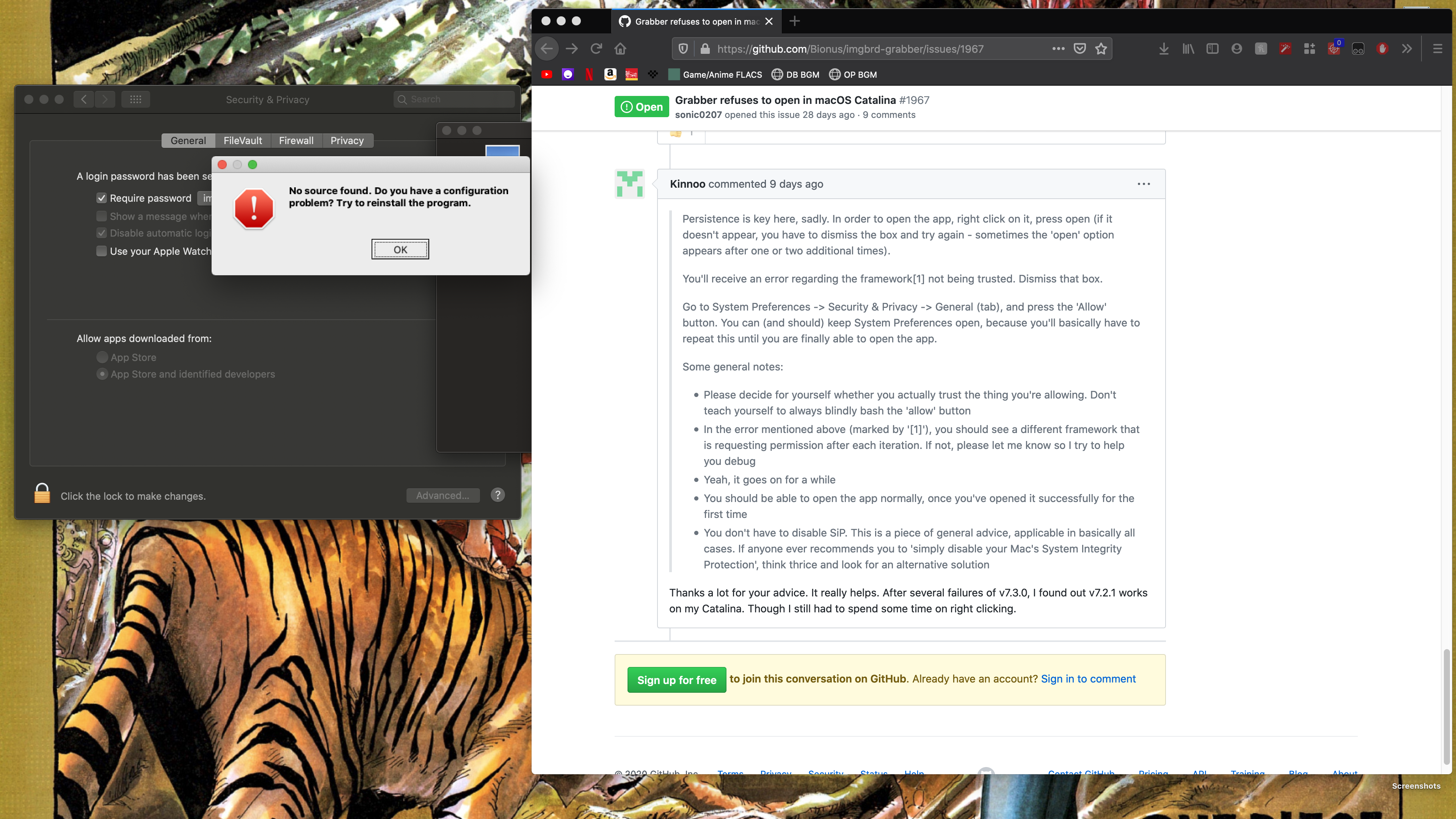
So I tried allowing all of the frameworks, and it did "open." However, it gave me this warning. I tried ejecting this program from my Mac and reinstalling it and it still showed this. I'm going to try to see if I can use a previous version (as I just found out about the framework stuff). Thank you all for the help. 👍
sonic0207
on 17 Jun 2020
The nightly version of 7.3.0 proved successful, as well as 7.2.1
sonic0207
on 17 Jun 2020
Persistence is key here, sadly. In order to open the app, right click on it, press open (if it doesn't appear, you have to dismiss the box and try again - sometimes the 'open' option appears after one or two additional times).
You'll receive an error regarding the framework[1] not being trusted. Dismiss that box.
Go to System Preferences -> Security & Privacy -> General (tab), and press the 'Allow' button. You can (and should) keep System Preferences open, because you'll basically have to repeat this until you are finally able to open the app.
Some general notes:
- Please decide for yourself whether you actually trust the thing you're allowing. Don't teach yourself to always blindly bash the 'allow' button
- In the error mentioned above (marked by '[1]'), you should see a different framework that is requesting permission after each iteration. If not, please let me know so I try to help you debug
- Yeah, it goes on for a while
- You should be able to open the app normally, once you've opened it successfully for the first time
- You don't have to disable SiP. This is a piece of general advice, applicable in basically all cases. If anyone ever recommends you to 'simply disable your Mac's System Integrity Protection', think thrice and look for an alternative solution
....
Yeah.. whatever i do, i cant open it.
Allow here.. allow there.. a thousand times, still nothing..
( MacOS Catalina 10.15.5 )
7.2.1 wont work.. 7.3.0 also wont...
 Kamero4K
on 21 Jun 2020
Kamero4K
on 21 Jun 2020
It's working fine with the latest nightly so the next release will definitely be fixed.
 BarryMode
on 22 Nov 2020
BarryMode
on 22 Nov 2020
@BarryMode I'm considering making the next release using Github actions, which might cause differences with the current Travis build.
Do you know if they both work? If only the Travis one does, I'll likely keep the MacOS build on it for the time being.
My macbook hasn't arrived yet so I can't properly test at the moment unfortunately. On my VM they both run properly, the only difference I see with both DMG is the removal of "virtual screen keyboard" on the Github version 🤔
Bionus
on 22 Nov 2020
The GitHub version is the one that I was referring to actually 😅 I didn't realize there was more than one. I just randomly decided to try it out today as I had switched to using the program through a copy of Windows in Parallels. Was pleased to find that it started right up so nice work!
BarryMode
on 22 Nov 2020
I mean they're technically both hosted on Github, but one is built using a Travis CI runner, while the other using Github actions. I only ever linked the Github build in the Android ticket, so maybe that's confusing 😅
The most used Nightly (linked in many issues and in the README) is the one built using Travis, and the historical one. It's also what's building the last dozen releases or so (so I guess that's the one you're using):
https://github.com/Bionus/imgbrd-grabber/releases/nightly
The new one is in (kind of) beta and is built using Github actions, and is called "Nightly (Github)":
https://github.com/Bionus/imgbrd-grabber/releases/nightly-github
Github actions is much nicer to use, and it allowed me to make the build more stable, and quickly introduce stuff such as Linux AppImages. That's why I'd like to use it for the next release so that Linux users can enjoy it. It's much better than the currently half-broken 7.3.2 tar.gz one that's built in debug mode for some reason.
In any case I'll be able to try both as soon as my mac arrives, hopefully next week. 🙏
From the quick DMG diff I made there's shouldn't be any difference (I only see the lack of virtual keyboard in Github but maybe that's just some Qt version difference, although they should both be using 5.15.1).
Bionus
on 22 Nov 2020
Oh ok, thanks for the info. I went ahead and tried out the other just to see and it looks like it's facing the same loading problem.
Nightly (Github) is working for me while nightly is not. I guess that's a good thing that the GitHub actions one is working :D That's super cool.
I'm sure you'll be able to figure it out as soon as you have the Mac to test.
BarryMode
on 22 Nov 2020
One more reason to switch to this one for the next release then! Thanks 👍
Bionus
on 22 Nov 2020
Related issues
 TogarUshindi
·
5Comments
TogarUshindi
·
5Comments
 help-me-please
·
4Comments
help-me-please
·
4Comments
 MrAndre96
·
4Comments
MrAndre96
·
4Comments
 angaratosurion
·
8Comments
angaratosurion
·
8Comments
 Lil-Sassy
·
4Comments
Lil-Sassy
·
4Comments