Imgbrd-grabber: E621 not loading content
Bug description
No content from e621 is displayed in the IU after the latest update to the e621 site
Steps to reproduce
- Have e621 selected as a source
- Search for anything
Expected behavior
The UI displays no results from e621 but works correctly for other websites
Context
Screenshots
System information
- OS: Windows 10
- Grabber version: 7.62.1
Additional context
E621 was recently updated and is most likely the problem
 Max-Kore
All 46 comments
It's confirmed that E621 has changed its page design, API request address and respond format. But the request parameters and request method for listing remain the same.
GET /posts/index.json -> GET /posts.json
XML support is unimplemented.
Example of respond:https://e621.net/posts.json?tags=fluffy+rating:s&limit=5
HTML: /post/index -> /posts
Tags: /tag/index.json -> /tags.json
Image: /post/show/xxx -> /posts/xxx
--
Trying using Danbooru (2.0) model for E621
--
Though the request address and parameter is very much the same, the response is totally different from donmai, maybe consider it as a delicate model is more suitable.
 sanddudu
on 6 Mar 2020
sanddudu
on 6 Mar 2020
After changing the source to 2.0, JSON keeps failing and it switches to HTML as it did before. The log gives the same error file, though the file structure did change from /posts/index.json to /posts.json
main.log
Max-Kore
on 6 Mar 2020
The response format is still similar to the original Danbooru format but with many changes.
- All posts are now included in an array named "posts".
- "created_at" now returned as a formatted time string instead of an array.
- Added "updated_at" field
- Fields about file information now included in the "file" and some of them got renamed.
file_size -> size
file_url -> url
file_ext -> ext
width, height, md5 have remained the same. - Fields about image preview now included in the "preview" and some of them got renamed.
preview_width -> width
preview_height -> height
preview_url -> url - Fields about image sample now included in the "sample" and some of them got renamed.
sample_width -> width
sample_height -> height
sample_url -> url
New field "has", indicate the post has a sample/thumbnail or not - If "locked_tags" is empty, now will return an empty array instead of null.
- Added "approver_id", if the post is pending, will return null
- New tag array: invalid, lore, meta
- "change" renamed as "change_seq"
- "status" is removed, replaced by "flags" with these fields included (return true or false)
pending
flagged
note_locked
status_locked
rating_locked
deleted - "has_comments" removed, replaced by "comment_count", return an int value
...
sanddudu
on 6 Mar 2020
Sorry about the custom format. I was experiencing pretty terrible performance with the default output serializer for danbooru, and decided to get fancy while fixing it.
The original intent was to move it to a different url, but I ran out of time. Hopefully the new more structured format isn't too terrible to work with.
 zwagoth
on 6 Mar 2020
zwagoth
on 6 Mar 2020
@zwagoth Thank you for your response. There is no need to feel sorry about these. But that would be better when these changes can be addressed when the beta site is online (I have checked before but the page is not updated).
The parser may not need a total rewrite, but it still needs some time to fit the new format.
sanddudu
on 6 Mar 2020
The beta site is live now as the main site, fwiw
 sbobbo
on 6 Mar 2020
sbobbo
on 6 Mar 2020
Current work:
- [x] Auth
- JSON parser
- [x] Search
[ ] Tags (untested)
HTML parser
- [x] Search.Tags (of the search result)
- [x] Search.PageCount (looks good, no need to fix)
Search.Image(Not enough infomation in HTML)
Search.Wiki(Broken due to "-status: deleted" added to the search query, cannot be fixed) - [ ] Details.Pools
Details.Tags(Code works but disabled due to making tags colored improperly) - [x] Details.imageUrl
- [ ] TagTypes (untested)
- [ ] Tags (untested)
- [x] Check (untested)
sanddudu
on 9 Mar 2020
If anyone wants to test the new model for E621, please follow these steps:
(Highly recommend using a VM or a clean installation of Grabber to avoid interruption for further official update)
- Go to "%LocalAppData%\Bionus\Grabber\sites\Danbooru" (may vary with other OS).
- Open "sites.txt" and delete "e621.net".
- Cut the "e621.net" folder.
- Back to the ”sites“ folder, create a new folder named "E621".
- Paste the ”e621.net“ folder in it.
- Download new model file, and place it into "E621"
- Create a text file named "sites.txt" with content "e621.net", and place it into "E621".
- Your folder structure should look like this:
sites
+-- some other folders and files
+-- Danbooru
|   +-- behoimi.org
|   +-- icon.png
|   +-- model.js
|   +-- model.xml
|   +-- sites.txt
+-- E621
|   +-- e621.net
|   +-- model.js
|   +-- sites.txt
- Now open your Grabber, choose "e621.net" in "Sources" (No icon).
The new model will keep update until the functionality is recovered. Then I will submit a PR for it.
sanddudu
on 9 Mar 2020
Check out https://github.com/sanddudu/imgbrd-grabber "e621-new-model " branch for further updates.
If you want to test without clone codes and install a typescript compiler, check out this gist.
sanddudu
on 9 Mar 2020
The workaround is working great for me
sbobbo
on 9 Mar 2020
Unfortunately that work around did not help me. Sources does not populate with an iconless E621 once completed.
 Rezboa
on 10 Mar 2020
Rezboa
on 10 Mar 2020
@Rezboa Maybe you forgot to delete "e621.net" from Danbooru's "sites.txt" file.
sanddudu
on 10 Mar 2020
This works but isn't letting me download all.
If I right-click on an image and save it works fine.
Any suggestions?
 GStubbs
on 15 Mar 2020
GStubbs
on 15 Mar 2020
@GStubbs This will happen when the HTML page is not fully loaded so HTML parser cannot work properly to read total pages number of search results (sometimes tags as well). Just execute the search again until the page count is showed correctly (not a question mark "?").
sanddudu
on 15 Mar 2020
@sanddudu It is showing Page 1 of 44 (20 of ~880) in the top left but it still does not work.
GStubbs
on 15 Mar 2020
@GStubbs Please provide the output of your "Log" tab.
sanddudu
on 15 Mar 2020
It's still going!
[19:54:05.545][Warning] Error loading thumbnail (Error transferring https://e621.net/null - server replied: Not Found), new try with extension JPG
[19:54:06.146][Warning] Error loading thumbnail (Error transferring https://e621.net/null - server replied: Not Found), new try with extension JPG
[19:54:06.744][Warning] Error loading thumbnail (Error transferring https://e621.net/null - server replied: Not Found), new try with extension JPG
[19:54:07.357][Warning] Error loading thumbnail (Error transferring https://e621.net/null - server replied: Not Found), new try with extension JPG
[19:54:07.961][Warning] Error loading thumbnail (Error transferring https://e621.net/null - server replied: Not Found), new try with extension JPG
[19:54:08.555][Warning] Error loading thumbnail (Error transferring https://e621.net/null - server replied: Not Found), new try with extension JPG
[19:54:09.136][Warning] Error loading thumbnail (Error transferring https://e621.net/null - server replied: Not Found), new try with extension JPG
GStubbs
on 15 Mar 2020
Just noticed as well that only 11 of 20 images are displayed on the first page.
GStubbs
on 15 Mar 2020
@GStubbs This sometimes happened with the thumbnail image is not parsed correctly, please quit the program for now. Sorry for the inconvenience. I am trying to fix this problem right now.
sanddudu
on 15 Mar 2020
@GStubbs After the investigation, I found that a variable's name is incorrect due to lack of checking after a copy & paste.
Some images may not contain an preview image URL (or valid URL) in the JSON response, so the script needs to add a valid URL by joining string with some fixed format. When I copy the format for the sample image, I forgot to change the variable "img.sample_url" to "img.preview_url". So the URL of the preview image will remain "NULL" in this case, caused a request loop.
You can now download the new version of the model and everything should be fine.
sanddudu
on 15 Mar 2020
You're a legend. It works now thank you.
I click Get This Page then go to the downloads tab and select the group and click download.
Thanks so much!
Now downloading the whole search.
GStubbs
on 15 Mar 2020
@Xeddius Login feature in the current version of the model is not implemented as you can see the status in the previous comment. I will try to fix this feature ASAP.
sanddudu
on 16 Mar 2020
@Xeddius Login feature is now fixed in the latest version of model. Please download and replace the old one.
sanddudu
on 17 Mar 2020
@sanddudu Thank you very much for your effort to fix e621! Your fix works for me except one thing: the tags for species are not marked as species, instead they are like ordinal tags. I noticed that your model.js has no section for species tags, only general, artist, character, copyright and meta.
Can you please add species tags as well?
Thank you!
 tnovak007
on 19 Mar 2020
tnovak007
on 19 Mar 2020
@tnovak007 Now I have added species tags list in the parser, but it couldn't be colored properly. So it still looks black but will be ahead of misc tags. I have checked some code that color tags but still have no clue.
sanddudu
on 19 Mar 2020
@sanddudu Is the only way to get e621 to work right now is by using your branch to make it? Im on windows and I've read the page on https://bionus.github.io/imgbrd-grabber/docs/compilation.html but the instructions is a bit hard to follow.
 bwalker22
on 20 Mar 2020
bwalker22
on 20 Mar 2020
@bwalker22 The model is written in typescript and it's dedicated to the main program. So there is no need to compile the whole project. But you still need a typescript environment to compile the model code (if you need).
You can use the model without compile by following these step:
https://github.com/Bionus/imgbrd-grabber/issues/1895#issuecomment-596331141
The gist in this comment contained the model file that compiled with the configure in the Grabber project. It will update every time I pushed the code to the repository manually. If you need to update the model, just replace the model file with the new one.
sanddudu
on 20 Mar 2020
@sanddudu So ive deleted everything and redownloaded grabber v7.2.1. After i did the steps, the only difference that i can see is that my danbooru folder doesnt have a model.xml in it. When i click on source, i dont see e621.net. Where did the model.xml come from?
bwalker22
on 20 Mar 2020
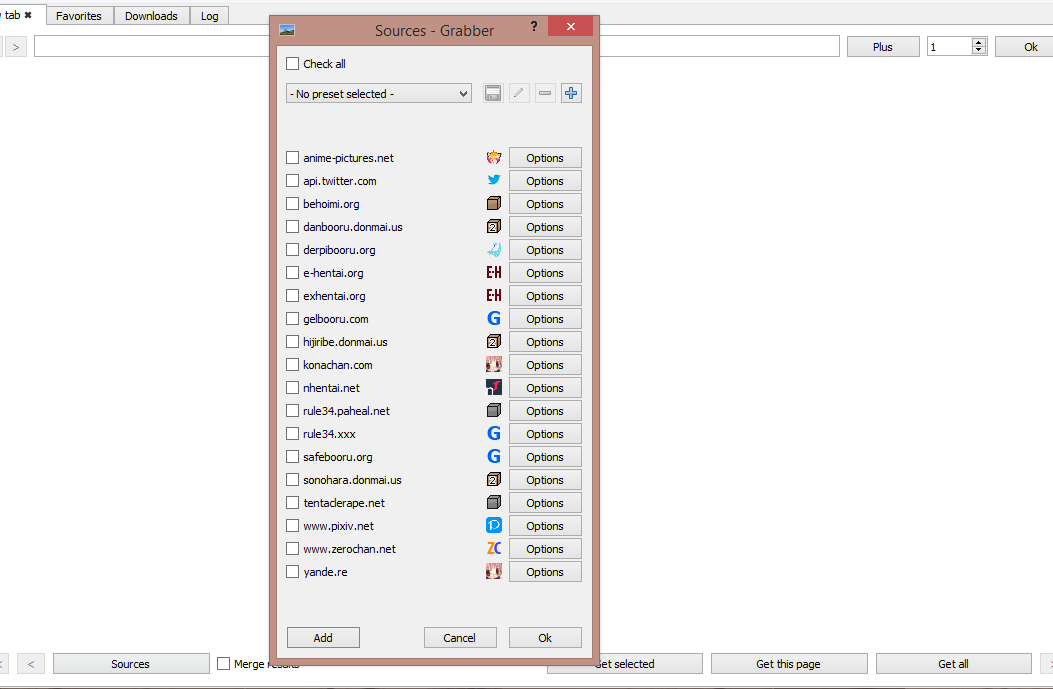
- e621.net
Hi @sanddudu I follow all the steps but it only makes e621.net disappear from the source list
or is there already another way to fix this problem?
i hope so
Thanks.
 lisiado5
on 21 Mar 2020
lisiado5
on 21 Mar 2020
@bwalker22 The XML model is deprecated and no longer required in the new version. Please check if your folder structure is the same as the one listed in the comment, or it won't be recognized in the program.
sanddudu
on 21 Mar 2020
@bwalker22 @lisiado5 If you still cannot see E621 in the sources, please download this file and unzip to "%LocalAppData%\Bionus\Grabber\sites" (may vary with other OS) and make sure "e621.net" is deleted in Danbooru's site.txt file.
sanddudu
on 21 Mar 2020
@bwalker22 @lisiado5 If you still cannot see E621 in the sources, please download this file and unzip to "%LocalAppData%\Bionus\Grabber\sites" (may vary with other OS) and make sure "e621.net" is deleted in Danbooru's site.txt file.
Thanks for the link bro but it won't let me in, missing the encryption key of Mega.
lisiado5
on 21 Mar 2020
@lisiado5 Sorry, using the wrong link. Now the link should work.
sanddudu
on 22 Mar 2020
Not working still.
 Lovewyrm
on 22 Mar 2020
Lovewyrm
on 22 Mar 2020
The link actually works now, but if you click on the link in the quoted message above, it still has the old one, but if you click on the link in the original edited message it's the correct one.
 SandwichChef
on 22 Mar 2020
SandwichChef
on 22 Mar 2020
@lisiado5 Sorry, using the wrong link. Now the link should work.
Hi bro now everything works normally
Thanks for the help.
and I will take the opportunity to ask if it is possible to download batch images only with the ID,
I mean, I know you can manually add the id of an image but I don't know if you can give an order to download images from id 5000 to 8000 for example, and not be putting 2000 id manually,
because in e621 you can only download up to page 750
Thanks.
lisiado5
on 24 Mar 2020
Just use "id:5000..8000" as your request, in fact you can download images by 20.000 max per request. So simply use packs like : "0..20000", "20000..40000", and so on.
 yami-no-tusbas
on 24 Mar 2020
yami-no-tusbas
on 24 Mar 2020
@sanddudu thanks a lot for the updated model!
I took the liberty to directly merge it via PR so that everyone can have it in the nightly releases. 👍
 Bionus
on 2 Apr 2020
Bionus
on 2 Apr 2020
I have a question right now I have problems with e621? because I enter the page no image loads me I see that other users can see content except me because of this error I have tried other sites where the content runs but in e621 it does not load anything I need help
 globito99
on 3 Apr 2020
globito99
on 3 Apr 2020
I have a question right now I have problems with e621? because I enter the page no image loads me I see that other users can see content except me because of this error I have tried other sites where the content runs but in e621 it does not load anything I need help
This is not a problem on your side. It's a problem with network congestion between the local cloudflare node and the image server.
The image server is on a different network connection from the main server, and that specific network link, while higher bandwidth, seems to get a lower network priority at times. The result is that when regions are busiest, connectivity to the image server becomes spotty. This is outside of the control of the team. The only thing you can do is to try using the site during off hours for the local region, or waiting. This is an unfortunate side effect of everyone being home and using the internet. When the internet stops being so congested things should return to normal.
zwagoth
on 3 Apr 2020
thank you very much friend for the information well it only remains to wait for this quarantine in the homes to end
globito99
on 4 Apr 2020
Any word when the new update will be out with the problems fixed?
 SvyraCosmix
on 29 Apr 2020
SvyraCosmix
on 29 Apr 2020
I recommend just installing the nightly from here:
sbobbo
on 29 Apr 2020
I'm patient, I was just wondering if bionus has said anything about it, I'd rather just let it update itself when it comes out.
SvyraCosmix
on 29 Apr 2020
There is only an old Version from 2017. Is this the correct link
Edit: It's working again. Thanks.
 xardius
on 29 Apr 2020
xardius
on 29 Apr 2020
@xardius You can check this page again now. There is a nightly build updated 20min ago.
sanddudu
on 29 Apr 2020
Related issues
 Lil-Sassy
·
4Comments
Lil-Sassy
·
4Comments
 angaratosurion
·
8Comments
Bionus
·
8Comments
angaratosurion
·
8Comments
Bionus
·
8Comments
 MasterPetrik
·
10Comments
MasterPetrik
·
10Comments
 Impervox
·
6Comments
Impervox
·
6Comments
Most helpful comment
@bwalker22 @lisiado5 If you still cannot see E621 in the sources, please download this file and unzip to "%LocalAppData%\Bionus\Grabber\sites" (may vary with other OS) and make sure "e621.net" is deleted in Danbooru's site.txt file.
Model files