Imageglass: BMP displaying incorrectly
System information:
- Windows OS version: 10
- ImageGlass version: 5.1.5.20
Describe the bug:
When opening some BMP files it does not display the image correctly. It appears to only show parts of the image. When opening with MS Paint it displays correctly.
Expected behavior:
display the image correctly
To Reproduce
Steps to reproduce the behavior:
- screen capture an image with IBM Notes sametime client
- Open the image with ImageGlass
Screenshots:
If applicable, add screenshots to hel
$33A3F6D37FE162E4.bmp.log
p explain your problem.
Additional context:
Attached is a copy of a bmp with the issue. Simply rename it to .bmp without the .log at the end.
 wolf681981
All 11 comments
This appears to be an issue for ImageMagick, the underlying library that IG uses to load images. ImageMagick returns no error indication: it thinks it has loaded the image correctly. If I manually force the code to not use ImageMagick in this case, the image is loaded correctly.
The problem still happens with the latest Magick.NET. I'll submit an issue to them.
 fire-eggs
on 3 Aug 2018
fire-eggs
on 3 Aug 2018
I received a fast response from the Magick.NET guy.
He claims the image format is BMP3, which provides Alpha channel (transparency) support. In another program I have, the provided bitmap is shown the same way as ImageGlass. MS Paint does not handle transparency, so the image displays "correctly".
Is it possible to configure "IBM Notes sametime client" to not provide transparency when doing screen capture?
I will investigate if it is possible to support selectively turning off image transparency in ImageGlass.
fire-eggs
on 4 Aug 2018
Apparently, it's the correct display for BMP3.
 d2phap
on 10 Dec 2018
d2phap
on 10 Dec 2018
Excuse me, so this is deemed the fault of the program which created the image, correct?
I recently installed ImageGlass on Windows 10 and found out it cannot display a certain collection of my BMP files.
The problematic BMPs look quite like it is the same issue here. Below is an example of them:
TXFJ9.bmp.log
ImageGlass displays almost nothing of it, even when selecting an individual channel.
They are created from a software's built-in save-as-image function, it is the only way I can get an image from the program, and it only outputs BMP. So I really need a viewer capable of viewing them.
 innaterebel
on 16 Oct 2019
innaterebel
on 16 Oct 2019
Maybe there should be an option to ignore the alpha channel of BMP3 format
d2phap
on 16 Oct 2019
It views OK for me in Windows Paint and Windows Photo Viewer. [Not that I want to praise the competition :) ]
fire-eggs
on 16 Oct 2019
I just got a big bmp image and ImageGlass only shows a white screen, no error message.
It opens correctly with all the other software I have checked.
The file is quite big: 7680x4320, 24 bits too big to upload it here.
You can get it in this link:
https://www.dropbox.com/s/ezaxmf1eurhboi8/jlf8.bmp?dl=0
Just click on download and then direct download.
 retrue
on 21 Oct 2019
retrue
on 21 Oct 2019
Thanks @retrue
I have checked your BMP file, this is Magick.NET error. I already reported at: https://github.com/dlemstra/Magick.NET/issues/528
As if you use ImageGlass Moon to open, it will display more details about the error:
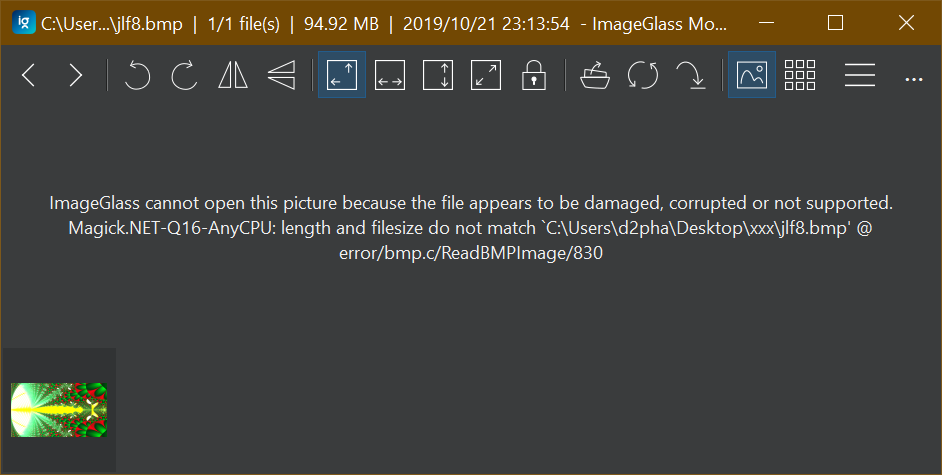
Once they fix the error and roll out the new version of Magick.NET lib, I will update ImageGlass.
d2phap
on 21 Oct 2019
@retrue
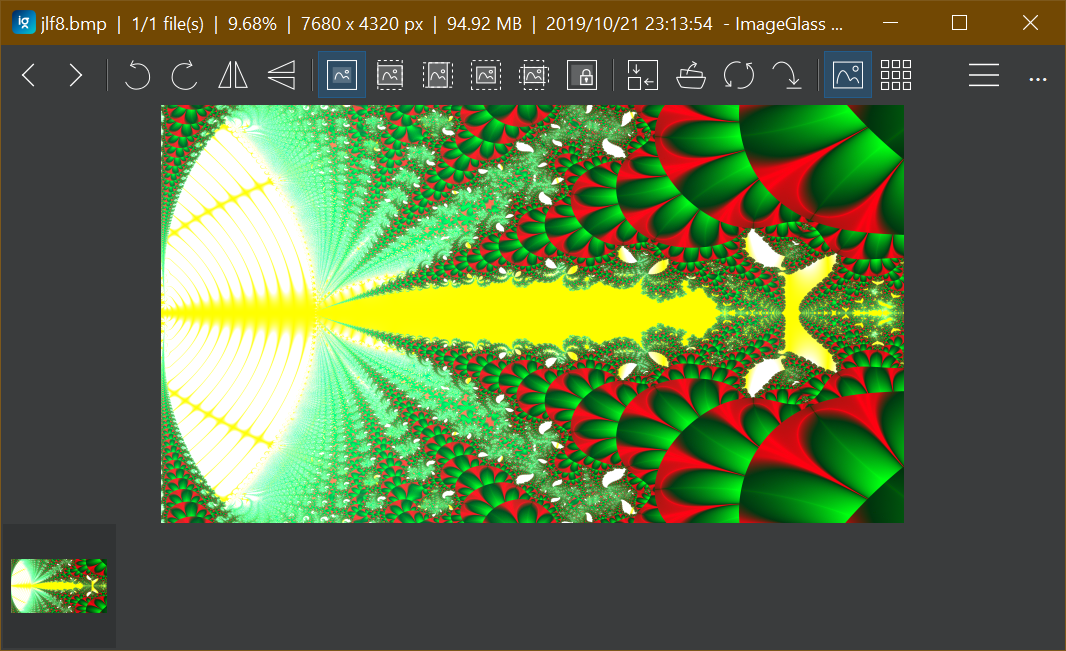
The bug due to your BMP file is fixed in ImageGlass Moon: https://imageglass.org/moon
d2phap
on 27 Oct 2019
Thank you very much. I just installed it and it works :)
The software I used to create this image is a very old fractal program called Kaos Rhei, from 1997.
retrue
on 29 Oct 2019
The software I used to create this image is a very old fractal program called Kaos Rhei, from 1997.
That's really old! 😳
d2phap
on 29 Oct 2019
Related issues
 TheDutchJewel
·
4Comments
TheDutchJewel
·
4Comments
 OLEGSHA
·
5Comments
retrue
·
5Comments
OLEGSHA
·
5Comments
retrue
·
5Comments
 xmha97
·
6Comments
xmha97
·
6Comments
 BowChow
·
6Comments
BowChow
·
6Comments